مقدمة
This manual provides detailed instructions for the installation, operation, and maintenance of your ORICO 3.5-inch USB 3.1 External Hard Drive Enclosure. This enclosure is designed to convert a 3.5-inch SATA HDD or SSD into an external storage device, offering high-speed data transfer and broad compatibility.

Image: The ORICO 3.5-inch USB 3.1 External Hard Drive Enclosure shown with its detachable vertical stand.
محتويات الحزمة
يرجى التأكد من وجود جميع العناصر في الحزمة:
- 1 × 3.5 بوصة حاوية القرص الصلب
- 1 x USB Cable (USB-C to USB-A)
- 1 × محول طاقة 12 فولت/2 أمبير
- 1 × قاعدة قابلة للفصل
- 1 × مفك براغي

Image: All components included in the ORICO 3.5-inch external hard drive enclosure package.
الإعداد والتثبيت
Follow these steps to install your 3.5-inch SATA hard drive or SSD into the enclosure:
- افتح العلبة: Use the provided screwdriver to open the enclosure cover.
- أدخل القرص الصلب: Carefully slide your 3.5-inch SATA HDD or SSD into the enclosure, ensuring it connects securely to the internal SATA connector.
- أغلق الغلاف: Replace the cover and tighten the screws using the screwdriver.
- الاتصال بالطاقة: Connect the 12V/2A power adapter to the enclosure's power port and plug it into an electrical outlet.
- الاتصال بجهاز الكمبيوتر: Connect the USB cable from the enclosure's USB 3.1 Type-C port to an available USB port on your computer. The device is plug-and-play.

Image: Step-by-step visual instructions for hard drive installation and connection.
The enclosure includes a detachable base for vertical placement, which can help save desk space. For portability, the main enclosure can be used without the base.

Image: The enclosure can be used vertically with its stand to save space or horizontally for portability.
تعليمات التشغيل
Once connected, the enclosure will be recognized by your operating system. A blue LED indicator on the front of the enclosure will illuminate to show power and activity status.

Image: The blue LED indicator signifies power and data activity.
سرعة نقل البيانات
The enclosure supports USB 3.1 Gen1 to SATA 3.0 with a maximum data transfer rate of 5 Gbps. It also supports the UASP (USB Attached SCSI Protocol) for enhanced performance, especially with SSDs.
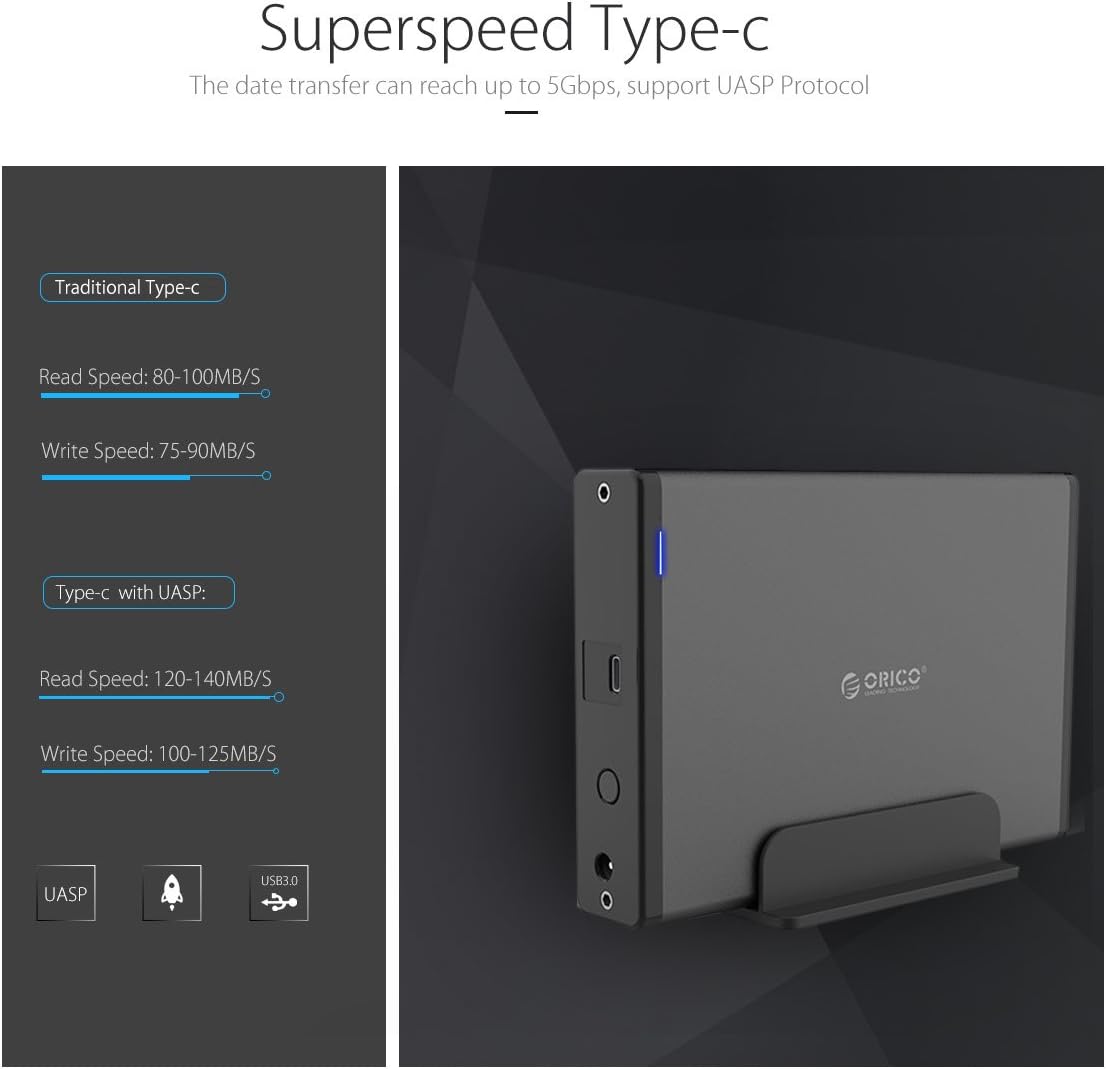
Image: Comparison of data transfer speeds with and without UASP support.
Smart Auto Sleep Function
The enclosure features a smart auto-sleep function that activates after 10 minutes of inactivity to conserve power and extend the lifespan of your hard drive.

Image: The enclosure enters sleep mode after 10 minutes of idle time.
التوافق
This enclosure is designed for broad compatibility:
- نوع القرص الصلب: Supports 3.5-inch SATA I/II/III HDDs and SSDs.
- السعة القصوى: يدعم محركات الأقراص الصلبة حتى سعة 18 تيرابايت.
- أنظمة التشغيل: Compatible with Windows 10/8/7, Mac OS 8.0 and above, and Linux systems.
- الواجهة: Connects via USB 3.1 Gen1 Type-C port.
مهم: Ensure your hard drive uses a Serial ATA (SATA) port. This enclosure is not compatible with Parallel ATA (IDE) ports.

Image: Visual guide to distinguish between compatible SATA and incompatible IDE ports.
تحديد
| نموذج | 7688 USB C (7688C3) |
| تكنولوجيا الاتصال | SATA, USB |
| الواجهة | USB 3.1 Gen1 (Type-C), SATA 3.0 |
| سرعة نقل البيانات | تصل إلى 5 جيجابت في الثانية |
| نوع محرك الأقراص المدعوم | قرص صلب/قرص صلب SSD من نوع SATA مقاس 3.5 بوصة |
| أقصى سعة تخزين | 18 TB (up to 20 TB mentioned in some specifications) |
| مادة | High-quality Magnesium Alloy, Aluminum, ABS |
| الأبعاد (الطول × العرض × الارتفاع) | 17.4 × 12.5 × 2.8 سم |
| وزن | 560 جرام |
| محول الطاقة | 12 فولت/2 أمبير |
| سمات | UASP Support, Hot Swap, Plug and Play, Smart Auto Sleep (10 mins) |
استكشاف الأخطاء وإصلاحها
- الجهاز غير قابل للتعريف:
- تأكد من توصيل محول الطاقة بشكل آمن وتشغيل الجهاز.
- Check the USB cable connection to both the enclosure and your computer. Try a different USB port or cable.
- Verify that the hard drive is properly seated within the enclosure and connected to the SATA interface.
- For Windows users, check Disk Management to see if the drive appears but needs initialization or formatting. For Mac users, check Disk Utility.
- If using Windows 11 and experiencing recognition issues, ensure your system drivers are up to date. Some users have reported compatibility challenges with specific Windows 11 configurations.
- نقل البيانات البطيء:
- Ensure you are connected to a USB 3.0 or USB 3.1 port on your computer. Connecting to a USB 2.0 port will result in slower speeds.
- Verify that your operating system and drivers support UASP for optimal performance.
- قد تكون سرعة القرص الصلب نفسه عاملاً محدداً.
- Hard Drive Not Fitting:
- Ensure you are using a 3.5-inch SATA HDD/SSD. The enclosure is not designed for 2.5-inch drives or IDE drives.
- Check for any internal obstructions or misalignments. Some hard drives might have slight variations in dimensions; ensure proper alignment with the SATA connector.
- ينقطع اتصال الجهاز بشكل عشوائي:
- Check power connections and USB cable integrity.
- Disable USB selective suspend settings in your computer's power options (Windows) or energy saver settings (Mac) to prevent the system from powering down the USB port.
صيانة
To ensure the longevity and optimal performance of your ORICO enclosure:
- حافظ على نظافة الحاوية وخلوها من الغبار. استخدم قطعة قماش ناعمة وجافة للتنظيف.
- تجنب تعريض الجهاز لدرجات حرارة شديدة أو رطوبة أو أشعة الشمس المباشرة.
- لا تقم بإسقاط الغلاف أو تعريضه لصدمات قوية.
- Always safely eject the hard drive from your operating system before disconnecting the USB cable or power.
- Store the enclosure in a cool, dry place when not in use.
الضمان والدعم
تأتي منتجات أوريكو مع ضمان قياسي من الشركة المصنعة. للاطلاع على شروط وأحكام الضمان بالتفصيل، يُرجى الرجوع إلى بطاقة الضمان المرفقة مع المنتج أو زيارة موقع أوريكو الرسمي. website. For technical support or customer service, please contact ORICO customer support through their official channels.
الشركة المصنعة: شركة أوريكو تكنولوجيز المحدودة


