1. المقدمة
Thank you for choosing the HTC USB Type-C Hi-Res Earphones, Model 99H20317-00. These earphones are designed to provide a high-quality audio experience with their advanced features and ergonomic design. This manual provides essential information for the proper setup, operation, maintenance, and troubleshooting of your new earphones.
تتضمن الميزات الرئيسية ما يلي:
- Concert hall design for unparalleled sound.
- Larger 13mm speakers for a fuller sound profile.
- Enhanced port optimization for improved bass reproduction.
- Lighter and thinner aerospace polymer diaphragm to increase sound frequency response.
- Ergonomic design for maximum comfort during extended use.
2. معلومات السلامة
Please read and follow these safety guidelines to ensure safe and optimal use of your earphones:
- حماية السمع: تجنب الاستماع بمستويات صوت عالية لفترات طويلة لمنع تلف السمع.
- وعي بيئي: Do not use earphones in situations where the inability to hear ambient sounds could be dangerous, such as while driving, cycling, or walking in traffic.
- تنظيف: Clean the earphones regularly with a soft, dry cloth. Do not use liquid cleaners or solvents.
- التعرض للماء: These earphones are not waterproof. Avoid exposure to water or excessive moisture.
- أطفال: يحفظ بعيداً عن متناول الأطفال الصغار لاحتوائه على أجزاء صغيرة قد تشكل خطر الاختناق.
3. محتويات العبوة
تأكد من وجود جميع العناصر في الحزمة الخاصة بك:
- HTC USB Type-C Hi-Res Earphones (Model: 99H20317-00)
- Additional ear tips (if included)
- دليل المستخدم (هذا المستند)
4. الإعداد
These earphones are designed for simple plug-and-play operation.
- يتصل: Insert the USB Type-C connector of the earphones into the USB Type-C port of your compatible device (Smartphone, Laptop, Tablet).
- التعرف على الجهاز: Your device should automatically recognize the earphones. If prompted, select the earphones as the audio output device.
- ضبط مستوى الصوت: Begin playback at a low volume and gradually increase to a comfortable listening level.
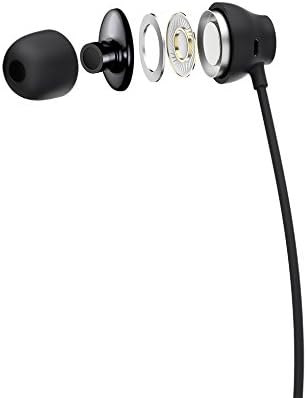
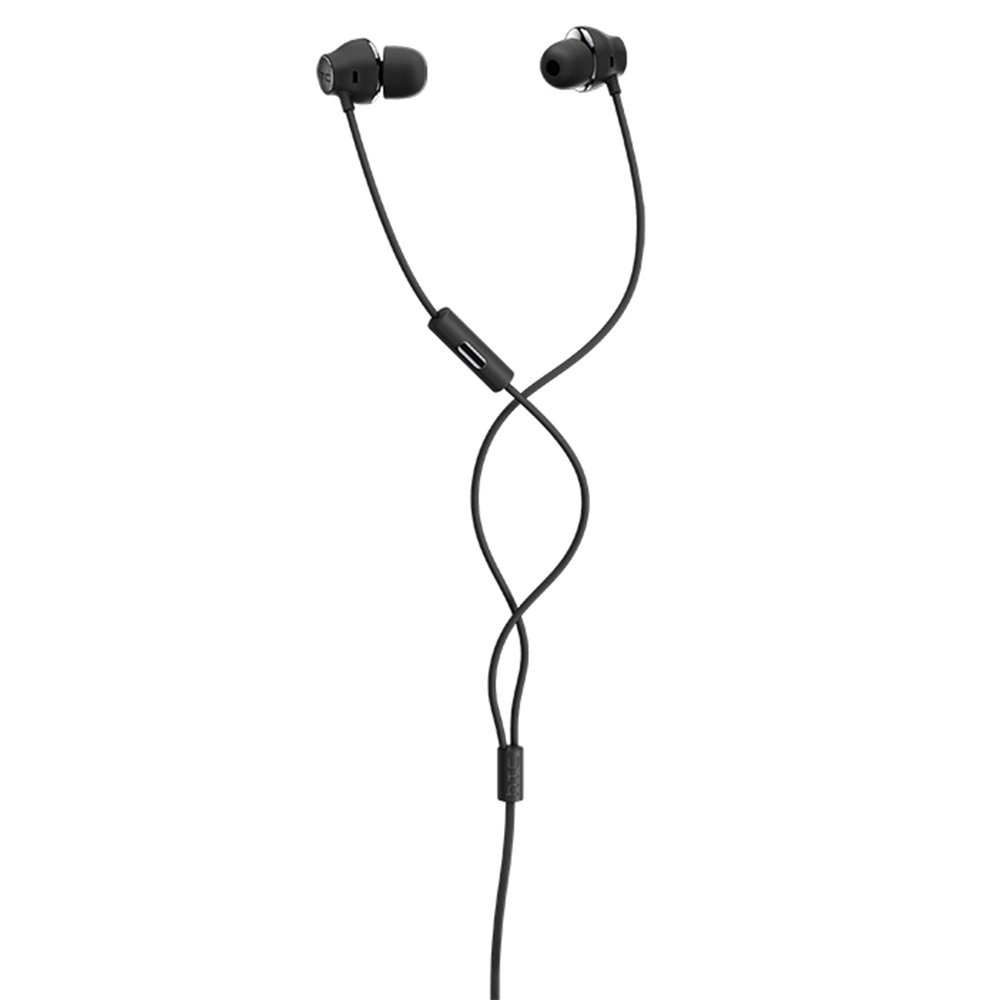
Figure 1: HTC USB Type-C Hi-Res Earphones connected to a device.
5. تعليمات التشغيل
Once connected, your earphones are ready for use.
- تشغيل الصوت: Play audio from your connected device. The sound will be routed through the earphones.
- إدارة المكالمات: For devices supporting call functions, you can typically answer/end calls using the device's interface.
- التحكم في التطبيق: This model supports control via an application. Refer to your device's app store for any official HTC audio control applications that may offer additional features or sound customization.
6. الصيانة والعناية
Proper care extends the lifespan of your earphones:
- نصائح لتنظيف الأذن: Gently remove ear tips and clean them with a mild soap solution and water. Ensure they are completely dry before reattaching.
- Cleaning Earphone Body: Wipe the earphone body and cable with a soft, dry, lint-free cloth. Do not use abrasive materials or harsh chemicals.
- تخزين: When not in use, store the earphones in a clean, dry place, preferably in a protective pouch to prevent tangling and damage.
- إدارة الكابلات: Avoid tightly winding the cable or subjecting it to sharp bends, which can damage internal wires.
الشكل 2: انفجرت view of earphone components, highlighting the 13mm speaker and aerospace polymer diaphragm.
7. استكشاف الأخطاء وإصلاحها
إذا واجهت أي مشكلات، راجع المشكلات والحلول الشائعة التالية:
| مشكلة | السبب المحتمل | حل |
|---|---|---|
| لا يوجد صوت | Earphones not properly connected; device volume too low; incorrect audio output selected on device. | Ensure the USB Type-C connector is fully inserted. Increase device volume. Check device audio settings to confirm earphones are selected as output. |
| جودة الصوت سيئة | Dirty ear tips; damaged cable; low-quality audio source. | Clean ear tips. Inspect the cable for visible damage. Try a different audio source or file. |
| Earphones uncomfortable or fall out | مقاس طرف الأذن غير صحيح. | Try different sized ear tips (if provided) to find the best fit for your ears. |
8. المواصفات
| ميزة | التفاصيل |
|---|---|
| ماركة | اتش تي سي |
| رقم الموديل | 99H20317-00 |
| تكنولوجيا الاتصال | سلكي (USB من النوع C) |
| حجم السماعة | 13 ملم |
| مادة | Synthetic leather (ear tips/housing accents) |
| وزن | 50 جرام |
| أبعاد المنتج | 0.1 x 0.1 x 0.1 cm (packaging/shipping dimensions, actual earphone size is compact) |
| طريقة التحكم | برنامج |
| دعم البلوتوث | لا |
| البطاريات المطلوبة | لا |
| الأجهزة المتوافقة | Smartphone, Laptop, Tablet with USB Type-C audio output |
| لون | رمادي غامق |
| وضع الأذن | داخل الأذن |
9. الضمان والدعم
For warranty information and technical support, please refer to the documentation provided with your purchase or visit the official HTC support webالموقع. احتفظ بإثبات الشراء الخاص بك لتقديم مطالبات الضمان.