مقدمة
This manual provides comprehensive instructions for the setup, operation, and maintenance of your Genius SW-2.1 355 Speaker System. Please read this manual thoroughly before using the product to ensure proper functionality and to maximize your listening experience.
معلومات السلامة
اتبع احتياطات السلامة التالية لمنع تلف الجهاز أو إصابتك:
- لا تعرض مكبرات الصوت للماء أو الرطوبة.
- تجنب وضع مكبرات الصوت بالقرب من مصادر الحرارة أو في ضوء الشمس المباشر.
- تأكد من التهوية المناسبة حول مكبر الصوت الفرعي لمنع ارتفاع درجة الحرارة.
- استخدم فقط محول الطاقة المرفق مع الوحدة.
- لا تحاول فتح أو إصلاح الجهاز بنفسك. أحل جميع أعمال الصيانة إلى فنيين مؤهلين.
- يحفظ بعيدًا عن متناول الأطفال.
محتويات الحزمة
تأكد من وجود جميع العناصر في العبوة:
- 1 x Subwoofer unit
- عدد 2 مكبرات صوت ستالايت
- 1 x Audio input cable (3.5mm stereo jack)
- 1 × محول الطاقة
- 1 × دليل المستخدم (هذه الوثيقة)
المنتج انتهىview
The Genius SW-2.1 355 Speaker System consists of a subwoofer and two satellite speakers designed to deliver clear audio and powerful bass for your multimedia needs.
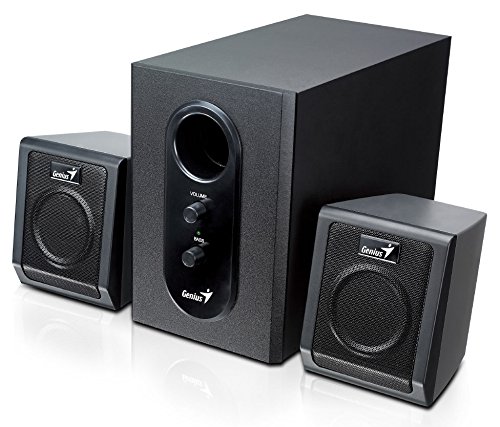
This image displays the Genius SW-2.1 355 Speaker System. It features a central, larger subwoofer unit with volume and bass control knobs on its front panel, and two smaller satellite speakers positioned on either side. All components are black.
عناصر:
- مضخم الصوت: The main unit housing the bass driver and control panel.
- مكبرات الصوت الفضائية: Two compact speakers for mid-range and high-frequency audio.
- لوحة التحكم: Located on the subwoofer, featuring Volume and Bass adjustment knobs.
يثبت
- وضع المتحدثين: Place the subwoofer on the floor or a sturdy surface. Position the satellite speakers on either side of your listening area, facing towards you for optimal stereo separation.
- توصيل مكبرات الصوت الفضائية: Connect the cables from the two satellite speakers to the corresponding output jacks on the rear of the subwoofer unit. Ensure a secure connection.
- توصيل مصدر الصوت: Connect one end of the 3.5mm audio input cable to the "Audio In" jack on the subwoofer. Connect the other end to the audio output jack (e.g., headphone jack) of your computer, MP3 player, smartphone, or other audio source.
- توصيل الطاقة: Plug the power adapter into the DC input jack on the subwoofer. Then, plug the power adapter into a standard electrical outlet.
- تشغيل الطاقة: Turn on the speaker system using the power switch, usually integrated with the volume knob.
عملية
- تشغيل/إيقاف التشغيل والتحكم في مستوى الصوت: The main knob on the subwoofer controls both power and overall volume. Rotate clockwise to turn on and increase volume; rotate counter-clockwise to decrease volume and turn off.
- ضبط الجهير: Use the "Bass" knob on the subwoofer to adjust the level of low-frequency sound. Rotate clockwise to increase bass, and counter-clockwise to decrease it, according to your preference.
- مستوى صوت المصدر الصوتي: For optimal sound quality, set the volume on your audio source (computer, phone, etc.) to about 75% and then use the speaker system's volume control for fine adjustments.
صيانة
- تنظيف: استخدم قطعة قماش ناعمة وجافة لتنظيف أسطح السماعات. لا تستخدم المنظفات السائلة أو المواد الكاشطة.
- تخزين: في حال تخزين السماعات لفترة طويلة، افصلها عن مصدر الطاقة وخزنها في مكان بارد وجاف.
- إدارة الكابلات: تأكد من عدم تشابك الكابلات أو انضغاطها لمنع التلف.
استكشاف الأخطاء وإصلاحها
| مشكلة | السبب المحتمل | حل |
|---|---|---|
| لا يوجد صوت |
|
|
| صوت مشوه |
|
|
| باس ضعيف |
|
|
تحديد
| ميزة | التفاصيل |
|---|---|
| اسم الموديل | SW-2.1 355 |
| نوع السماعة | 2.1 Channel Multimedia Speaker System (Bookshelf, Satellite, Subwoofer) |
| إجمالي الطاقة الناتجة | 10 Watts RMS (5W Subwoofer + 2.5W x 2 Satellites) |
| مادة | خشب (مضخم صوت) |
| تكنولوجيا الاتصال | سلكي (مدخل صوت 3.5 ملم) |
| الأجهزة المتوافقة | MP3 Player, Personal Computer, Smartphones, Tablets, Televisions |
| عناصر التحكم | حجم، باس |
| مصدر الطاقة | DC |
| وزن العنصر | 2.78 كجم |
| أبعاد الحزمة | 39.6 × 25 × 18.4 سم |
الضمان والدعم
Genius products are designed for reliability and performance. For information regarding warranty coverage, technical support, or service inquiries, please refer to the warranty card included with your product or visit the official Genius webالموقع. احتفظ بإيصال الشراء كإثبات للشراء.


