1. المقدمة
The D-Link DIR-808L Wireless AC600 Dual-Band Cloud Router provides high-speed Wi-Fi connectivity with dual-band technology and Fast Ethernet ports. This device is designed to deliver a reliable networking experience for home use, supporting activities such as HD media streaming, online gaming, and web browsing. It includes security features and mydlink Cloud Services for remote network management.
The DIR-808L is backward compatible with existing Wi-Fi devices (802.11a/b/g/n) for seamless integration into your current network setup.
2. محتويات العبوة
تأكد من أن الحزمة الخاصة بك تحتوي على العناصر التالية:
- Wireless AC600 Dual Band Cloud Router (DIR-808L)
- محول الطاقة
- كابل إيثرنت
- دليل التثبيت السريع
في حال فقدان أو تلف أي من العناصر المذكورة أعلاه، يرجى الاتصال بموزع D-Link المحلي.
3. الحد الأدنى من متطلبات النظام
To set up and use the D-Link DIR-808L router, ensure your computer meets the following minimum requirements:
- نظام التشغيل: Windows® 8, Windows® 7, Windows Vista®, Windows® XP SP3, or Mac OS® X (v10.4 or higher)
- Web المتصفح: Internet Explorer® v6, Mozilla® Firefox®, Google Chrome, or Safari 4 or higher
- الأجهزة: بطاقة واجهة الشبكة (NIC)
For Internet access, you will also need:
- كابل أو مودم DSL
- الاشتراك مع مزود خدمة الإنترنت (ISP)
4. انتهت الأجهزةview
Familiarize yourself with the physical components and ports of your DIR-808L router.

الشكل 4.1: أمام view of the DIR-808L router with power and internet status indicators.

الشكل 4.2: Rear panel of the DIR-808L router, detailing port layout.
وصف اللوحة الخلفية:
- منافذ الشبكة المحلية (1-4): Four Fast Ethernet ports for connecting wired devices such as computers, gaming consoles, or network storage.
- منفذ الإنترنت: يتصل بالمودم الخاص بك للوصول إلى الإنترنت.
- زر إعادة الضبط: Press and hold for 10 seconds to restore the router to factory default settings.
- مدخلات الطاقة: قم بتوصيل محول الطاقة المرفق هنا.
- زر WPS: Use for easy, secure wireless connection to WPS-compatible devices.
5. الإعداد والتثبيت
Follow these steps to set up your D-Link DIR-808L router.
5.1 اتصال فيزيائي
- إيقاف التشغيل: افصل الطاقة عن المودم وجهاز التوجيه (إن أمكن).
- توصيل المودم: Connect an Ethernet cable from your modem's Ethernet port to the إنترنت port on the back of your DIR-808L router.
- توصيل الكمبيوتر (اختياري): For initial setup, connect an Ethernet cable from your computer's Ethernet port to any of the شبكة محلية ports (1-4) on the back of your DIR-808L router. You can also connect wirelessly using the default Wi-Fi name and password found on the device label.
- تشغيل المودم: Connect the power adapter to your modem and power it on. Wait for the modem's indicator lights to stabilize, indicating an active internet connection.
- تشغيل جهاز التوجيه: قم بتوصيل محول الطاقة المرفق بالجهاز مدخلات الطاقة on the back of your DIR-808L router and plug it into a power outlet. The power LED on the front of the router should illuminate.
5.2 التكوين الأولي (Web المتصفح)
After physical connections are made, configure your router using a web المتصفح.
- افتح web متصفح (مثل Chrome أو Firefox أو Edge) على جهاز كمبيوتر متصل بجهاز التوجيه.
- في شريط العناوين، اكتب
http://dlinkrouter.localor192.168.0.1واضغط على Enter. - The D-Link Setup Wizard should appear. Follow the on-screen instructions to configure your Internet connection, wireless network name (SSID), and password.
- Create a unique password for your router's administration interface for security.
5.3 Quick Router Setup Mobile App
Alternatively, you can use the D-Link Quick Router Setup mobile app for convenient setup from your smartphone or tablet.
- Download the "D-Link QRS Mobile" app from the Apple App Store or Google Play Store.
- Connect your mobile device to the router's default Wi-Fi network (SSID and password are on the router's label).
- Launch the QRS Mobile app and follow the instructions to complete the setup.
6. التشغيل
This section covers the basic operation of your DIR-808L router.
6.1 Dual-Band Wireless Performance
The DIR-808L operates on two frequency bands: 2.4 GHz and 5 GHz.
- نطاق 2.4 جيجاهرتز: يوفر تغطية أوسع واختراقًا أفضل للجدران، وهو مناسب للاستخدام العام للإنترنت والأجهزة القديمة.
- نطاق 5 جيجاهرتز: Offers faster speeds and less interference, ideal for high-bandwidth activities like HD video streaming and online gaming, but with a shorter range.
You can configure separate SSIDs (network names) for each band or use a single SSID for both, allowing the router to intelligently assign devices to the optimal band.
6.2 الاتصال السلكي
The four Fast Ethernet LAN ports allow you to connect up to four wired devices directly to the router for stable and fast connections.
6.3 mydlink Cloud Management
mydlink Cloud Services enable you to monitor and manage your network remotely from anywhere using the mydlink Lite app or the mydlink web منفذ.
- الوصول عن بعد: View connected devices, block unwanted users, and receive notifications.
- الرقابة الأبوية: Manage internet access schedules and block specific webالمواقع.
To use mydlink services, you will need to register your router with a mydlink account during or after the initial setup process.
6.4 الأمن اللاسلكي
The DIR-808L supports WPA/WPA2 encryption to secure your wireless network. It is recommended to use WPA2-PSK (AES) for the strongest security.
- WPS (إعداد Wi-Fi المحمي): Provides a simple way to connect WPS-compatible devices to your wireless network by pressing the WPS button on the router and the device.
7. الصيانة
تضمن الصيانة المناسبة الأداء الأمثل وطول عمر جهاز التوجيه الخاص بك.
- تحديثات البرامج الثابتة: تحقق بشكل دوري من دعم D-Link website for firmware updates. Updating firmware can improve performance, add new features, and fix security vulnerabilities. Instructions for updating firmware are typically provided with the update package.
- تنظيف: احفظ جهاز التوجيه في بيئة نظيفة وخالية من الغبار. استخدم قطعة قماش ناعمة وجافة لتنظيف السطح الخارجي. لا تستخدم المنظفات السائلة أو البخاخات.
- الموقع: Place the router in a central location, away from obstructions and devices that may cause interference (e.g., cordless phones, microwaves).
8. استكشاف الأخطاء وإصلاحها
This section addresses common issues you might encounter with your DIR-808L router.
8.1 لا يوجد اتصال بالإنترنت
- فحص الكابلات: تأكد من توصيل جميع كابلات Ethernet بشكل آمن بالمنافذ الصحيحة على جهاز التوجيه والمودم.
- دورة الطاقة: Power off your modem, then your router. Wait 30 seconds, then power on your modem first. Once the modem is fully online (indicator lights stable), power on your router.
- حالة المودم: Verify that your modem has an active internet connection. Check its indicator lights or consult your modem's manual.
- إعدادات مزود خدمة الإنترنت: Confirm your Internet Service Provider (ISP) settings are correctly entered in the router's web واجهة.
8.2 Slow Wireless Speed or Poor Range
- وضع جهاز التوجيه: Position the router in a central location, elevated, and away from large metal objects, concrete walls, and other electronic devices that may cause interference.
- تدخل: Other wireless devices (cordless phones, microwaves, Bluetooth devices) can interfere with Wi-Fi signals. Try changing the wireless channel in the router's settings.
- استخدام النطاق المزدوج: Connect devices that require high bandwidth (e.g., streaming devices) to the 5 GHz band, and other devices to the 2.4 GHz band.
- البرامج الثابتة: تأكد من أن البرامج الثابتة لجهاز التوجيه الخاص بك محدثة.
8.3 لا يمكن الوصول إلى جهاز التوجيه Web الواجهة
- عنوان IP: تأكد من ضبط جهاز الكمبيوتر الخاص بك للحصول على عنوان IP تلقائيًا (DHCP).
- العنوان الصحيح: تأكد من أنك تكتب العنوان الصحيح:
http://dlinkrouter.localor192.168.0.1. - Temporary Disable Firewall/Antivirus: قم بتعطيل أي جدار حماية أو برنامج مكافحة فيروسات على جهاز الكمبيوتر الخاص بك مؤقتًا والذي قد يمنع الوصول.
- إعادة تعيين جهاز التوجيه: If all else fails, perform a factory reset by pressing and holding the Reset button on the back of the router for 10 seconds. ملحوظة: سيؤدي هذا إلى مسح جميع إعداداتك المخصصة.
9. المواصفات الفنية
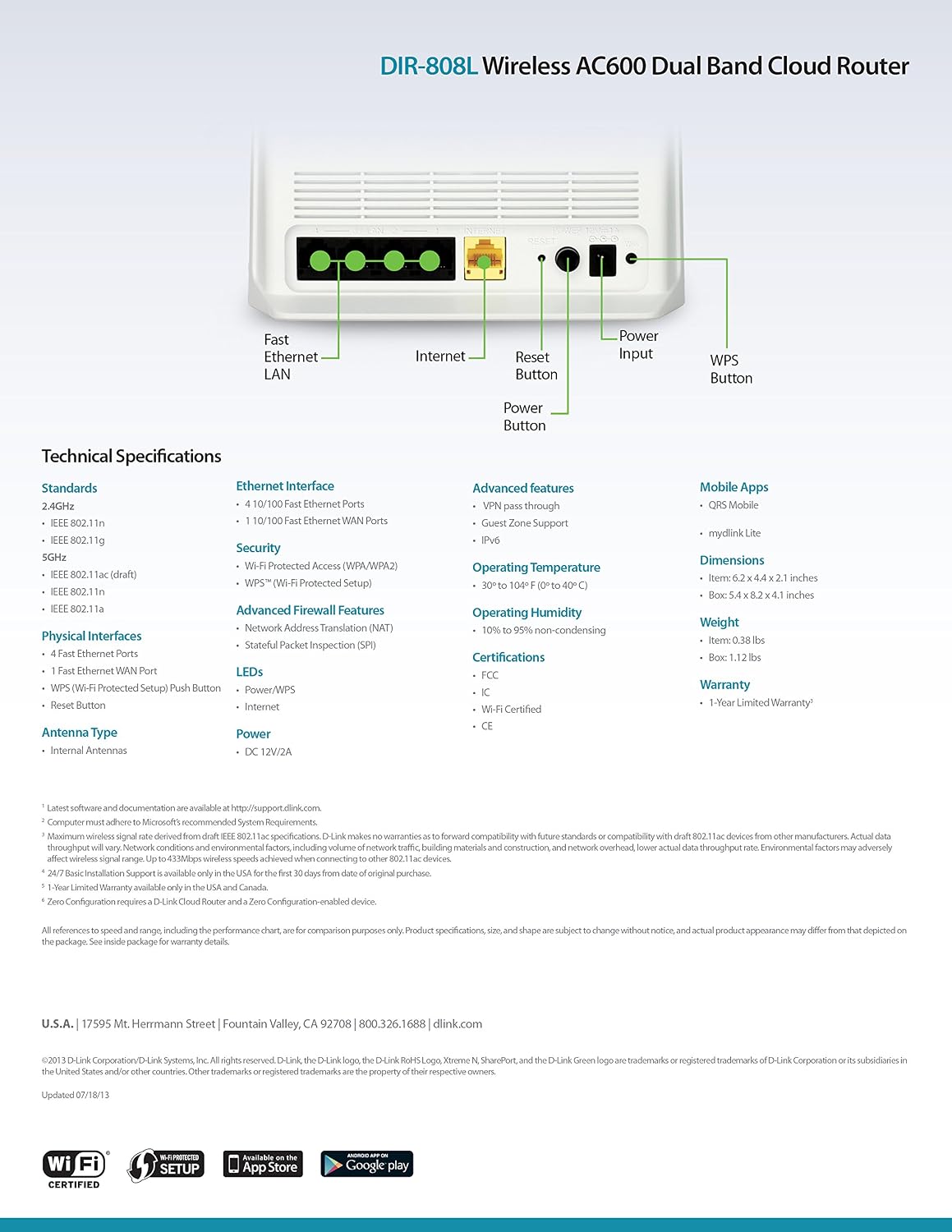
الشكل 9.1: Technical specifications and rear panel diagram of the DIR-808L router.
| ميزة | وصف |
|---|---|
| اسم الموديل | دير-808L |
| نوع لاسلكي | 802.11ac (AC600), 802.11a/b/g/n |
| فئة نطاق التردد | النطاق المزدوج (2.4 جيجاهرتز و 5 جيجاهرتز) |
| الاتصال السلكي | 4 x Fast Ethernet LAN Ports, 1 x Fast Ethernet WAN Port |
| حماية | WPA/WPA2, WPS (Wi-Fi Protected Setup) |
| توافق نظام التشغيل | Windows, Mac, Android |
| الأبعاد (الطول × العرض × الارتفاع) | 2.1 × 6.1 × 4.4 بوصة |
| وزن العنصر | 7.2 أونصة (0.45 رطل) |
| مدخلات الطاقة | شنومكسف دس، شنومكسا |
| درجة حرارة التشغيل | 0 إلى 40 درجة مئوية (32 إلى 104 درجة فهرنهايت) |
| رطوبة التشغيل | 10% إلى 95% بدون تكاثف |
| الشهادات | FCC, Wi-Fi Certified, CE |
10. معلومات الضمان
The D-Link DIR-808L Wireless AC600 Dual-Band Cloud Router comes with a ضمان محدود لمدة عامين من تاريخ الشراء. يغطي هذا الضمان عيوب المواد والصناعة في ظل الاستخدام العادي.
For full warranty terms and conditions, please refer to the warranty card included with your product or visit the official D-Link webموقع.
Legal Disclaimer: D-Link is not responsible for honoring warranty claims from unauthorized resellers. Please contact the manufacturer directly for official warranty service.
11. الدعم الفني
If you encounter problems that are not addressed in this manual, or require further assistance, please contact D-Link Technical Support.
- دعم دي لينك Webموقع: يزور support.dlink.com for FAQs, documentation, and firmware downloads.
- Phone Support (U.S.): You may contact D-Link customer support at 1-877-453-5465. Please have your product model number (DIR-808L) and serial number ready when calling.


