مقدمة
This manual provides essential information for the safe and efficient operation of your Sony KDL-55W900A 55-Inch 3D Internet LED HDTV. Please read these instructions thoroughly before using the television and retain them for future reference.
The Sony KDL-55W900A features a 55-inch display with 1080p resolution, 240Hz refresh rate, 3D capabilities, and integrated internet connectivity. It incorporates X-Reality PRO for enhanced detail and a TRILUMINOS display for brilliant colors.

صورة: أمام view of the Sony KDL-55W900A 55-Inch 3D Internet LED HDTV, showcasinيتميز بتصميمه الأنيق وشاشته.
ماذا يوجد في الصندوق
تأكد من تضمين جميع العناصر التالية مع التلفزيون الخاص بك:
- Television Unit (Sony KDL-55W900A)
- جهاز التحكم عن بعد
- حامل تلفاز
- سلك الطاقة
- Active 3D Glasses (quantity may vary, typically 4 pairs)
- AA Batteries (2 for remote control)
- الوثائق (دليل الإعداد السريع، معلومات السلامة)
يثبت
1. تركيب حامل التلفزيون
Place the TV screen face down on a soft, clean surface to prevent damage. Align the stand with the mounting holes on the bottom of the TV and secure it using the provided screws. Ensure the stand is firmly attached before proceeding.

صورة: Diagram showing the dimensions of the Sony KDL-55W900A TV, including width, height, and depth.

صورة: جانب view of the Sony KDL-55W900A TV, highlighting its slim profile.
2. توصيل الأجهزة الطرفية
Connect your external devices such as Blu-ray players, gaming consoles, or cable/satellite boxes to the appropriate input ports (HDMI, USB, etc.) on the rear of the TV.
- HDMI: للحصول على صوت وفيديو عالي الدقة.
- USB: لتوصيل أجهزة تخزين USB.
- إيثرنت: للاتصال بالإنترنت السلكي.
- الترددات اللاسلكية: لتوصيل الهوائي أو الكابل.
3. توصيل الطاقة
قم بتوصيل سلك الطاقة بمدخل الطاقة الخاص بالتلفزيون، ثم بمأخذ الحائط.
4. معالج الإعداد الأولي
Upon first power-on, the TV will guide you through an initial setup process. This includes language selection, time zone, channel scanning, and network configuration.

صورة: A person interacting with a tablet displaying a program guide, with the Sony TV visible in the background, demonstrating smart TV control.
تعليمات التشغيل
1. وظائف التلفزيون الأساسية
- قوة: اضغط على زر الطاقة الموجود على جهاز التحكم عن بعد أو التلفزيون لتشغيله/إيقافه.
- اختيار الإدخال: Use the "Input" or "Source" button on the remote to switch between connected devices (HDMI 1, HDMI 2, TV, etc.).
- مقدار: Adjust using the Volume Up/Down buttons.
- قناة: Change channels using the Channel Up/Down buttons or number pad.
2. Smart TV Features and Internet Connectivity
Your TV can connect to the internet via Wi-Fi or Ethernet. Access various online services and applications through the Smart TV interface.
- Navigate the Smart TV menu using the remote's directional pad.
- Select apps like Netflix, Hulu, or Amazon Prime Video for streaming content.
- استخدم المدمج web browser for internet surfing.

صورة: A family enjoying content on the Sony TV, with a smartphone mirroring its display to the TV, illustrating connectivity features.
3. إعدادات الصورة والصوت
Access the "Picture" and "Sound" menus to customize your viewجي والاستماع.
- أوضاع الصورة: Choose from Standard, Vivid, Cinema, Game, etc.
- السطوع والتباين واللون: قم بضبط هذه الإعدادات حسب تفضيلاتك.
- إكس رياليتي برو: This feature enhances detail and texture.
- شاشة TRILUMINOS: Provides a wider spectrum of colors.
- Motionflow XR 960: Improves motion clarity for fast-moving scenes.

صورة: A split-screen comparison demonstrating the enhanced detail and clarity provided by X-Reality PRO technology on the Sony TV.
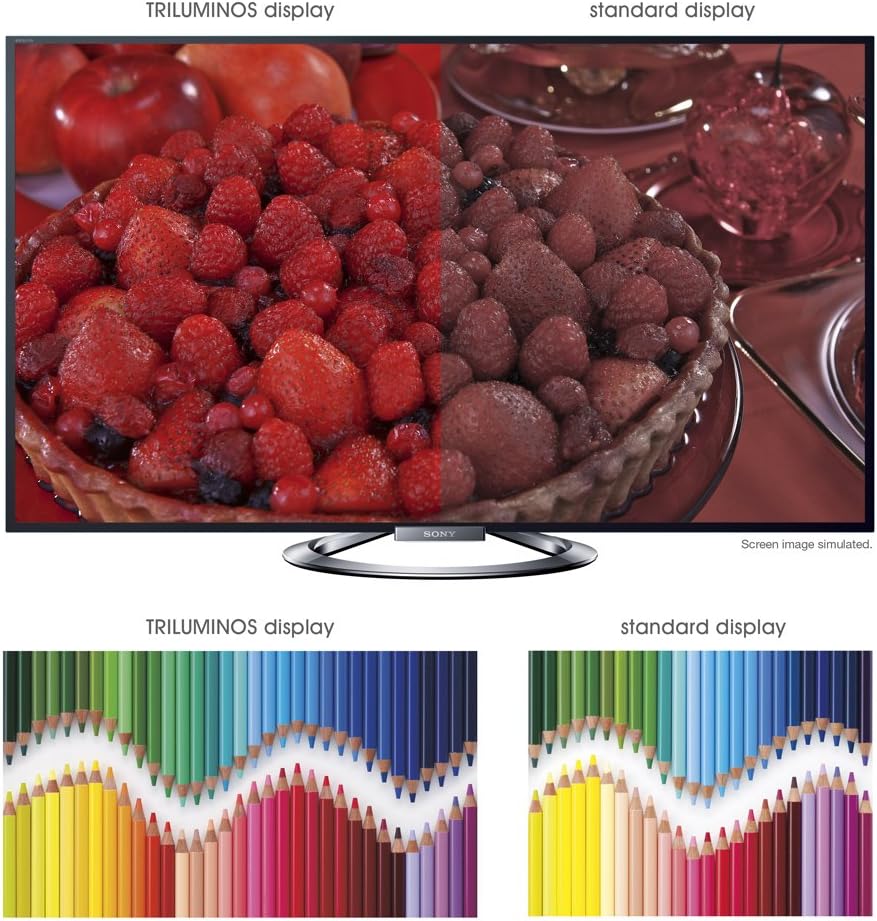
صورة: A split-screen comparison illustrating the vibrant and expanded color palette of the TRILUMINOS display versus a standard display.
4. 3D Viewعمل
To enjoy 3D content, ensure you have active 3D glasses and a 3D-compatible source (e.g., 3D Blu-ray player).
- Put on the active 3D glasses.
- Play 3D content from a connected source. The TV should automatically detect and switch to 3D mode.
- If 3D mode does not activate automatically, check the TV's picture settings for 3D options.
- Ensure 3D glasses are charged or have fresh batteries.
صيانة
1. تنظيف التلفزيون
- شاشة: امسح الشاشة برفق بقطعة قماش ناعمة وجافة من الألياف الدقيقة. لإزالة البقع الصعبة، امسحها برفق بقطعة قماش جافة.ampبلل قطعة القماش بالماء أو بمنظف الشاشة المتخصص (لا ترش مباشرة على الشاشة).
- خزانة: امسح خزانة التلفزيون بقطعة قماش ناعمة وجافة. تجنب استخدام المنظفات الكاشطة أو الشمع أو المذيبات.
- افصل دائمًا التلفاز عن الكهرباء قبل التنظيف.
2. تحديثات البرامج
قم بالتحقق دورياً من وجود تحديثات للبرامج لضمان الأداء الأمثل والوصول إلى أحدث الميزات.
- Navigate to the "Settings" menu on your TV.
- Look for "System Software Update" or similar options.
- Follow the on-screen instructions to download and install updates. Ensure the TV remains powered on during the update process.
3. 3D Glasses Care
- Clean lenses with a soft, dry cloth.
- Store glasses in a protective case when not in use.
- Replace batteries as needed (typically AA batteries).
استكشاف الأخطاء وإصلاحها
| مشكلة | السبب المحتمل / الحل |
|---|---|
| لا يوجد طاقة |
|
| لا توجد صورة / شاشة سوداء |
|
| لا يوجد صوت |
|
| مشاكل اتصال الشبكة |
|
| 3D Image is Blurry or Not Working |
|
إذا استمرت المشكلة بعد تجربة هذه الحلول، فيرجى الرجوع إلى قسم الدعم للحصول على مزيد من المساعدة.
تحديد
| ميزة | التفاصيل |
|---|---|
| ماركة | سوني |
| رقم الموديل | كيه دي ال-55 دبليو 900 ايه |
| حجم الشاشة | 55 بوصة |
| تكنولوجيا العرض | قاد |
| دقة | 1080 بكسل |
| معدل التحديث | 240 Hz (Motionflow XR 960) |
| نسبة العرض إلى الارتفاع | 16:9 |
| المميزات الخاصة | Flat, 3D Capable, Internet TV, X-Reality PRO, TRILUMINOS Display, Dynamic Edge LED Backlight |
| تكنولوجيا الاتصال | إيثرنت، HDMI، RF، USB، واي فاي |
| أبعاد المنتج (مع الحامل) | 48.9 بوصة عرض × 29.9 بوصة ارتفاع × 11.8 بوصة عمق |
| أبعاد المنتج (بدون حامل) | 48.9 بوصة عرض × 28.5 بوصة ارتفاع × 2.5 بوصة عمق |
| وزن العنصر | 48.5 رطل |
| البطاريات المطلوبة | بطاريتان AA (لجهاز التحكم عن بعد) |
| تاريخ أول توفر | 7 يناير 2013 |
معلومات الضمان
Your Sony KDL-55W900A television is covered by a limited warranty. The specific terms and duration of the warranty may vary by region and purchase date. Please refer to the warranty card included with your product or visit the official Sony support webللحصول على معلومات مفصلة حول تغطية الضمان وشروطه وأحكامه، يرجى زيارة الموقع الإلكتروني.
احتفظ بإثبات الشراء (الإيصال) لأنه سيكون مطلوبًا لأي مطالبات ضمان.
دعم العملاء
For further assistance, technical support, or service inquiries regarding your Sony KDL-55W900A, please contact Sony customer support.
- الدعم عبر الإنترنت: قم بزيارة موقع دعم سوني الرسمي website for FAQs, troubleshooting guides, software downloads, and contact options.
- الدعم عبر الهاتف: يرجى الرجوع إلى معلومات الاتصال المتوفرة في وثائق المنتج أو على موقع دعم سوني. website for regional telephone numbers.
When contacting support, please have your TV model number (KDL-55W900A) and serial number ready.


