مقدمة
This manual provides essential information for the proper setup, operation, and maintenance of your Hitachi Touro Desk Dx3 2TB External Hard Drive. Please read these instructions carefully before using the device to ensure optimal performance and longevity.
محتويات الحزمة
تأكد من وجود جميع العناصر في العبوة:
- Hitachi Touro Desk Dx3 2TB External Hard Drive
- كابل بيانات أوسب شنومكس
- AC Power Adapter (EURO plug)
- دليل البدء السريع (إذا كان متضمنًا)
المنتج انتهىview
The Hitachi Touro Desk Dx3 is a 2TB external desktop hard drive designed for reliable data storage and backup. It features a stylish, stackable design and SuperSpeed USB 3.0 connectivity for fast data transfers, while also being backwards compatible with USB 2.0.

الشكل 1: أمام view of the Hitachi Touro Desk Dx3. This image displays the sleek, black, vertically ribbed casing of the external hard drive. A small, rectangular indicator light is visible towards the bottom center of the front panel, signifying power or activity status.
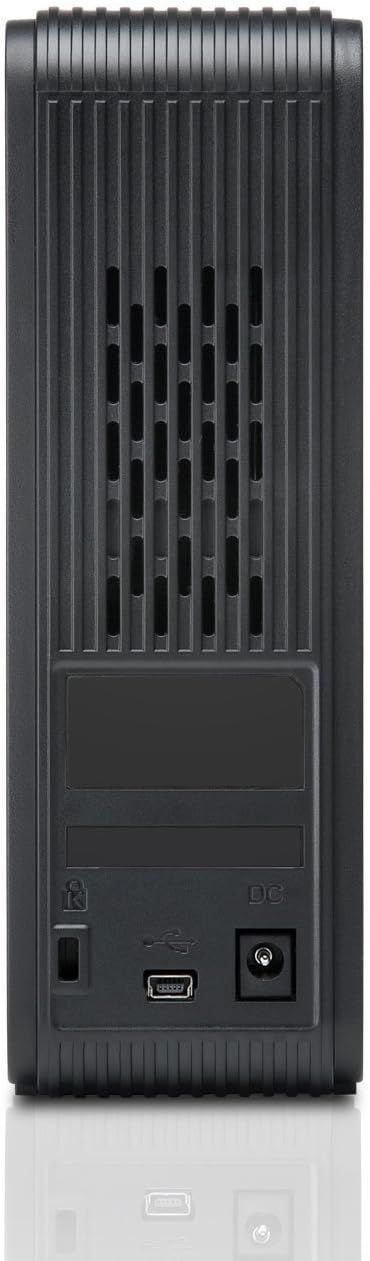
الشكل 2: خلف view of the Hitachi Touro Desk Dx3. This image shows the rear panel of the hard drive, which includes the DC power input port on the right, the USB 3.0 data port in the center, and a security lock slot on the left. Ventilation grilles are visible across the top portion of the back panel.
يثبت
Follow these steps to set up your external hard drive:
- قم بتوصيل محول الطاقة: Plug the AC power adapter into the DC power input port on the back of the Touro Desk Dx3. Then, plug the other end of the power adapter into a wall outlet. The drive will power on automatically.
- قم بتوصيل كبل USB: Connect one end of the supplied USB 3.0 data cable to the USB port on the back of the Touro Desk Dx3. Connect the other end of the USB cable to an available USB port on your computer. For optimal performance, use a USB 3.0 port.
- التعرف على نظام التشغيل: Your computer's operating system (Windows or macOS) should automatically detect and install the necessary drivers for the hard drive. The drive will appear as a new storage device in 'My Computer' (Windows) or 'Finder' (macOS).
- التنسيق الأولي (اختياري): The drive comes pre-formatted. If you wish to reformat the drive or partition it, refer to your operating system's disk management tools. Note: Reformatting will erase all data on the drive.
التشغيل
Once connected, your Touro Desk Dx3 is ready for use.
- نقل البيانات: السحب والإفلات files or folders to and from the Touro Desk Dx3 icon on your desktop or in your file explorer. The USB 3.0 interface allows for rapid data transfer speeds.
- دعم: Use your operating system's built-in backup utilities or third-party software to create backups of your important files on the external drive.
- إزالة آمنة: Always safely eject the hard drive before disconnecting it from your computer. In Windows, right-click the drive icon in the system tray and select 'Eject'. In macOS, drag the drive icon to the Trash or click the Eject button next to the drive in Finder. This prevents data corruption.
صيانة
تضمن الصيانة المناسبة طول عمر جهازك.
- تنظيف: استخدم قطعة قماش ناعمة وجافة وخالية من الوبر لتنظيف الجزء الخارجي من القرص الصلب. لا تستخدم المنظفات السائلة أو البخاخات.
- الظروف البيئية: Store and operate the drive in a cool, dry environment, away from direct sunlight, extreme temperatures, and high humidity. Avoid placing the drive near strong magnetic fields.
- التعامل الجسدي: Handle the drive with care. Avoid dropping it or subjecting it to strong impacts, as this can damage the internal components.
استكشاف الأخطاء وإصلاحها
إذا واجهت أي مشكلات، راجع الحلول الشائعة التالية:
- لم يتم التعرف على محرك الأقراص:
- Ensure the power adapter is securely connected to both the drive and a working power outlet.
- Verify the USB cable is firmly connected to both the drive and your computer. Try a different USB port or cable.
- أعد تشغيل الكمبيوتر الخاص بك.
- Check Disk Management (Windows) or Disk Utility (macOS) to see if the drive is detected but not assigned a drive letter or mounted.
- سرعات نقل بطيئة:
- Ensure you are connected to a USB 3.0 port on your computer for SuperSpeed performance. USB 2.0 ports will operate at slower speeds.
- تجنب نقل العديد من الأشياء الصغيرة files simultaneously; large files transfer more efficiently.
- Close other applications that might be using system resources or the USB bus.
- ضوء القيادة غير مضاء:
- Check the power adapter connection to the drive and the wall outlet.
- حاول استخدام منفذ طاقة مختلف.
تحديد
| سعة التخزين الرقمية | 2 تيرابايت |
| واجهة القرص الصلب | يو اس بي 3.0 |
| تكنولوجيا الاتصال | USB |
| ماركة | هيتاشي |
| عامل شكل القرص الصلب | 3.5 بوصة |
| الأجهزة المتوافقة | أجهزة الكمبيوتر المكتبية |
| نوع التثبيت | سطح الطاولة |
| لون | أسود |
معلومات الضمان
This product is covered by a limited warranty. For detailed information regarding warranty terms, conditions, and duration, please refer to the warranty card included in your product packaging or visit the official Hitachi support webالموقع. احتفظ بإثبات الشراء الخاص بك لتقديم مطالبات الضمان.
دعم العملاء
For further assistance, technical support, or to inquire about service, please visit the official Hitachi support webالموقع الإلكتروني أو تواصل مع قسم خدمة العملاء. عادةً ما تجد معلومات الاتصال على موقع الشركة المصنعة. webالموقع أو في وثائق المنتج.


