1. المقدمة
The Polk Audio SWA500 Power Amplifier is engineered to provide dedicated power for Polk Audio CSW Series built-in subwoofers. This Class D digital amplifier delivers 500 watts into 4 ohms, ensuring robust and distortion-free bass performance. Its design prioritizes long-term reliability and efficient operation. This manual provides essential information for the safe and effective installation, operation, and maintenance of your SWA500 ampمكبر.
2. تعليمات السلامة الهامة
- اقرأ هذه التعليمات جيداً قبل تشغيل الجهاز ampمكبر.
- احتفظ بهذه التعليمات للرجوع إليها في المستقبل.
- انتبه إلى كافة التحذيرات الموجودة على المنتج وفي هذا الدليل.
- Follow all instructions for safe use and installation.
- لا تستخدم هذا الجهاز بالقرب من الماء أو الرطوبة.
- نظف فقط بقطعة قماش جافة.
- لا تسد أي فتحات تهوية. ثبّت المنتج وفقًا لتعليمات الشركة المصنعة.
- لا تقم بالتثبيت بالقرب من أي مصادر للحرارة مثل المشعات أو فتحات التدفئة أو المواقد أو أي أجهزة أخرى (بما في ذلك ampالمُضخِّمات) التي تنتج الحرارة.
- لا تفسد الغرض من السلامة في القابس المستقطب أو القابس الأرضي. يحتوي القابس المستقطب على شفرتين إحداهما أوسع من الأخرى. يحتوي القابس الأرضي على شفرتين وشوكة تأريض ثالثة. يتم توفير الشفرة العريضة أو الشوكة الثالثة لسلامتك. إذا لم يكن القابس المرفق مناسبًا للمأخذ الخاص بك، فاستشر كهربائيًا لاستبدال المنفذ القديم.
- احمِ سلك الطاقة من أن يدوس عليه أحد أو يضغط عليه، وخاصةً عند المقابس ومنافذ التوصيل الكهربائية ونقطة خروجها من الجهاز.
- استخدم فقط المرفقات/الملحقات المحددة من قبل الشركة المصنعة.
- افصل هذا الجهاز أثناء العواصف الرعدية أو عند عدم استخدامه لفترات طويلة من الزمن.
- أحل جميع أعمال الصيانة إلى موظفي الصيانة المؤهلين. يلزم إجراء الصيانة عند تعرض الجهاز للتلف بأي شكل من الأشكال، مثل تلف سلك مصدر الطاقة أو القابس، أو انسكاب السوائل أو سقوط الأشياء داخل الجهاز، أو تعرض الجهاز للمطر أو الرطوبة، أو عدم تشغيله بشكل طبيعي، أو سقوطه.
تحذير: لتقليل خطر نشوب حريق أو حدوث صدمة كهربائية، لا تعرض هذا الجهاز للمطر أو الرطوبة.
3. الإعداد والاتصالات
قبل إجراء أي اتصالات، تأكد من amplifier is powered off and unplugged from the AC outlet. The SWA500 is designed to power up to two Polk Audio CSW Series subwoofers of the same model.
3.1. SPEX Circuit Card Installation
The SWA500 amplifier utilizes SPEX circuit cards to optimize its performance for specific CSW subwoofer models. Ensure the correct SPEX card for your subwoofer model is inserted into the designated slot on the rear panel of the amplifier. These cards provide custom frequency shaping for optimal bass response.
3.2. اتصالات اللوحة الخلفية
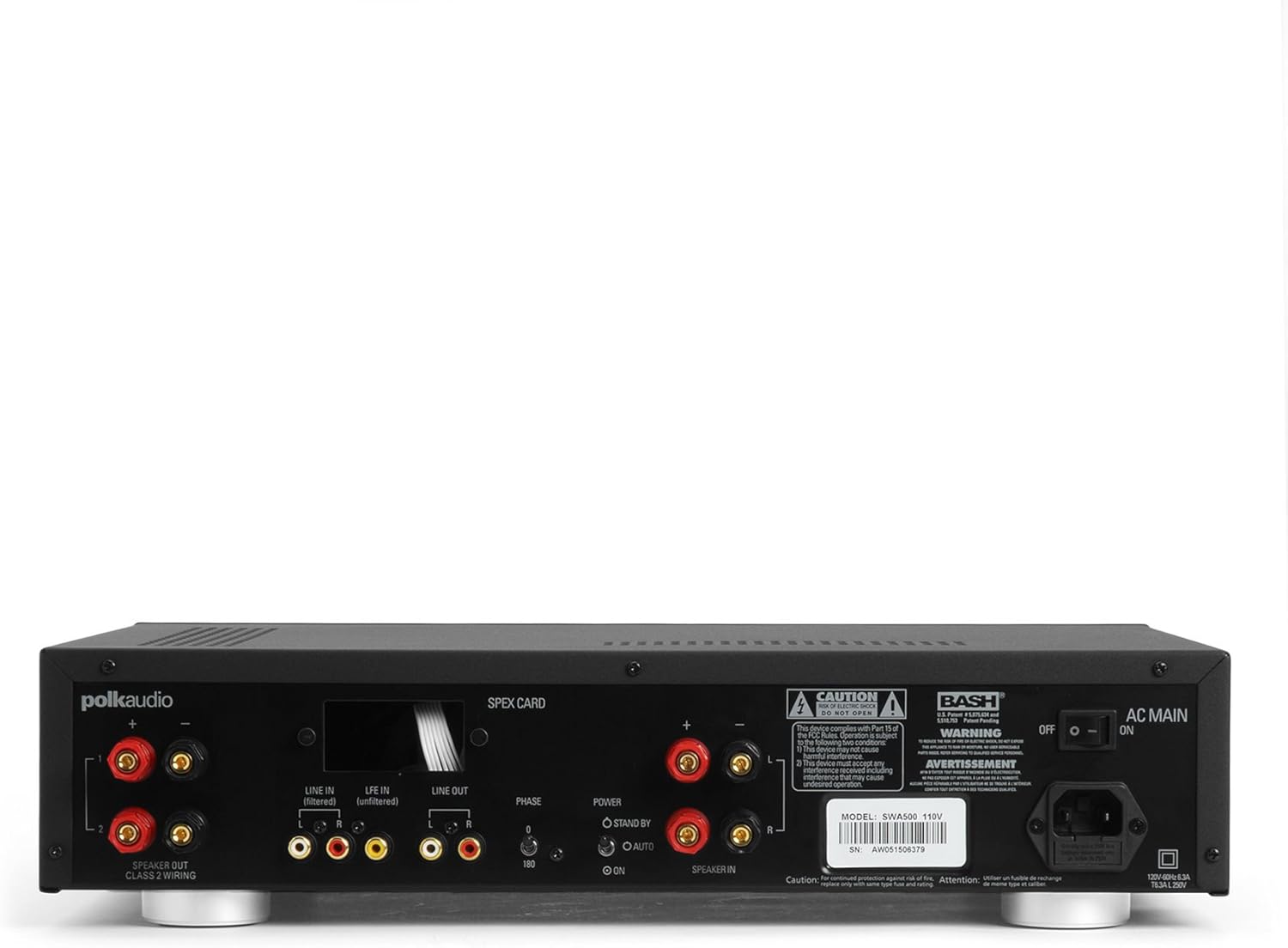
Figure 1: Rear panel of the SWA500 amplifier, illustrating various connection points including Line In, Line Out, Speaker Out, SPEX Card slot, Phase switch, Power mode switch, and AC Main input.
- Line In (Filtered/Unfiltered): Connect your audio source (e.g., AV receiver's subwoofer output) to the appropriate Line In jacks using RCA cables. The "Filtered" input applies a low-pass filter, while "Unfiltered" bypasses it, useful if your source provides its own filtered signal.
- خط خارج: These RCA outputs can be used to pass the audio signal to another ampمكبر صوت أو جهاز.
- مكبر صوت: Connect your Polk Audio CSW subwoofer(s) to these terminals using appropriate speaker wire. Ensure correct polarity (+ to + and - to -). The SWA500 supports Class 2 wiring.
- مفتاح الطور: Adjust this switch (0° or 180°) to optimize the subwoofer's phase with your main speakers for seamless sound integration.
- مفتاح وضع الطاقة: Select between "ON" (always on), "AUTO" (turns on when an audio signal is detected), or "STANDBY" (low power mode, awaiting signal).
- التيار المتردد الرئيسي: Connect the supplied power cord to this input and then to a suitable AC power outlet.
4. التشغيل
Once all connections are made and the amplifier is plugged in, you can begin operating your SWA500.
4.1. ضوابط اللوحة الأمامية

Figure 2: Front panel of the SWA500 amplifier, featuring the Power button, Protection indicator, Low Pass Filter control, and Volume control.
- زر الطاقة: اضغط لقلب ملف ampتشغيل أو إيقاف تشغيل المضخم. سيضيء مؤشر الطاقة عند تشغيل الجهاز.
- مؤشر الحماية: يضيء هذا الضوء إذا كان amplifier enters protection mode due to overheating or an electrical fault. If this occurs, turn off the amplifier, check connections, and allow it to cool before restarting.
- Low Pass Filter (80Hz - 120Hz): This knob adjusts the upper frequency limit of the subwoofer's output. Adjust this to blend the subwoofer's sound seamlessly with your main speakers. Start with a setting around 80Hz and adjust by ear.
- Volume (Min - Max): This knob controls the overall output level of the subwoofer. Adjust to achieve the desired bass intensity relative to your main speakers.
4.2. ضبط الصوت الأولي
Begin with the Low Pass Filter set to a mid-point (e.g., 100Hz) and the Volume knob at a low setting. Play a familiar piece of music or movie scene. Gradually increase the Volume until the bass is noticeable but not overpowering. Then, fine-tune the Low Pass Filter and Phase switch to achieve the most natural and integrated sound with your main speakers. The goal is for the subwoofer to enhance the low frequencies without drawing attention to its location.
5. الصيانة
- تنظيف: Disconnect the power cord before cleaning. Use a soft, dry cloth to wipe the exterior surfaces of the amplifier. Do not use liquid cleaners or aerosol sprays.
- تهوية: تأكد من أن فتحات التهوية على amplifier are not blocked. Proper airflow is crucial for preventing overheating and maintaining long-term reliability.
- تخزين: إذا تم تخزين amplifier for an extended period, unplug it from the power outlet and store it in a cool, dry place, away from direct sunlight and extreme temperatures.
6. استكشاف الأخطاء وإصلاحها
If you experience issues with your SWA500 ampللمُحسِّن، راجع دليل استكشاف الأخطاء وإصلاحها التالي:
| مشكلة | السبب المحتمل | حل |
|---|---|---|
| لا يوجد ضوء مؤشر الطاقة | Power cord not connected; AC outlet not active; Power switch off. | Ensure power cord is securely connected. Check AC outlet with another device. Press the front panel power button. |
| لا يوجد صوت من مكبر الصوت الفرعي | Incorrect input connection; Speaker wires loose or incorrect polarity; Volume too low; SPEX card missing or incorrect; Amplifier in standby/auto mode without signal. | Verify RCA input connections. Check speaker wire connections and polarity. Increase volume. Ensure correct SPEX card is installed. Set Power Mode switch to "ON" for testing. |
| Distorted or poor quality sound | Volume too high; Incorrect Low Pass Filter setting; Phase mismatch; Damaged speaker wire or subwoofer. | Reduce volume. Adjust Low Pass Filter. Toggle Phase switch (0°/180°). Inspect speaker wires and subwoofer for damage. |
| Protection indicator illuminated | Overheating; Short circuit in speaker wiring; Ampخطأ الرافعة. | اغلاق amplifier and allow to cool. Check speaker wiring for shorts. If problem persists, contact customer support. |
7. المواصفات
- نموذج: SWA500
- انتاج الطاقة: 500 واط في 4 أوم
- Ampنوع مكبر: فئة D رقمية
- التوافق: Designed for Polk Audio CSW Series built-in subwoofers (requires specific SPEX circuit card)
- مرشح تمرير منخفض: Adjustable (Front Panel)
- التحكم في مستوى الصوت: Adjustable (Front Panel)
- التحكم في المرحلة: 0°/180° (Rear Panel)
- أوضاع الطاقة: ON, AUTO, STANDBY (Rear Panel)
- أبعاد المنتج: 1 × 1 × 1 بوصة (تقريبًا، وفقًا للبيانات المقدمة)
- وزن السلعة: 12.25 رطل
- الشركة المصنعة: بولك الصوت
- تاريخ التوفر الأول: 18 أبريل 2005
8. الضمان والدعم
For specific warranty information, please refer to the warranty card included with your product or visit the official Polk Audio webالموقع. احتفظ بإيصال الشراء الخاص بك كإثبات للشراء في حالة مطالبات الضمان.
If you require technical assistance or have questions not covered in this manual, please contact Polk Audio customer support. Contact information can typically be found on the official Polk Audio webالموقع أو على عبوة منتجك.
Polk Audio Official Webموقع: www.polkaudio.com


