1. መግቢያ
The Level Lock (Matter) is a smart deadbolt designed to integrate seamlessly into your home. It offers advanced security features and convenient access options through Matter-over-Thread technology. This manual provides essential information for the proper installation, operation, and care of your Level Lock.
ቁልፍ ባህሪዎች
- Impossibly Small Design: Technology is hidden inside the door, making it the smallest smart lock available.
- Bluetooth + Matter Built-In: Interoperable with Apple Home, Google Home, Amazon Alexa, and SmartThings (SmartThings hub required) for easy integration.
- የርቀት መዳረሻ፡ Lock or unlock your door and receive activity notifications from anywhere using certified smart home apps (requires Matter-over-Thread Hub + Border Router).
- ቁልፍ የሌለው ግቤት፡ Utilize the Level Home app (iOS & Android) for keyless access, sharing, and activity history.
- Best-in-Class Security: Certified AAA by BHMA and ANSI grade 1/A, meeting the highest industry standards for security, durability, and finish.
- ቀላል ጭነት; Wire-free design, easy to install with a screwdriver, fitting standard American deadbolts.
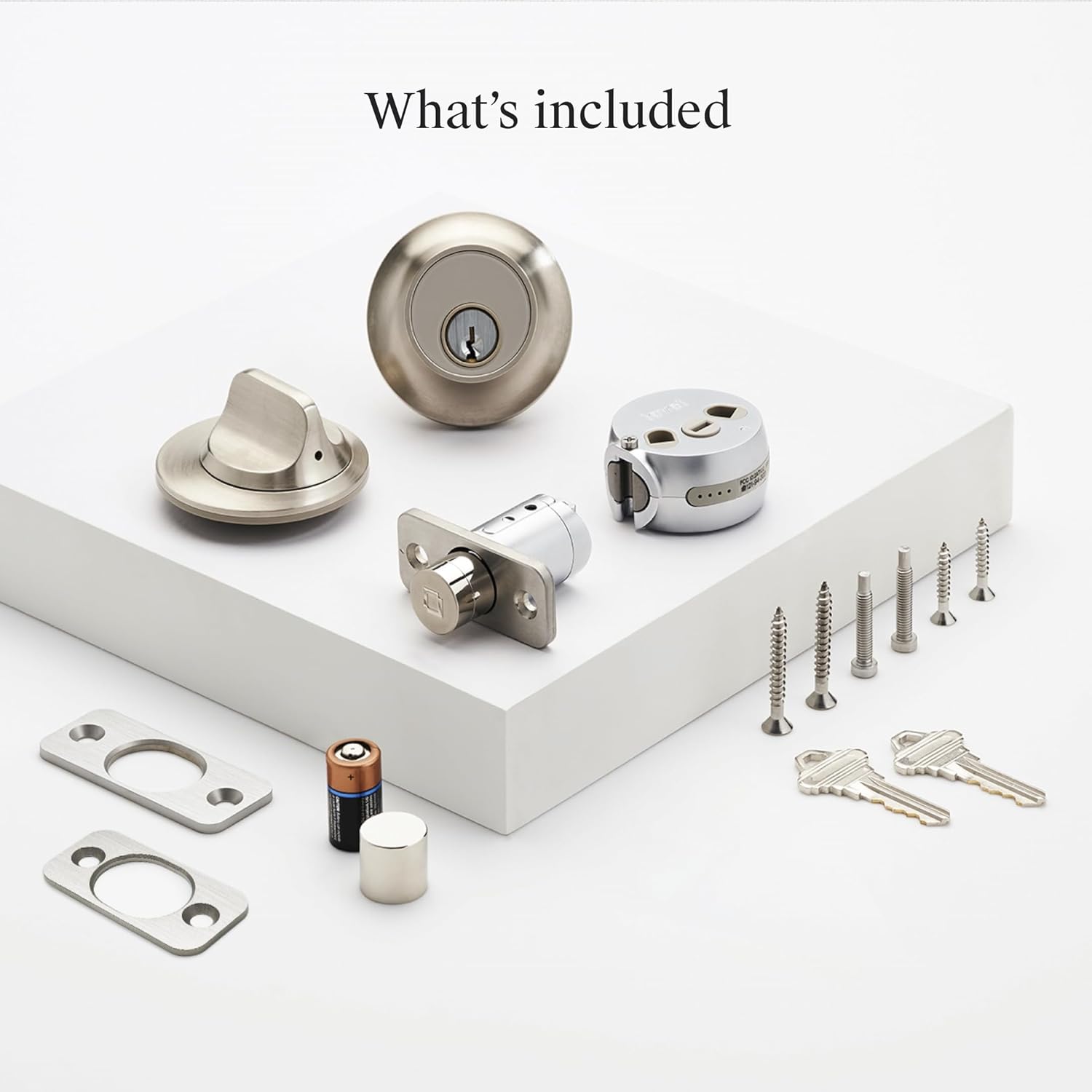
2. ምን ይካተታል
Verify that all components are present in your Level Lock (Matter) package:
- 1 Level Lock (Matter) Assembly
- 1 የመጫኛ መመሪያ
- 2 ቁልፎች
- 6 Installation Screws
- 2 የመምታት ሰሌዳዎች
- 1 CR2 ባትሪ
3. ማዋቀር እና መጫን
The Level Lock is designed for straightforward installation, typically requiring only a screwdriver. It replaces most American standard deadbolts.
የበር ተኳኋኝነት;
- Works with most American standard deadbolts.
- መደበኛ ፕሮfile deadbolt: 0.75 inches or greater.
- Backset lengths: 2.375 inches or 2.75 inches.
- Door thickness: 1.75 inches - 2 inches.
- ANSI standard 2.125 inches bore hole diameter.
የመጫኛ ደረጃዎች
- በርዎን ያዘጋጁ; Ensure your door meets the compatibility requirements. Remove any existing deadbolt hardware.
- Install the Bolt: Insert the Level Lock bolt into the door edge.
- Install the Housing: Place the interior and exterior housings, securing them with the provided screws.
- ባትሪ አስገባ፡ Install the CR2 battery into the designated compartment.
- የሙከራ ተግባር Manually test the lock and unlock mechanism to ensure smooth operation.
- መተግበሪያ ማዋቀር፡ Download the Level Home app (available for iOS and Android) and follow the on-screen instructions to pair your lock and complete the setup.

Exterior and Interior Design:
The Level Lock is designed to be discreet, maintaining the aesthetic of your door without bulky external keypads or large interior housings.


4. የአሠራር መመሪያዎች
The Level Lock offers multiple ways to control access to your home, integrating with various smart home platforms.
የመቆጣጠሪያ ዘዴዎች፡-
- Level Home App: Use the dedicated Level Home app (iOS & Android) to lock/unlock, manage access, and view activity history.
- የድምጽ ቁጥጥር፡- Integrate with Amazon Alexa, Google Assistant, or Apple HomeKit for voice commands (e.g., "Alexa, unlock front door").
- አካላዊ ቁልፍ፡- Traditional key access is always available.
- Level Keypad (Sold Separately): For key code access, a Level Keypad can be installed within 30 feet of your lock.

Smart Home Integration (Matter-over-Thread):
The Level Lock (Matter) is designed for multi-platform control, allowing you to manage it through various compatible smart home ecosystems.
- ተስማሚ መገናኛዎች To use Matter-enabled features, a Matter-over-Thread hub connected to your home Wi-Fi and updated to the latest firmware is required. Examples include Apple TV 4K (2nd/3rd Gen), HomePod (2nd Gen), HomePod mini, various Echo devices, Nest Hub (2nd Gen), Nest Hub Max, and SmartThings hubs.
- የርቀት መዳረሻ፡ Requires a Matter-over-Thread Hub + Border Router for remote lock/unlock and notifications.
- የአካባቢ ቁጥጥር Manage your lock from your phone while at home without internet access.


5. ጥገና
የባትሪ መተካት፡
The Level Lock is powered by one CR2 Lithium Manganese Dioxide battery. When the battery level is low, you will receive notifications through the Level Home app. To replace the battery:
- Locate the battery compartment within the lock assembly.
- የድሮውን CR2 ባትሪ ያስወግዱ።
- አዲስ የ CR2 ባትሪ አስገባ፣ ይህም ትክክለኛውን ዋልታነት ያረጋግጣል።
- የባትሪውን ክፍል ደህንነቱ በተጠበቀ ሁኔታ ይዝጉ።
ማጽዳት፡
To maintain the appearance and functionality of your Level Lock, wipe it with a soft, damp ጨርቅ። እነዚህ ጨርቁን ሊያበላሹ ስለሚችሉ ሻካራ ማጽጃዎችን ወይም ሟሟቶችን አይጠቀሙ።
6. መላ መፈለግ
If you encounter issues with your Level Lock, consider the following:
- ምላሽ የማይሰጥ ቁልፍ፡ Check the battery level in the Level Home app. Replace the CR2 battery if it is low.
- የግንኙነት ጉዳዮች፡- Ensure your Matter-over-Thread hub and border router are powered on and connected to your home network. Verify that the Level Home app and your smart home platforms are updated to the latest versions.
- የመተግበሪያ ችግሮች፡- Try restarting the Level Home app or reinstalling it. Ensure your smartphone's Bluetooth is enabled.
- የአካል ማደናቀፍ; Check for any physical obstructions in the door frame or strike plate that might prevent the deadbolt from extending or retracting fully.
For persistent issues, refer to the Level Home app's help section or contact Level customer support.
7. ዝርዝሮች
| ባህሪ | ዝርዝር |
|---|---|
| የምርት ስም | ደረጃ |
| የሞዴል ስም | Lock (Matter) |
| የንጥል ሞዴል ቁጥር | C2 |
| ዩፒሲ | 850058738291 |
| የመቆለፊያ ዓይነት | ሙድቦልት |
| ቁሳቁስ | Metal (440C stainless steel and strengthened metal alloys) |
| ቀለም | የሳቲን ኒኬል |
| የምርት ልኬቶች (L x W x H) | 4.5 x 2.75 x 2.75 ኢንች |
| የእቃው ክብደት | 3.38 ፓውንድ |
| ልዩ ባህሪያት | Auto-Lock, Matter-Enabled, Scratch-Resistant, Smart Lock, Weather Resistant |
| የግንኙነት ፕሮቶኮል | Matter, Bluetooth |
| የመቆጣጠሪያ ዘዴ | መተግበሪያ ፣ የርቀት ፣ ድምጽ |
| የመቆጣጠሪያ አይነት | Amazon Alexa፣ Android፣ Apple HomeKit፣ Google ረዳት፣ አይኦኤስ |
| የኃይል ምንጭ | 1 CR2 Battery (included) |
| የባትሪ ሕዋስ ዓይነት | ሊቲየም ማንጋኒዝ ዳይኦክሳይድ |
| የደህንነት ማረጋገጫ | BHMA AAA, ANSI Grade 1/A |

8. የዋስትና መረጃ
The Level Lock (Matter) Smart Lock is backed by a የ 2 ዓመት የተወሰነ ዋስትና. This warranty covers defects in materials and workmanship under normal use. For specific terms and conditions, please refer to the warranty documentation included with your product or visit the official Level webጣቢያ.
9. ድጋፍ
For further assistance, technical support, or to access additional resources, please visit the official Level support website or contact their customer service team. You can typically find contact information within the Level Home app or on the Level webጣቢያ.
የመስመር ላይ መርጃዎች፡- www.level.co/support


