1. ምርት አብቅቷልview
The Philips 44W 4200 lm Motion Sensor LED Security Light is designed for outdoor use, providing bright and efficient illumination. This 2-pack floodlight features a Passive Infrared (PIR) motion sensor, 5000K daylight color temperature, and is built to withstand various weather conditions. Its adjustable heads and multiple operating modes offer versatile lighting solutions for your property.
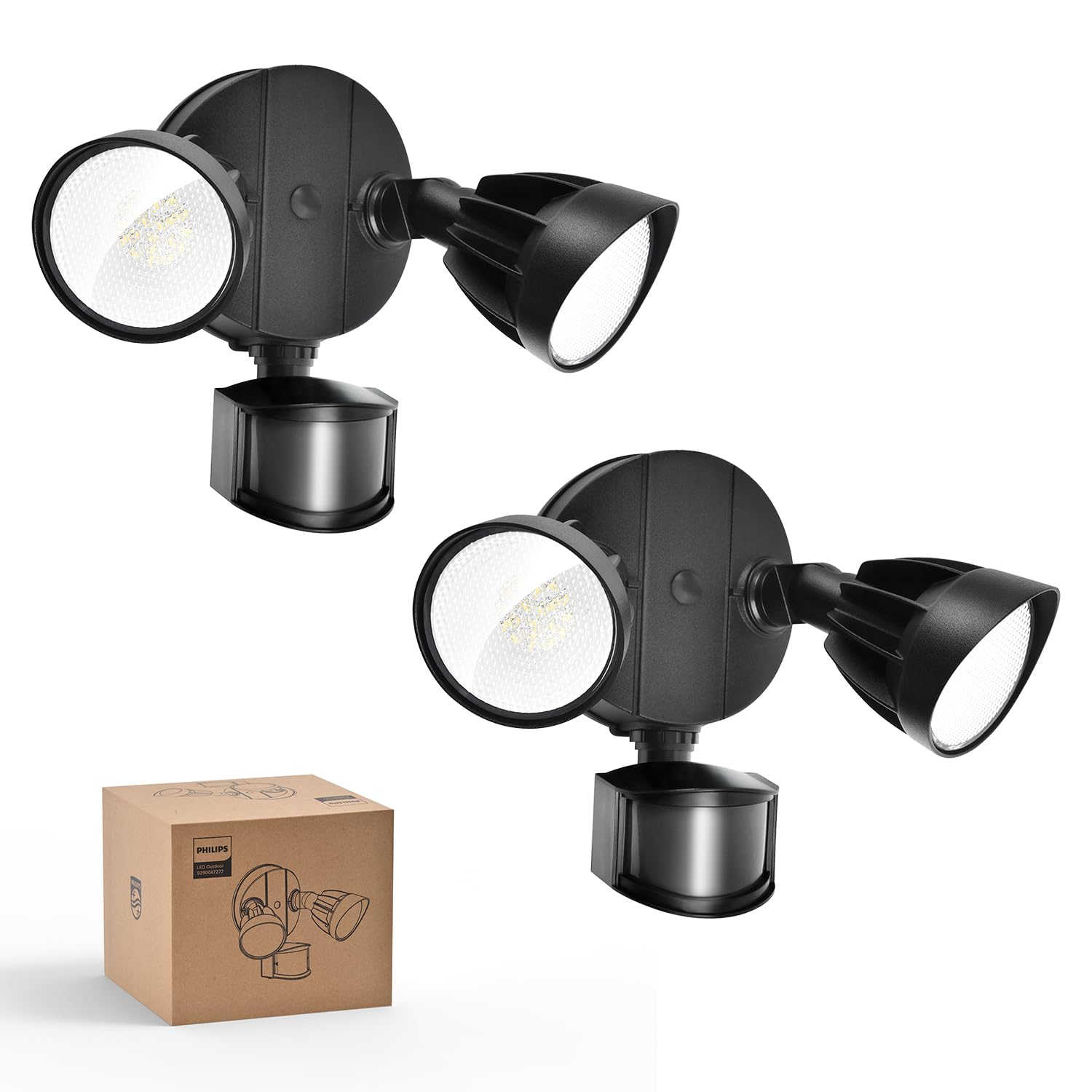
Image: Philips 44W 4200 lm Motion Sensor LED Security Light (2-pack) in black.
2. የደህንነት መረጃ
- ከመጫንዎ ወይም ከማገልገልዎ በፊት ሁል ጊዜ በወረዳው ላይ ያለውን ኃይል ያጥፉ።
- ስለ መጫኑ ሂደት እርግጠኛ ካልሆኑ ብቃት ያለው ኤሌትሪክ ያማክሩ።
- ሁሉም የገመድ ግንኙነቶች ደህንነታቸው የተጠበቀ መሆኑን እና የአካባቢ ኤሌክትሪክ ኮዶችን ያከብራሉ።
- Do not attempt to modify the product. Any modifications may void the warranty and create safety hazards.
- ልጆችን ከመጫኛ ቦታ ያርቁ.
3. በሳጥኑ ውስጥ ያለው
Each Philips 44W 4200 lm Motion Sensor LED Security Light package includes the following components:
- LED Security Light Fixture (2 units for this pack)
- የ LED ሌንስ
- Mounting Hardware (screws, wire nuts, mounting plate, rubber plug, gasket)
- መመሪያ መመሪያ

Image: Included accessories for installation.
4. ባህሪያት
- ከፍተኛ ብሩህነት እና ሰፊ የብርሃን አንግል፡ Emits 4200 lumens with a 5000K cool daylight color temperature. Two adjustable heads provide customizable coverage.
- High-Sensitivity PIR Sensor: Detects motion within a 0-69ft range and 180° induction angle. Lighting time is adjustable from 1-10 minutes.
- 4 የመብራት ሁነታዎች፡- Includes Test Mode, Security Mode, Dusk to Dawn Mode, and Manual Override Mode (always-on at 80% brightness for up to 6 hours).
- የሚበረክት እና የአየር ሁኔታ መከላከያ; Constructed with aluminum lamp material, tested for corrosion and rust resistance, and rated IP65 for various weather conditions.
- ኃይል ቆጣቢ LED Integrated LED design eliminates bulb replacement and reduces electricity costs by up to 80% compared to 220W incandescent fixtures.
- Adjustable Head Design: Customize each light head's angle to suit specific lighting needs.

Image: Key features of the Philips security light.

Image: Adjustable head design for flexible lighting coverage.

Image: Aluminum construction for durability and heat dissipation.
5. መጫን
The Philips security light is designed for easy installation. It requires hardwiring; a junction box is not included. Follow these general steps for installation:
- ሽቦ ማዘጋጀት; Ensure power is off at the circuit breaker. Connect the ground wire (green) from the light fixture to the ground wire in the junction box.
- ሽቦዎችን ማገናኘት; Connect the white wire (neutral) from the light fixture to the white wire from the junction box using a wire nut. Connect the black wire (live) from the light fixture to the black wire from the junction box using a wire nut.
- የመወጣጫ ወለል የመጫኛ ሳህኑን ወደ መጋጠሚያ ሳጥኑ ይጠብቁ።
- አባሪ አያይዝ፡ Align the light fixture with the mounting plate and secure it with the provided screws. Ensure a tight seal between the lamp and the wall to enhance water resistance.
- ማኅተም Apply sealant around the fixture base to prevent water leakage.
- ጭንቅላትን ማስተካከል; የብርሃን ጭንቅላቶችን እና የእንቅስቃሴ ዳሳሹን ወደሚፈልጉት ማዕዘኖች ያስተካክሉ።
Recommended installation height: 8.2 ft.

Image: Easy installation steps for the security light.

Image: Two common mounting methods: eave and wall mounting.
የመጫኛ ቪዲዮ
Video: Detailed installation guide for high-voltage products, demonstrating wiring and mounting procedures.
6. የአሠራር ዘዴዎች
The Philips security light offers four distinct operating modes to suit various needs:

ምስል፡ አልቋልview of the four available lighting modes.
- የሙከራ ሁነታ፡ Can be activated in both daytime and nighttime. When motion is detected, the light turns on for 5 seconds. If no motion, it stays off. This mode is useful for verifying sensor functionality and coverage area during installation.
- የደህንነት ሁኔታ Operates only at nighttime. When motion is detected, the light automatically turns on for a set duration (1, 3, or 10 minutes). If no motion, it stays off.
- ከጠዋት እስከ ንጋት ሁነታ፡ Operates only at nighttime. The light automatically turns on at dusk and turns off at dawn. When motion is detected, the light brightens to 100% and then dims to 20% when no one is around.
- በእጅ መሻር ሁነታ: Can be activated in both daytime and nighttime. This mode keeps the light on at 80% brightness for a maximum of 6 hours. To activate, switch the light OFF and ON twice within 3 seconds. To deactivate, switch the light OFF and ON for more than 3 seconds, returning it to sensor mode. The brightness automatically dims from 100% to 80% after 12 minutes in this mode.

Image: Test Mode operation.

Image: Security Mode operation.

Image: Dusk to Dawn Mode operation.

Image: Manual Override Mode activation and deactivation.
7. ቅንብሮችን ማስተካከል
The motion sensor allows for adjustment of both sensing distance and activated lighting time:
- የመዳሰስ ርቀት፡ Adjust the 'DISTANCE' dial on the sensor to set the detection range:
- L (Low): 0-20 ft
- M (Medium): 0-39 ft
- H (High): 0-69 ft
- Activated Lighting Time: Adjust the 'TIME' dial on the sensor to set how long the light stays on after motion is detected:
- 1 MIN: 1 minute
- 3 MIN: 3 minutes
- 10 MIN: 10 minutes

Image: Dials for adjusting sensing distance and lighting time.

Image: Switch tips for adjusting sensor settings.
8. ጥገና
To ensure optimal performance and longevity of your Philips security light, follow these maintenance guidelines:
- ማጽዳት፡ የብርሃን መሳሪያውን እና የእንቅስቃሴ ዳሳሽ ሌንስን በየጊዜው ለስላሳ፣ ዲ በመጠቀም ያጽዱamp ጨርቅ። ጨርቁን ወይም የኤሌክትሮኒክስ ክፍሎችን ሊጎዱ የሚችሉ ሻካራ ማጽጃዎችን ወይም መሟሟቶችን ከመጠቀም ይቆጠቡ።
- ምርመራ፡- Regularly inspect the fixture for any signs of damage, loose wiring, or wear. Ensure the sealant around the base remains intact to maintain its waterproof rating.
- የአምፖል ምትክ የለም This unit features integrated LED lighting, meaning there are no bulbs to replace.
9. መላ መፈለግ
If you encounter issues with your Philips security light, refer to the following common troubleshooting steps:
- መብራት የማይበራ;
- በሲውትሪክ ብሬክተር ላይ የኃይል አቅርቦቱን ያረጋግጡ።
- Ensure the motion sensor is not obstructed.
- Verify the operating mode settings (e.g., if in Security Mode, ensure it's dark enough).
- Adjust the 'DISTANCE' and 'TIME' settings on the sensor.
- መብራቱ ያለማቋረጥ በርቷል;
- Check if the light is in Manual Override Mode. Refer to Section 6 for deactivation instructions.
- Ensure the 'TIME' setting is not set too high.
- Verify that there is no continuous motion within the sensor's detection range.
- የእንቅስቃሴ ዳሳሽ አለማወቅ፡-
- የሴንሰሩ ሌንስ ንጹህ እና ከእንቅፋቶች የጸዳ መሆኑን ያረጋግጡ።
- Adjust the 'DISTANCE' setting to a higher sensitivity.
- Verify the sensor's angle and position to cover the desired area.
- Test the sensor in 'Test Mode' to confirm functionality.
የምርት ቪዲዮ
ቪዲዮ: አልቋልview of the Philips 44W 4200 lm LED Security Light with motion sensor, highlighting its features and benefits.
10. ዝርዝሮች
| ባህሪ | ዋጋ |
|---|---|
| የምርት ስም | ፊሊፕስ |
| የሞዴል ቁጥር | 7601909012 |
| ዩፒሲ | 046677607111 |
| ቀለም | ጥቁር |
| ቁሳቁስ | አሉሚኒየም, ፕላስቲክ |
| የብርሃን ማቀፊያ ቅጽ | የጎርፍ ብርሃን |
| የምርት ልኬቶች | 6.69"ኤል x 9.05" ዋ x 9.45" ኤች |
| የኃይል ምንጭ | ባለገመድ ኤሌክትሪክ |
| የመጫኛ ዓይነት | የግድግዳ ተራራ |
| ልዩ ባህሪያት | Anti-Rust, Energy Efficient, Motion Sensor, Waterproof |
| የብርሃን ምንጭ ዓይነት | LED |
| ጥራዝtage | 120 ቮልት |
| ፈካ ያለ ቀለም | የቀን ብርሃን |
| የእቃዎች ብዛት | 2 |
| ዋትtage | 44 ዋት |
| የመቀየሪያ አይነት | የእንቅስቃሴ ዳሳሽ |
| የውሃ መቋቋም ደረጃ | ውሃ የማይገባ (IP65) |
| ብሩህነት | 4200 Lumen |
| የቀለም ሙቀት | 5000 ኬልቪን |
| የእቃው ክብደት | 4.2 ፓውንድ |
| ስብሰባ ያስፈልጋል | አዎ |
11. ዋስትና እና ድጋፍ
Philips products are manufactured to the highest quality standards. For warranty information, technical support, or service inquiries, please refer to the official Philips webጣቢያ ወይም በቀጥታ የደንበኛ አገልግሎታቸውን ያግኙ። ለዋስትና ጥያቄዎች የግዢ ደረሰኝዎን እንደ ግዢ ማረጋገጫ ያቆዩት።
ለበለጠ መረጃ፣ ይጎብኙ ፊሊፕስ መደብር በአማዞን ላይ.


