1. መግቢያ
This manual provides detailed instructions for the safe and efficient use of your Blitzwolf BW-CML5 Monitor Light Bar. Please read this manual thoroughly before operating the device and retain it for future reference.
2. የጥቅል ይዘቶች
Please check the package contents upon opening to ensure all items are present and undamaged. If any items are missing or damaged, please contact customer support.
- Blitzwolf BW-CML5 Monitor Light Bar
- ገመድ አልባ የርቀት መቆጣጠሪያ
- የዩኤስቢ ኃይል ገመድ
- የተጠቃሚ መመሪያ (ይህ ሰነድ)
3. የደህንነት መመሪያዎች
ደህንነቱ የተጠበቀ አሰራርን ለማረጋገጥ እና ጉዳት እንዳይደርስ ለመከላከል የሚከተሉትን የደህንነት ጥንቃቄዎች ይከተሉ።
- መሳሪያውን በውሃ ወይም ከመጠን በላይ እርጥበት አያጋልጡ.
- መሳሪያውን በሙቀት ምንጮች አጠገብ ወይም በቀጥታ የፀሐይ ብርሃን ላይ ከማስቀመጥ ይቆጠቡ.
- መሳሪያውን እራስዎ ለመበተን ወይም ለመጠገን አይሞክሩ. ሁሉንም አገልግሎቶች ብቁ ለሆኑ ባለሙያዎች ያመልክቱ።
- የቀረበውን የዩኤስቢ የኃይል ገመድ ወይም የተረጋገጠ ተመጣጣኝ ብቻ ይጠቀሙ።
- ልጆች በማይደርሱበት ቦታ ያስቀምጡ.
- Ensure the light bar is securely attached to the monitor to prevent accidental falls.
4. ማዋቀር እና መጫን
Follow these steps to set up your monitor light bar:
- የብርሃን አሞሌውን ያያይዙ፡ Gently place the light bar on top of your monitor. The adjustable clip mechanism should securely grip the top edge of the monitor. Ensure the light source faces downwards towards your desk.
- የግንኙነት ኃይል; Connect the USB power cable to the light bar's power input port. Plug the other end of the USB cable into a USB port on your computer or a compatible USB power adapter (5V/1A recommended).
- የርቀት መቆጣጠሪያውን ያስቀምጡ; Place the wireless remote control on your desk within easy reach. The remote operates wirelessly and does not require direct line of sight to the light bar.
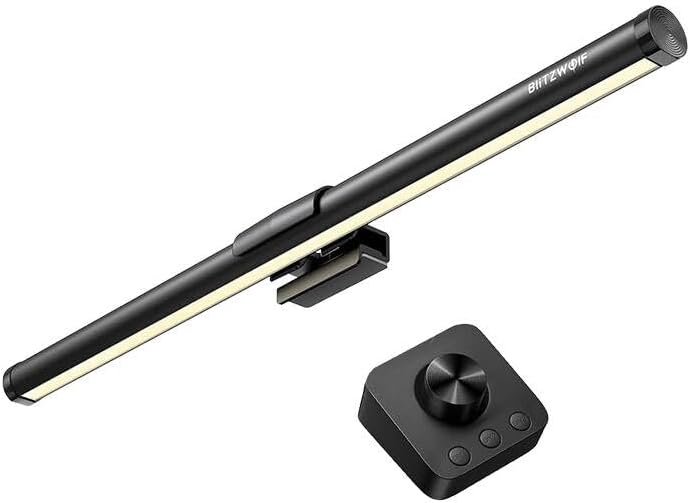
ምስል 1፡ The Blitzwolf BW-CML5 Monitor Light Bar attached to a monitor, with its wireless remote control placed on a desk. This image illustrates the typical setup of the product.
5. የአሠራር መመሪያዎች
The Blitzwolf BW-CML5 is controlled via its wireless remote. Familiarize yourself with the remote's functions:
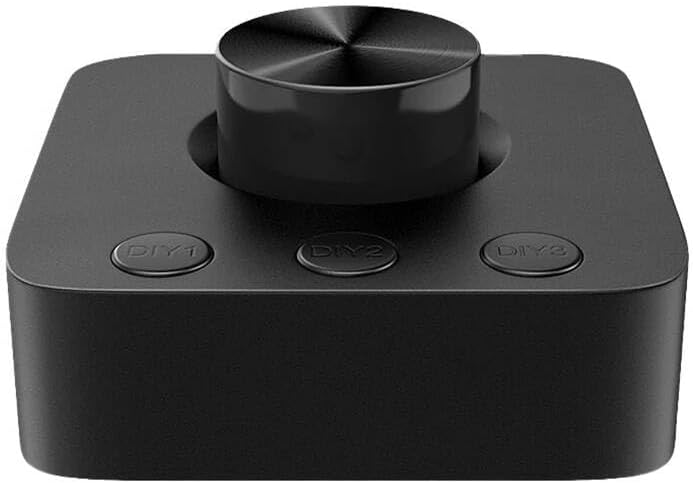
ምስል 2፡ መቀራረብ view of the wireless remote control for the Blitzwolf BW-CML5 Monitor Light Bar, showing the central rotary knob and three "DIY" preset buttons.
- ማብራት/ማጥፋት፡ Press the central rotary knob once to turn the light bar on or off.
- ብሩህነትን ማስተካከል; Rotate the central knob clockwise to increase brightness and counter-clockwise to decrease brightness.
- የቀለም ሙቀት ማስተካከል; Press and hold the central knob for approximately 2 seconds. While holding, rotate the knob to cycle through different color temperature settings (e.g., warm white, neutral white, cool white). Release the knob to set the desired temperature.
- DIY Preset Buttons (DIY1, DIY2, DIY3): These buttons allow you to save and recall your preferred brightness and color temperature settings.
- To Save a Preset: Adjust the light bar to your desired brightness and color temperature. Then, press and hold one of the DIY buttons (DIY1, DIY2, or DIY3) for approximately 3 seconds until the light blinks, indicating the setting has been saved.
- ቅድመ ዝግጅትን ለማስታወስ፡- Simply press the corresponding DIY button (DIY1, DIY2, or DIY3) once to activate the saved setting.
6. ጥገና
Proper maintenance ensures the longevity of your device:
- ማጽዳት፡ Disconnect the power before cleaning. Use a soft, dry cloth to wipe the light bar and remote control. Do not use abrasive cleaners or solvents.
- ማከማቻ፡ ለረጅም ጊዜ ጥቅም ላይ በማይውልበት ጊዜ መሳሪያውን በቀጥታ ከፀሀይ ብርሀን እና ከከፍተኛ ሙቀት ርቆ በቀዝቃዛና ደረቅ ቦታ ያከማቹ።
7. መላ መፈለግ
If you encounter issues with your Blitzwolf BW-CML5, please refer to the following common problems and solutions:
| ችግር | ሊሆን የሚችል ምክንያት | መፍትሄ |
|---|---|---|
| የመብራት አሞሌ አይበራም። | No power, loose connection, remote battery low. | Check USB power cable connection. Ensure USB power source is active. Replace remote control batteries if applicable (check remote manual for battery type). |
| የርቀት መቆጣጠሪያ ምላሽ አይሰጥም። | Remote battery low, interference, not paired. | Replace remote control batteries. Move remote closer to the light bar. If issues persist, refer to the remote's specific pairing instructions (if any, usually automatic for these devices). |
| ብርሃን በድንገት ብልጭ ድርግም ይላል ወይም ይደበዝዛል። | Insufficient power supply, faulty cable. | Ensure the USB power source provides sufficient power (5V/1A recommended). Try a different USB port or power adapter. Replace the USB cable if necessary. |
If the problem persists after trying these solutions, please contact Blitzwolf customer support for further assistance.
8. ዝርዝሮች
| ሞዴል | BW-CML5 |
| የምርት ስም | BlitzWolf |
| የምርት ልኬቶች (L x W x H) | 10 x 5 x 1.27 ሴ.ሜ |
| የምርት ክብደት | 100 ግ |
| ግብዓት Voltage | 5V (via USB) |
| ቀለም | ጥቁር |
9. ዋስትና እና ድጋፍ
Blitzwolf products are designed and manufactured to the highest quality standards. For information regarding warranty coverage, technical support, or service inquiries, please refer to the warranty card included with your product or visit the official Blitzwolf website. Please have your model number (BW-CML5) and purchase information ready when contacting support.
For further assistance, you may contact Blitzwolf customer service through their official channels.


