1. መግቢያ
This manual provides detailed instructions for the installation, operation, and maintenance of your Creative Sound Blaster Live! SB0410 7.1-Channel PCI Sound Card. Please read this manual thoroughly before proceeding with installation to ensure proper setup and optimal performance.
2. ምርት አብቅቷልview
The Creative Sound Blaster Live! SB0410 is a 7.1-channel PCI sound card designed to enhance your PC's audio capabilities. It features the CA0106-DAT audio chipset, delivering high-quality sound for various applications.
2.1 ቁልፍ ባህሪያት
- Creative CA0106-DAT chipset for robust audio processing.
- 64 audio channel playback with independent sample ተመኖች።
- 24-bit Analog-to-Digital conversion of analog inputs at 96 kHz sample ተመን።
- 24-bit Digital-to-Analog conversion of digital sources at 96 kHz to analog 5.1 speaker output.
- Supports 16-bit and 24-bit recording with sampling rates of 8, 11.025, 16, 22.05, 24, 32, 44.1, 48, and 96 kHz.
2.2 አካል መለየት
Familiarize yourself with the components of your sound card:

ምስል 1፡ ከላይ ወደታች view of the Creative Sound Blaster Live! SB0410 PCI Sound Card. This image displays the overall layout of the circuit board, including various chips, capacitors, and the PCI connector at the bottom.

ምስል 2፡ የኋላ ፓነል view of the Creative Sound Blaster Live! SB0410, showing the various audio input and output ports. From left to right, these typically include line-out, line-in, microphone, and other surround sound outputs.
3. ማዋቀር እና መጫን
Proper installation is crucial for the functionality of your sound card. Follow these steps carefully.
3.1 የቅድመ-መጫኛ ደረጃዎች
- ምትኬ ውሂብ፡ Before making any hardware changes, it is recommended to back up important data on your computer.
- ኃይል ዝጋ: ኮምፒተርዎን ሙሉ በሙሉ ያጥፉ እና የኃይል ገመዱን ከግድግዳው መውጫ ያላቅቁ።
- ክፈት መያዣ፡ Open your computer's case to access the motherboard.
- የኦንቦርድ ኦዲዮን ያሰናክሉ፦ If your motherboard has integrated audio, it is highly recommended to disable it. This can typically be done in the computer's BIOS/UEFI settings. Consult your motherboard manual for specific instructions. Failure to do so may result in driver conflicts or system instability.
3.2 አካላዊ ጭነት
- የፒሲ ማስገቢያ ቦታን ያግኙ፡ በማዘርቦርድዎ ላይ የሚገኝ የPCI ማስፋፊያ ማስገቢያ ይለዩ።
- ማስገቢያ ሽፋን አስወግድ: Carefully remove the metal slot cover from the back of your computer case corresponding to the chosen PCI slot.
- Insert Sound Card: Align the sound card with the PCI slot and gently but firmly press it down until it is securely seated. Ensure the metal bracket is flush with the back of the case.
- ደህንነቱ የተጠበቀ ካርድ፡ Fasten the sound card's metal bracket to the computer case using a screw.
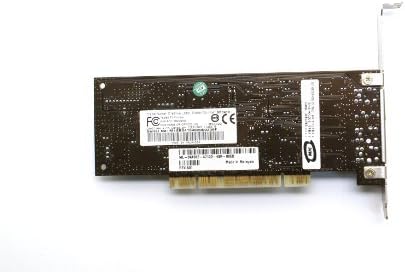
ምስል 3፡ ከስር view of the Creative Sound Blaster Live! SB0410, highlighting the PCI connector pins. This is the part that inserts into the motherboard's PCI slot.
3.3 የአሽከርካሪዎች መጫኛ
- ኃይልን እንደገና ማገናኘት; የኮምፒተርዎን መያዣ ይዝጉ ፣ የኃይል ገመዱን እንደገና ያገናኙ እና በኮምፒተርዎ ላይ ያብሩት።
- የክወና ስርዓት ማወቂያ፡ የእርስዎ ስርዓተ ክወና አዲሱን ሃርድዌር በራስ-ሰር ሊያገኝ እና አጠቃላይ ነጂዎችን ለመጫን ሊሞክር ይችላል።
- Install Official Drivers: For optimal performance and access to all features, download and install the latest official drivers from the Creative website. Navigate to the support section, search for model SB0410, and download the appropriate drivers for your operating system.
- ኮምፒተርን እንደገና ያስጀምሩ; After driver installation, restart your computer as prompted.
4. ኦፕሬሽን
Once installed, configure your sound card for optimal audio output.
4.1 Connecting Speakers/Headphones
Connect your speakers or headphones to the appropriate audio output jacks on the sound card's rear panel. Refer to Figure 2 for port identification. For 7.1-channel systems, ensure all speaker channels are connected correctly.
4.2 የድምጽ ውቅር
- የድምጽ ቅንብሮች፡- Access your operating system's sound settings (e.g., Windows Sound Control Panel, macOS Sound Preferences).
- የመልሶ ማጫዎቻ መሳሪያ ይምረጡ፦ Ensure the Creative Sound Blaster Live! SB0410 is selected as the default playback device.
- Configure Speaker Setup: Configure your speaker setup (e.g., Stereo, 5.1 Surround, 7.1 Surround) to match your connected speakers.
- Creative Software: Utilize any included Creative audio control panel software for advanced settings, equalizer adjustments, and special effects.
5. ጥገና
To ensure the longevity and consistent performance of your sound card, consider the following maintenance tips:
- የአሽከርካሪ ማሻሻያ Periodically check the Creative website for updated drivers. Keeping drivers current can improve compatibility, performance, and resolve potential issues.
- አካላዊ ጽዳት; If your computer case accumulates dust, carefully clean the sound card and its PCI slot using compressed air. Ensure the computer is powered off and unplugged before cleaning.
- የአካባቢ ሁኔታዎች; Operate your computer in a well-ventilated area to prevent overheating, which can affect all internal components, including the sound card.
6. መላ መፈለግ
If you encounter issues with your Creative Sound Blaster Live! SB0410, refer to the following common troubleshooting steps:
6.1 ምንም የድምፅ ውፅዓት የለም
- ግንኙነቶችን ይፈትሹ፡ Ensure speakers/headphones are securely connected to the correct output jacks.
- የድምጽ ደረጃዎች፡- Verify that volume levels are not muted or set too low in both your operating system and any Creative audio software.
- ነባሪ መልሶ ማጫወት መሣሪያ፡- Confirm that the Sound Blaster SB0410 is selected as the default playback device in your operating system's sound settings.
- የአሽከርካሪ ጭነት; Reinstall the latest drivers from the Creative website. Corrupted or incorrect drivers are a common cause of no sound.
- Physical Seating: Power off your computer, open the case, and ensure the sound card is firmly seated in its PCI slot.
6.2 Driver Conflicts or Instability
- የኦንቦርድ ኦዲዮን ያሰናክሉ፦ Double-check that your motherboard's onboard audio is disabled in the BIOS/UEFI settings.
- Clean Driver Installation: Uninstall all previous audio drivers (especially onboard audio drivers) before performing a fresh installation of the Creative drivers.
- PCI Slot Compatibility: While rare, some PCI slots or motherboards may have compatibility quirks. If possible, try the card in a different PCI slot.
6.3 Distorted or Poor Quality Sound
- Speaker Quality: Test with different speakers or headphones to rule out issues with the audio output devices.
- የኬብል ጥራት Ensure audio cables are not damaged and are properly shielded.
- የሶፍትዌር ቅንጅቶች Reset audio settings in the Creative control panel or operating system to default. Disable any special effects or enhancements that might be causing distortion.
7. ዝርዝሮች
The following table outlines the key technical specifications for the Creative Sound Blaster Live! SB0410 PCI Sound Card:
| ባህሪ | ዝርዝር |
|---|---|
| የምርት ስም | ፈጠራ |
| የሞዴል ቁጥር | SB0410 |
| የድምጽ ቺፕሴት | CA0106-DAT |
| ቻናሎች | 7.1 ቻናል |
| በይነገጽ | PCI |
| የድምጽ ውፅዓት ሁኔታ | ዙሪያ |
| Analog-to-Digital Conversion | 24-bit at 96 kHz |
| ዲጂታል-ወደ-አናሎግ ልወጣ | 24-bit at 96 kHz (to analog 5.1 speaker output) |
| መቅዳት ኤስample ተመኖች | 8፣ 11.025፣ 16፣ 22.05፣ 24፣ 32፣ 44.1፣ 48፣ 96 kHz |
| ተስማሚ መሣሪያዎች | ተናጋሪ |
| የምርት ልኬቶች (LxWxH) | 12 x 10 x 2 ኢንች |
| የእቃው ክብደት | 0.01 አውንስ |
8. ዋስትና እና ድጋፍ
Your Creative Sound Blaster Live! SB0410 PCI Sound Card comes with a standard manufacturer warranty. For specific details regarding the warranty period and coverage, please refer to the documentation provided with your purchase or visit the official Creative webጣቢያ.
Creative offers technical support for product assistance, including remote installation guidance via internet, phone, or email. For support inquiries, please visit the Creative support portal or contact their customer service.


