Inleiding
Welcome to the user manual for your new VAIO SX-R Laptop. This document provides essential information to help you set up, operate, maintain, and troubleshoot your device. Please read this manual thoroughly to ensure optimal performance and longevity of your laptop.
Produk verbyview
The VAIO SX-R is a high-performance laptop designed for productivity and creative tasks. It features an Intel Core Ultra 7 processor, a vibrant 14-inch WQXGA Touch Display, ample memory, and fast storage.
Sleutel kenmerke
- Verwerker: Intel Core Ultra 7 (16-Core, AI-Boosted) for enhanced speed and responsiveness.
- Vertoon: 14-inch WQXGA Touch Display (2560x1600) offering high resolution and wide color gamut.
- Geheue: 32GB LPDDR5 RAM for superior multitasking.
- Berging: 1TB PCIe NVMe SSD for fast data access and ample berging.
- Bedryfstelsel: Windows 11 Pro with enterprise-grade security and productivity features.
- Sekuriteit: Integrated IR Camera and Fingerprint Reader for secure login.
- Onderstel: Durable Carbon Fiber construction.
Laptop Components and Ports

Figure 1: VAIO SX-R Laptop, illustrating the overall design.
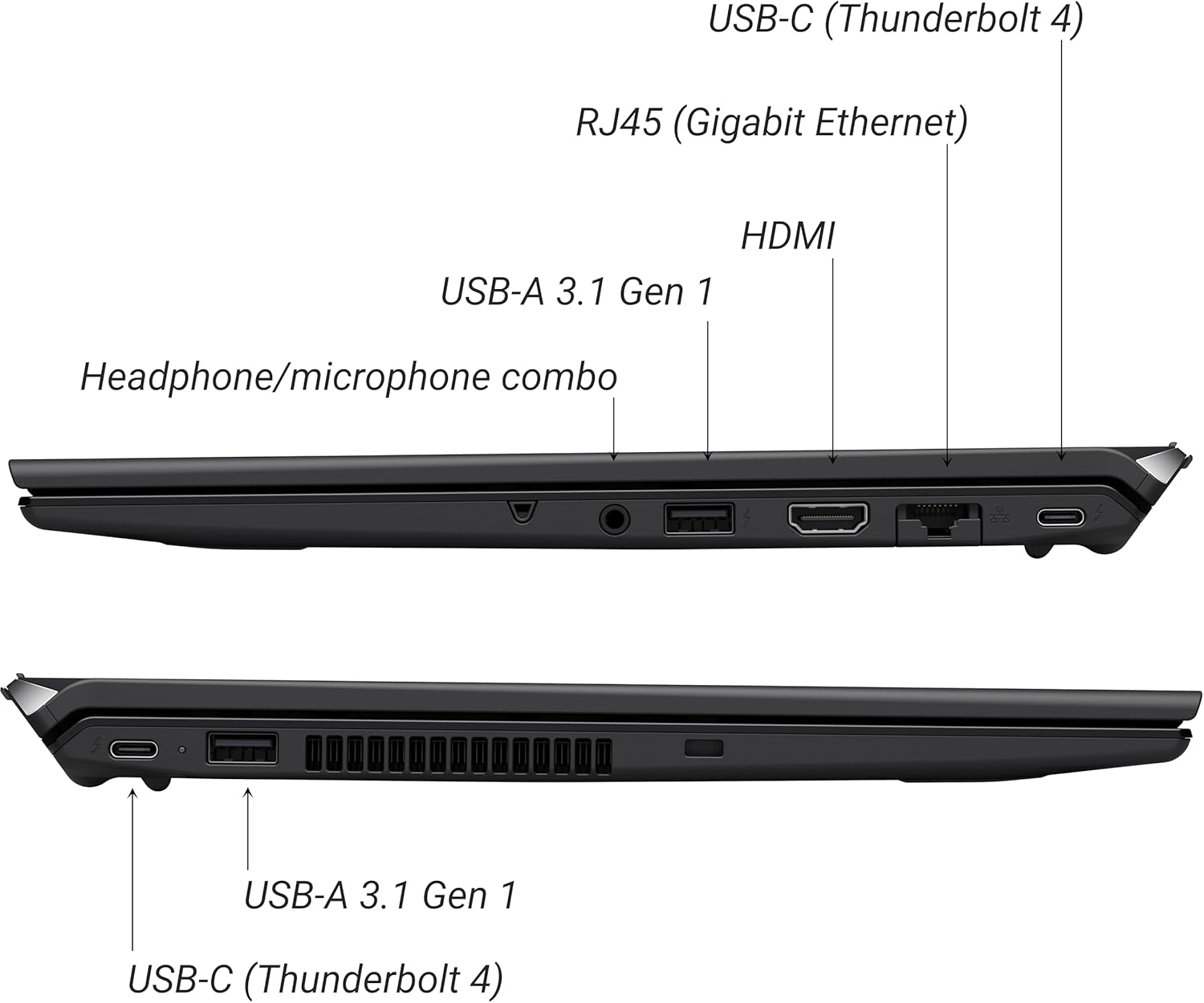
Figure 2: Port layout of the VAIO SX-R Laptop. The left side includes a headphone/microphone combo jack, USB-A 3.1 Gen 1, HDMI, RJ45 (Gigabit Ethernet), and USB-C (Thunderbolt 4). The right side features another USB-C (Thunderbolt 4) and USB-A 3.1 Gen 1 port.
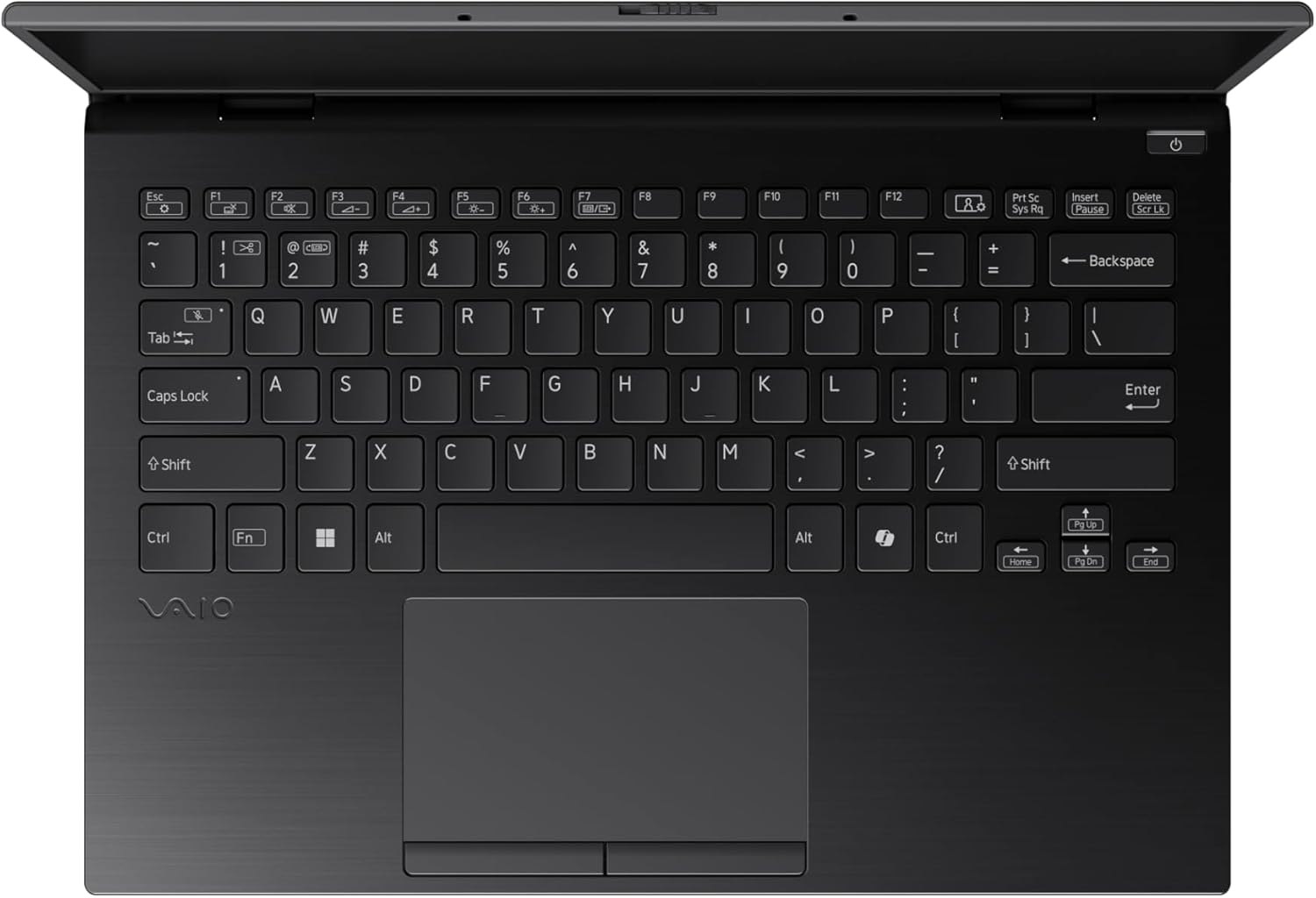
Figure 3: The VAIO SX-R Laptop keyboard and touchpad, featuring a backlit keyboard and integrated fingerprint sensor.
Opstelling
1. Aanvanklike aanskakeling
- Koppel krag: Steek die wisselstroomadapter in die skootrekenaar se kragpoort en dan in 'n muuraansluiting.
- Maak skootrekenaar oop: Maak die deksel van die skootrekenaar versigtig oop.
- Krag aan: Press the power button, typically located on the top right of the keyboard deck. The power indicator light will illuminate.
2. Windows 11 Pro-opstelling
Follow the on-screen instructions to complete the initial Windows 11 Pro setup. This includes:
- Kies jou streek en sleutelborduitleg.
- Koppel aan 'n Wi-Fi-netwerk.
- Aanvaarding van die lisensieooreenkoms.
- Creating or logging in with a Microsoft account.
- Setting up your PIN, fingerprint, or facial recognition (IR Camera).
3. Aansluiting van randapparatuur
You can connect external devices such as mice, keyboards, external monitors, and USB drives to the available ports as shown in Figure 2.
Bedryf
1. Basiese gebruik
- Sleutelbord: Use the integrated backlit keyboard for typing. Function keys (F1-F12) often have secondary functions accessible via the 'Fn' key.
- Raakblad: Die presisie-aanraakpaneel ondersteun multi-aanraakgebare vir navigasie.
- Raakskerm: Interact directly with the 14-inch WQXGA display using touch gestures.
2. Sekuriteitskenmerke
- Vingerafdrukleser: Enroll your fingerprints through Windows Settings > Accounts > Sign-in options for quick and secure login.
- IR Camera: Utilize Windows Hello facial recognition for convenient and secure access. Set this up in Windows Settings > Accounts > Sign-in options.
3. Kragbestuur
- Slaap stelling: Close the lid or press the power button briefly to put the laptop to sleep.
- Sluit af: Go to Start > Power > Shut down to turn off the laptop completely.
- Herbegin: Go to Start > Power > Restart to reboot the system.
Onderhoud
1. Skoonmaak
- Skerm: Gebruik 'n sagte, pluisvrye lap effens dampmet water of 'n skermreiniger afgespoel. Vermy harde chemikalieë.
- Sleutelbord en Onderstel: Gebruik 'n sagte lap. Vir hardnekkige vuiligheid, 'n effens damp 'n Lap met sagte seep kan gebruik word, en verseker dat geen vloeistof in die openinge binnedring nie.
- Poorte: Gebruik saamgeperste lug om stof versigtig uit poorte te verwyder.

Figure 4: The VAIO SX-R features a water-resistant keyboard, designed to withstand minor spills.
2. Sagteware-opdaterings
Regularly update your Windows operating system and device drivers to ensure optimal performance, security, and compatibility. Access updates via Windows Settings > Windows Update.
3. Batteryversorging
- Vermy uiterste temperature.
- Moenie die battery gereeld heeltemal ontlaai nie.
- Vir langtermynberging, laai die battery tot ongeveer 50-60%.
Probleemoplossing
Hierdie afdeling spreek algemene probleme aan wat jy mag teëkom.
1. Skootrekenaar skakel nie aan nie
- Maak seker dat die wisselstroomadapter stewig aan beide die skootrekenaar en 'n werkende kragaansluiting gekoppel is.
- Kontroleer of die kragaansluiting funksioneel is deur 'n ander toestel in te prop.
- Indien die battery heeltemal leeg is, laat dit vir ten minste 30 minute laai voordat jy probeer om dit aan te skakel.
2. Skermprobleme
- Geen skerm: Koppel 'n eksterne monitor aan die HDMI-poort om te kyk of die probleem met die skootrekenaar se interne skerm is.
- Flickering/Distorted Display: Update your graphics drivers. Adjust display resolution and refresh rate in Windows Settings > System > Display.
3. Wi-Fi-verbindingsprobleme
- Ensure Wi-Fi is enabled in Windows Settings > Network & internet > Wi-Fi.
- Herbegin jou router en modem.
- Begin die Windows Netwerk Probleemoplosser.
4. Stadige Prestasie
- Maak onnodige toepassings wat in die agtergrond loop toe.
- Gaan Taakbestuurder (Ctrl+Shift+Esc) na vir hulpbron-intensiewe prosesse.
- Ensure your system is up to date and free from malware.
Spesifikasies
Below are the detailed specifications for the VAIO SX-R Laptop (Model: VJS4R1X0511B).
| Kenmerk | Spesifikasie |
|---|---|
| Handelsmerk | VAIO |
| Model Naam | VAIO SX-R |
| Item Modelnommer | VJS4R1X0511B |
| Bedryfstelsel | Windows 11 Pro |
| Verwerker | Intel Core Ultra 7 (1.4 GHz) |
| RAM geheue | 32 GB LPDDR5 |
| Hardeskyf | 1 TB PCIe NVMe SSD |
| Skerm grootte | 14 duim |
| Skermresolusie | 2560 x 1600 pixels (WQXGA) |
| Grafiese kaart | Geïntegreerde Intel-grafika |
| Draadlose tipe | 802.11bgn |
| USB 3.0-poorte | 3 |
| Gemiddelde batterylewe | 10 ure |
| Item gewig | 3.1 pond |
| Produk afmetings | 14.2 x 15 x 3.3 duim |
| Spesiale kenmerke | Backlit Keyboard, Fingerprint Reader, HD Audio, Memory Card Slot, Webnok |
Waarborg en Ondersteuning
1. Waarborginligting
Your VAIO SX-R Laptop is covered by a manufacturer's warranty. Please refer to the warranty card included with your product packaging for specific terms, conditions, and duration. Keep your proof of purchase for warranty claims.
2. Tegniese Ondersteuning
For technical assistance, troubleshooting beyond this manual, or service inquiries, please contact VAIO customer support. You can typically find contact information on the official VAIO webwebwerf of in die dokumentasie wat saam met jou skootrekenaar voorsien word.
- Aanlyn ondersteuning: Visit the official VAIO support website for FAQs, driver downloads, and contact options.
- Telefoonondersteuning: Refer to your product documentation for regional support phone numbers.


