Introduction to Your Oura Ring Gen3 Horizon
The Oura Ring Gen3 Horizon is a revolutionary smart ring designed to provide accurate and personalized daily health data, insights, and guidance. It works seamlessly with the Oura App to track various biometrics, helping you understand and improve your sleep, activity, and recovery.
This manual provides essential information for setting up, operating, and maintaining your Oura Ring Gen3 Horizon.

Image: The Oura Ring Gen3 Horizon in Silver, showcasing its sleek design and internal sensors.
Wat is in die boks
Upon unboxing your Oura Ring Gen3 Horizon, you should find the following components:
- Oura Ring Gen3
- Lader
- USB kabel
- Inligtingsboekie
- Vinnige Begingids

Image: A visual representation of the Oura Ring Gen3 and its accompanying charger and USB cable, as typically found in the product packaging.
Grootte en pas
Proper sizing is crucial for the accurate performance of your Oura Ring Gen3. Oura Ring Gen3 uses a unique sizing system that differs from standard US ring sizes. It is highly recommended to size yourself with an official Oura Ring Gen3 Sizing Kit before purchasing jou ring.
Sizing Process:
- Purchase the Oura Ring Gen3 Sizing Kit: This kit contains plastic replicas of all Oura Ring sizes.
- Probeer verskeie groottes: Wear different sizes from the kit to determine the most comfortable fit.
- Dra vir 24 uur: For optimal accuracy, wear the chosen plastic sizer for at least 24 hours to account for natural finger swelling throughout the day and night.
- Vind jou gemaklikste pasvorm: The ring should be snug but comfortable, allowing for full finger movement without feeling too tight or loose.
For best performance and accuracy, it is recommended to wear the Oura Ring on your index finger.
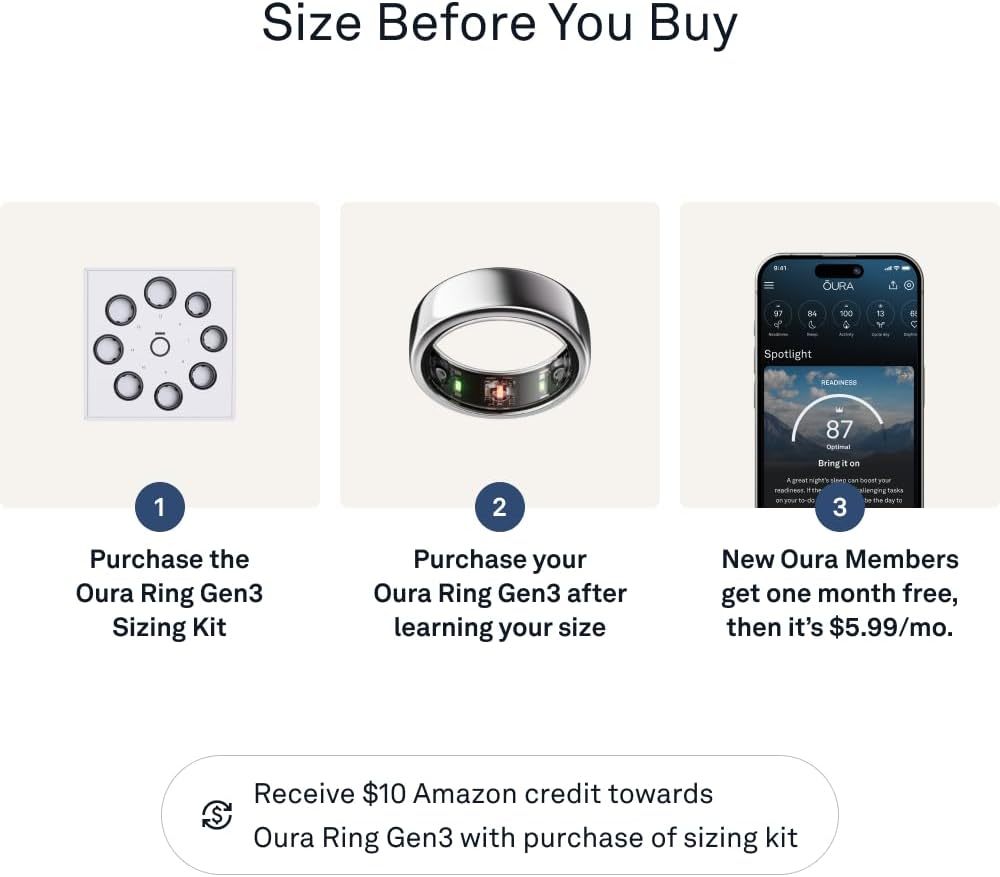
Image: The Oura Ring Gen3 Sizing Kit, essential for finding the correct ring size for optimal performance.

Image: A visual guide illustrating the three key steps to properly size your Oura Ring for the best fit and data accuracy.
Opstelling en eerste gebruik
Follow these steps to set up your Oura Ring Gen3 Horizon and begin tracking your health data:
- Charge Your Ring: Place your Oura Ring on the provided charger. Connect the USB cable to a power source. The indicator light on the charger will show charging status.
- Download the Oura App: Download the official Oura App from the Apple App Store (for iOS devices) or Google Play Store (for Android devices).
- Create an Oura Account: Open the app and follow the on-screen instructions to create a new Oura account.
- Pair Your Ring: Ensure Bluetooth is enabled on your smartphone. Follow the app's prompts to pair your Oura Ring with your device.
- Activate Oura Membership: The first month of Oura Membership is included for new members. Register for your membership within the Oura App to unlock all features and insights. A subscription fee of $5.99/month applies after the first month.

Image: A visual guide to the initial setup process, including obtaining the sizing kit, purchasing the ring, and downloading the Oura App.
Operating Your Oura Ring
Your Oura Ring Gen3 Horizon continuously tracks your health data throughout the day and night. All data and insights are accessible through the Oura App.
Key Features and Tracking:
- Slaap dop: Monitor slaaptages (Awake, REM, Light, Deep), sleep duration, and sleep quality. Provides insights to optimize your rest.
- Aktiwiteitnasporing: Records your daily movement, steps, calories burned, and provides an activity score. Encourages meeting daily activity goals.
- Recovery and Readiness: Analyzes your physiological signals (Heart Rate Variability, Resting Heart Rate, Body Temperature) to provide a daily Readiness Score, indicating your body's capacity for physical and mental performance.
- Stress Levels: Tracks physiological responses related to stress, offering insights into your daily stress patterns.
- Hartklop: Provides 24/7 heart rate monitoring, including resting heart rate and average heart rate during activity.
- Temperatuurwaarneming: Detects subtle changes in body temperature, which can indicate illness or provide insights for menstrual cycle tracking.
- HSA/FSA Eligibility: The Oura Ring Gen3 is eligible for reimbursement with HSA or FSA funds. Consult your employer/provider for specific coverage details.
The Oura App provides personalized insights, trends, and guidance based on your data. It also allows seamless integration with over 40 popular health and fitness apps, including Apple Health, Google Health Connect, Natural Cycles, Flo, and Strava.

Beeld: 'n Oorview of the key health metrics tracked by the Oura Ring, including sleep, activity, recovery, stress, and heart rate.

Image: Screenshots from the Oura App demonstrating in-depth sleep analysis, stress level tracking, continuous heart rate monitoring, battery life, and the ring's water resistance.
Onderhoud en versorging
To ensure the longevity and optimal performance of your Oura Ring Gen3 Horizon, follow these maintenance guidelines:
- Skoonmaak: Clean your Oura Ring regularly with a soft, damp cloth. Avoid abrasive materials or harsh chemicals that could damage the finish or sensors.
- Waterweerstand: The Oura Ring Gen3 is water resistant up to 100 meters (approximately 328 feet). You can wear it while showering, swimming, or washing hands. However, prolonged exposure to hot water (e.g., hot tubs, saunas) or harsh chemicals (e.g., chlorine in high concentrations) should be limited as it may affect the ring's longevity.
- Laai: Charge your ring using only the provided Oura charger and USB cable. Avoid using third-party chargers.
- Batterylewe: The Oura Ring Gen3 offers up to 7 days of battery life. Battery performance may vary based on usage and features enabled.
- Berging: When not in use, store your Oura Ring in a safe place away from extreme temperatures and direct sunlight.

Beeld: 'n Gedetailleerde view of the Oura Ring's interior, highlighting the advanced sensors that require proper care for accurate data collection.
Probleemoplossing
If you encounter issues with your Oura Ring Gen3 Horizon, try the following common troubleshooting steps:
- Ring Not Connecting to App:
- Maak seker dat Bluetooth op jou toestel geaktiveer is.
- Make sure the Oura App is updated to the latest version.
- Restart your smartphone and the Oura App.
- Place the ring on its charger to wake it up, then try connecting again.
- Onakkurate data:
- Verify that your ring fits snugly and is worn on the recommended finger (index finger).
- Ensure the sensors on the inside of the ring are clean and free from debris.
- Check for any recent software updates for the ring via the Oura App.
- Battery dreineer vinnig:
- Ensure the ring is fully charged.
- Minimize frequent app syncing if not necessary.
- If the issue persists, contact Oura Support.
- Ring Not Charging:
- Ensure the USB cable is securely connected to both the charger and a working power source.
- Clean the charging contacts on both the ring and the charger.
- Probeer 'n ander USB-poort of kragadapter.
For more detailed troubleshooting or persistent issues, please refer to the official Oura support website or contact Oura customer service.
Spesifikasies
| Kenmerk | Detail |
|---|---|
| Produk afmetings | 0.91 x 0.91 x 0.31 duim |
| Item gewig | 7.8 onse |
| Modelnommer | JZ90-51384-08 |
| Batterye | 1 Litium-ioonbattery (ingesluit) |
| Kleur | Silwer |
| Konnektiwiteit | Draadloos (Bluetooth) |
| Waterweerstand | Tot 100 meter |
| Batterylewe | Tot 7 dae |
| Vervaardiger | Oura |
| Eerste Beskikbaar | 19 Januarie 2024 |

Image: An annotated diagram of the Oura Ring Gen3, detailing its strong titanium exterior, up to 7-day battery life, temperature sensing capabilities, and research-grade heart rate and SpO2 sensors.
Waarborg en Ondersteuning
For information regarding the warranty of your Oura Ring Gen3 Horizon, please refer to the official Oura website or the documentation included with your product. Oura provides ongoing support and updates through its mobile application and customer service channels.
For any questions, technical assistance, or warranty claims, please visit the Official OURA Store on Amazon or the Oura support portal.


