Inleiding
The Oura Ring Gen3 Horizon is a revolutionary smart ring designed to provide accurate and personalized daily health data, insights, and guidance. It tracks various biometrics including sleep, activity, recovery, stress, and heart rate, offering a comprehensive view of your well-being. This manual provides essential information for setting up, operating, and maintaining your Oura Ring Gen3 Horizon.

Image: The Oura Ring Gen3 Horizon in silver, showcasing sy slanke ontwerp.
Wat is in die boks
Upon unboxing your Oura Ring Gen3 Horizon, you should find the following components:
- Oura Ring Gen3 Horizon
- Oura Ring Charger
- USB kabel
- Inligtingsboekie
- Vinnige Begingids

Image: The Oura Ring Gen3 and its accompanying charger and USB cable, as typically found in the product packaging.
Sizing and Initial Setup
Proper sizing is critical for the accuracy and comfort of your Oura Ring. Oura Ring Gen3 uses a unique sizing system that differs from standard US ring sizes. It is highly recommended to use an Oura Ring Gen3 Sizing Kit before purchasing your ring to ensure the best experience.
Sizing Process
- Purchase the Oura Ring Gen3 Sizing Kit: Obtain an official sizing kit to determine your precise Oura Ring size.
- Try on Multiple Sizes: The sizing kit contains various ring sizes. Try them on different fingers to find the most comfortable fit.
- Wear for 24 Hours: For optimal accuracy, wear the chosen sizing ring for at least 24 hours to account for natural finger swelling and ensure comfort during sleep and daily activities.
- Find Your Most Comfortable Fit: Select the size that feels secure but not too tight, allowing for slight movement. For best performance and accuracy, wearing the ring on your index finger is recommended.
- Purchase Your Oura Ring Gen3: Once your size is confirmed, proceed with purchasing your Oura Ring Gen3 in the determined size.

Image: Visual guide illustrating the recommended steps for sizing your Oura Ring, including trying different sizes and wearing a sample ring for a full day.

Image: A step-by-step visual guide on the Oura Ring purchase process, emphasizing the importance of using a sizing kit first.
Initial Setup with Oura App
After receiving your Oura Ring, download the Oura App from your device's app store. The app will guide you through the pairing process and initial setup, allowing you to activate your Oura Membership. The first month of membership is included for new members, with a subscription fee of $5.99/month thereafter. Membership is required to access all features and insights.
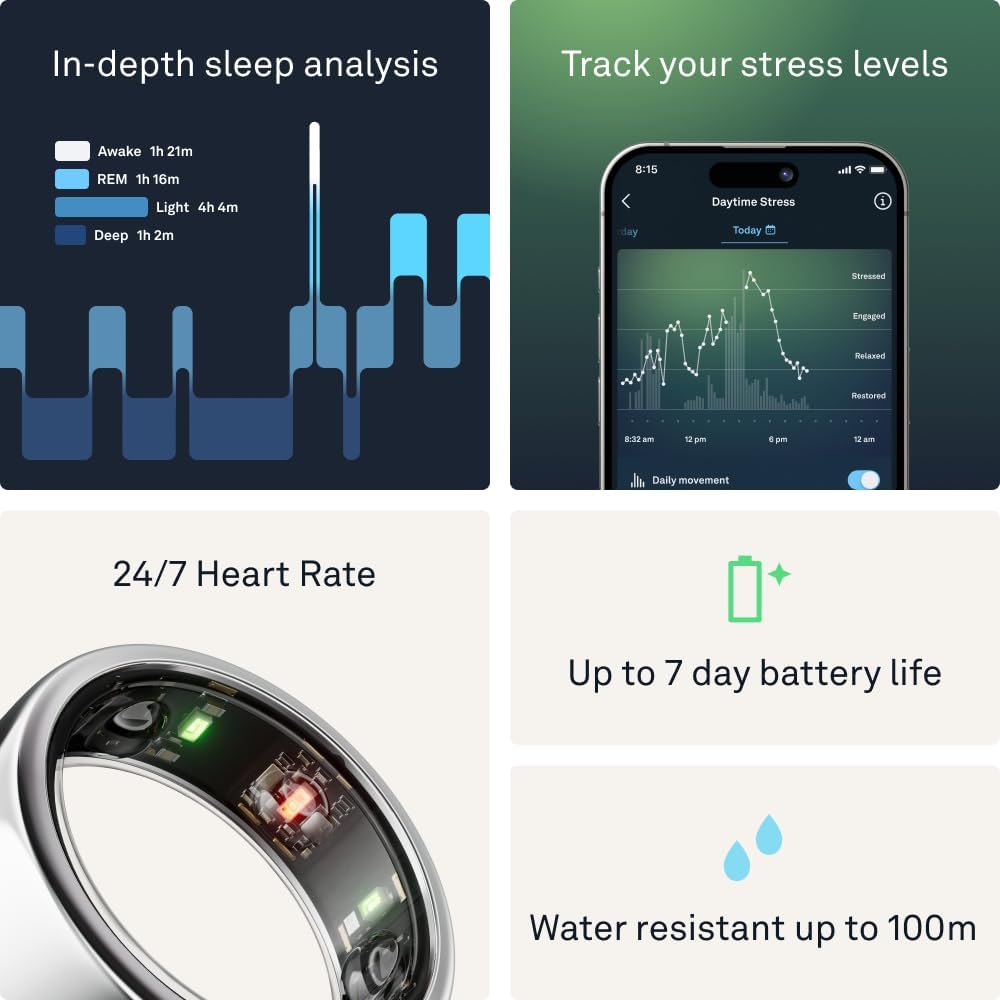
Image: A user interacting with the Oura App on a smartphone, demonstrating the various health metrics tracked by the Oura Ring.
Operating Your Oura Ring
The Oura Ring Gen3 Horizon continuously monitors your health data throughout the day and night. Its advanced sensor technology provides insights into various aspects of your well-being.
Key Features and Tracking
- Slaap dop: Provides in-depth analysis of your sleep stages (Awake, REM, Light, Deep), sleep efficiency, and disturbances.
- Aktiwiteitnasporing: Monitors your daily movement, steps, calories burned, and helps you achieve activity goals.
- Recovery Insights: Assesses your body's readiness for the day based on sleep, heart rate variability, and body temperature.
- Stresmonitering: Tracks physiological responses to stress and provides guidance for managing it.
- Heart Rate & SpO2: Utilizes research-grade sensors for 24/7 heart rate monitoring and blood oxygen saturation (SpO2) for pinpoint accuracy.
- Temperatuurwaarneming: Detects subtle changes in body temperature, which can indicate illness or menstrual cycle phases.

Image: A visual summary of the Oura Ring's core functionalities, including sleep analysis, stress tracking, continuous heart rate monitoring, battery life, and water resistance.

Beeld: 'n Gedetailleerde view of the Oura Ring's interior, highlighting the advanced sensors responsible for data collection.

Image: An annotated diagram of the Oura Ring, pointing out its key physical and technological features.
Batterylewe
The Oura Ring Gen3 Horizon offers an impressive battery life of 5-7 days on a single charge, depending on usage. It charges quickly, typically reaching a full charge in about an hour.
Programversoenbaarheid
The Oura Ring is compatible with both iOS and Android devices. It seamlessly integrates with over 40 popular health and fitness applications, including Apple Health, Google Health Connect, Natural Cycles, Flo, and Strava, allowing you to consolidate your health data.
Onderhoud
To ensure the longevity and optimal performance of your Oura Ring Gen3 Horizon, follow these maintenance guidelines:
- Skoonmaak: Regularly clean your Oura Ring with a soft, damp cloth. Avoid abrasive materials or harsh chemicals that could damage the finish or sensors.
- Laai: Charge your ring using the provided Oura Ring Charger and USB cable. Ensure the charging contacts on the ring and charger are clean and dry before charging.
- Waterweerstand: The Oura Ring is water-resistant up to 100 meters, making it suitable for swimming and showering. However, prolonged exposure to hot water, steam, or harsh chemicals (like those in hot tubs or saunas) should be avoided as it may affect the ring's seals over time.
- Berging: When not in use, store your Oura Ring in a cool, dry place away from direct sunlight and extreme temperatures.
Probleemoplossing
If you encounter issues with your Oura Ring Gen3 Horizon, consider the following common troubleshooting steps:
- Sinkroniseringskwessies: Ensure Bluetooth is enabled on your smartphone and the Oura App is open and running in the background. Try restarting both the app and your phone.
- Laai probleme: Verify that the charger is properly connected to a power source and the ring is correctly seated on the charger. Clean the charging contacts if necessary.
- Onakkurate data: Confirm that your ring is worn on the recommended finger (index finger) and fits snugly. Ensure the sensors on the inside of the ring are clean.
- Program reageer nie: Force close the Oura App and reopen it. If the issue persists, try uninstalling and reinstalling the app (your data is stored in the cloud).
- Firmware-opdateringskwessies: Ensure your ring is charged and close to your phone during firmware updates. Do not interrupt the update process.
For persistent issues or problems not covered here, please refer to the official Oura support resources or contact Oura customer service.
Spesifikasies
| Produk afmetings | 1.02 x 1.02 x 0.31 duim |
| Item gewig | 7.8 onse |
| Modelnommer | JZ90-51384-11 |
| Batterye | 1 Litium-ioonbattery benodig (ingesluit) |
| Kleur | Silver (for this specific model) |
| Vervaardiger | Oura |
| Konnektiwiteit | Draadloos (Bluetooth) |
| Waterweerstand | Tot 100 meter |
| Batterylewe | 5-7 dae |
Waarborg en Ondersteuning
For detailed warranty information and customer support, please refer to the official Oura website or the documentation included with your product. Oura Ring Gen3 is also HSA/FSA eligible, meaning it may be reimbursed with Health Savings Account (HSA) or Flexible Spending Account (FSA) funds. Please check with your employer or plan administrator for specific coverage details.

Image: A visual representation highlighting the HSA/FSA eligibility of the Oura Ring Gen3.
Vir verdere hulp, besoek die Official OURA Store on Amazon.
Belangrike nota oor video's
While the product listing indicates the presence of videos, the provided data does not include specific video URLs or metadata (such as creator type) necessary to embed them according to the specified guidelines. Therefore, no videos are embedded in this manual.


