1. Inleiding
This manual provides detailed instructions for the installation, operation, and maintenance of your AVATTO Smart WiFi Thermostat (Model WT400S-3A-B). This thermostat is designed for controlling water underfloor heating systems and gas/oil boilers, offering intelligent temperature management through its programmable features, app control, and voice assistant compatibility. Please read this manual thoroughly before installation and use to ensure proper function and safety.
2. Produk verbyview
The AVATTO Smart WiFi Thermostat is an advanced device for precise climate control in your home. It features a touch screen display and can be remotely managed via the "Smart Life" or "Tuya Smart" applications.
Sleutel kenmerke:
- Verenigbaarheid: Suitable for water underfloor heating systems and gas/oil boilers. Supports electric actuators with 110-240V.
- Slimbeheer: WiFi connectivity for remote control via "Smart Life" or "Tuya Smart" apps.
- Stembeheer: Integrates with Amazon Alexa and Google Home for hands-free operation.
- Programmeerbare modusse: Offers 5+2, 6+1, or 7-day programming with multiple daily temperature settings.
- Temperatuur Kalibrasie: Allows adjustment to match actual room temperature.
- Verstelbare skermhelderheid: Customizable display brightness, including an option to turn it off completely.
- Kinderslot: Voorkom ongemagtigde veranderinge aan instellings.
- Antivries funksie: Protects pipes from freezing.

Figuur 2.1: The AVATTO Smart WiFi Thermostat displaying current temperature and time, alongside a smartphone showing the corresponding control app interface.
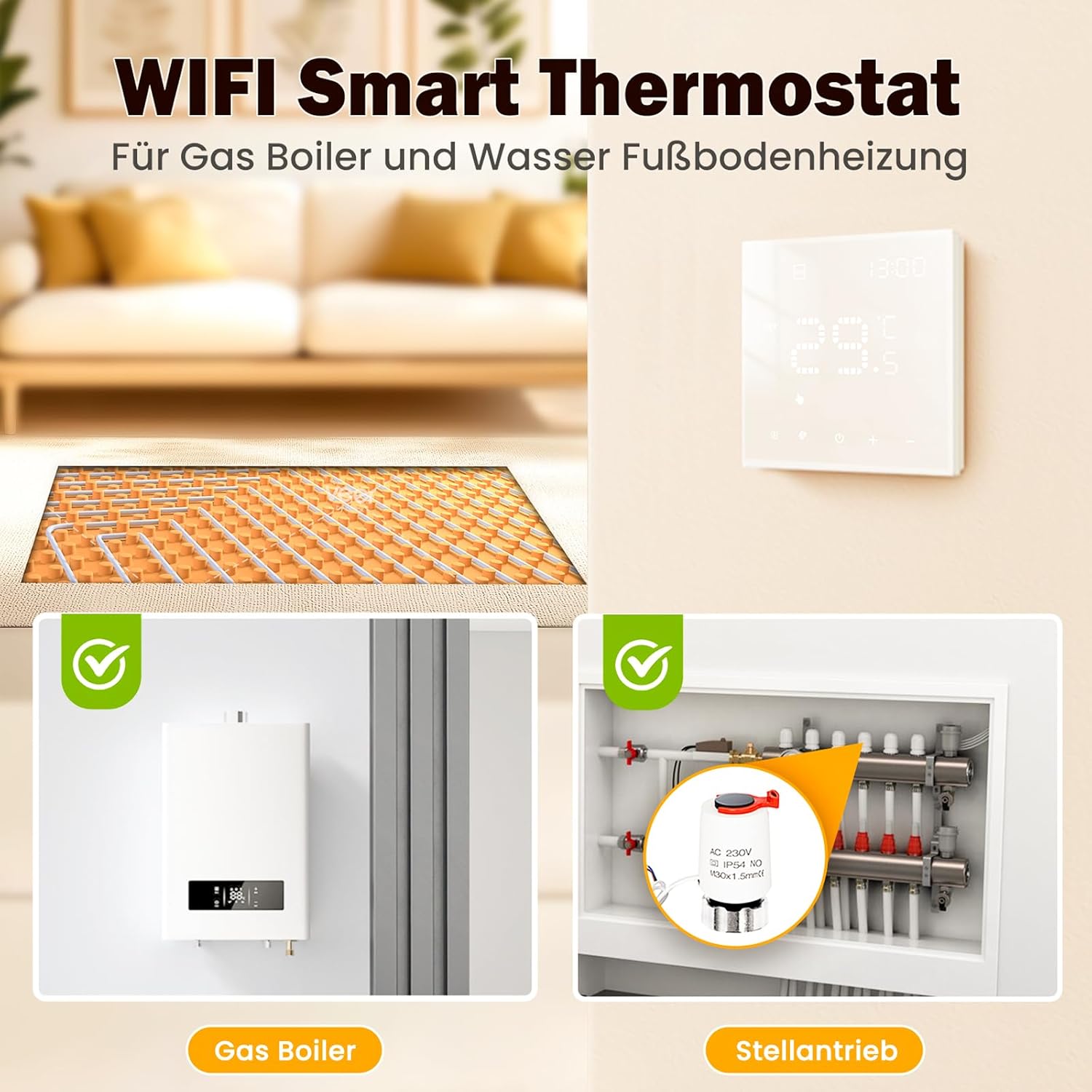
Figuur 2.2: Illustration of the thermostat's application in controlling both gas boiler systems and water underfloor heating, showing the heating pipes and a gas boiler unit.

Figuur 2.3: A detailed diagram indicating the various display elements and button functions on the AVATTO Smart Thermostat, including time, room temperature, manual/automatic mode, and WiFi pairing instructions.
3. Opstelling en installering
3.1 Veiligheidsmaatreëls
- Installasie moet deur 'n gekwalifiseerde elektrisiën uitgevoer word.
- Ensure power is disconnected at the main circuit breaker before installation.
- Moenie installeer in damp omgewings.
3.2 Bedradingsdiagram
The thermostat is designed for 110-240V systems. Connect the wires according to the diagram provided on the back of the device and in the illustration below. Ensure all connections are secure.

Figuur 3.1: Technical drawing showing the dimensions of the AVATTO Smart Thermostat and its back panel with wiring terminals. A suitable wall mounting box is also depicted.
Let wel: This thermostat supports electric actuators with a voltage range of 110 to 240 volts. When used with a gas or oil boiler, the thermostat initiates boiler operation to provide hot water for heating when the room temperature falls below the set point.
3.3 App-installasie en WiFi-paring
- Download the "Smart Life" or "Tuya Smart" app from your smartphone's app store (iOS or Android).
- Registreer of meld aan by jou rekening binne die app.
- Add a new device by selecting "Add Device" or the "+" icon. Choose "Thermostat" or "Heater" from the device list.
- On the thermostat, press and hold the WiFi button (often indicated by a WiFi icon or a specific button for 5-10 seconds) until the WiFi indicator on the thermostat starts flashing rapidly. This indicates pairing mode.
- Follow the on-screen instructions in the app to connect the thermostat to your 2.4GHz WiFi network.
- Once connected, the WiFi indicator on the thermostat will become solid, and you can control the device via the app.

Figuur 3.2: A user interacting with the "Smart Life" app on a smartphone to remotely control the thermostat, highlighting the convenience of app-based management.
4. Bedryfsinstruksies
4.1 Handmatige modus
In Manual Mode, you can set the desired temperature directly on the thermostat or via the app. The thermostat will maintain this temperature until you change it or switch to another mode.
4.2 Programmeerbare modus
The thermostat supports flexible programming schedules to optimize energy consumption and comfort. You can choose between 5+2 (weekdays + weekend), 6+1 (weekdays + Sunday), or 7-day programming.
- Weekday Programming: Up to 6 different temperature settings per day.
- Weekend Programming: Up to 2 different temperature settings per day.
Access the programming settings through the "Program" or "Schedule" option in the app or directly on the thermostat's menu.
4.3 Stembeheer
Integrate your AVATTO thermostat with Amazon Alexa or Google Home for convenient voice commands.
- Ensure your thermostat is successfully paired with the "Smart Life" or "Tuya Smart" app.
- Maak die Alexa- of Google Home-app oop.
- Enable the "Smart Life" or "Tuya Smart" skill/service.
- Discover devices. Your thermostat should appear.
- Jy kan nou opdragte soos die volgende gebruik:
- "Alexa, stel [Termostaatnaam] op 22 grade."
- "Hey Google, what is the temperature in [Thermostat Name]?"
- "Alexa, turn on [Thermostat Name]."

Figuur 4.1: An illustration demonstrating the voice control capability of the thermostat, showing interaction with Amazon Alexa and Google Home devices.
4.4 Temperatuur Kalibrasie
If there is a discrepancy between the actual room temperature and the temperature displayed on the thermostat, you can calibrate it. This feature is typically found in the advanced settings menu on the thermostat or within the app. Adjust the offset value until the displayed temperature matches a reliable external thermometer.
4.5 Skermhelderheidaanpassing
The screen brightness can be adjusted to your preference, from a percentage value to completely off, to avoid disturbance, especially during sleep. This setting is accessible through the thermostat's menu or the app.

Figuur 4.2: A visual representation of the screen brightness adjustment feature, showing different brightness levels from 0% to 100% and its impact on visibility.
4.6 Child Lock and Antifreeze
- Kinderslot: Activate this feature to prevent accidental changes to the thermostat settings. It can be enabled/disabled via the app or by a specific button combination on the thermostat.
- Antivries funksie: This feature automatically activates heating if the room temperature drops below a preset minimum (e.g., 5°C) to prevent pipes from freezing.

Figuur 4.3: An image illustrating the precise temperature control capabilities of the thermostat, including minimum temperature setting, temperature hysteresis, and upper/lower temperature limits.
5. Onderhoud
The AVATTO Smart WiFi Thermostat requires minimal maintenance.
- Skoonmaak: Wipe the screen and casing with a soft, dry cloth. Do not use abrasive cleaners, solvents, or spray liquids directly onto the device.
- Vermy obstruksies: Ensure the thermostat is not covered by furniture, curtains, or other objects that could obstruct its temperature sensor.
6. Probleemoplossing
As jy probleme met jou termostaat ondervind, raadpleeg die volgende algemene probleme en oplossings:
| Probleem | Moontlike oorsaak | Oplossing |
|---|---|---|
| Thermostat not connecting to WiFi. | Incorrect WiFi password, 5GHz network, weak signal, or thermostat not in pairing mode. |
|
| Heating not turning on/off as expected. | Incorrect wiring, thermostat in manual mode with wrong setting, programming schedule conflict, or faulty actuator/boiler. |
|
| Displayed temperature is inaccurate. | Thermostat sensor offset, or external factors affecting sensor reading. |
|
| App shows incorrect temperature or status. | App synchronization issue, outdated app version, or server communication problem. |
|
7. Spesifikasies
| Handelsmerk | AVATTO |
| Model | WT400S-3A-B |
| Kleur | Wit |
| Afmetings | 10.5 x 9.8 x 6.7 cm |
| Gewig | 200 gram |
| Wattage | 1200 watt |
| Voltage | 240 Volt (AC) |
| Materiaal | Plastiek |
| Spesiale kenmerke | Amazon Alexa, Smart Life App, Google Assistant, Child Protection, Programmable |
| Tipe beheerder | Amazon Alexa, Google Assistant, Button |
8. Waarborg en Ondersteuning
For warranty information and technical support, please refer to the documentation included with your purchase or contact your retailer. You may also visit the official AVATTO webwebwerf vir verdere hulp en opgedateerde inligting.


