1. Inleiding
This manual provides essential information for the safe and efficient use of your Samsung QM85R 85-inch 4K UHD LCD Display. Please read this manual thoroughly before operating the device and retain it for future reference. The Samsung QM85R is a commercial-grade display designed for continuous operation, featuring a 4K UHD resolution and integrated MagicINFO S6 and SSSP 6.0 for advanced content management.
2. Veiligheidsinligting
Neem altyd die volgende veiligheidsmaatreëls in ag om elektriese skok, brand of skade aan die skerm te voorkom.
- Kragbron: Use only the specified power supply. Ensure the power cord is securely plugged into an appropriate outlet.
- Ventilasie: Moenie ventilasie-openinge blokkeer nie. Maak seker dat daar voldoende spasie rondom die skerm is vir behoorlike lugvloei om oorverhitting te voorkom.
- Vloeistofblootstelling: Hou die skerm weg van vloeistowwe. Moenie dit aan reën of vog blootstel nie.
- Skoonmaak: Disconnect the power cord before cleaning. Use a soft, dry cloth. Avoid using liquid or aerosol cleaners directly on the screen.
- Montering: If wall-mounting, ensure the wall mount is compatible with the display's weight and VESA standards. Professional installation is recommended for large displays.
- Diens: Moenie probeer om hierdie produk self te onderhou nie. Verwys alle diens na gekwalifiseerde dienspersoneel.
3. Pakketinhoud
Please check that the following items are included with your display. If any items are missing, contact your vendor.
- Samsung QM85R 85-inch 4K UHD LCD Display
- Kragkoord
- Afstandbeheer met batterye
- Gebruikershandleiding (hierdie dokument)
- Waarborgkaart (kan per streek verskil)
4. Opstelling
4.1 Fisiese installasie
The Samsung QM85R display can be installed using a compatible wall mount or a floor stand (sold separately). Due to its size and weight (approximately 140.4 pounds), professional installation is highly recommended.
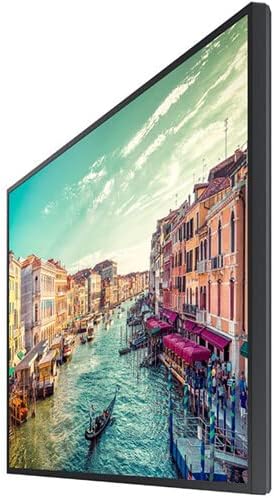
Figuur 1: Kant view of the Samsung QM85R display. Note the slim design suitable for various mounting options.
4.2 Aansluitkabels
Before connecting any cables, ensure the display and all connected devices are powered off.
- Kragverbinding: Koppel die kragkabel aan die skerm se kragtoevoer en dan aan 'n geaarde elektriese aansluiting.
- Video Input: Connect your video source (e.g., PC, media player) to one of the display's HDMI or DisplayPort inputs using appropriate cables. The display supports 4K UHD (3840x2160) resolution.
- Netwerk konneksie: For MagicINFO S6 and SSSP 6.0 functionality, connect an Ethernet cable to the display's LAN port for network access.
- Ander verbindings: Connect any other peripheral devices as required (e.g., USB devices, audio output).
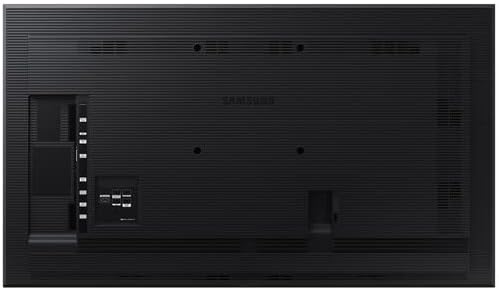
Figuur 2: Agter view of the Samsung QM85R display, illustrating the location of power, video, and network ports.
4.3 Aanvanklike aanskakeling
After all connections are made, power on the display using the power button on the remote control or the display itself. Follow any on-screen prompts for initial setup, such as language selection and network configuration.
5. Bedryf
5.1 Basiese kontroles
Use the provided remote control to access the display's functions:
- Kragknoppie: Skakel die skerm aan of uit.
- Bron knoppie: Cycles through available input sources (HDMI1, HDMI2, DisplayPort, etc.).
- Kieslys-knoppie: Maak die Skermvertoning (OSD)-kieslys oop.
- Navigasieknoppies (Op/Af/Links/Regs): Navigeer deur menu-opsies.
- Enter-knoppie: Bevestig keuses in die kieslys.
5.2 Vertooninstellings
Kry toegang tot die OSD-kieslys om verskeie skerminstellings aan te pas:
- Prentmodus: Select from preset modes (e.g., Standard, Dynamic, Custom) or adjust individual settings like brightness, contrast, sharpness, and color temperature.
- Resolusie: The display natively supports 3840x2160 (4K UHD) resolution. Ensure your source device is configured to output this resolution for optimal clarity.
- Herlaaitempo: The display operates at a 75Hz refresh rate, providing smooth motion for compatible content.
- Oudio: Adjust volume, mute, and select audio output options if external speakers are connected.
5.3 Smart Signage Platform (SSSP 6.0) and MagicINFO S6
The QM85R features Samsung's integrated Smart Signage Platform (SSSP 6.0) powered by MagicINFO S6. This allows for advanced content management, scheduling, and remote control capabilities. Refer to the dedicated MagicINFO S6 user guide for detailed instructions on utilizing these features.
6. Onderhoud
6.1 Skoonmaak van die skerm
To maintain the display's appearance and performance:
- Skerm: Vee die skerm liggies af met 'n sagte, pluisvrye lap. Vir hardnekkige merke, vee liggiesampen the cloth with water or a specialized screen cleaner, then wipe dry immediately. Do not spray liquids directly onto the screen.
- Liggaam: Wipe the display's frame and back panel with a soft, dry cloth.
- Vermy: Do not use abrasive cleaners, waxes, or solvents (e.g., alcohol, benzene, paint thinner) as they can damage the display surface.
6.2 Omgewingsoorwegings
Ensure the display is operated within its specified temperature and humidity ranges to ensure longevity and optimal performance. Avoid direct sunlight exposure and extreme temperature fluctuations.
7. Probleemoplossing
If you encounter issues with your display, refer to the following common problems and solutions before contacting support.
| Probleem | Moontlike oorsaak | Oplossing |
|---|---|---|
| Geen krag nie | Kragkabel ontkoppel; probleem met kragpunt. | Kontroleer die kragkabelverbinding. Toets die aansluiting met 'n ander toestel. |
| Geen sein nie | Incorrect input source selected; video cable disconnected. | Press the 'Source' button on the remote to select the correct input. Ensure video cables are securely connected. |
| Swak beeldkwaliteit | Incorrect resolution; display settings. | Ensure source device outputs 3840x2160 resolution. Adjust picture settings (brightness, contrast) in the OSD menu. |
| Afstandbeheer werk nie | Dooie batterye; obstruksie. | Replace batteries. Ensure no obstructions between remote and display's IR receiver. |
8. Spesifikasies
| Kenmerk | Spesifikasie |
|---|---|
| Model Naam | QM85R |
| Skerm grootte | 85 duim |
| Resolusie | 3840 x 2160 (4K UHD) |
| Herlaaitempo | 75Hz |
| Helderheid | 500 XNUMX NIT |
| Bedryfsure | 24/7 |
| Ingeboude kenmerke | MagicINFO S6, SSSP 6.0 |
| Produkafmetings (LxBxH) | 82.52 x 49.02 x 10.51 duim |
| Item gewig | 140.4 pond |
| Kleur | Swart |
| Vervaardiger | Samsung |
9. Waarborg en Ondersteuning
Your Samsung QM85R display is covered by a manufacturer's warranty. For specific warranty terms and conditions, please refer to the warranty card included with your product or visit the official Samsung website. For technical assistance, troubleshooting beyond this manual, or to inquire about service, please contact Samsung Customer Support.
Aanlyn ondersteuning: Besoek www.samsung.com/us/support/
Telefoniese ondersteuning: Refer to your regional Samsung support contact information.