1. Inleiding
Dankie vir die aankoopasing the Infocus 24-inch 720p LED TV, model IM24ED800. This manual provides essential information for setting up, operating, and maintaining your television. Please read this manual thoroughly before using the product and retain it for future reference.
Veiligheidsinligting
- Moenie die TV aan reën of vog blootstel nie.
- Moenie ventilasie-openinge blokkeer nie.
- Verseker behoorlike kragtoevoer voltage.
- Beskerm die kragkabel teen geloop of vasgeknyp.
- Verwys alle diens na gekwalifiseerde dienspersoneel.
- Hou die TV weg van direkte sonlig, hittebronne en sterk magnetiese velde.
2. Pakketinhoud
Merk asseblief die blokkie vir die volgende items:
- Infocus 24-inch 720p LED TV (IM24ED800)
- Remote Control (with batteries, if included)
- Kragkoord
- TV-staander (2 stukke)
- Skroewe vir TV-staander
- Gebruikershandleiding (hierdie dokument)
3. Opstelling
3.1 Bevestig die TV-staander
To attach the stand to your Infocus TV:
- Plaas die TV-skerm versigtig met die skerm na onder op 'n sagte, skoon oppervlak om skrape te voorkom.
- Rig elke staanderstuk met die ooreenstemmende gleuwe aan die onderkant van die TV.
- Maak elke staanderstuk vas met die meegeleverde skroewe. Maak seker dat hulle stewig vasgedraai is.
- Lig die TV versigtig op en plaas dit op 'n stabiele, gelyk oppervlak.
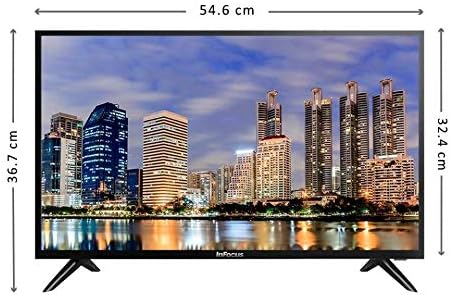
Beeld: Voorkant view of the Infocus 24-inch LED TV with dimensions indicated. The TV measures approximately 54.6 cm in width and 36.7 cm in height with the stand.
3.2 Koppel toestelle
Your Infocus TV features multiple input ports for connecting external devices.

Beeld: Agter view of the Infocus 24-inch LED TV, highlighting the location of various input ports including HDMI and USB.
- HDMI-verbindings: Connect Blu-ray players, game consoles, or cable/satellite boxes to the HDMI ports. The TV has 2 HDMI inputs.
- USB-verbindings: Connect USB flash drives for media playback to the USB ports. The TV has 2 USB inputs.
- Antenna/kabel: Connect an antenna or cable TV signal to the RF input (if available, not explicitly listed but standard for TVs).
- Krag: Koppel die kragkabel aan die TV se kragtoevoer en dan aan 'n muursok.
3.3 Aanvanklike aanskakeling
Nadat al die nodige kabels gekoppel is:
- Ensure the power cord is securely plugged into both the TV and a power outlet.
- Druk die aan/uit-knoppie op die afstandbeheerder of op die TV self.
- Follow the on-screen instructions for initial setup, which may include language selection, time zone, and channel scanning.
4. Gebruik u TV
4.1 Afstandbeheer oorview
The remote control allows you to access all TV functions. While specific button layouts may vary, common functions include:
- Krag: Skakel die TV aan of af.
- Invoer/bron: Selects the input source (HDMI 1, HDMI 2, USB, TV).
- Volume op/af: Pas die klankvlak aan.
- Kanaal op/af: Verander TV-kanale.
- Demp: Maak die TV-klank stil.
- Spyskaart: Opens the main menu for settings adjustments.
- Navigasieknoppies (Op/Af/Links/Regs/OK): Word gebruik om deur spyskaarte te navigeer en keuses te bevestig.
- Exit/Back: Keer terug na die vorige skerm of verlaat die kieslys.
4.2 Basiese Funksies
- Verander invoerbron: Druk die Invoer or Bron button on your remote control. Use the navigation buttons to select the desired input (e.g., HDMI 1, USB) and press OK.
- Verstel volume: Gebruik die Volume op (+) or Volume af (-) knoppies.
- Veranderende kanale: Gebruik die Channel Up (CH+) or Channel Down (CH-) knoppies.
4.3 USB-mediaterugspeel
Om media te speel files from a USB flash drive:
- Insert a USB flash drive into one of the TV's USB ports.
- Druk die Invoer or Bron knoppie op u afstandbeheer en kies USB.
- The TV's media browser should appear. Navigate through your files (photos, music, videos) using the remote control.
- Kies 'n file en druk OK om dit te speel.
5. Onderhoud
5.1 Skoonmaak van die skerm
- Turn off the TV and unplug the power cord before cleaning.
- Use a soft, lint-free cloth (e.g., microfiber cloth) to gently wipe the screen.
- Vir hardnekkige merke, liggiesampMaak die lap skoon met water of 'n gespesialiseerde skermreiniger. Moet nooit die skoonmaakmiddel direk op die skerm spuit nie.
- Vermy die gebruik van skuurmiddels, alkohol, benseen of verdunner, aangesien dit die skerm kan beskadig.
5.2 Algemene sorg
- Hou die TV in 'n goed geventileerde area.
- Vermy om swaar voorwerpe bo-op die TV te plaas.
- Ontkoppel die TV tydens weerligstorms of wanneer dit vir lang tye nie gebruik sal word nie.
6. Probleemoplossing
As jy probleme met jou TV ondervind, raadpleeg die volgende algemene probleme en oplossings:
| Probleem | Moontlike oorsaak | Oplossing |
|---|---|---|
| Geen krag nie | Power cord not connected; power outlet issue | Maak seker dat die kragkabel stewig ingeprop is. Toets die aansluiting met 'n ander toestel. |
| Geen beeld nie, maar klank is teenwoordig | Incorrect input source selected; loose video cable | Druk die Invoer/bron button to select the correct input. Check video cable connections. |
| Geen klank nie, maar beeld is teenwoordig | Volume muted or too low; audio cable issue | Druk die Demp knoppie of verhoog volume. Kontroleer die klankkabelverbindings. |
| Afstandbeheer werk nie | Batteries depleted; obstruction; remote sensor blocked | Replace batteries. Remove any obstructions between the remote and TV. Ensure the TV's remote sensor is clear. |
| "Geen sein"-boodskap | Incorrect input source; device not powered on; cable issue | Verify the correct input source is selected. Ensure the connected device is powered on. Check all cable connections. |
7. Spesifikasies
The following are the technical specifications for the Infocus 24-inch 720p LED TV model IM24ED800:
| Kenmerk | Detail |
|---|---|
| Modelnommer | IM24ED800 |
| Skerm grootte | 24 duim (61 cm) |
| Vertoon tegnologie | LED |
| Resolusie | 1366 x 768 (720p HD) |
| Herlaaitempo | 60 Hz |
| HDMI-insette | 2 |
| USB-insette | 2 |
| Konnektiwiteit | HDMI, USB |
| Montage tipe | Tafelstaander |
| Pakket afmetings | 60.8 x 37.8 x 12 cm |
| Pakket gewig | 5 kg |
8. Waarborg en Ondersteuning
This Infocus TV is sold as a renewed product, which typically comes with a limited warranty provided by the seller or refurbisher. Please refer to your purchase documentation or contact your retailer for specific warranty terms and conditions.
For technical support or service inquiries, please contact the customer support channel provided by your retailer or the Infocus support webwebwerf.


