1. Inleiding en oorview
The AdirOffice Digital Depository Safe is designed to provide secure storage for valuables, cash, and important documents. Constructed from rugged steel, it offers robust protection against unauthorized access. This safe features both an electronic keypad lock and a manual key override, along with a convenient front-loading drop slot for quick deposits without opening the main compartment. Its design is suitable for both home and business environments.

Image: The AdirOffice Digital Depository Safe positioned in an office environment, demonstrating its compact size and discreet appearance.
2. Ingesluit komponente
Please verify that all components are present before beginning installation or operation:
- AdirOffice Digital Depository Safe Unit
- Vier (4) AA-batterye
- Two (2) Override Keys
- Mounting Hardware (bolts/anchors for concrete)
3. Opstelling
3.1 Battery installasie
The electronic keypad requires four (4) AA batteries for operation. The battery compartment is located behind the door of the safe. Open the safe using the override key (if it's the first time opening or if batteries are dead), locate the battery cover, and insert the batteries according to the polarity markings. Close the battery cover securely.

Image: A hand demonstrating the installation of AA batteries into the designated compartment located on the interior of the safe door, which powers the digital keypad.
3.2 Aanvanklike Kode-instelling
Upon first use, or after battery replacement, you will need to set your personal access code. Refer to the detailed instructions provided in the 'Operating' section for programming your code.
3.3 Montage-opsies
For enhanced security, the safe can be securely mounted to a floor or wall. Pre-drilled holes are located on the bottom and back panels of the safe. Use the included mounting hardware to secure the safe in your desired location. Ensure the surface is stable and capable of supporting the safe's weight and contents.

Image: A visual representation highlighting the pre-drilled mounting holes on both the bottom and back panels of the safe, indicating options for securing it to a surface.
4. Bediening van die kluis
4.1 Digital Keypad Operation
To open the safe using the digital keypad:
- Enter your programmed access code (typically 3-8 digits).
- Press the 'A' or '#' key to confirm.
- Within 5 seconds, turn the handle clockwise to open the door.
To program or change your access code:
- With the safe door open, press the red reset button located on the inside of the door near the hinge. A beep will sound, and the yellow light on the keypad will illuminate.
- Voer jou nuwe 3-8-syferkode in.
- Press the 'A' or '#' key to confirm. A confirmation beep will sound.
- Toets die nuwe kode met die deur oop voordat jy dit toemaak.
The safe features a lockout mode that activates after three incorrect code attempts, temporarily disabling the keypad for a period to prevent unauthorized access.

Beeld: 'n Gedetailleerde view of the digital keypad and the robust deadbolt locking mechanism, illustrating the safe's advanced security features.
4.2 Manual Access Keys
In case of forgotten codes, dead batteries, or electronic malfunction, the safe can be opened using the provided override keys. The concealed keyhole is typically located behind the AdirOffice logo plate or a small removable cover near the handle. Insert the key and turn it while simultaneously turning the handle to open the safe.
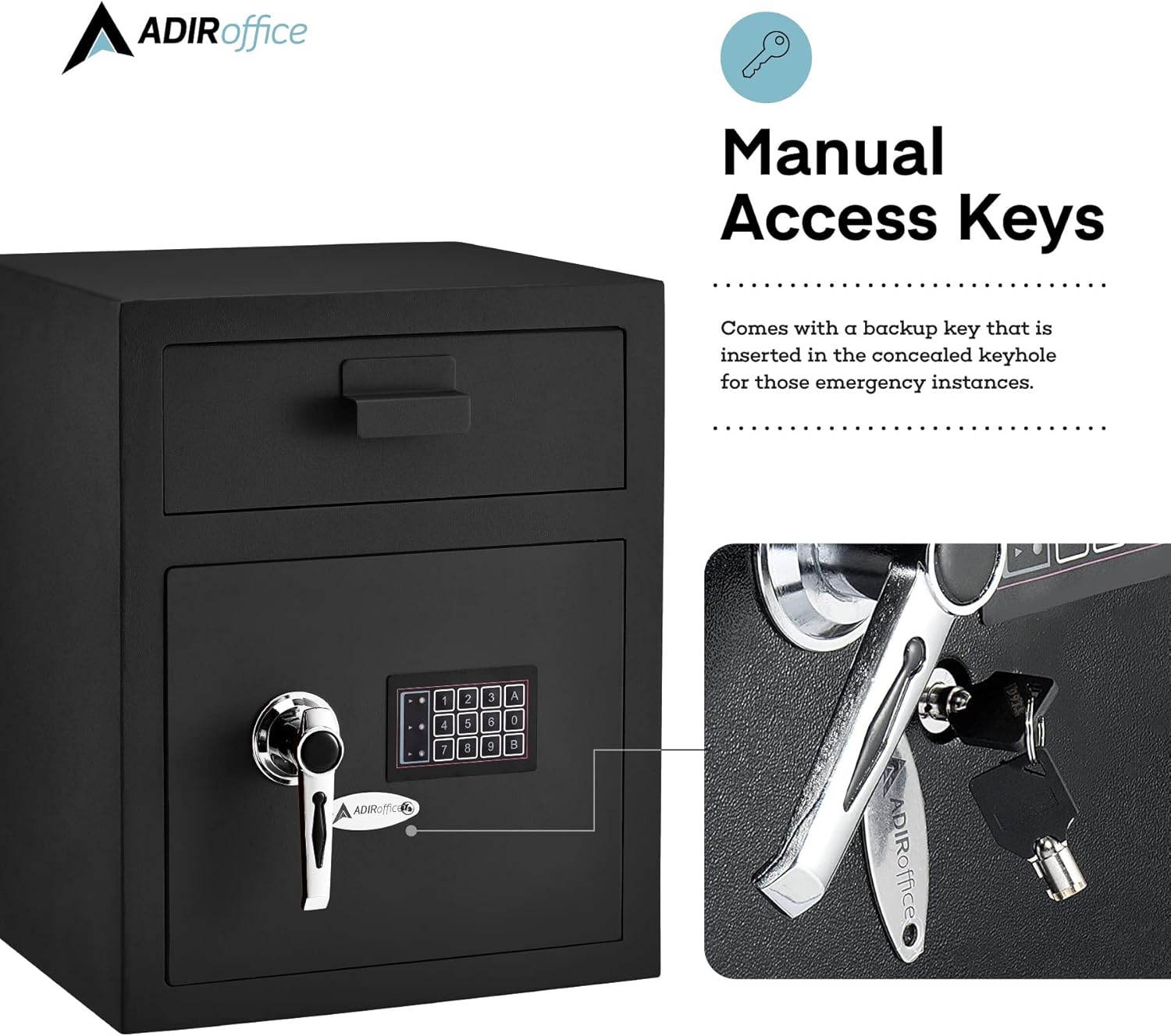
Image: A close-up demonstrating the use of the manual access key, highlighting the concealed keyhole for emergency entry.
4.3 Drop Box Functionality
The unique front-loading drop slot allows for quick and secure deposits without needing to open the main safe compartment. Simply lift the bin door, place items into the slot, and close the bin door. Items will fall into the main compartment of the safe.

Image: A hand inserting an envelope into the secure drop box slot, demonstrating the convenient feature for quick and secure deposits.
5. Onderhoud
- Skoonmaak: Vee die buitekant van die kluis af met 'n sagte, damp lap. Vermy skuurmiddels of oplosmiddels wat die afwerking kan beskadig.
- Battery vervanging: Replace the AA batteries annually, or immediately if the keypad lights dim or the safe fails to respond. Always use fresh, high-quality alkaline batteries.
- Slotmeganisme: Do not lubricate the lock mechanism. If the lock feels stiff, contact customer support.
6. Probleemoplossing
- Safe will not open with code:
- Maak seker dat batterye vars en korrek geïnstalleer is.
- Verify you are entering the correct code.
- Wait for the lockout period to expire if too many incorrect attempts were made.
- Use the manual override key to open the safe.
- Sleutelbord reageer nie:
- Vervang batterye.
- Check for any debris obstructing the buttons.
- Door will not close/lock:
- Ensure no items are obstructing the door or locking bolts.
- Verify the handle is fully turned to the locked position.
Note: No official seller troubleshooting videos were provided for this product. The available video was created by a customer and is not suitable for inclusion in this manual.
7. Spesifikasies
| Handelsmerk | AdirOffice |
| Modelnommer | 670-200-BLK |
| Tipe slot | Electronic and Manual |
| Kleur | Swart |
| Materiaal | Allooi staal |
| Produk afmetings | 14 x 15.3 x 19 duim (B x D x H) |
| Interne afmetings | 18.5" x 15" x 12" (from image) |
| Item gewig | 54 pond |
| Montage tipe | Vrystaande, Tafelblad |
| Tipe beheer | Druk knoppie beheer |
| Batterye benodig | 4 AA batterye |
| UPC | 819598020082 |

Image: A diagram illustrating the external and internal dimensions of the safe, including height, width, and depth measurements.
8. Waarborg en Ondersteuning
The AdirOffice Digital Depository Safe comes with a 1-jaar beperkte waarborg. This warranty covers defects in materials and workmanship under normal use. For warranty claims or technical support, please contact AdirOffice customer service directly. Keep your purchase receipt as proof of purchase.
For further assistance, please visit the official AdirOffice webwebwerf of kontak hul kliëntedienslyn. Kontakbesonderhede kan tipies op die produkverpakking of hul amptelike webwebwerf.