
1. Introduction
The GROW R503 is a high-performance capacitive fingerprint module designed for integration into various access control and security systems. It features a circular, round design with an RGB ring indicator LED, offering visual feedback. This module operates on DC 3.3V and communicates via an SH1.0-6pin connector using the RS232 (TTL) interface. It boasts a 200-fingerprint capacity and a 508 DPI resolution sensing array, making it a reliable choice for biometric authentication.


2. Safety Information
Please read and understand all instructions before using the module. Failure to follow these instructions may result in electric shock, fire, or serious injury.
- Ensure the power supply voltage matches the module's requirements (DC 3.3V).
- Avoid exposing the module to water or excessive moisture, as it is generally not waterproof.
- Do not attempt to disassemble or modify the module.
- Handle with care to prevent damage to the sensor surface or wiring.
- Keep out of reach of children.
3. Package Contents
Upon opening your package, please verify that all the following items are included:
- 1 x GROW R503 Fingerprint Module
- 1 x M25 Nut

4. Specifications
| Feature | Specification |
|---|---|
| Model Number | R503 |
| Brand Name | grow |
| Origin | Mainland China |
| Certification | CE |
| Interface | RS232 (TTL) |
| Voltage | DC 3.3V |
| Fingerprint Module External Diameter | 28mm |
| Fingerprint Module Inner Diameter | 25mm (M25) |
| Fingerprint Module Height | Available in 15mm, 19mm, 32mm versions |
| Effective Collection Area | Diameter 15mm |
| Fingerprint Capacity | 200 |
| Resolution | 508 DPI |
| Sensing Array | 192*192 pixel |
| LED Color | RGB |
| LED Control | Yes |
| Weight | 32g |
| Working Current (Fingerprint Acquisition) | 20mA |
| Standby Current (Finger Detection) | 3.3V, 2uA |
| Package Dimensions (L x W x H) | 13 cm x 8 cm x 9 cm |
| Package Weight | 0.1 kg |

5. Setup and Installation
5.1 Wiring Diagram
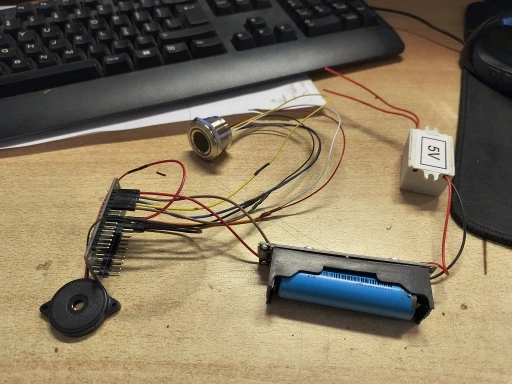
The GROW R503 module connects via a SH1.0-6pin JST connector. Refer to the table and image below for correct pin assignments:
| Pin | Name | Description |
|---|---|---|
| 1 | Power Supply | DC 3.3V |
| 2 | GND | Signal ground. Connected to power ground. |
| 3 | TXD | Data output. TTL logical level. |
| 4 | RXD | Data input. TTL logical level. |
| 5 | WAKEUP | Finger Detection Signal. Standby-high level, have finger-output low level. |
| 6 | 3.3VT | Touch induction power supply, DC3—5V. |

5.2 Physical Installation
The module is designed for easy installation with its M25 size. It can be mounted using the provided M25 nut. Ensure the mounting hole is appropriately sized for the module's diameter.
5.3 Software Setup
The GROW R503 module communicates via a UART (RS232 TTL) interface. It is compatible with microcontrollers like Arduino and ESP32. For Arduino, the Adafruit Fingerprint Sensor Library is commonly used. For ESP32, integration with ESPHOME for Home Assistant is also possible.
6. Operating Instructions
6.1 Fingerprint Enrollment
To enroll fingerprints, you will typically use a host microcontroller (e.g., Arduino, ESP32) running specific software. The process generally involves:
- Sending a command to the module to enter enrollment mode.
- Placing a finger on the sensor multiple times as prompted by the software.
- The module will process the scans and store the fingerprint template in its internal memory (up to 200 fingerprints).
6.2 Fingerprint Verification/Identification
Once fingerprints are enrolled, the module can be used for verification or identification:
- Send a command to the module to initiate scanning.
- Place a finger on the sensor.
- The module will compare the scanned fingerprint with stored templates and send a match result (e.g., ID of the matched fingerprint or no match) back to the host microcontroller.
6.3 LED Control
The R503 module features an RGB ring indicator LED that can be controlled via commands from the host microcontroller. This allows for customizable visual feedback, such as indicating successful scans (e.g., green light) or errors (e.g., red light).

7. Maintenance
- Cleaning: Gently wipe the sensor surface with a soft, dry, lint-free cloth. Avoid using abrasive materials or harsh chemicals.
- Environmental Conditions: Keep the module in a dry environment. Standard versions are not waterproof, and exposure to moisture can impair functionality. While some specific upgraded versions may offer waterproofing (e.g., R503 Short Version-15mm), it is generally recommended to protect the module from liquids.
- Cable Integrity: Periodically check the connection cables for any signs of wear or damage.
8. Troubleshooting
- Module not responding: Check power supply (DC 3.3V) and ensure all wiring connections (GND, TXD, RXD) are secure and correct according to the pinout diagram.
- Fingerprint not enrolling/matching: Ensure the sensor surface is clean and dry. Try different fingers or adjust finger placement. Verify that the software commands for enrollment/matching are correctly implemented.
- LED not working: Check power supply and LED control commands. Ensure the LED control feature is enabled in your software.
- SDK issues on Windows: Some users report that the SDK might be blurry or have limited functionality on Windows. Consider using the module with microcontrollers like ESP32 or Arduino, which have well-supported libraries.
- Wet operation: The module is generally not designed for wet conditions. If it gets wet, it may not function correctly. Allow it to dry completely before attempting to use it again.
9. User Tips
- Microcontroller Compatibility: The R503 module works seamlessly with ESP32 and Arduino Uno. Many users have successfully integrated it into their projects.
- Home Assistant Integration: For smart home enthusiasts, the module can be integrated with Home Assistant using an ESP32 and ESPHOME, providing a robust biometric solution.
- LED Customization: Take advantage of the RGB LED control feature to provide intuitive visual feedback for different states (e.g., enrollment, success, failure).
- Power Supply: Always ensure a stable 3.3V power supply for optimal performance.
10. Frequently Asked Questions (FAQ)
- Q: Can this module be used with an Arduino?
- A: Yes, it can be used with Arduino. The Adafruit Fingerprint Sensor Library is recommended for this purpose.
- Q: Is the R503 module waterproof?
- A: Standard versions of the R503 are generally not waterproof, and wet operation will not work. Some specific upgraded versions, like the R503 Short Version-15mm, may offer waterproofing, but this should be confirmed for your specific model.
- Q: What is the working voltage of the module?
- A: The working voltage is DC 3.3V.
- Q: Can I connect the module directly to a PC?
- A: Theoretically, yes, but it might be troublesome. The module uses a TTL serial interface, which would require a USB-to-TTL converter to connect to a PC. Software development for PC interaction might also be more complex than with microcontrollers.
- Q: How many fingerprints can the module store?
- A: The module has a capacity to store up to 200 fingerprints.
- Q: What material is the module made of?
- A: The outer casing of the fingerprint module is typically made of metal, providing durability.
11. Warranty and Support
For any warranty claims, technical support, or inquiries regarding your GROW R503 Fingerprint Module, please contact the seller or manufacturer directly. Ensure you have your purchase details available for faster assistance.