
1. Product Overview
The Gaqqee DC 7-100V LED Digital Display Voltmeter is a versatile two-wire voltage and battery level indicator designed for a wide range of battery types, including acid batteries, ternary lithium batteries, and lithium iron phosphate (LiFePO4) batteries. It features a wide viewing angle LCD color screen, intelligent memory, and precise monitoring with high and low voltage alarms.

Figure 1: Voltmeter unit, mounting bracket, and base components.
Video 1: Product demonstration and feature overview.
2. Setup and Installation
2.1 Wiring Instructions
The voltmeter operates with a two-wire connection. Ensure correct polarity to prevent damage to the device.
- Red Wire: Connect to the positive (+) terminal of the power source/battery.
- Black Wire: Connect to the negative (-) terminal of the power source/battery.
The cable length is approximately 45 cm.

Figure 2: Wiring diagram showing positive (red) and negative (black) connections.
2.2 Mounting Options
The voltmeter can be mounted in various ways, including embedded installation or using the provided stand and base.
- Embedded Installation: For a flush mount, a cutout of 54.56 mm diameter is required. The product dimensions are 59 x 59 x 18.2 mm.
- Stand and Base: Use the included bracket and base for surface mounting on handlebars or other suitable locations.

Figure 3: Example of embedded installation using the provided bracket.
3. Operating Instructions
3.1 Power On/Off and Display
The device powers on automatically when connected to a valid DC 7-100V power source. The LCD color screen displays voltage, battery percentage, and temperature. The display can be turned off or settings adjusted with one-touch operation.
3.2 Battery Type Settings
The voltmeter supports various battery types. You can configure the device to match your specific battery pack for accurate readings. Use the 'M' button to navigate through settings.

Figure 4: Mode setting instructions for Ternary Lithium, Lithium Iron Phosphate, and Acid batteries.
- Ternary Lithium Battery Settings (Menu 1): Select 'L-' and set the cell count from L03S to L22S.
- Lithium Iron Phosphate Battery Settings (Menu 2): Select 'F-' and set the cell count from F03S to F26S.
- Acid Battery Settings (Menu 3): Select 'P-' and set the voltage (DC 12V, 24V, 36V, 48V, 60V, 72V, 84V).
- Custom Settings (Menu C): Allows setting any battery voltage parameter within the DC 7-100V range.
3.3 Backlight Adjustment
The backlight duration can be adjusted for optimal visibility and power saving.
4. Maintenance
The voltmeter is designed for durability and requires minimal maintenance.
- Cleaning: Use a soft, dry cloth to clean the display and casing. Avoid abrasive cleaners or solvents.
- Disassembly: This product has a closed design. Unauthorized disassembly will damage the unit and void any potential support.
- Storage: Store the device in a dry environment away from extreme temperatures when not in use.
5. Troubleshooting
- No Display: Check the power connection. Ensure the red wire is connected to positive and the black wire to negative. Verify the input voltage is within the DC 7-100V range.
- Inaccurate Readings: Ensure the correct battery type and cell count/voltage are set in the device's menu.
- High/Low Voltage Alarms: The device features precise monitoring with factory-calibrated voltage and will trigger alarms for out-of-range voltages to ensure battery safety. Address the underlying battery issue if an alarm sounds.
- Data Loss: The device features smart memory, retaining parameters during power loss. If settings are lost, reconfigure them.
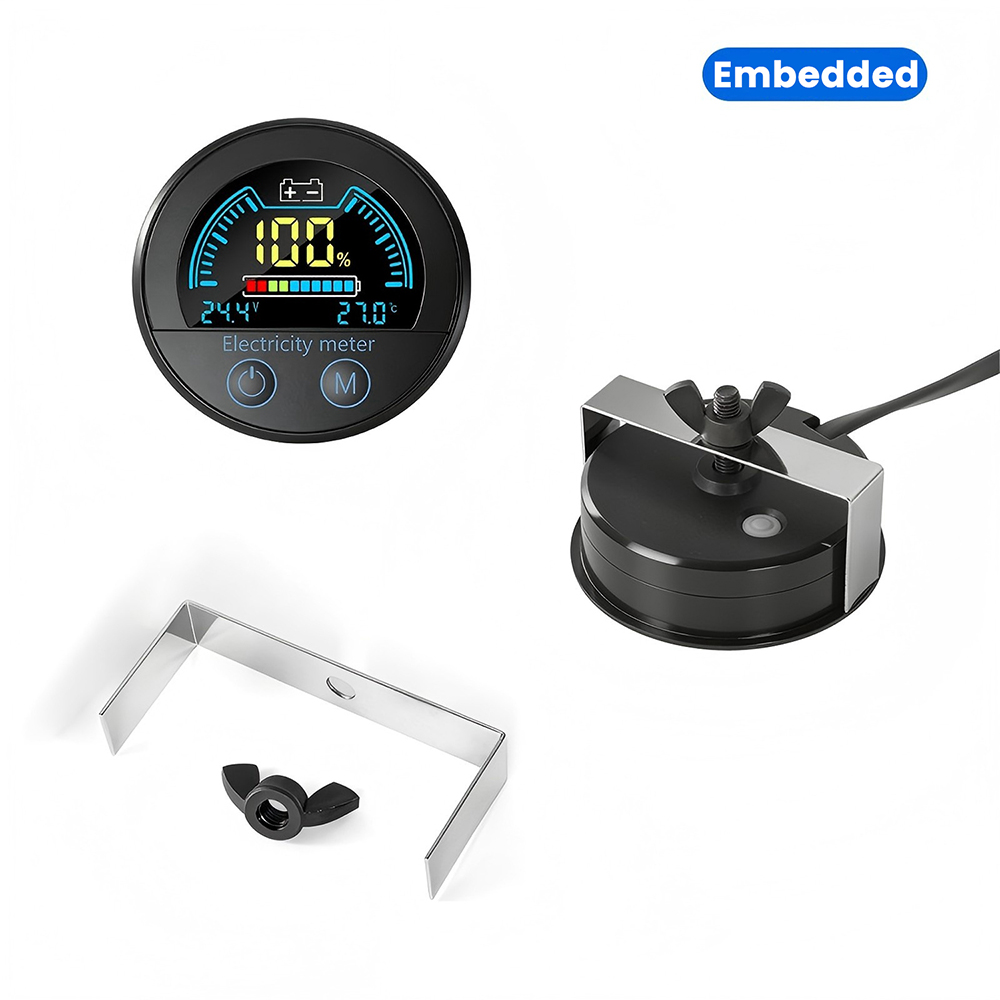
Figure 5: Product dimensions and important warm tips.
Important Warm Tips:
- This product has a closed design; unauthorized disassembly will damage it.
- The input voltage must not exceed the product's operating range (DC 7-100V), otherwise the product will be damaged.
- The test data for this product is for reference only; please refer to professional instruments for actual conditions.
6. Specifications
| Parameter | Value |
|---|---|
| Voltage Measurement Range | DC 7-100 V |
| Operating Current | ≤20 mA |
| Measurement Accuracy | ±1% |
| Standby Power Consumption | <2 mA |
| Scan Rate | 1 scan/500 ms |
| Cable Length | Approx. 45 cm (Red: Positive, Black: Negative) |
| Product Dimensions | 59 × 59 × 18.2 mm |
| Cutout Dimensions | 54.56 mm |
| Display Type | Color Screen (Wide Viewing Angle) |
| Certification | CE |
| Data Record | Yes |
| Power Supply/Source | DC |
| Function | Voltage Test, Battery Level Indication |

Figure 6: Visual representation of product parameters.
7. User Tips
- For optimal accuracy, ensure the voltmeter is configured to the exact type and cell count/voltage of your battery pack.
- Regularly check the display for any high or low voltage alarms, which indicate potential issues with your battery system.
- Utilize the one-touch screen off feature to conserve power when the display is not needed, especially in battery-powered applications.
- Consider the embedded installation for a cleaner, more integrated look in your setup.
8. Warranty and Support
For any technical assistance, warranty claims, or support inquiries, please contact the seller or manufacturer directly. Please refer to your purchase documentation for specific warranty terms and contact information.
A detailed user manual is also available in PDF format: View PDF Manual