
Introduction
This manual provides essential information for setting up, operating, and maintaining your OPPO A78 Global Edition Smartphone. Please read this guide carefully to ensure optimal performance and longevity of your device.

Setup
-
SIM Card Installation: Locate the SIM tray on the side of your device. Use the provided SIM ejector tool to open the tray. Insert up to two Nano-SIM cards into the designated slots. Ensure the cards are correctly oriented as indicated on the tray. Close the tray securely.
-
Power On: Press and hold the Power button (usually on the right side) until the OPPO logo appears. Follow the on-screen prompts to complete the initial setup, including language selection, Wi-Fi connection, and Google account login.
-
Fingerprint and Face Recognition Setup: For enhanced security, navigate to Settings > Password & Biometrics to set up In-Screen Fingerprint Recognition and Face Recognition. Follow the instructions to register your fingerprints and face data.
Operating Instructions
Display
The OPPO A78 features a 6.56-inch IPS LCD display with a 90Hz refresh rate for smooth visuals. The display resolution is 720 x 1612 pixels, protected by Panda glass. Adjust brightness and display settings in the Settings menu.

Camera
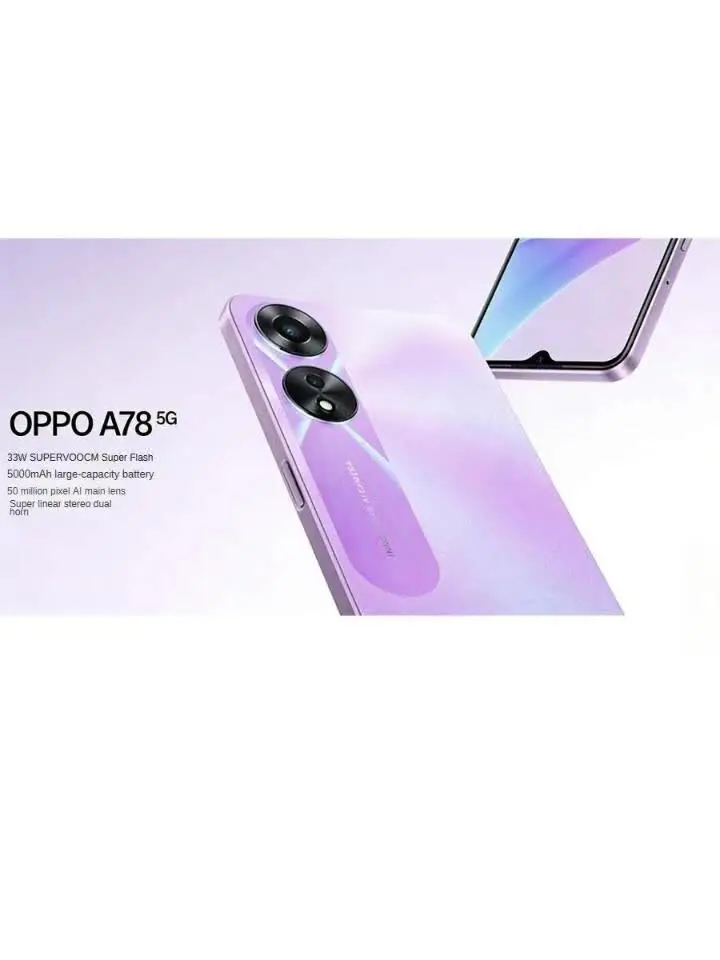
Your device is equipped with a 50MP AI main lens on the rear and an 8MP front camera. Both cameras support 1080p video recording at 30 frames per second. Features include LED flash, HDR, and panorama mode. Open the Camera app to capture photos and videos.

Audio
Enjoy an immersive audio experience with superlinear stereo dual speakers. The device also includes a 3.5mm headphone jack for wired audio accessories.

Connectivity
The OPPO A78 supports Wi-Fi 802.11 a/b/g/n/ac (dual-band), Bluetooth 5.3 (A2DP, aptX), GPS (GALILEO, GLONASS, BDS, QZSS), and NFC. It features a USB Type-C 2.0 port with OTG support for data transfer and peripheral connections.
Battery and Charging
The phone is powered by a 5000mAh Li-Po battery. It supports 33W wired fast charging, capable of reaching 52% charge in 30 minutes and 100% in 67 minutes.


Video Overview
Maintenance
-
Cleaning: Use a soft, lint-free cloth to clean the screen and body of your phone. Avoid using harsh chemicals or abrasive materials.
-
Battery Care: To prolong battery life, avoid exposing the phone to extreme temperatures. It is recommended to keep the battery charge between 20% and 80% for optimal long-term health.
-
Water and Dust Resistance: The OPPO A78 is IP54 rated, meaning it is protected against dust and water splashes. However, it is not fully waterproof. Avoid submerging the device in water or exposing it to high-pressure water jets.
Troubleshooting
-
Device Not Responding: If your phone becomes unresponsive, press and hold the Power button for about 10-15 seconds to force a restart.
-
Connectivity Issues: If you experience problems with Wi-Fi or Bluetooth, try toggling the respective settings off and on. For persistent issues, restart your device or reset network settings (Settings > System settings > Back up and reset > Reset phone > Reset network settings).
-
App Crashes: If an app frequently crashes, try clearing its cache and data (Settings > Apps > App management > [App Name] > Storage usage > Clear cache/Clear data). If the issue persists, reinstall the app.
-
Battery Draining Quickly: Check battery usage in Settings > Battery to identify apps consuming excessive power. Adjust screen brightness, disable unnecessary background apps, and turn off features like GPS or NFC when not in use.
Specifications
| Category | Feature | Specification |
|---|---|---|
| Body | Dimensions | 163.8 x 75.1 x 8 mm (6.45 x 2.56 x 0.31 in) |
| Weight | 188 g (6.63 oz) | |
| SIM | Nano-SIM + Nano-SIM, IP54 dust and water resistant (water splashes) | |
| Display | Type | IPS LCD, 90Hz, 480 nits (typ), 600 nits (HBM) |
| Size | 6.56 inches (~84.0% screen-to-body ratio) | |
| Resolution | 720 x 1612 pixels, 20:9 ratio (~269 ppi density) | |
| Protection | Panda glass | |
| Platform | OS | Android 12, upgradable to Android 14, ColorOS 14 |
| Chipset | Mediatek Dimensity 700 (7 nm) | |
| CPU | Octa-core (2x2.2 GHz Cortex-A76 & 6x2.0 GHz Cortex-A55) | |
| GPU | Mali-G57 MC2 | |
| Memory | Card slot | microSDXC |
| Internal | 128GB 4GB RAM, 128GB 8GB RAM, 256GB 8GB RAM (UFS 2.2) | |
| Memory Expansion | Yes (8GB+8GB RAM, 128GB ROM shown in image) | |
| Main Camera | Dual | 50 MP, f/1.8, 27mm (wide), PDAF + Auxiliary lens |
| Features | LED flash, HDR, panorama | |
| Video | 1080p@30fps | |
| Selfie Camera | Single | 8 MP, f/2.0, 27mm (wide) |
| Video | 1080p@30fps | |
| Sound | Loudspeaker | Yes, with stereo speakers |
| 3.5mm jack | Yes | |
| Comms | WLAN | Wi-Fi 802.11 a/b/g/n/ac, dual-band |
| Bluetooth | 5.3, A2DP, LE, aptX | |
| Positioning | GPS, GALILEO, GLONASS, BDS, QZSS | |
| NFC | Yes | |
| USB | USB Type-C 2.0, OTG | |
| Features | Sensors | Fingerprint (side-mounted), accelerometer, proximity, compass |
| Battery | Type | Li-Po 5000 mAh, Not Detachable |
| Charging | 33W wired, PD, 52% in 30 min, 100% in 67 min | |
| Misc | Colors | Glowing Black, Glowing Purple (Blue also available) |
| Models | CPH2483, CPH2495 |


User Tips
-
Efficient Charging: With 33W Super Flash charging, you can quickly top up your battery. A short charge during a coffee break can provide significant power, allowing you more free time.
-
All-Day Power: The 5000mAh large-capacity battery is designed to accompany you day to night, offering extended standby, talk, and video playback times.
-
Immersive Audio: Take advantage of the superlinear stereo dual speakers for an enhanced audio experience when watching videos or listening to music.
Warranty and Support
Your OPPO A78 smartphone comes with a standard manufacturer's warranty. For detailed warranty terms, service centers, and further support, please refer to the official OPPO website or the comprehensive user manual available in PDF format. You can access the PDF manual here.