
1. Introduction
Welcome to the user manual for your new OPPO A3 Pro 5G 2026 Edition smartphone. This guide provides essential information on setting up, operating, maintaining, and troubleshooting your device. The OPPO A3 Pro 5G features a stunning 6.7-inch display, a powerful 5000mAh battery, 8GB RAM, 256GB storage, and 5G connectivity, designed to deliver an exceptional mobile experience.
For a more detailed guide, please refer to the official user manual PDF: User manual (PDF)
2. What's in the Box
Your OPPO A3 Pro 5G package should contain the following items:
- Main unit (OPPO A3 Pro 5G smartphone)
- USB Type-C Cable
- Power Charger (67W Super Flash Charge)
- SIM Card Pin
- Protective Case
- Quick Start Guide
- Warranty Card
3. Device Overview
Familiarize yourself with the key features and design elements of your OPPO A3 Pro 5G.
Video: OPPO A3 Pro 5G Product Overview.
- Display: 6.7-inch OLED curved screen with 2412x1080 resolution, 120Hz refresh rate, and 240Hz touch sampling rate.
- Cameras: Dual rear camera system with a 64MP main camera and a 2MP portrait camera. An 8MP front camera for selfies.
- Battery: High-capacity 5000mAh battery with 67W Super Flash Charging.
- Security: In-screen fingerprint sensor and Face Recognition for secure unlocking.
- Audio: Equipped with dual speakers for an enhanced audio experience.
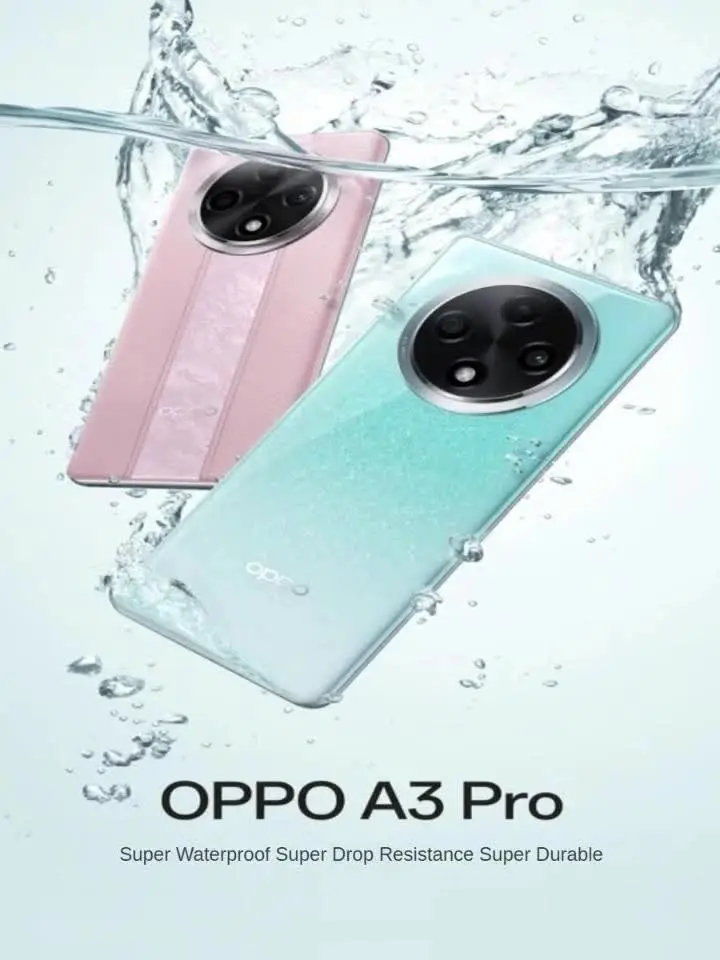
- Design: Ultra-thin (7.53mm), light (177g), and narrow (74.3mm) hyperboloid design, featuring a unique 'Mountain and sea picture scroll' aesthetic and 'Azure ice glaze' process. Available in colors like Pink and Blue.


4. Initial Setup
- Insert SIM Card: Use the provided SIM ejector tool to open the SIM card tray. Insert your Nano-SIM card(s) into the tray. This device supports dual SIM cards.
- Charge the Device: Connect the USB Type-C cable to your phone and the 67W Super Flash Charger. Plug the charger into a power outlet. It takes approximately 44 minutes for a full charge, or 20 minutes to reach 56% battery.
- Power On: Press and hold the Power button (usually on the right side) until the OPPO logo appears.
- Initial Configuration: Follow the on-screen instructions to select your language, connect to Wi-Fi, set up your Google account, and configure security features like fingerprint and face recognition.
5. Operating Your Device
5.1. Display and Navigation
- Your phone features a 6.7-inch OLED curved screen with a 120Hz refresh rate for smooth visuals and a 240Hz touch sampling rate for responsive interaction.
- The display includes eye protection features to reduce strain during prolonged use.
- Navigate using gestures or the traditional navigation bar, configurable in Settings.
5.2. Camera Functions
The OPPO A3 Pro 5G is equipped with a versatile camera system:
- Rear Camera: 64MP main camera with autofocus and a 2MP portrait camera. Supports various modes including Portrait, Night Scene, Ultra-Clear Image Quality, Panorama, Slow Motion, Time-Lapse Photography, Multi-Scene Video, Cute Shooting, and AI ID Photo.
- Front Camera: 8MP camera for high-quality selfies and video calls.
- Video Recording: Record videos up to 4K resolution at 30 frames per second (fps), 1080P at 60/30fps, and 720P at 60/30fps. Slow motion video is supported at 1080P (120 fps) and 720P (240 fps).

5.3. Security Features
- In-Screen Fingerprint Recognition: Register your fingerprints in Settings > Security & Privacy > Fingerprint.
- Face Recognition: Set up face unlock in Settings > Security & Privacy > Face.
5.4. Connectivity
- Wi-Fi: Supports Wi-Fi 6 (802.11ax) for fast and stable wireless internet.
- Bluetooth: Features Bluetooth 5.3 with Low Energy support for connecting wireless accessories.
- GPS: Built-in GPS with support for BeiDou, GLONASS, Galileo, and QZSS for accurate location services.
- Cellular: Supports 4G LTE and 5G networks.
6. Maintenance and Care
6.1. Water and Dust Resistance
The OPPO A3 Pro 5G boasts IP68/IP69K ratings, indicating high levels of water and dust resistance. It is designed to withstand immersion in water for up to half an hour. However, it is not resistant to hot water and should be protected against immersion and spraying in such conditions.

6.2. Drop Resistance
The device features 360° drop resistance, designed to resist falling from up to 1.8 meters. It has passed Swiss SGS gold standard five-star drop resistance certification and national military standard impact tests.
6.3. Cleaning Your Device
- Use a soft, lint-free cloth to wipe the screen and body.
- Avoid using harsh chemicals or abrasive materials that could damage the finish.
- If the phone gets wet, wipe it dry thoroughly before charging or using ports.
6.4. Battery Care
- Avoid exposing the phone to extreme temperatures.
- Use only the official 67W Super Flash Charger for optimal charging and battery health.
- OPPO's self-developed bionic repair electrolyte technology helps protect the battery and extends its service life.

7. Troubleshooting
- Device Not Turning On: Ensure the battery is charged. Press and hold the Power button for at least 10 seconds.
- Charging Issues: Check if the charger and cable are properly connected. Use the original charger and cable.
- Sound Quality Issues: If you experience muffled sound, especially from the camera area, ensure that no unperforated protective film is covering the air pressure balancing holes on the rear camera lens.
- Network Connectivity Problems: Check your SIM card insertion. Restart the device. Verify network settings in Settings > Mobile Network.
- App Crashes/Freezes: Close the app and reopen it. Clear the app's cache in Settings > Apps.
- Performing a Factory Reset: If persistent issues occur, you may need to perform a factory reset. Go to Settings > System settings > Back up and reset > Reset phone > Erase all data. Warning: This will erase all data on your phone. Back up important data before proceeding.
8. Specifications
| Feature | Specification |
|---|---|
| Brand Name | OPPO |
| Operation System | Android (ColorOS 14.0) |
| Display Size | 6.7 inches (diagonal) |
| Display Resolution | 2412x1080 pixels, 304 PPI |
| Screen Refresh Rate | 240 Hz (support up to 120Hz) |
| Screen Type | Curved OLED Screen |
| Screen Material | LCD |
| Touch Screen | Yes |
| RAM | 8 GB |
| ROM | 256 GB |
| Expand Storage | Not supported |
| Rear Camera Quantity | 2 |
| Rear Camera Pixel | ≈ 64 MP (Main), 2 MP (Portrait) |
| Front Camera Quantity | 1 |
| Front Camera Pixel | 8MP |
| Video Recording Resolution | FullHD (1080p) 30 fps, HD (720p) 30 fps, 4K 30 fps |
| Battery Capacity (mAh) | 5000mAh (Typical), 4880 mAh (Rated) |
| Battery Type | Not Detachable |
| Charging Power | 67W (Super Flash Charge) |
| Fast Charging | 67W |
| Wireless Charging | No |
| Charging Interface Type | Type-C |
| Biometrics Technology | In-Screen Fingerprint Recognition, Face Recognition |
| Built-in GPS | Yes (Baidou, GPS, GLONASS, Galileo, QZSS) |
| WIFI | Yes (Wi-Fi 6, 802.11ax) |
| Bluetooth Version | YES (Bluetooth 5.3) |
| NFC | No |
| 3.5mm Headphone Port | No |
| SIM Card Quantity | 2 SIM Card (Nano-SIM) |
| Cellular | 4G LTE, 5G |
| IP Rating | IP68/IP69K |
| Design | Flip |
| Dimensions (Thin) | 7.53 mm (glass), 7.89 mm (leather) |
| Weight | 177 g (glass), 183 g (leather) |
9. User Tips
- Optimize Battery Life: Adjust screen brightness, enable dark mode, and close unused background apps to extend battery life.
- Maximize Security: Utilize both in-screen fingerprint and face recognition for quick and secure access. Regularly update your device's software to ensure the latest security patches.
- Camera Enhancements: Experiment with different camera modes like 'Ultra-Clear Image Quality' for detailed shots and 'Night Scene' for improved low-light photography.
- Display Comfort: Take advantage of the eye protection screen features, especially during long reading sessions, to reduce eye strain.
10. Warranty and Support
Your OPPO A3 Pro 5G comes with a comprehensive after-sales service. From the date of purchase (subject to the purchase invoice) and with a valid quality inspection certificate:
- Return: You may return the device within 7 days for quality problems.
- Replacement: You may request a replacement within 30 days for quality problems.
- Warranty Period: Enjoy free warranty service during the specified warranty period.
For further assistance, please contact your retailer or the official OPPO support channels.
11. Safety Information
- Battery Safety: Do not attempt to replace the battery yourself. Use only authorized service providers. Do not expose the battery to high temperatures or dispose of it in fire.
- Charging Safety: Use only the original charger and cable provided with your device. Using incompatible chargers may cause damage or safety hazards.
- Water Resistance: While the device is IP68/IP69K rated, avoid intentional submersion, exposure to high-pressure water, or hot water. If the device gets wet, ensure it is completely dry before charging.
- Operating Temperature: Operate the device within the recommended temperature range to prevent damage.
- Disposal: Dispose of the device and its accessories responsibly according to local regulations. Do not dispose of electronic waste in household trash.