
Introduction
This manual provides essential information for setting up, operating, maintaining, and troubleshooting your OPPO Find X7 Global Edition Smartphone. Please read this manual carefully to ensure proper use and to maximize the device's performance and longevity.
Product Overview Video: A brief introduction to the OPPO Find X7 Global Edition Smartphone.
1. Setup
1.1 Package Contents
Ensure all items are present in the box:
- OPPO Find X7 Smartphone
- Charging Cable (Type-C)
- Power Adapter (100W Super Flash Charge compatible)
- SIM Ejector Tool
- Quick Start Guide
- Safety Information
1.2 Inserting SIM Cards
The OPPO Find X7 supports Dual SIM cards. Use the provided SIM ejector tool to open the SIM tray. Insert your Nano-SIM cards into the designated slots. Ensure the tray is fully re-inserted to maintain water and dust resistance.
1.3 Initial Charging and Power On
- Connect the Type-C charging cable to your phone and the 100W power adapter.
- Plug the adapter into a power outlet.
- Allow the phone to charge for a few minutes before powering it on.
- To power on, press and hold the Power button (usually on the right side) until the OPPO logo appears.
- Follow the on-screen instructions to complete the initial setup, including language selection, Wi-Fi connection, and Google account setup.

Image illustrating key features including battery, charging, and cooling system.
2. Operating Your Device
2.1 Display Features
Your OPPO Find X7 features a 6.78-inch AMOLED Curved Screen with a resolution of 2780x1264 pixels (450 PPI). It supports a 1-120Hz adaptive refresh rate and up to 240Hz touch sampling rate for a smooth and responsive experience. The display offers 1.07 billion colors with a wide color gamut (P3) and boasts a peak brightness of 4500 nits (HDR) or 1600 nits (HBM typical).
For eye comfort, the display includes 2160Hz high-frequency PWM Dimming, 360° color temperature adaptive technology, hardware-level low blue light, and a Sleep mode. It also features TÜV Rheinland Smart Eye Protection 3.0 certification.

Display features for enhanced visual comfort and quality.
2.2 Camera System
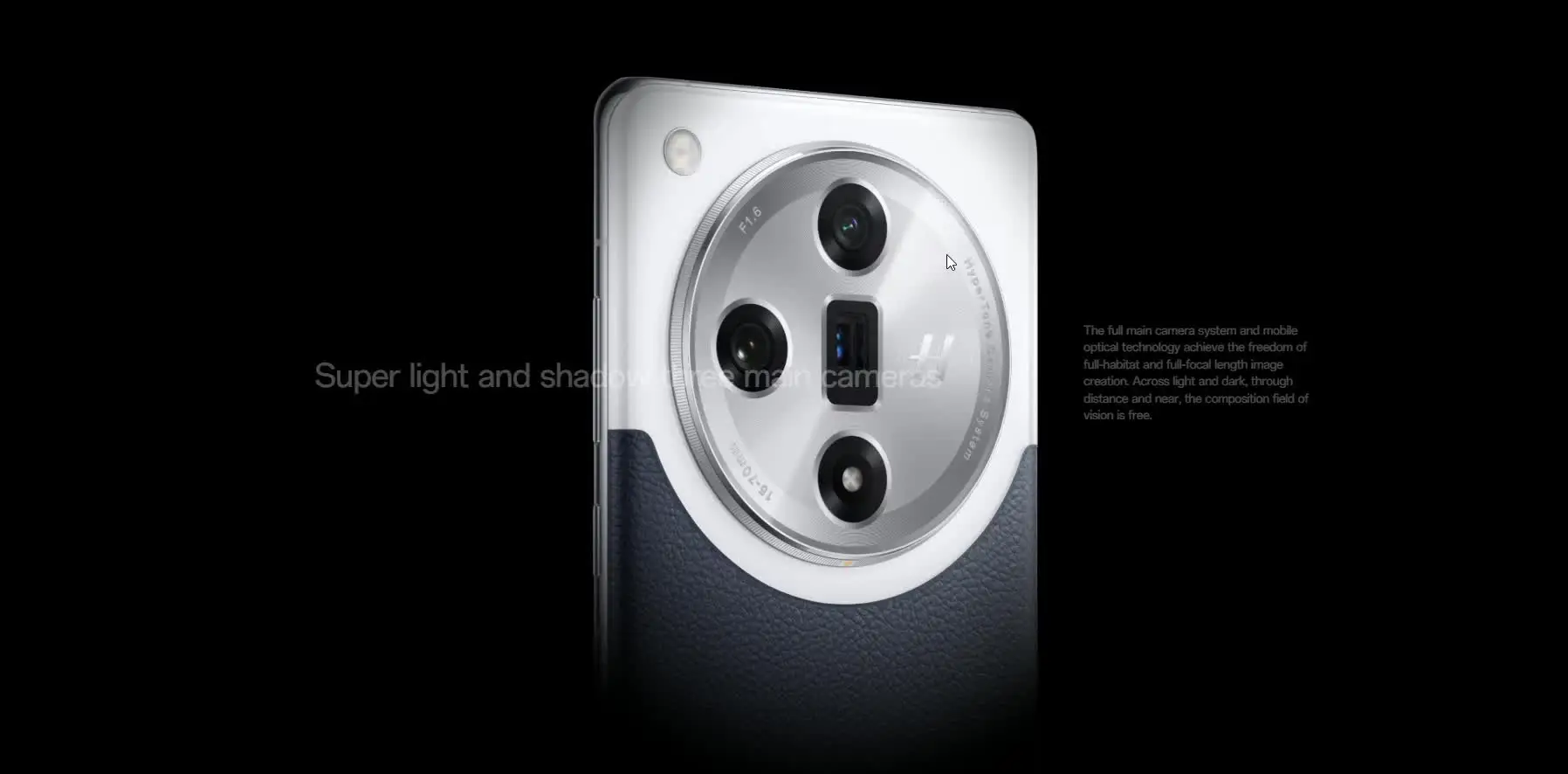
The OPPO Find X7 is equipped with an advanced triple camera system co-developed with Hasselblad:
- Main Camera: 50-million-pixel wide-angle camera (f/1.6, 23mm equivalent focal length) with AF autofocus and OIS image stabilization.
- Ultra-Wide-Angle Camera: 50-million-pixel (f/2.0, 15mm equivalent focal length) with 119° wide viewing angle, AF autofocus, and 3.5cm macro shooting.
- Periscope Telephoto Camera: 64-million-pixel super-light-sensitive (1/2.6" sensor, f/2.6, 70mm equivalent focal length) with quad-mirror lens, AF autofocus, and OIS anti-shake. Supports up to 3x optical zoom and 120x digital zoom.
- Front Camera: 32-million-pixel (f/2.4, 21mm equivalent focal length) with AF autofocus.
Camera Features: Photo, Video, Night Scene, Master, Portrait, High Pixel, Panorama, Movie, Slow Motion, Time-Lapse, Long Exposure, Multi-Scene Video, Cute Shooting, AI ID Photo, XPAN, Super Text. Supported formats include HEIF, JPEG, and DING.
Video Recording:
- Rear Camera: 4K at 60 fps, 30 fps; 1080P at 60 fps, 30 fps; 720P at 30 fps.
- Slow Motion: 1080P at 240 fps, 720P at 480 fps.
- Front Camera: 4K at 60 fps, 30 fps; 1080P at 60 fps, 30 fps; 720P at 30 fps.
- Both front and rear cameras support video stabilization.

Hasselblad camera features for professional-grade photography and videography.

Detailed view of the camera module and its specifications.

Hasselblad Master Mode interface for advanced photo settings.
2.3 Performance and Connectivity
Powered by the Dimensity 9300 mobile platform with an 8-core CPU and a maximum frequency of 3.25GHz, the OPPO Find X7 delivers strong performance. It supports 4G and 5G cellular networks, Wi-Fi, and Bluetooth. Built-in GPS ensures accurate navigation.
2.4 Security Features
The device offers advanced biometric security options including In-Screen Fingerprint Recognition and Face Recognition for quick and secure unlocking.
3. Maintenance
3.1 Battery Care
The OPPO Find X7 is equipped with a 5000 mAh (typical) non-detachable battery. To prolong battery life:
- Use the original 100W Super Flash Charge adapter and cable for optimal charging speed and safety.
- Avoid extreme temperatures, as they can degrade battery performance.
- Do not let the battery completely drain frequently.
The device features an aerospace-grade cooling system to manage heat during intensive use and charging, contributing to stable performance and battery health.
3.2 Water and Dust Resistance
The OPPO Find X7 has an IP68/IP69K rating, meaning it is resistant to dust and can withstand immersion in water under specific conditions. However, this resistance is not permanent and may decrease over time with normal wear. Avoid exposing the device to pressurized water, high-velocity water, or extreme conditions. If the device gets wet, dry it thoroughly before charging or using the ports.
4. Troubleshooting
- Device not turning on: Ensure the battery is charged. Connect to the charger and try powering on again.
- Apps crashing or freezing: Close background apps, clear app cache, or restart the device.
- Poor network signal: Check your SIM card insertion, ensure you are in an area with network coverage, or restart the device.
- Charging issues: Use the original charger and cable. Check for debris in the charging port.
- Screen unresponsiveness: Restart the device. If the issue persists, contact support.
5. Specifications
| Feature | Specification |
|---|---|
| Brand Name | OPPO |
| Model | Find X7 |
| Dimensions (High) | 162.7 mm |
| Dimensions (Wide) | 75.4 mm |
| Dimensions (Thick) | 8.7 mm (Starry Sky Black, Smoke Cloud Purple, Daydreamer); 9.0 mm (Sea and Sky, Desert Silver Moon) |
| Weight | 206 g (Starry Sky Black, Smoke Cloud Purple, Daydreamer); 202 g (Sea and Sky, Desert Silver Moon) |
| RAM Capacity | 8GB (also available in 12GB, 16GB) |
| ROM Capacity | 256GB (also available in 512GB, 1TB) |
| RAM Specifications | LPDDR5X |
| ROM Specifications | UFS 4.0 |
| Expandable Storage | Not supported |
| OTG Data Transfer | Yes |
| Display Size | 6.78 inches (diagonal) |
| Display Resolution | 2780x1264 pixels with 450 PPI |
| Color Gamut | 1.07 billion colors with wide color gamut (P3) |
| Peak Brightness | 4500 nits (HDR), 2300 nits (HDR), 1600 nits (HBM typical) |
| Screen Type | OLED Curved Screen |
| Screen Refresh Rate | 1-120Hz adaptive |
| Touch Sampling Rate | Up to 240Hz |
| Rear Camera Quantity | 2 (Triple Camera System: 50MP Main, 50MP Ultra-Wide, 64MP Periscope Telephoto) |
| Front Camera Quantity | 1 (32MP) |
| Video Recording Resolution | FullHD (1080p) 30 fps (also 4K 60/30fps, 720p 30fps) |
| Mobile Platform (Chip) | Dimensity 9300, 8 cores, max frequency 3.25GHz |
| Battery Capacity (Rated) | 2430 mAh (dual-cell series design, equivalent to 4860 mAh) |
| Battery Capacity (Typical) | 2500 mAh (dual-cell series design, equivalent to 5000 mAh) |
| Fast Charging | 100W Super Flash Charge (compatible with 80W, 67W, 65W, 50W, 33W Super Flash Charge, 15W Flash Charge, 33W UFCS, 13.5W PD) |
| Battery Type | Not Detachable |
| Cellular | 4G, 5G |
| Operation System | Android |
| SIM Card Quantity | 2 SIM Card |
| Charging Interface Type | Type-C |
| Biometrics Technology | In-Screen Fingerprint Recognition, Face Recognition |
| Built-in GPS | Yes |
| Built-in Radiator | Yes |
| IP Rating | IP68/IP69K |
| WIFI | Yes |
| Bluetooth Version | YES |
| 3.5mm Headphone Port | No |
| Wireless Charging | No |
| NFC | No |
| Language | English (and others based on global version) |
6. User Tips
- Verify Authenticity: Always ensure you purchase from reputable sellers and verify the authenticity of your device, especially for global versions. Some users have reported concerns about devices being misrepresented.
- Network Compatibility: Be aware that specific network features like Voice over IP (VoIP) or Voice over LTE (VoLTE) might have regional compatibility issues with certain carriers, even if the phone supports 3G/4G/5G. Check with your local service provider if you encounter such issues.
- Software Differences: Regional software versions (e.g., ColorOS for India vs. other markets) may have different features or user interfaces. Familiarize yourself with the specific software version on your device.
- Language Support: While the global version supports English, confirm support for other specific languages like Arabic if needed, as this can vary by region and software build.
7. Warranty and Support
For detailed warranty information, please refer to the warranty card included with your product or visit the official OPPO website. If you encounter any issues not covered in this manual, please contact OPPO customer support or your retailer.
A comprehensive user manual in PDF format is available for download. You can access it via the following link: OPPO Find X7 User Manual (PDF).