
1. Introduction
Thank you for choosing the abay TWS In-Ear Sleep Earbuds. This manual provides detailed instructions for the safe and effective use of your new earbuds. Please read it thoroughly before use and keep it for future reference.
For a downloadable PDF version of this manual, please refer to the official user manual (PDF).
2. Package Contents
Ensure all items are present in the package:
- abay TWS In-Ear Sleep Earbuds (Left and Right)
- Charging Case
- USB Charging Cable (Type-C)
- User Manual

Figure 2.1: Example of product packaging contents.
3. Setup
3.1. Charging the Earbuds and Case
Before first use, fully charge the earbuds and the charging case.
- Place the earbuds into the charging case. Ensure they are correctly seated; the earbuds will show an indicator light.
- Connect the provided USB Type-C charging cable to the charging port on the case and the other end to a USB power adapter (not included) or a computer's USB port.
- The digital display on the charging case will show the battery percentage. The earbuds themselves will also indicate charging status.
- A full charge for the earbuds takes approximately 30 minutes. The charging case provides up to 72 hours of additional use for the earbuds.
Figure 3.1: Earbuds in charging case with digital display.

Figure 3.2: Battery life and charging times.
3.2. Pairing with Your Device
The earbuds use Bluetooth 5.3 for a stable and fast connection.
- Open the charging case. The earbuds will automatically power on and enter pairing mode.
- On your smartphone or other Bluetooth-enabled device, go to the Bluetooth settings.
- Search for new devices and select "[Earbud Model Name]" from the list.
- Once connected, you will hear a confirmation tone, and the earbuds will be ready for use.
- The earbuds support automatic re-connection to the last paired device when taken out of the case.

Figure 3.3: Dual channel connection for stable audio.

Figure 3.4: Wide compatibility with various operating systems.
3.3. Wearing the Earbuds
These earbuds are designed for comfort, especially for side sleepers, with an ultra-thin profile.
- Gently insert each earbud into your ear canal.
- Adjust for a snug and comfortable fit. The design allows for comfortable wear even when lying on your side, as they are approximately 1cm thin.

Figure 3.5: Earbud worn comfortably in the ear.

Figure 3.6: Comfortable for side sleeping.
4. Operating Instructions
4.1. Touch Controls
The earbuds feature intuitive touch controls for easy management of audio and calls:
- Play/Pause: Tap the switch once.
- Next Song: Tap the switch twice.
- Previous Song: Tap the switch twice.
- Volume Control: Tap the switch for 3 seconds.
- Answer/End Call: Tap the switch once.
- Activate Voice Assistant (Siri/Google Assistant): Tap the switch for 2 seconds.

Figure 4.1: Earbud touch control functions.
4.2. Noise Reduction and Call Quality
The earbuds incorporate intelligent noise reduction technology to enhance call clarity and provide an immersive audio experience.
- Active Noise Cancelling helps to minimize environmental distractions.
- High-resolution stereo sound quality ensures a rich audio experience.

Figure 4.2: Enhanced call clarity with noise reduction.

Figure 4.3: Immersive 360° sound experience.
5. Maintenance
5.1. Cleaning
- Regularly clean the earbuds and charging case with a soft, dry, lint-free cloth.
- Do not use abrasive cleaners, alcohol, or chemical solvents.
- Ensure the charging contacts on both the earbuds and the case are clean and free of debris.
5.2. Storage
- When not in use, store the earbuds in their charging case to protect them and keep them charged.
- Avoid exposing the earbuds to extreme temperatures, humidity, or direct sunlight.
5.3. Waterproof Design
The earbuds feature a waterproof and dustproof design, making them suitable for various indoor and outdoor environments. However, they are not designed for submersion in water.
- Wipe off any sweat or water splashes immediately after exposure.
- Do not use the earbuds while swimming or showering.

Figure 5.1: Waterproof and dustproof design.
6. Troubleshooting
If you encounter any issues, please try the following solutions:
| Problem | Solution |
|---|---|
| Earbuds not pairing |
|
| No sound from earbuds |
|
| Earbuds not charging |
|
| Intermittent connection |
|
7. Specifications
| Feature | Detail |
|---|---|
| Brand Name | abay |
| Material | ABS, Plastic |
| Width | 40mm |
| Depth | 70mm |
| Weight | 40g |
| Height | 20mm |
| Battery Capacity | 400mAh (Charging Case) |
| Voice Assistant Built-in | Yes |
| Maximum Wireless Range | <10m |
| NFC Technology | Yes |
| Sound Isolating | Yes |
| Category | Earphones & Headphones |
| Earcups Type | Semi-open |
| Charging Method | Cable (Type-C) |
| Impedance Range | up to 32 Ω |
| Bluetooth Version | 5.3 |
| Features | Waterproof, With microphone, Active Noise Cancelling |
| Is Wireless | Yes |
| Waterproof | Yes |
| Function | HiFi Headphone |
| Volume Control | Yes |
| Vocalism Principle | Other |
| Wireless Type | Bluetooth |
| Communication | Wireless |
| Style | TWS in-ear headphones |
| Certification | CE |
| Origin | Mainland China |
8. User Tips
- For optimal sound quality, ensure the earbuds fit snugly in your ears.
- Regularly clean the earbuds to maintain hygiene and sound performance.
- Keep the charging case charged to ensure your earbuds are always ready for use.
- When experiencing connection issues, try resetting your device's Bluetooth or restarting both the earbuds and your device.
9. Warranty and Support
Your abay TWS In-Ear Sleep Earbuds come with a standard manufacturer's warranty. Please refer to your purchase documentation for specific warranty terms and conditions.
For technical support, troubleshooting assistance, or warranty claims, please contact the seller or the manufacturer directly through the platform where you purchased the product.
10. Product Demonstration Video
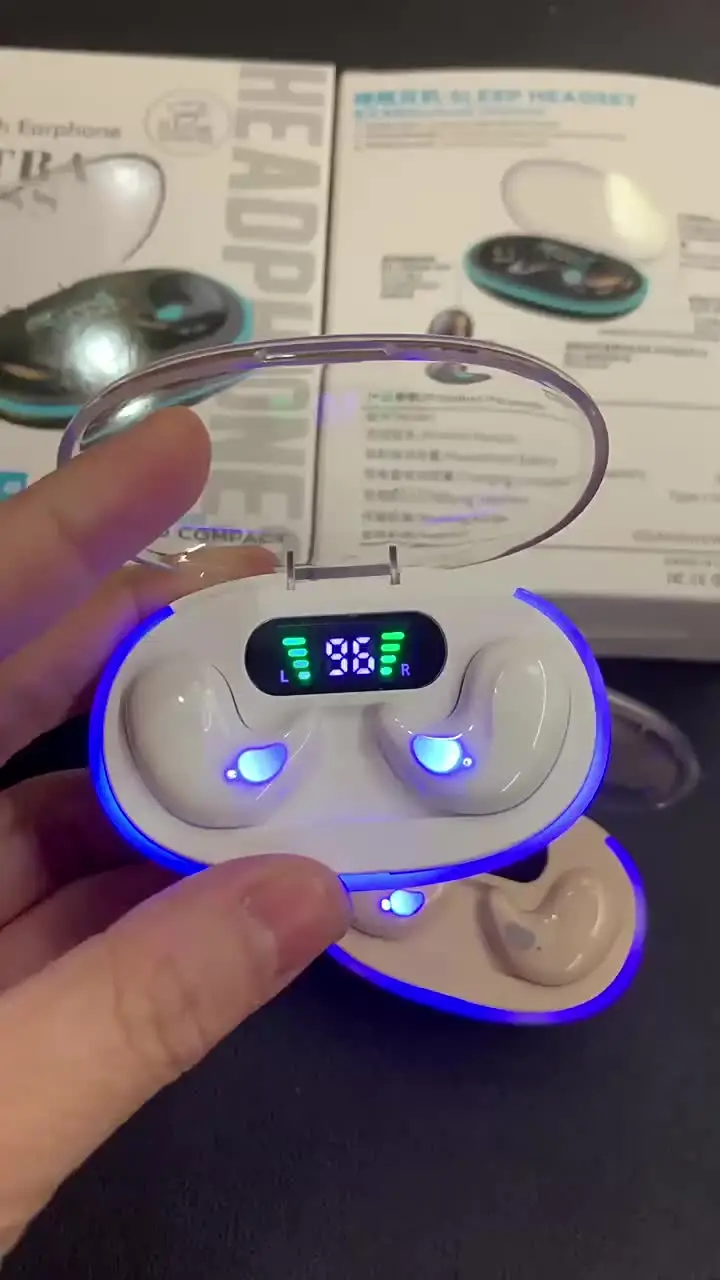
Video 10.1: Product overview and demonstration of features.