
1. Introduction
This manual provides essential information for the safe and efficient use of the Aideepen 350W AC-DC Switching Power Supply Module. This module is designed with a wide-voltage input range (AC 170-260 V) and delivers a stable DC 24V output, adjustable within ±2V. It is capable of providing up to 350W of power at 15A, making it suitable for a variety of high-performance applications.
The power supply incorporates an intelligent temperature control system, activating its cooling fan at 50°C and shutting down output at 90°C for protection. Multiple safety features, including overvoltage, overcurrent, short-circuit, and overload protection, ensure reliable and continuous operation.
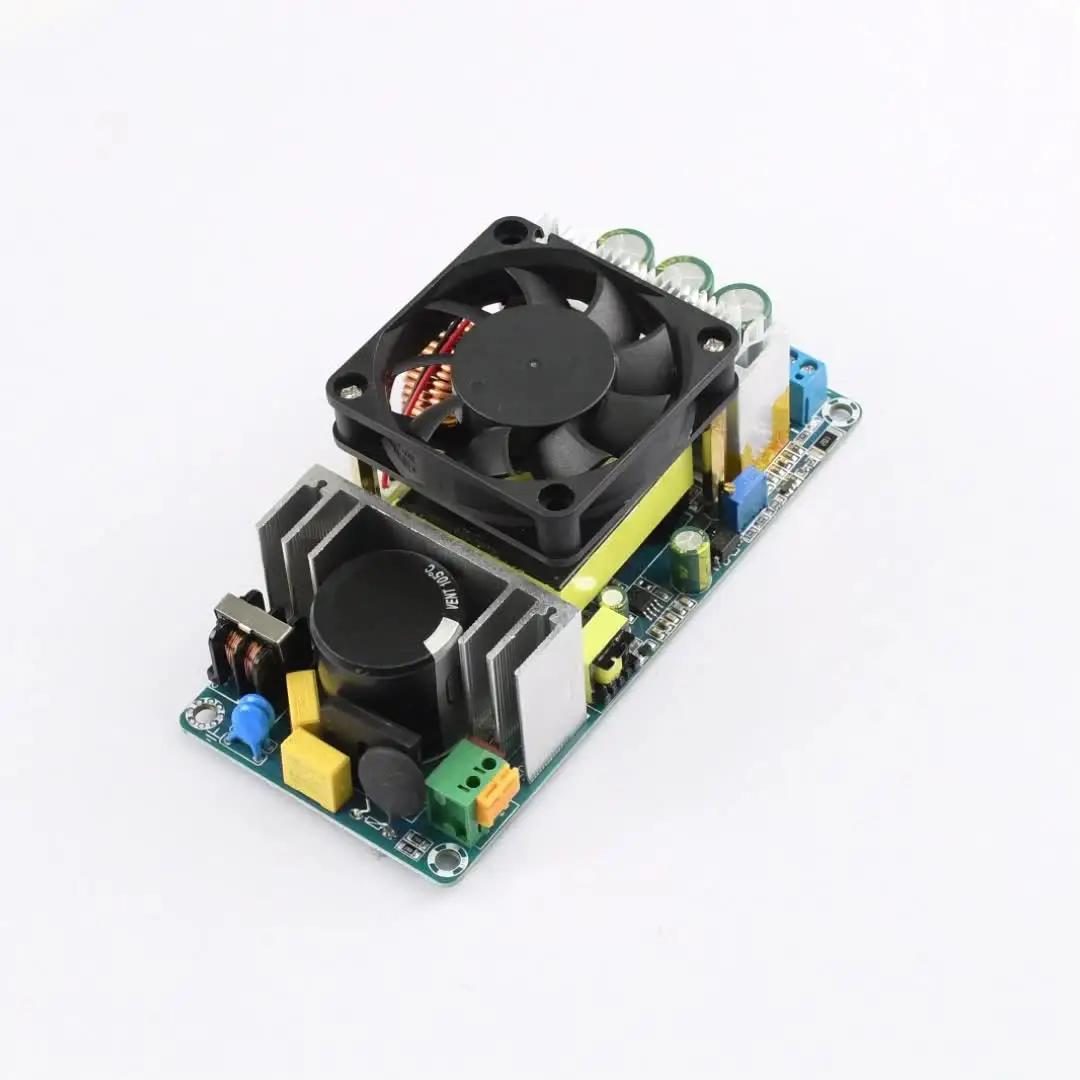
2. Product Features
- Wide Input Voltage Range: AC 170-260 V, ensuring compatibility with diverse power supply environments.
- Adjustable Output Voltage: DC 24 V output with ±2 V fine-tuning capability to meet specific device requirements.
- High Output Power: 350 W output power for stable operation of high-performance equipment.
- Advanced Thermal Protection: Integrated fan activates at temperatures above 50°C, and output ceases at temperatures exceeding 90°C to prevent damage.
- Comprehensive Protection: Includes overvoltage, overcurrent, short-circuit, and overload protection for enhanced safety and reliability.
- Broad Applications: Ideal for industrial automation, scientific research equipment, LED lighting, and consumer electronics.

3. Specifications
| Parameter | Value |
|---|---|
| Product Name | Switching Power Supply Module |
| Input Voltage | AC 170-260 V |
| Output Voltage | DC 24 V (Adjustable ±2 V) |
| Output Current | 15 A |
| AC Frequency | 50 Hz / 60 Hz |
| Output Power | 350 W |
| Protection Features | Overvoltage, Overcurrent, Short Circuit, Overload |
| Overall Dimensions | 146 x 70 x 55 mm |


4. Setup Instructions
4.1 Safety Precautions
- Ensure the power supply is disconnected from the main AC power before making any connections.
- All wiring should be performed by qualified personnel.
- Verify input and output voltage/current ratings match your application requirements.
- Proper grounding is essential for safety.
4.2 Wiring Connections
Refer to the diagram below for proper wiring of the power supply module. Ensure all connections are secure and correctly polarized.

- 220V AC Input: Connect your AC power source (170-260 V) to the designated input terminals.
- Ground Wire: Connect the ground wire to the appropriate terminal for safety.
- DC Voltage Output Terminals: Connect your load to these terminals. Ensure correct polarity (positive and negative).
- 12V Fan Connector: This connector is for the integrated cooling fan.
4.3 Output Voltage Adjustment
The output voltage can be fine-tuned within ±2 V of the nominal 24 VDC. Use a small screwdriver to carefully adjust the precision voltage trimming potentiometer. Monitor the output voltage with a multimeter during adjustment to avoid over-voltage to your connected devices.

5. Operating Instructions
5.1 Powering On
Once all connections are securely made and verified, connect the AC input to the main power source. The module will power on and begin supplying DC 24V to the connected load.
5.2 Thermal Management
The power supply module features an intelligent temperature control system:
- The cooling fan automatically activates when the module's temperature exceeds 50°C.
- If the temperature continues to rise and reaches 90°C, the module will automatically stop outputting power to prevent damage.
- It is crucial to ensure adequate ventilation around the module to facilitate proper cooling. The output power is measured with the fan running; otherwise, the power transistor may overheat, triggering thermal protection and causing the unit to stop outputting power.

5.3 Protection Features
The module is equipped with the following protection mechanisms:
- Overvoltage Protection: Safeguards against excessive output voltage.
- Overcurrent Protection: Prevents damage from excessive output current.
- Short-Circuit Protection: Automatically shuts down in case of a short circuit at the output.
- Overload Protection: Protects the module from damage due to excessive load.
6. Maintenance
The Aideepen 350W AC-DC Switching Power Supply Module is designed for reliable operation with minimal maintenance. However, adhering to the following guidelines can prolong its lifespan:
- Cleaning: Periodically inspect the module for dust accumulation, especially on the fan and heatsinks. Use compressed air or a soft brush to gently remove dust. Ensure the power supply is disconnected before cleaning.
- Environmental Conditions: Operate the module within its specified temperature and humidity ranges. Avoid exposure to moisture, corrosive gases, or excessive vibrations.
- Ventilation: Always ensure proper airflow around the module. Do not block the fan or heatsink fins.
7. Troubleshooting
7.1 No Output Power
- Check AC Input: Verify that the AC input voltage is within the 170-260 V range and properly connected.
- Check Connections: Ensure all wiring, especially output connections, are secure and correct.
- Overload/Short Circuit: Disconnect the load and check if the power supply resumes operation. If it does, the load might be drawing too much current or have a short circuit.
- Thermal Protection: If the module is excessively hot, it might have triggered thermal protection. Allow it to cool down and ensure proper ventilation.
7.2 Fan Not Running
- The fan is temperature-controlled and will only activate when the module's temperature exceeds 50°C. If the module is cool, the fan will not run.
- If the module is hot (above 50°C) and the fan is not running, check for obstructions or damage to the fan.
8. User Tips
- 127V Operation: This power supply is designed for 220V (170-260V) input. It may not handle even low loads (e.g., 30W) at 127V. If operating in a 127V environment, an external voltage converter is recommended to ensure proper functionality and prevent damage.
- Fan Operation is Crucial: The module relies on its fan for cooling, especially under continuous high-power operation. Ensure the fan is always able to run freely and is not obstructed. Continuous operation without the fan at high temperatures will lead to thermal protection shutdown.
9. Warranty and Support
For any technical assistance or support inquiries, please refer to the seller's contact information or the official product page. A detailed user manual in PDF format is also available for download, providing additional guidance and information. You can view the user manual PDF here.