
1. Product Introduction
Thank you for choosing the abay F9 Wireless Straight Hair Comb. This portable, cordless hair straightening brush is designed for easy styling without frizz, offering multi-level temperature regulation and long-lasting shaping. It combines the functions of a straightener and a comb, allowing for smooth styling without pulling or damaging hair.

Figure 1: Product overview highlighting smooth, damage-free styling.

Figure 2: Key features including multi-level temperature regulation and frizz control.
2. Setup and First Use
2.1 Package Contents
Upon unboxing, please ensure all items are present:
- Wireless Straight Hair Comb (Model F9)
- USB Type-C Charging Cable
- User Manual
- Hair clips (may vary)
- Comb (may vary)
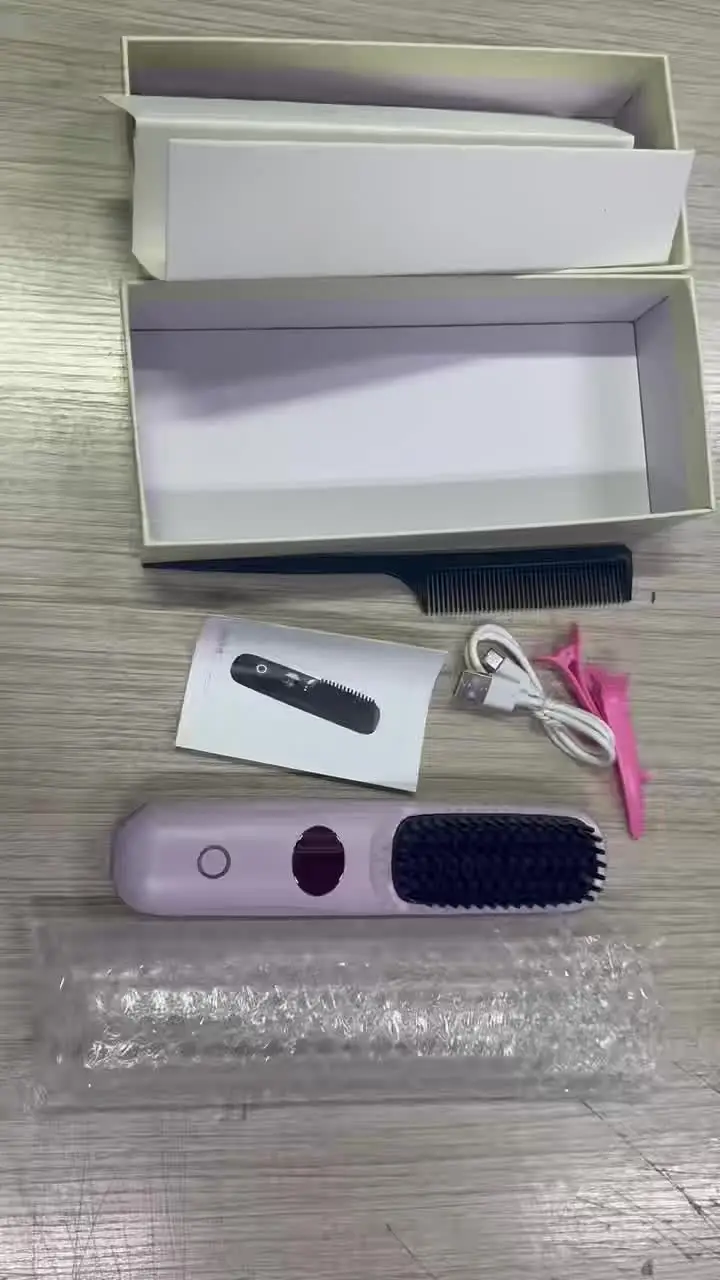
Video 1: Unboxing and initial overview of the Cordless Hair Straightener Brush.
2.2 Charging the Device
Before first use, fully charge the device. The product takes approximately 3-5 hours to charge from 0-100% battery level. Charging time may vary slightly depending on the charging adapter used.
- Connect the USB Type-C charging cable to the charging input port on the device.
- Plug the other end of the cable into a suitable USB power source (e.g., wall adapter, computer USB port).
- While charging, the display screen lights up and the battery level indicator flashes.
- Once fully charged, the battery level indicator will show 100%.
- The product cannot be used while charging.

Figure 3: Type-C charging port for convenient charging.
3. Operating Instructions
3.1 Pre-Styling Preparation
- Wash and blow dry your hair thoroughly until it is smooth and free from tangles.
- Ensure your hair is completely dry before using the brush. Styling on wet hair may not achieve the desired effect.
- For longer-lasting styles, you may apply a small amount of hair gel or heat protectant.
3.2 Button and Display Functions
- Power On/Off: Press and hold the power button for 2 seconds. The display screen will light up.
- Temperature Adjustment: Short press the power button to cycle through temperature settings.
- Temperature Display: The display screen shows the current temperature in real-time during heating or cooling. It stops jumping once the set temperature is reached.
- Automatic Shut-off: The device is equipped with a 15-minute automatic shut-off feature for safety and energy saving. To restart, press and hold the power button for 2 seconds.
- Low Battery Indicator: When the battery level is low, the battery indicator on the display screen will flash.
3.3 Temperature Selection Guide
Choose the appropriate temperature setting based on your hair type:
- 160°C (285°F): Suitable for bleached, damaged, or fine soft hair.
- 180°C (320°F): Suitable for ordinary or slightly curly hair texture.
- 200°C (375°F): Suitable for severely curly, coarse, and hard hair.

Figure 4: Temperature settings for different hair types.
3.4 Straightening Hair
- Power on the device and select your desired temperature.
- Allow the brush to heat up to the set temperature.
- Hold the handle firmly and comb through sections of your hair slowly from root to tip.
- Ensure a safe distance between the heating teeth and your skin or eyes.
- Repeat until desired straightness is achieved.

Figure 5: The ceramic glaze heating comb teeth ensure efficient styling.
4. Maintenance
- Ensure the device is turned off and cooled down before cleaning.
- Wipe the surface of the brush with a soft, dry cloth.
- Do not use abrasive cleaners or immerse the device in water.
- Store the device in a cool, dry place away from direct sunlight and moisture.
- If not used for a long period, charge the device periodically to maintain battery health.
5. Troubleshooting
- Device not turning on: Ensure the device is fully charged. Press and hold the power button for 2 seconds.
- Not heating up: Check if the device is powered on and the temperature is set. If the battery is low, it may not heat effectively; charge the device.
- Poor styling results: Ensure hair is completely dry and detangled. Adjust the temperature setting according to your hair type.
- Battery not holding charge: Ensure you are using the original charging cable and a compatible power adapter. If the issue persists, contact customer support.
6. Specifications
| Feature | Specification |
|---|---|
| Product Name | Wireless Straight Comb |
| Model | F9 |
| Rated Input | 5V 1-2A |
| Rated Power | 35W |
| Temperature Range | 160°C - 200°C (285°F - 375°F) |
| Working Time | Approximately 30 minutes |
| Voltage | 100-240V (Dual voltage) |
| Power Source | Dry Battery |
| Material | Plastic |
| Size | 10*10*10cm |
7. Warranty and Support
For warranty information or technical support, please refer to the seller's policy or contact the point of purchase. Keep your proof of purchase for any warranty claims.