

Introduction
Thank you for choosing the 7artisans 35mm F1.4 III Full Frame Manual Focus Prime Lens. This manual provides essential information for the safe and effective use of your new lens. Please read it thoroughly before use and keep it for future reference.
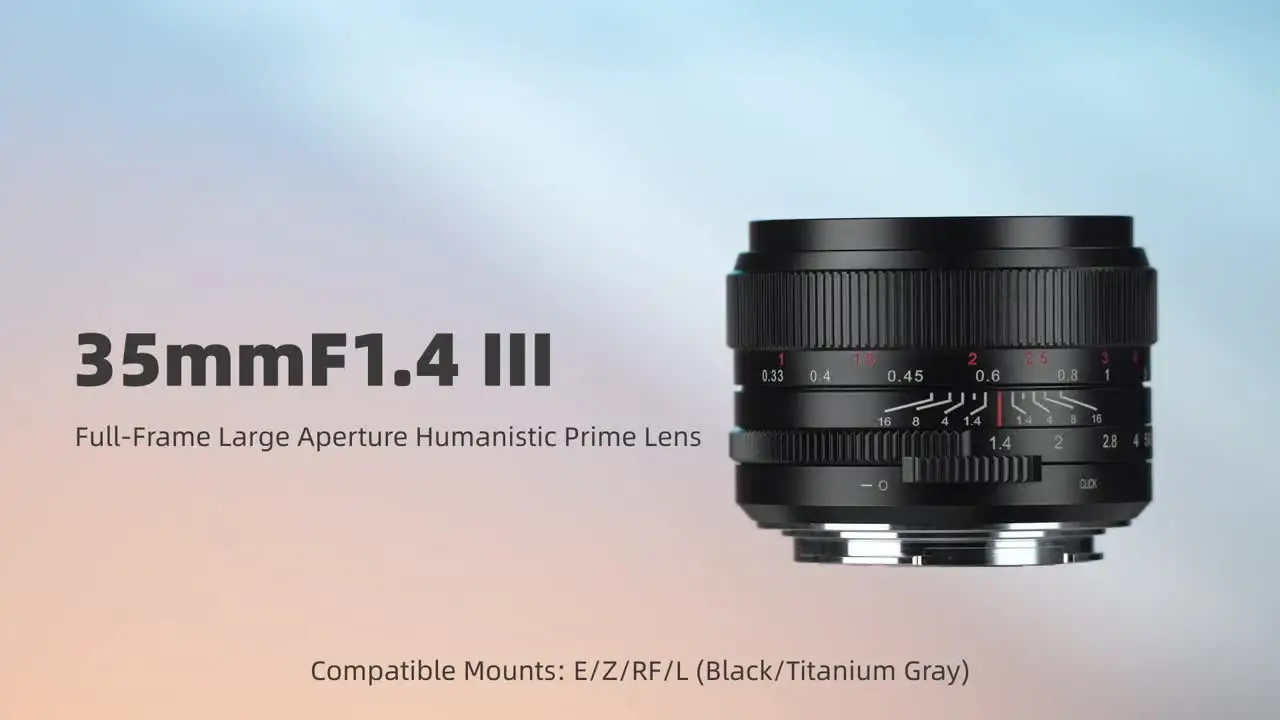
This lens is designed for full-frame mirrorless cameras, offering a versatile 35mm focal length and a wide F1.4 aperture, ideal for various photography styles including humanities, street, and indoor portraits. Its humanistic perspective closely resembles the field of view of the human eye, providing immersive and lifelike images.
Safety Precautions
- Do not look at the sun or any bright light source through the lens or camera, as this could impair your vision.
- Do not leave the lens in direct sunlight without a cover, whether mounted on the camera or not, as the lens could focus sunlight and cause a fire.
- Keep the lens out of reach of children to prevent accidental injury.
- Do not disassemble the internal parts of the product.
- Avoid impact on the lens or direct exposure to extreme heat, cold, or humid environments.
- The lens is not waterproof; exercise caution when using it on rainy days or near water sources. Internal parts, lens, and electronic components may be irreparably damaged if exposed to water.
Package Contents
The package typically includes:
- 7artisans 35mm F1.4 III Lens
- Front Lens Cap
- Rear Lens Cap
- User Manual (this document)
Setup
Attaching the Lens
- Align the mounting mark on the lens with the corresponding mark on your camera body.
- Rotate the lens clockwise until you hear a "click." This indicates the lens is securely in place.
Refer to your camera's user manual for detailed instructions on mounting and removing lenses specific to your camera model.
Detaching the Lens
- Press and hold the lens release button on your camera body.
- Rotate the lens counter-clockwise until it can be removed from the camera body.
- After detaching, place the lens with its rear element facing upward to protect the surface and electronic contacts from scratches.
Mount Compatibility
This lens is available for various full-frame mirrorless camera mounts:
- Nikon Z (Z50, ZFC, etc.)
- Canon RF (EOS-R, etc.)
- L-Mount (Leica SL, Sigma FP, etc.)
- Sony E-mount (FE) (Alpha 7 series, etc.)

Image: The 7artisans 35mm F1.4 III lens mounted on Canon RF, L-Mount (Lumix), Sony E, and Nikon Z cameras.
Operation
Focusing (Manual Focus)
This is a manual focus lens. To achieve sharp focus:
- Set your camera to manual focus (MF) mode.
- Look through the viewfinder or use your camera's live view screen.
- Rotate the focus ring on the lens until your subject appears sharp. Many cameras offer focus peaking or magnification aids to assist with manual focusing.

Image: A detailed view of the lens's focus and aperture rings, indicating manual controls.
Aperture Control
The lens features a switchable aperture mechanism, allowing you to toggle between a clicked aperture and a de-clicked, smooth aperture. This provides tactile feedback for precise control in still photography and seamless transitions in video recording.
- Clicked Aperture: Provides distinct stops (clicks) at each aperture value (F1.4 to F16), useful for photography where precise aperture settings are desired.
- De-clicked Aperture: Offers smooth, stepless aperture changes, ideal for video recording to avoid audible clicks during adjustments.

Image: A close-up of the lens highlighting the de-/clicked aperture toggle switch.
Optical Features
- Multi-Layer MC Coating: Reduces light reflection, improves light transmission, eliminates vignetting and ghosting caused by reflections, and enhances image sharpness.
- Full-Frame Design: Optimized for full-frame mirrorless cameras, ensuring high image quality across the entire sensor.
- High Resolution: Designed to deliver sharp and detailed images.
- 10 Diaphragm Blades: Contributes to a smooth and pleasing bokeh (background blur).
- Optical Structure: Features 7 elements in 5 groups, including Extra-low Dispersion and High-Refraction elements for excellent dispersion control and sharpness.

Image: The front element of the lens, illustrating the multi-layer MC coating.
Product Overview Video
Video: A promotional video showcasing the features and capabilities of the 7artisans 35mm F1.4 III lens, including its design, coating, and sample images.
Maintenance
Cleaning
- Do not touch the lens contacts directly with your hands.
- If the lens gets dirty, use a lens blower to remove dust.
- Gently wipe the lens with a clean, soft lens cloth.
- Do not use any organic solvents, such as thinner or gasoline, to clean the lens.
Storage
- When not in use, always keep the front and rear lens caps on the lens.
- For long-term storage, keep the product in a dry, cool, and well-ventilated place, preferably in a moisture-proof box, to prevent mold growth.
Troubleshooting
If you encounter any issues with your lens, please consider the following:
- Unsharp Images: Ensure your camera is set to manual focus (MF) and that you are accurately focusing using your camera's focus aids (e.g., focus peaking, magnification).
- Dust on Lens: Use a lens blower to remove dust. Avoid wiping with abrasive materials.
- Lens Not Mounting: Double-check that the lens mount type matches your camera and that you are aligning the mounting marks correctly before rotating.
- Aperture Ring Issues: Verify the clicked/de-clicked switch is in the desired position.
For persistent issues, please refer to the warranty information for support.
Specifications
| Feature | Specification |
|---|---|
| Model | 35mm F1.4 III |
| Focal Length | 35mm |
| Maximum Aperture | f/1.4 |
| Minimum Aperture | F16.0 |
| Aperture Blades | 10 Blades |
| Optical Structure | 7 elements in 5 groups (including Extra-low Dispersion and High-Refraction elements) |
| Angle of View | 42° |
| Focus Mode | Manual Focus (MF) |
| Focusing Distance | 0.3m ~ ∞ |
| Lens UV Filter Size | 52mm |
| Weight | Approx. 274g (201g-300g range) |
| Lens Type | Fixed Focus Lens / Standard Prime |
| Full Frame Support | Yes |
| Applicable Camera Specifications | Full Frame Mirrorless Camera |
| Launch Date | 2024 |

Image: Detailed lens specifications, optical structure diagram, and MTF (Modulation Transfer Function) curve.
User Tips
- Mastering Manual Focus: Practice is key for manual focus lenses. Utilize your camera's focus peaking and magnification features to ensure critical sharpness, especially when shooting wide open at F1.4.
- Creative Bokeh: The F1.4 aperture and 10 diaphragm blades allow for beautiful, creamy bokeh. Experiment with subject-to-background distance to achieve varying degrees of blur.
- Street Photography: The 35mm focal length is often considered ideal for street photography due to its natural perspective. Pre-focusing to a common distance (zone focusing) can help capture fleeting moments quickly.
- Low Light Performance: The wide F1.4 aperture excels in low-light conditions, allowing for faster shutter speeds or lower ISO settings.
Warranty and Support
This product comes with a warranty. Please refer to the warranty card included in your package for specific terms and conditions. Generally, consumers can enjoy free maintenance service within one year from the date of purchase for product quality problems under normal use (non-human damage), provided the product has not been disassembled or repaired by unauthorized personnel.
To claim warranty service, you must provide the warranty card and a valid proof of purchase. If these documents are not provided or the information is inconsistent, the company reserves the right to refuse free maintenance services, though paid services may be available.
The warranty does not cover damages caused by:
- Unauthorized disassembly or repair.
- Failure to operate according to the user manual.
- Improper use or storage (e.g., physical impact, water damage, improper cleaning).
- Irresistible factors such as natural disasters.
Free maintenance service does not include transportation costs. The company does not provide on-site service.
For further support or inquiries, you may contact 7artisans via their official website or the contact information provided on the warranty card.
A digital version of the user manual (PDF) is available for reference. You can find it by searching for the product model on the manufacturer's support page.