
1. Introduction
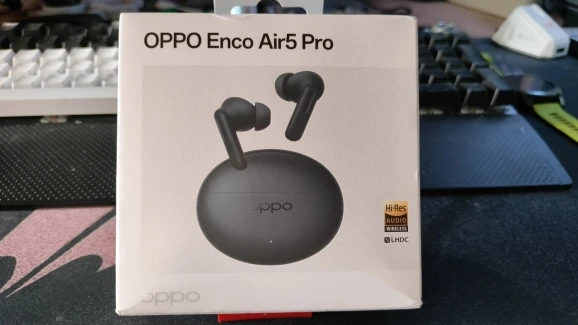
Thank you for choosing the OPPO Enco Air 5 Pro Wireless Earbuds. These earbuds offer an immersive audio experience with advanced features such as 55dB Active Noise Cancellation (ANC), long-lasting battery life, and a comfortable, lightweight design. This manual will guide you through the setup, operation, and maintenance of your new earbuds.

2. Package Contents
Please check the box for the following items:
- OPPO Enco Air 5 Pro Wireless Earbuds (L/R)
- Charging Case
- Silicone Earbuds (S, M, L sizes - M size pre-mounted)
- User Manual
- Warranty Card
Note: A Type-C charging cable and power adapter are not included in the accessory package.
3. Setup
3.1 Initial Charging
Before first use, fully charge the earbuds and charging case. Connect a USB Type-C cable (not included) to the charging port on the case and a power source. The charging indicator light will show the charging status.
- Charging Interface: USB Type-C
- Wired Charging Time (Case + Earphones): Approximately 90 minutes
3.2 Ear Tip Selection and Fit
For optimal sound quality, noise cancellation, and comfort, choose the ear tips that best fit your ears. Experiment with the S, M, and L sizes provided.
- Gently insert the earbuds into your ears and rotate them slightly to ensure a secure and comfortable fit.
- The earbuds feature an earphone fit detection system to help match optimal ear tips.
3.3 Pairing with Your Device
- Open the charging case with the earbuds inside. The earbuds will automatically enter pairing mode (or press and hold the function button on the case for a few seconds until the indicator light flashes).
- On your device (smartphone, tablet, etc.), go to Bluetooth settings and turn Bluetooth on.
- Search for available devices and select "OPPO Enco Air 5 Pro" from the list.
- Once connected, the indicator light on the case will turn solid, and you will hear a confirmation tone.
- Bluetooth Version: 6.0
- Transmission Radius: 10 meters
- Dual Connection: Yes, supports simultaneous connection to two devices.
- Latency in Normal Mode: Approximately 200 milliseconds
4. Operating Your Earbuds
4.1 Touch Controls
The earbuds feature touch-sensitive areas for controlling playback, calls, and noise cancellation modes. (Specific gestures may vary; refer to the quick start guide or OPPO HeyMelody app for customization options).
4.2 Active Noise Cancellation (ANC)
The OPPO Enco Air 5 Pro features advanced ANC with a depth of 55dB. You can switch between different noise cancellation modes:
- Intelligent Dynamic Noise Reduction: Automatically adjusts noise cancellation based on your environment.
- Deep Noise Reduction: For highly noisy environments.
- Moderate Noise Reduction: For moderately noisy environments.
- Light Noise Reduction: For quieter environments.
- Transparency Mode: Allows you to hear your surroundings without removing the earbuds.
4.3 Call Functions
The earbuds are equipped with Sanmal AI call noise reduction to ensure clear voice calls even in noisy environments.
4.4 Audio Features
- Sound Unit: 12mm dynamic unit for rich and clear audio.
- Frequency Response Range: 20 Hz - 40 KHz.
- Spatial Audio: Enjoy an immersive, three-dimensional sound experience.
- Bilateral Stereo: Both earbuds deliver stereo sound.
5. Maintenance
5.1 Cleaning
- Regularly clean the earbuds, ear tips, and charging contacts with a soft, dry, lint-free cloth.
- Remove ear tips and clean them with water and mild soap if necessary, ensuring they are completely dry before reattaching.
- Do not use harsh chemicals or abrasive materials.
5.2 Storage
- When not in use, store the earbuds in their charging case to protect them and keep them charged.
- Store in a cool, dry place away from extreme temperatures and direct sunlight.
5.3 Water and Dust Resistance
The earbuds have an IP55 dustproof and waterproof rating, making them resistant to sweat and light splashes. The charging case is not water-resistant. Avoid submerging the earbuds in water.
6. Troubleshooting
6.1 Earbuds Not Pairing
- Ensure the earbuds are charged.
- Place earbuds in the case, close, then open the lid to re-enter pairing mode.
- Turn off and on Bluetooth on your device.
- Forget the device in your Bluetooth settings and try pairing again.
6.2 No Sound or Low Volume
- Check the volume level on both your device and the earbuds.
- Ensure earbuds are properly seated in your ears and ear tips provide a good seal.
- Clean any debris from the earbud speakers.
6.3 Charging Issues
- Ensure the charging cable and power adapter are working correctly.
- Clean the charging contacts on both the earbuds and the case.
- Ensure earbuds are correctly placed in the charging case.
6.4 Poor Noise Cancellation
- Ensure you have selected the correct size ear tips for a good seal.
- Check that ANC is enabled and set to the appropriate mode for your environment.
7. Specifications
| Feature | Specification |
|---|---|
| Product Name | OPPO Enco Air 5 Pro |
| Brand | OPPO |
| Headset Model | ETEL1 |
| Charging Case Model | ETELT |
| Headphone Type | Wireless In-ear |
| Noise Reduction | ANC Active Noise Cancellation |
| Noise Reduction Depth | 55 dB |
| Noise Cancellation Modes | Intelligent Dynamic, Deep, Moderate, Light, Transparency |
| Battery Life (Total with Case, ANC off, AAC) | 54 hours |
| Battery Life (Earbuds only, ANC off, AAC) | 13 hours |
| Battery Life (Total with Case, ANC on, AAC) | 29 hours |
| Battery Life (Earbuds only, ANC on, AAC) | 7 hours |
| Battery Life (Total with Case, ANC on, LHDC) | 26 hours |
| Battery Life (Earbuds only, ANC on, LHDC) | 6 hours |
| Charging Case Battery Capacity | 530 mAh |
| Wired Charging Time (Case + Earphones) | Approx. 90 minutes |
| Charging Interface | USB Type-C |
| Bluetooth Version | 6.0 |
| Transmission Radius | 10 meters |
| Latency (Normal Mode) | Approx. 200 milliseconds |
| Sound Unit | 12mm Dynamic Unit |
| Frequency Response Range | 20 Hz - 40 KHz |
| Number of Microphones | 3 |
| Call Function | Sanmal AI Call Noise Reduction |
| Spatial Audio | Yes |
| Dustproof and Waterproof Rating | IP55 (Earbuds only) |
| Net Weight (Whole Machine) | 43.0 g (±1 g) |
| Net Weight (Single Earphone) | 4.4 g (±0.2 g) |
| Net Weight (Charging Case) | 34.2 g (±1 g) |
| Dimensions (Complete Machine) | 65.36 × 50.00 × 24.81 mm |
| Material | Plastic |
| Features | Waterproof, With microphone |
| Codecs | AAC, SBC |

8. User Tips
- Optimal Fit: Always ensure you select the correct ear tip size for your ears. A good seal is crucial for effective noise cancellation and rich bass response.
- Firmware Updates: Check the OPPO HeyMelody app regularly for firmware updates to ensure your earbuds have the latest features and performance improvements.
- Compatibility: If purchasing outside of China, verify if the product is a global version for full compatibility with local services and apps.
9. Warranty and Support
Your OPPO Enco Air 5 Pro earbuds come with a manufacturer's warranty. Please refer to the included Warranty Card for detailed terms and conditions. For technical support, troubleshooting assistance, or warranty claims, please contact your local OPPO customer service or the authorized retailer where you purchased the product.