
Introduction
Thank you for choosing the INPHIC YC-CYBER tri-mode game mouse. This manual provides detailed instructions for setup, operation, maintenance, and safety to ensure optimal performance and longevity of your device. Please read this guide carefully before use and retain it for future reference.
Product Overview
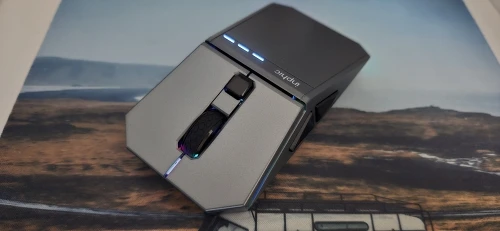
Familiarize yourself with the various components and controls of your INPHIC YuanChuang-Cyber mouse:

- Left button: Standard left-click function.
- Right button: Standard right-click function.
- Middle button & Scroll wheel: For scrolling and middle-click actions.
- Forward button: Navigates forward in web browsers or applications.
- Backward button: Navigates backward in web browsers or applications.
- DPI button: Adjusts the mouse's sensitivity (DPI).
- 2.4G indicator light: Indicates 2.4G wireless connection status.
- BT indicator light: Indicates Bluetooth connection status.
- Bluetooth pairing button & Report rate button: Used for Bluetooth pairing and cycling through report rates.
- Mode switch: Toggles between 2.4G, Bluetooth, and Off modes.
- 2.4G receiver: USB dongle for 2.4G wireless connection.
- Battery indicator light: Displays the current battery level.
Setup Instructions
1. Wired Mode & Charging
To use the mouse in wired mode or to charge it, connect the mouse to your computer using a USB-A to USB-C data transfer cable. Note: The included cable in the package supports charging only and does not transmit data. To use the wired mode, you must purchase a separate USB-C data cable or use another compatible USB-C data cable. When in wired mode, the mouse battery can be charged simultaneously.

2. 2.4G Wireless Mode
- Take out the 2.4G receiver from the bottom of the mouse.
- Insert the receiver into an available USB port on your computer.
- Turn the mode switch on the bottom of the mouse to the '2.4G' position. The mouse should connect automatically.
3. Bluetooth Mode
- For first-time Bluetooth connection, turn the mode switch on the bottom of the mouse to the 'BT' position.
- Within 2 minutes, pair the mouse with your computer via Bluetooth settings.
- If the mouse has been previously paired with your computer, it will automatically reconnect when the switch is set to 'BT'.
Reset Bluetooth Pairing
In Bluetooth mode, press and hold the PAIR button on the bottom of the mouse until the indicator light flashes rapidly. The mouse will then enter Bluetooth pairing mode, allowing it to connect to new devices.
Operating System Compatibility
Bluetooth mode is supported on Windows 8/10, macOS, Android (5.0 and above), and iOS (13.0 and above). Windows 7 and earlier systems require the use of 2.4G wireless mode.
Operation
DPI Adjustment
The mouse features six levels of DPI adjustment, ranging from 800 to 12800 DPI. In wired and 2.4G modes, short press the 'Report Rate/DPI Adjust' button on the bottom of the mouse to cycle through 125-250-500-1000Hz report rates. After successful switching, the decorative light will change color and flash quickly 4 times. The DPI can also be adjusted via the driver software.
Note: In Bluetooth mode, the report rate is fixed at 133Hz and cannot be adjusted.

RGB Lighting Effects
The mouse features a dual-zone RGB light array with a front guide light strip and a rear energy halo. This customizable lighting effect supports multiple dynamic modes and 16.8 million color selections, enhancing your gaming or work atmosphere.

Low-Noise Micro-Switch Buttons
The left and right buttons are equipped with specially adjusted low-noise micro-movements. This design retains clear tactile feedback while significantly reducing clicking sound, making it ideal for quiet environments.

Power Management
The mouse is equipped with a 500mAh large-capacity battery. Combined with intelligent low-power technology, it provides long-lasting battery life, allowing for continuous use for several days on a single charge.
The mouse will enter sleep mode if it remains stationary for 0.5 seconds to 10 minutes. It can be woken up by moving the mouse or pressing any key. If the mouse remains stationary for 10 minutes, it will enter hibernation mode and can only be woken up by pressing any key.

User Tips
- The mouse features a quiet click sound, which is a common characteristic of INPHIC products.
- The grip is generally comfortable, and the button response is excellent for most users.
- For advanced customization, including DPI settings and macros, download the official driver software.
- Be aware that the mouse is longer than some standard mice, and it may take some time to get accustomed to its shape.
- Some users have noted that the angled part of the mouse can cause discomfort on the underside of the palm during prolonged use.
- The RGB lighting can be controlled via the mouse driver.
Specifications
| Feature | Specification |
|---|---|
| Model Number | YC-CYBER |
| Brand Name | inphic |
| Connection Method | Wired / 2.4G Wireless / Bluetooth 5.0 |
| Built-in Battery Voltage | 3.7V |
| Rated Input | 5V=500mA |
| Tracking System | Optical |
| DPI (Resolution) | 800-12800 DPI (Adjustable via driver) |
| Report Rate | 125/250/500/1000Hz (Bluetooth fixed at 133Hz) |
| Number of Rollers | 1 pcs |
| Number of Buttons | 6 |
| Hand Orientation | Right |
| Movement Speed (IPS) | 120 |
| Battery Capacity | 500mAh |
| Weight | 65.5 ± 3g |
| Size | 115 * 60 * 32mm |
| Operation Mode | Opto-electronic |
| Power Source | Rechargeable |
| Material | ABS |
| Certification | CE, RoHS |
| Operating System | Windows, macOS, iOS, Android |
Maintenance
Battery Care for Rechargeable Products
If the product will not be used for an extended period, fully charge the battery, turn off the power switch, and store the product in a cool, dry environment. To prevent damage to the rechargeable battery due to prolonged periods of disuse, charge the product once every 3 months.
Troubleshooting
Cursor Stuttering
If the mouse cursor stutters, it may be caused by a low battery. Please charge the mouse promptly. It is recommended to charge the mouse for at least two hours, until the battery indicator lights are all solid, before using it again.
Product Not Functioning Properly
If the product is not functioning as expected, please contact customer service for assistance. For any service or repairs, ensure the product is returned to the relevant INPHIC department.
Safety Precautions
Danger
- Do not immerse the product in any liquid.
- If the product is exposed to an environment beyond the established temperature range (0°C to 40°C, 40%-85% RH), immediately turn off the power switch (unplug USB cable for wired devices) until the temperature stabilizes within the specified range.
- Do not charge rechargeable products in hot or humid environments. Ensure the charging cable, mouse, and USB port are dry and free of debris during charging.
- If the product connection or charging cable sustains any damage, cease use immediately.
Warning
- Do not attempt to dismantle or repair the product yourself.
- This product is not recommended for unsupervised use by children. If children use this product, they must be supervised to ensure safe usage and to understand potential hazards. Do not allow children to charge or clean the product unsupervised.
- Prolonged repetition of single movements, improper computer setup, incorrect body posture, and other poor habits can lead to nerve, tendon, or muscle injuries. If you experience symptoms like pain, numbness, weakness, swelling, burning sensations, cramping, or stiffness, consult a qualified medical professional.
- This product does not contain any user-serviceable parts.
- Any modifications, alterations, or repairs to the product without explicit approval from INPHIC will void the product warranty and the user's right to operate the product.
Environmental Information
China RoHS Compliance
The following table indicates the presence of hazardous substances in the product components, compiled according to SJ/T 11364 regulations:
| Part Name | Lead (Pb) | Mercury (Hg) | Cadmium (Cd) | Hexavalent Chromium (Cr(VI)) | Polybrominated Biphenyls (PBB) | Polybrominated Diphenyl Ethers (PBDE) |
|---|---|---|---|---|---|---|
| Printed Circuit Board Assembly (PCBA) | X | O | O | O | O | O |
| Casing & Accessories | X | O | O | O | O | O |
| Battery | O | O | O | O | O | O |
| Metal Parts | O | O | O | O | O | O |
O: Indicates that the concentration of this hazardous substance in all homogeneous materials of this component is below the limit requirements of GB/T 26572.
X: Indicates that the concentration of this hazardous substance in at least one homogeneous material of this component exceeds the limit requirements of GB/T 26572. At present, there are no mature or alternative technologies available, and INPHIC will continue to strive to reduce the use of these substances through technological improvements.
Note: The hazardous substances exceeding the standard in this table do not affect the safe use and product quality. These substances are located inside the product, and there is no risk of leakage of toxic or harmful substances during normal use. They will not cause harm to the user. During the environmental protection use period of this product, the hazardous substances in the product will not leak and will not cause serious pollution to the environment.
Environmental Friendly Use Period (EFUP)
The EFUP for this product is 10 years, based on SJ/T 11364 "Requirements for Restriction of Hazardous Substances in Electrical and Electronic Products." This period is a reference standard and depends on the temperature and humidity conditions during normal operation of the product.
The "environmental friendly use period" is not a safe use period. It differs from the use period limited by electrical safety, electromagnetic safety, and other factors. When the product is properly disposed of after use, it is hoped that it will be handled in accordance with relevant laws and regulations for the recycling or reuse of electronic products.
Recycling
When disposing of batteries and electronic devices, they should not be treated as household waste. Instead, they should be handed over to government-designated recycling centers. This practice is conducive to recycling and environmental protection.
Warranty and Support
Contact Information
Manufactured by: INPHIC ELECTRONICS CO., LTD.
Producer: Dongguan INPHIC Electronics Co., Ltd.
Address: 24/F, Jinhua Building, Longfeng 3rd Road, Dalang Street, Longhua District, Shenzhen, Guangdong, China
Executive Standard: GB/T 26245-2010
Warranty Voidance
Any modifications, alterations, or repairs to the product without explicit approval from INPHIC will result in the user losing the right to operate the product and voiding the product warranty.
