
1. Introduction
Thank you for purchasing the SkyBeats LPO-L208 RGB Portable Wireless Bluetooth Speaker. This versatile device combines a high-quality Bluetooth speaker with a vibrant RGB camping lantern, designed for various outdoor and indoor activities. Please read this manual carefully before use to ensure proper operation and to maximize your enjoyment of the product.
This equipment has been tested and found to comply with the limits for a Class B digital device, pursuant to part 15 of the FCC Rules. These limits are designed to provide reasonable protection against harmful interference in a residential installation. This equipment generates, uses and can radiate radio frequency energy and, if not installed and used in accordance with the instructions, may cause harmful interference to radio communications. However, there is no guarantee that interference will not occur in a particular installation. If this equipment does cause harmful interference to radio or television reception, which can be determined by turning the equipment off and on, the user is encouraged to try to correct the interference by one or more of the following measures:
- Reorient or relocate the receiving antenna.
- Increase the separation between the equipment and receiver.
- Connect the equipment into an outlet on a circuit different from that to which the receiver is connected.
- Consult the dealer or an experienced radio/TV technician for help.
Important: Change or modifications not expressly approved by the manufacturer responsible for compliance could void the user's authority to operate the equipment.
2. Package Contents
Ensure all items are present in the box:
- 1 x SkyBeats LPO-L208 Audio System
- 1 x Lanyard (dual-purpose)
- 1 x Detachable Vertical Stand (Bracket)
- 1 x Type-C Charging Cable
- 1 x Instruction Manual

3. Product Overview
The SkyBeats LPO-L208 features a robust design with intuitive controls and versatile usage options.
3.1 Components and Controls

- Type-C Port: For charging the device.
- microSD (TF) Card Slot: For playing audio directly from a TF card.
- LED Camping Lantern: Provides illumination.
- Volume - Button: Short press to decrease volume; long press for previous track (in music mode).
- ON/OFF Button: Long press to power on/off. Short press to play/pause (in music mode).
- Volume + Button: Short press to increase volume; long press for next track (in music mode).
- Mode Button (M): Short press to switch between functional modes (TF card, Line in, USB, Wireless, FM). Long press for TWS pairing.
3.2 Versatile Usage
The speaker can be used in various configurations:
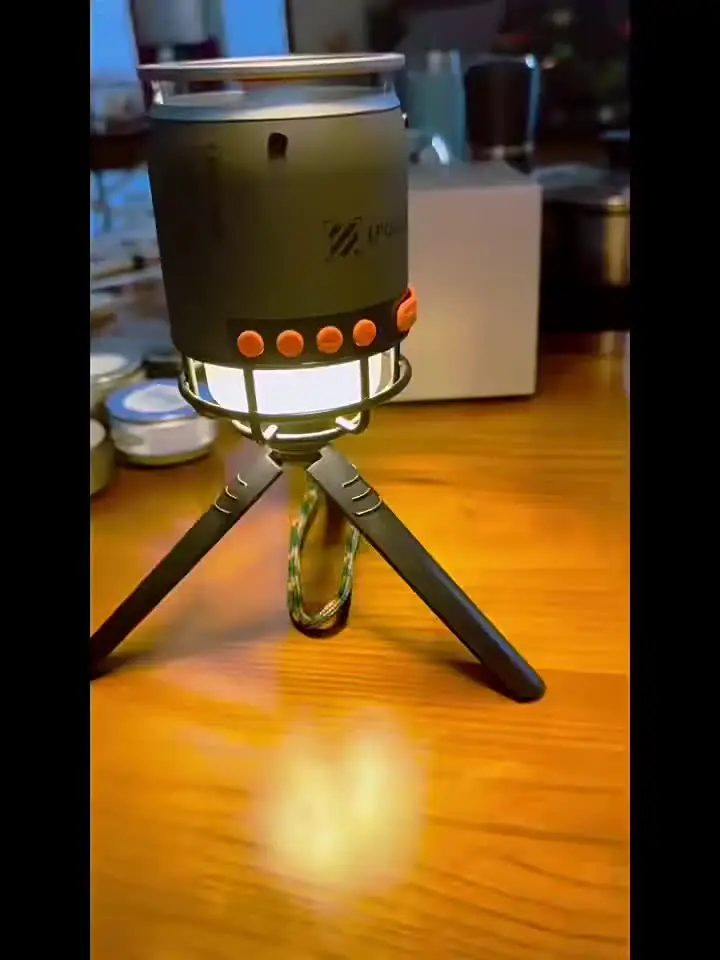
- Free-Standing: Use with the detachable tripod stand.
- Hang Mode: Attach the lanyard to hang it from a backpack clip or other fixtures.
- Portable: Compact design allows for easy handheld use.

4. Specifications
| Feature | Specification |
|---|---|
| Product Name | The Voyager Metal Speaker |
| Model Number | LPO-L208 |
| Bluetooth Version | BT5.4 |
| Bluetooth Name | GA-03 |
| Functional Features | Bluetooth playback, TF card, colorful lights, night lights |
| Speaker Output Power | 5W per speaker (10W total) |
| Impedance | 4 Ohm |
| Frequency Response | 120Hz-20KHz |
| Input Sensitivity | 42dB |
| Input Voltage | USB (5-20V DC) / 5V/1.5A (Charging) |
| Battery Capacity | 1600mAh (3.7V) |
| Charging Current | 500mA |
| Playback Time | Approx. 3-4 hours (at normal volume) |
| Standby Time | Approx. 18 hours |
| Wireless Range | 10m-20m |
| Signal-to-Noise Ratio (SNR) | >90dB |
| Product Dimensions | 74mm x 74mm x 106mm |
| Gross Weight | 327.5g per unit |
| Material | Metal + PC + ABS |
| Waterproof | Yes |
| Support Memory Card | Yes (TF Card) |
| Sound Mode | 3D Surround Sound Mode, Stereo Sound Mode |
| Active Noise-Cancellation | PASSIVE |

5. Setup
5.1 Initial Charging
Before first use, fully charge the speaker. Connect the provided Type-C charging cable to the speaker's Type-C port and the other end to a 5V/1.5A (or 5V/500mA minimum) USB power adapter (not included). The charging time is approximately 3-4 hours.
5.2 Power On/Off
Long press the ON/OFF button to power the speaker on or off.
5.3 Attaching the Stand/Lanyard
The detachable vertical stand can be screwed into the bottom of the speaker for free-standing use. The dual-purpose lanyard can be attached to the top ring for hanging or carrying.
6. Operating Instructions
6.1 Bluetooth Playback
1. Power on the speaker. It will automatically enter Bluetooth pairing mode (a blue indicator light may blink).
2. On your mobile device (smartphone, tablet, etc.), enable Bluetooth and search for available devices.
3. Select "GA-03" from the list of devices to pair. Once connected, you will hear a confirmation tone.
4. You can now play audio from your device through the speaker. Use the Volume +/- buttons on the speaker or your device to adjust the volume. Short press the ON/OFF button to play/pause. Long press Volume - for previous track, long press Volume + for next track.

6.2 TF Card / USB Playback
1. Insert a FAT32 formatted microSD (TF) card or USB drive containing MP3 audio files into the respective slot.
2. The speaker will automatically switch to TF card/USB mode and begin playing. If not, short press the Mode (M) button to cycle through modes until TF card/USB mode is active.
3. Use the Volume +/- buttons for volume control and track navigation (long press for next/previous track).

6.3 FM Radio Mode
1. Short press the Mode (M) button to switch to FM radio mode.
2. To auto-search for radio stations, short press the ON/OFF button. Press again to stop searching.
3. For better FM reception, insert the Type-C charging cable into the charging port; it acts as an antenna.
6.4 TWS (True Wireless Stereo) Function
1. Ensure both LPO-L208 speakers are powered on and not connected to any Bluetooth device.
2. On one of the speakers, long press the Mode (M) button for 2-3 seconds until you hear a prompt tone. The speakers will attempt to pair with each other.
3. Once successfully paired, one speaker's indicator light will stop blinking, indicating it is the primary speaker. You can then connect your mobile device to the primary speaker via Bluetooth.
6.5 Call Handling (in Bluetooth mode)
When a call comes in while connected via Bluetooth:
- Short press the ON/OFF button to answer the call hands-free.
- Short press the ON/OFF button again to hang up the call.
- Double-press the ON/OFF button to redial the last number.
6.6 Lighting Modes
The speaker features vibrant RGB lighting with three modes:
- Warm White Light: 3-level adjustable brightness.
- RGB Color Mode: Cycles through various colors.
- Red and Blue Mode (SOS): Flashing red and blue lights for warning or emergency signals.

7. Maintenance
- Keep the speaker away from extreme temperatures, direct sunlight, and dusty environments.
- Clean the device with a soft, dry cloth. Do not use abrasive cleaners or solvents.
- If the speaker will not be used for a long period, charge it fully and store it in a cool, dry place. Recharge every 3 months to prolong battery life.
- The speaker is waterproof; however, avoid submerging it in water for extended periods.
8. Troubleshooting
| Problem | Possible Solution |
|---|---|
| Speaker does not power on | Ensure the battery is charged. Connect to a power source and try again. |
| Cannot connect via Bluetooth | Ensure the speaker is in Bluetooth pairing mode. Turn off and on Bluetooth on your device. Move closer to the speaker. |
| No sound or low volume | Check volume levels on both the speaker and your connected device. Ensure the correct mode (Bluetooth, TF, AUX) is selected. |
| Poor FM radio reception | Insert the Type-C charging cable into the port to act as an antenna. Try moving to a different location. |
| TF card/USB drive not playing | Ensure the card/drive is formatted to FAT32 and contains MP3 files. Reinsert the card/drive. |
| TWS pairing fails | Ensure both speakers are not connected to any other Bluetooth device. Try pairing again, ensuring they are close to each other. |
9. User Tips
- Many users appreciate the robust build quality and attractive design of the LPO-L208. Its alloy body gives it a satisfying weight and premium feel.
- While the speaker provides decent sound for casual listening, some users find the audio quality to be subjective. If the sound doesn't meet your expectations for music, consider leveraging its excellent lighting features as a decorative piece or a camping lantern.
- The integrated lamp is a highlight, offering good illumination and contributing to the overall aesthetic.
10. Warranty and Support
For warranty information and technical support, please refer to the seller or the official SkyBeats website. Keep your purchase receipt as proof of purchase.