
1. Introduction
The TahLiTech V380 is a cutting-edge outdoor security camera designed to meet the demands of modern surveillance. Featuring dual 8 million pixel lenses, this camera captures crystal-clear 4K footage, providing a comprehensive view of your surroundings. Its 10X zoom capability allows for detailed observation from a distance. The camera's advanced night vision system, with optional infrared or full-color modes, ensures that your property is monitored 24/7, even in low-light conditions. Built for durability, the V380 is IP66 rated, making it suitable for all weather conditions.
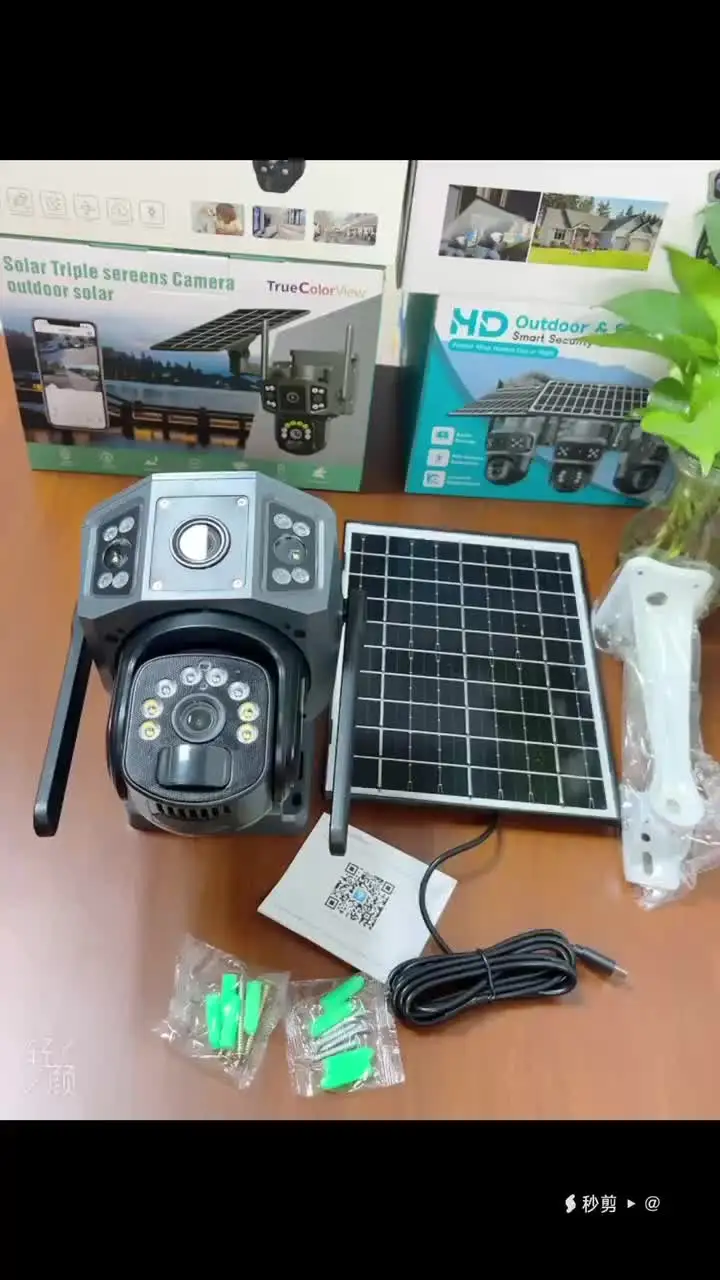
2. Package Contents
Please check the box for the following items:
- TahLiTech V380 Dual Lens Solar Security Camera
- Solar Panel with 1.8m Charging Line
- Solar Panel Bracket
- Antennas (2)
- User Manual (PDF available online)
- Screw Accessories for installation
- Charging Cable (USB)

3. Product Overview
Familiarize yourself with the components of your V380 camera:

- Solar Panel: For continuous power supply and battery charging.
- Solar Panel Bracket: Used to mount the solar panel.
- Antenna: For WiFi or 4G signal reception.
- Fixed Lens: Provides a panoramic viewing angle.
- PTZ Lens: Pan-Tilt-Zoom lens for adjustable viewing.
- White Light & IR Light: LEDs for night vision (infrared and full-color).
- PIR Sensor: Passive Infrared sensor for motion detection.
- Memory Card Slot: Supports up to 128GB SD card for local storage.
- Reset Key: Used to reset the camera to factory settings.
- 4G Card Slot: For inserting a 4G SIM card (only for 4G version).
- Charging Interface: USB port for initial charging or supplementary power.
- ON/OFF Switch: To power the camera on or off.
4. Specifications
| Feature | Specification |
|---|---|
| Brand Name | TahLiTech |
| Clarity | 4K (Dual 8MP Lenses) |
| Supported Mobile Systems | iOS, Android (V380 Pro App) |
| Viewing Angle | 110° |
| Connectivity | WiFi (2.4GHz), 4G (SIM card) |
| Signal System | NTSC, PAL |
| Sensor Size | 1/2'' |
| Sensor Type | CMOS |
| Focal Length | 3.6mm |
| Installation | Side, Normal (Ceiling) |
| Technology | Infrared, Pan / Tilt / Zoom |
| Certification | CE, FCC |
| Alarm Type | Local Alarm, PIR+AI Humanoid Detection |
| Internal Storage | Max 128GB TF Card, Cloud Storage (paid subscription) |
| Power Supply | Solar Panel (8W), Built-in 12000mAh Battery |
| Pan & Tilt Range | Pan 355°, Tilt 100° |
| IR Distance | 20 meters |
| Waterproof Rating | IP66 |
| Product Dimensions (approx.) | Camera: 120mm (W) x 170mm (H) x 70mm (D); Solar Panel: 235mm (W) x 172mm (H) |
5. Setup Guide
5.1 Initial Charging
Before first use, it is recommended to fully charge the camera's built-in battery using the provided USB charging cable. Connect the cable to the charging interface on the camera and a standard USB power adapter (not included).
5.2 SIM Card / SD Card Installation
Locate the card slots on the camera body. Carefully insert a compatible 4G SIM card (for 4G version) and/or a TF (microSD) card (up to 128GB) into their respective slots. Ensure they are inserted correctly until they click into place. Close the protective cover securely to maintain the IP66 waterproof rating.
5.3 Mounting the Camera and Solar Panel
The camera supports various installation methods, including side and ceiling mounting. Use the provided screw accessories and solar panel bracket to securely attach the camera and solar panel to your desired location. Ensure the solar panel is positioned to receive maximum sunlight for optimal charging.

5.4 App Installation and Connectivity
- Download the V380 Pro app from your mobile device's app store (iOS or Android).
- Register for an account or log in if you already have one.
- Power on the camera using the ON/OFF switch.
- Follow the in-app instructions to add your camera.
Connectivity Options:
- WiFi Version: Supports 2.4GHz WiFi connection only. Does NOT support 5GHz WiFi.
- 4G Version: Supports 4G SIM card connection only. Does NOT support 2.4GHz or 5GHz WiFi.
Important 4G Compatibility Note: The 4G version of this camera does NOT support use in Korea, Japan, USA, Chile, Brazil, Canada, Mexico, Colombia, Peru, and other American countries. If you are in these regions, please consider the WiFi version.


5.5 Product Unboxing and Initial Setup Video
Watch this video for a visual guide on unboxing and initial setup steps:
6. Operating Instructions
6.1 Powering On/Off
Use the ON/OFF switch located on the camera body to power the device on or off. Ensure the camera is powered on for operation and charging via the solar panel.
6.2 Pan & Tilt Control
The camera features a 355° horizontal pan and 100° vertical tilt. You can remotely control the camera's movement through the V380 Pro app to monitor any desired area and capture specific details.

6.3 Night Vision Modes
The camera offers two night vision modes: Infrared (IR) and Full-Color. In low-light conditions, the camera can automatically switch to IR night vision. You can also enable full-color night vision for clearer, more detailed images at night, utilizing the built-in white lights.

6.4 Two-Way Audio Intercom
Utilize the built-in microphone and speaker for two-way audio communication. You can speak through your phone via the V380 Pro app to communicate with individuals near the camera, or listen to audio from the camera's vicinity.

6.5 Motion Detection & Humanoid Tracking
The camera features a highly sensitive PIR motion sensor combined with AI humanoid detection. When a human figure is detected, the camera will automatically track their movement by adjusting its pan and tilt. This system reduces false alarms from other moving objects and sends immediate alert notifications to your smartphone.


6.6 Activity Alarm Area Setup
You can define specific activity alarm areas within the V380 Pro mobile app. The camera will then focus its detection and alerts on these designated zones, allowing for more precise monitoring.

6.7 Preset Position Settings
The app allows you to set up to 6 preset positions. You can quickly navigate the camera to any of these saved positions with a single tap in the app.

6.8 Storage Options
The V380 camera supports two storage methods for recorded video footage:
- SD Card Storage: Insert a TF (microSD) card up to 128GB into the designated slot. Recordings will be saved locally.
- Cloud Storage: A paid subscription service is available for cloud-based video storage.
When motion is detected, the camera will quickly activate and record video, saving it to either the SD card or cloud storage.

6.9 Sharing with Multiple Users
You can share access to your camera with family members or trusted individuals through the V380 Pro app. This allows multiple users to view the live feed and recordings simultaneously, enhancing collective security.

7. Maintenance
7.1 Cleaning
Regularly clean the camera lenses and solar panel with a soft, damp cloth to ensure optimal performance. Avoid using harsh chemicals or abrasive materials that could scratch the surfaces.
7.2 Battery Maintenance
The camera is equipped with a high-efficiency 8W solar panel and a built-in 12000mAh battery. Ensure the solar panel is free from obstructions and dirt to maximize charging efficiency. Even with minimal sunlight, the solar panel helps maintain battery life, potentially allowing the camera to operate for extended periods.

7.3 Firmware Updates
Periodically check the V380 Pro app for available firmware updates. Keeping your camera's firmware up-to-date ensures you have the latest features, security patches, and performance improvements.
8. Troubleshooting
8.1 Connectivity Issues
- No Connection: Ensure the camera is powered on. For WiFi versions, check that your router is 2.4GHz and within range. For 4G versions, verify the SIM card is correctly inserted, has an active data plan, and is compatible with your region (refer to the 4G compatibility note in Section 5.4).
- Frequent Disconnections: Check signal strength for both WiFi and 4G. Relocate the camera or router/4G antenna if necessary.
8.2 Night Vision Problems
- Poor Night Vision: Ensure the camera lenses and IR/white lights are clean and unobstructed. Check app settings to confirm the desired night vision mode (IR or Full-Color) is selected.
8.3 Motion Detection False Alarms
- Too Many Alerts: Adjust the motion detection sensitivity in the V380 Pro app. Define specific activity alarm areas to exclude irrelevant zones (e.g., busy roads).
8.4 Recording Issues
- No Recordings: Verify that an SD card is properly inserted and formatted, or that your cloud storage subscription is active. Check the recording schedule and motion detection settings in the app.
8.5 Camera Not Responding
- Hard Reset: If the camera becomes unresponsive, use a pin to press and hold the Reset Key for approximately 5-10 seconds until you hear a prompt or see the indicator lights change. This will restore factory settings.
9. User Tips
- Customize Alerts: Take advantage of the custom alert feature in the V380 Pro app to receive notifications tailored to your specific needs. You can set arbitrary arming times and customize alarm sounds.
- Optimize Solar Charging: Position the solar panel in an area that receives direct sunlight for most of the day to ensure continuous power and extend battery life.
- Regular App Checks: Periodically open the V380 Pro app to check camera status, battery level, and review event recordings.
- Secure Your Account: Use a strong, unique password for your V380 Pro account to protect your privacy and camera access.
10. Warranty and Support
10.1 Warranty Information
- 7-Day Free Replacement: Enjoy 7 days free replacement from your receipt of products. The buyer should return products in original conditions and bear shipping cost for return.
- 12-Month Free Maintenance: Enjoy 12-month free maintenance for any quality problem. The buyer should return products in original conditions and bear shipping cost for return, and pay for any necessary replaced parts.
10.2 Further Assistance
For detailed instructions and further assistance, please refer to the comprehensive user manual available in PDF format:
11. Statement of Compliance
⚠️ Camera products can only be used for purposes permissible under applicable law and regulations. Misuse of the product for any illegal activities is strictly forbidden. Please comply with the applicable laws and regulations in your country/area.