
1. Introduction
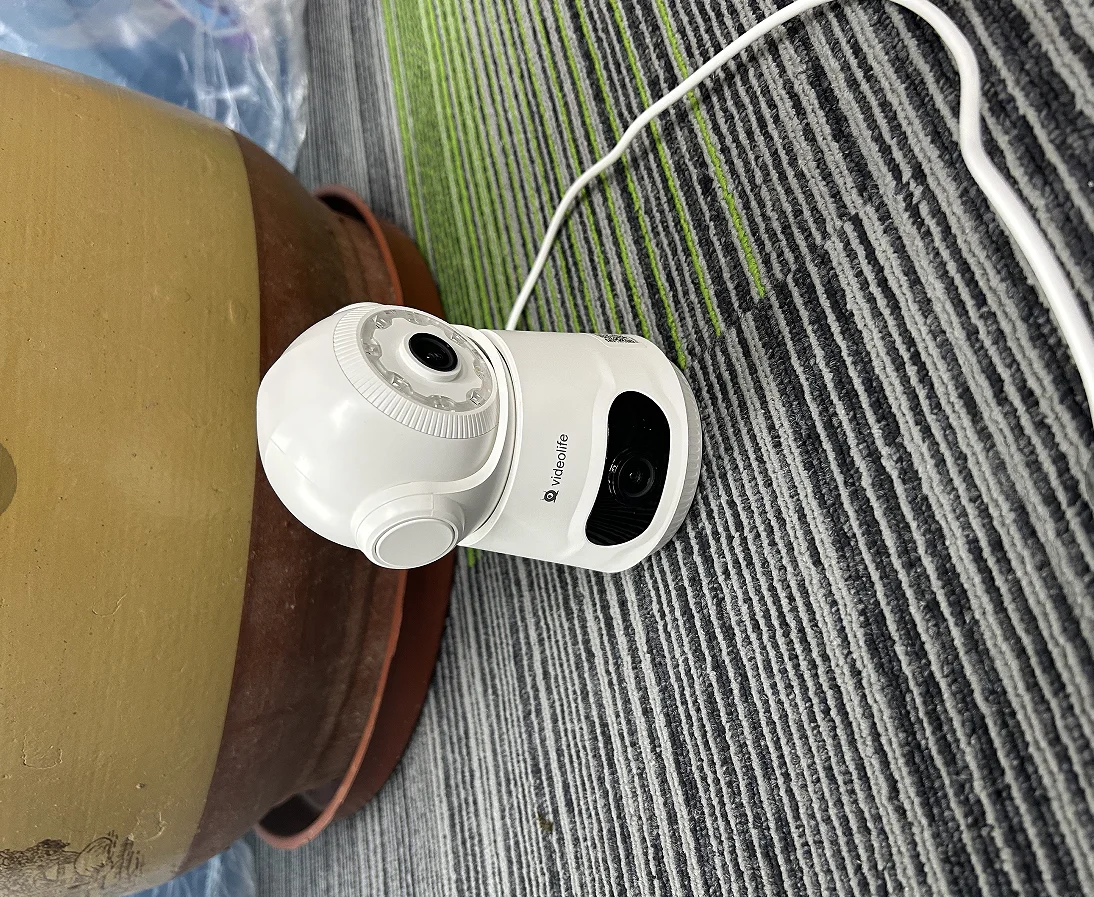
The Videolife 4MP Indoor Camera is a versatile security solution designed for indoor monitoring. It features dual lenses, two-way audio, AI-powered human detection and motion tracking, and multiple night vision modes to ensure comprehensive surveillance. This manual provides detailed instructions for setting up, operating, and maintaining your camera.
2. Product Features
The Videolife 4MP Indoor Camera offers a range of advanced features for effective home security:
- Night Vision: Clear monitoring even in low-light conditions.
- Motion Tracking: Automatically follows detected movement.
- Two-way Talk: Communicate with people on the camera's side.
- PTZ Control: Pan, Tilt, and Zoom functionality for comprehensive coverage.
- Dual Lens: Provides multiple viewing angles simultaneously.
- AI Detection: Intelligent recognition of human figures.

3. Specifications
| Attribute | Value |
|---|---|
| Brand Name | VIDEOLIFE |
| Megapixels | 4MP |
| High Definition | 1080P(Full-HD) |
| Lens (mm) | 3.6mm |
| Lens Quantity | Dual Lens |
| Zoom | 10X (Digital zoom) |
| Movement Range (Pan) | -10°-180° |
| Movement Range (Tilt) | -10°-180° |
| AI Functions | Human Detection |
| Audio Output | Two Way Audio |
| Connectivity | WIFI (2.4GHz) |
| Sensor | CMOS |
| Video Compression Format | H.265 |
| Power Supply | Normal (5V, Mains Electricity) |
| Rechargeable Battery | NONE |
| Operating Temperature | -10°-60° |
| Installation | Normal |
| Scene | Indoor |
| Special Features | Waterproof / Weatherproof (Note: While listed, the primary scene is Indoor.) |
| Shell Material | Plastic |
| Alarm Type | Local Alarm |
| Supported Mobile Systems | Symbian, Windows Mobile, Android, iOS |
| Supported Operating Systems | Windows 98, XP, Vista, 7, macOS, 8, 10, 2000, 2003, 2008 |
| Certification | CE, FCC, RoHS |
4. Setup Guide
Follow these steps to set up your Videolife camera:
4.1 App Download
- Scan the QR code provided below or search for "videolife" in your device's app store.
- For Android devices, search "videolife" in the Google Play Store.
- For iOS devices, search "videolife" in the App Store.
4.2 Power Connection
- Connect the device to a power supply using the provided USB cable and adapter.
- Wait for approximately 1 minute for the camera to power on and initialize.
4.3 Device Pairing
- Open the "videolife" app and log in to your account.
- Tap on "Add device" within the app.
- Scan the QR code located on the fuselage (body) of the camera.
- The app will wait for automatic recognition of the device.
- Select your 2.4GHz WiFi network and enter the correct password.
- Show the QR code displayed on your phone screen to the camera's lens.
- Listen for a beep sound from the camera. Once you hear it, tick the "I have heard it" confirmation in the app, then click "Next".
- Wait for the network configuration to complete.
- Once added, you can name your device for easy identification.
5. Operating Instructions
5.1 Dual Lens Dual Screen Preview
The camera is equipped with two lenses: one fixed wide-angle lens and one rotatable lens. This allows you to view images from different directions simultaneously on a dual-screen interface within the app.

- Pan Range: 360°
- Tilt Range: 110°
5.2 Two-Way Voice Call
Utilize the built-in microphone and speaker for real-time two-way communication through the camera via the app.

5.3 PTZ Control
From the app interface, you can remotely control the camera's pan (horizontal), tilt (vertical), and digital zoom functions to adjust the viewing angle and focus on specific areas.
5.4 Night Vision Modes
The camera offers versatile night vision capabilities:
- Full Color Night Vision: Provides color images in low light.
- Infrared Night Vision: Standard black and white night vision.
- Smart Night Vision: Automatically switches between modes for optimal clarity.

5.5 Storage Options
Your camera supports two methods for storing video footage:
- Micro SD Card: Insert a Micro SD card (not included) into the designated slot for local storage.
- Cloud Storage: A subscription-based service for secure online storage of your recordings.
Both options allow for 24/7 live streaming and recording of important moments.

5.6 AI Functions
The camera incorporates Artificial Intelligence for enhanced monitoring:
- Human Detection: Identifies human shapes to reduce false alarms.
- Automatic Body Tracking: When a human is detected, the camera will automatically follow their movement within its field of view.
6. Installation Methods
The Videolife camera offers flexible installation options to suit your needs:
- Desktop Placement: Simply place the camera on a flat surface like a table or shelf.
- Wall-mounted: Secure the camera to a wall using appropriate mounting hardware (not always included, check package contents).
- Ceiling Mount: Attach the camera to the ceiling for an overhead view.

7. Maintenance
To ensure optimal performance and longevity of your Videolife camera, consider the following maintenance tips:
- Clean Lenses: Regularly wipe the camera lenses with a soft, dry cloth to ensure clear image quality. Avoid abrasive cleaners.
- Ventilation: Ensure the camera is placed in an area with adequate ventilation to prevent overheating.
- Firmware Updates: Check the app periodically for firmware updates to ensure your camera has the latest features and security patches.
- SD Card Management: The camera is designed to automatically overwrite the oldest video files when the Micro SD card capacity falls below 500MB. No manual deletion is typically required.
8. Troubleshooting
If you encounter issues with your camera, refer to the following common problems and solutions:
| Problem | Solution |
|---|---|
| Device unsuccessfully added | Check whether the WiFi password is correct and the network can be connected correctly. Then, RESET the camera and add it again after completion. |
| How to download recorded video | During playback in the app, click the "Record Screen" button. Click the red button after recording, and the video file will be saved to your phone. |
| Display device is offline | First, confirm that the power supply and network are normal. If there is no problem, power off the camera and restart it. If the connection is still offline, contact customer support. |
| Memory card is full | No manual processing is required. When the remaining memory card capacity is less than or equal to 500MB, the camera will automatically overwrite the oldest video file. |
| Memory card shows no memory card or abnormal |
|
| Cannot receive warning messages | Confirm whether your phone's system has turned off the message push permission for the "videolife" app. If it is off, please turn on the "message notification permission" in your phone settings and check whether message push is turned off in the device settings within the app. |
9. User Tips
Here are some helpful tips from other users to enhance your experience:
- The AI humanoid tracking function is sensitive. When someone enters the monitored area, the camera will automatically follow and can also send an alert notification.
- The color reproduction during the day is very high, and both images are 1080p, with clarity more than sufficient.
- The combination of prime and zoom lenses is very practical: one lens captures the panorama, while the other zooms in to see details, making faces and license plates clearly visible.
- With two screens arranged one in front of the other, there is no need to rotate back and forth to track, which is convenient and safer.
- Don't worry about whether the binoculars will affect night vision brightness. In practice, the infrared lights of the two lenses work very well together, and the image brightness is even.
10. Safety Information and Compliance
Disclaimer: Camera products can only be used for purposes permissible under applicable law and regulations. Misuse of the product for any illegal activities is strictly forbidden. Please comply with the applicable laws and regulations in your country/area.
Certifications: This product is certified with CE, FCC, and RoHS standards.
11. Support and Further Information
For a detailed user manual and additional information, please refer to the official PDF document: