
1. Product Introduction
The ZW-012 Bluetooth Sports Headphones are designed for an exceptional audio experience during sports and daily commuting. Featuring a 180° free rotation design, these headphones can be flexibly worn on both left and right ears, adapting to various usage habits and scenarios. The integrated real-time digital display provides clear visibility of the remaining battery power, ensuring timely charging.
Equipped with high-definition sound quality technology, the ZW-012 delivers a clear and transparent audio experience for both music listening and calls. Its long-lasting battery life supports extended use, and the painless wearing design effectively reduces ear pressure, even during prolonged periods.

Image: ZW-012 headphone highlighting its long standby time and comfortable design.
2. Technical Specifications
| Feature | Specification |
|---|---|
| Material | PVC |
| Category | Earphones & Headphones |
| Active Noise-Cancellation | Yes |
| Volume Control | Yes |
| Control Button | Yes |
| Vocalism Principle | Balanced Armature |
| Wireless Type | Bluetooth |
| Communication | Wireless |
| Style | In-ear with Ear Hook (Rotatable) |
| Origin | Mainland China |
| Package Length | 12 cm |
| Package Width | 9 cm |
| Package Height | 2 cm |
| Package Weight | 0.036 kg |
3. Package Contents
Please check the package for the following items:
- ZW-012 Bluetooth Sports Headphone
- USB Charging Cable
- User Manual
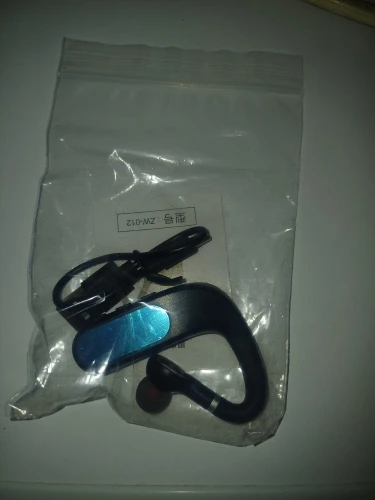
Image: Unboxed ZW-012 headphone, charging cable, and manual.
4. Wearing Guide
4.1. Rotation Adjustment
Hold the headphone body and rotate the headphone unit 180° according to your wearing needs to adjust to the suitable wearing angle for either the left or right ear.

Image: Demonstrating the 180° free rotation design for left and right ear wear.
4.2. Fit Wearing
Gently place the adjusted headphones into your ear canal. Adjust the position to ensure the headphones fit closely with your ears, providing stable wearing and a comfortable, pressure-free experience.
4.3. Fixation Check
After wearing, gently shake your head to confirm that the headphones will not fall off, ensuring stable wearing during activities.
5. Basic Operations
5.1. Power On/Off
- Power On: Press and hold the function key for 3 seconds until the headphone indicator light turns on with a power-on prompt tone. The real-time digital display screen will light up simultaneously to show the current battery level.
- Power Off: Press and hold the function key for 5 seconds. The indicator light will go out with a power-off prompt tone, and the display screen will turn off, indicating the headphones are powered off.
5.2. Bluetooth Pairing
- First Use: After power-on, the headphones will automatically enter pairing mode, and the indicator light will flash quickly.
- Turn on the Bluetooth function on your mobile phone or other devices. Search for nearby Bluetooth devices and find the device name corresponding to these headphones (refer to the product outer packaging for the exact name, e.g., "ZW-012").
- Click the device name to complete pairing. Upon successful pairing, the indicator light will flash slowly, accompanied by a pairing success prompt tone.
- Subsequent Use: For future use, the headphones will automatically connect to the last successfully paired device after power-on, provided the device's Bluetooth is enabled.
5.3. Audio Control
- Play/Pause: Short-press the function key once.
- Previous Track: Double-click the function key quickly.
- Next Track: Triple-click the function key quickly.
- Volume Adjustment: Some models support adjustment via the mobile phone's volume keys, or by long-pressing the headphone's dedicated volume "+" and "-" keys (if available on your model).

Image: ZW-012 headphone with visible control buttons and digital display.
5.4. Call Functions
- Answer Incoming Call: Short-press the function key once.
- Hang Up Call: Short-press the function key once or long-press it for 2 seconds.
- Reject Incoming Call: Long-press the function key for 2 seconds.
- Switch Calls: During a call, if there is a new incoming call, long-press the function key for 2 seconds to switch to the new call and hang up the current one.
5.5. Real-time Digital Display
After power-on, the display screen will continuously show the remaining battery percentage of the headphones, allowing you to monitor the battery level at any time and prevent usage interruptions due to low power. During charging, the display screen will show the real-time charging progress.

Image: ZW-012 headphone illustrating the digital battery display and long standby/listening times.
6. Charging Instructions
- Cable: Use the original or a compliant USB charging cable.
- Connection: Connect one end of the charging cable to the headphone's charging port and the other end to a power adapter (5V/1A is recommended) or a computer's USB port.
- Indicator: During charging, the real-time digital display screen will show charging progress, and the indicator light will be red. Once fully charged, the indicator light will turn blue and stay on, and the display screen will show 100% battery.
- Environment: It is recommended to charge between 0°C and 45°C to avoid affecting battery life.
- Overcharging: Disconnect the charging connection promptly after full charge to prevent long-term overcharging.
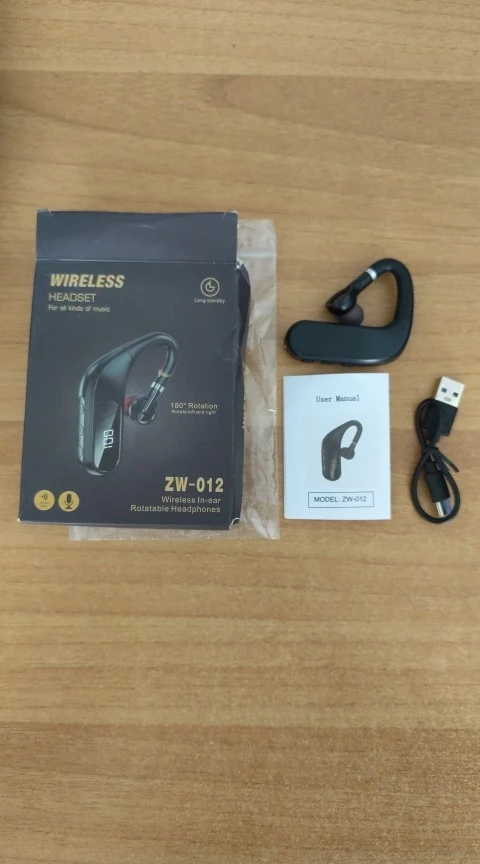
Image: Close-up of the ZW-012 headphone's charging port.
7. Care and Maintenance
- Cleaning: Keep the headphones clean. If dirty, wipe gently with a dry, soft cloth. Do not use corrosive cleaners such as alcohol or gasoline.
- Storage: When not in use for a long time, ensure the headphones are fully charged and stored in a dry, ventilated, and cool environment. Recharge them approximately every 3 months to protect the battery.
- Environmental Factors: Avoid using the headphones in environments with strong magnetic fields and electromagnetic radiation, as this can affect Bluetooth connection stability and sound quality.
8. Troubleshooting
If you encounter any issues with your ZW-012 headphones, please refer to the following common solutions:
- Headphones not powering on: Ensure the headphones are fully charged. Press and hold the function key for the specified duration (3 seconds for power on).
- Pairing issues: Make sure Bluetooth is enabled on your device and the headphones are in pairing mode (fast flashing indicator). Check that you are selecting the correct device name (e.g., "ZW-012").
- No sound or low volume: Check the volume levels on both your headphones and the connected device. Ensure the headphones are properly paired and connected.
- Poor sound quality: Ensure there are no obstructions between the headphones and your device. Avoid environments with strong electromagnetic interference.
- Language switching: If the voice prompts are in an unexpected language, try pressing the function key multiple times (e.g., 2 or 5 times) after powering on to cycle through available languages.
If the headphones malfunction and the above steps do not resolve the issue, contact official after-sales service for repair. Do not attempt to disassemble the headphones yourself.
9. User Tips
Based on feedback from other users, here are some helpful tips for using your ZW-012 headphones:
- Battery Life: Users frequently praise the long battery life and short charging time, making them reliable for extended use.
- Physical Controls: The physical buttons for play/pause and volume control are generally well-received for their ease of use.
- Digital Display: The digital display indicating the charge level is a convenient feature for monitoring battery status.
- Audio Use: While suitable for spoken content like podcasts or calls, some users note that the sound quality might be less ideal for music with heavy bass.
- Lightweight Design: The lightweight nature of the headphones contributes to comfortable wear, especially during sports.
10. Warranty and Support
For warranty information, technical support, or service inquiries, please refer to the documentation provided with your purchase or contact the seller directly. Do not attempt to repair the product yourself, as this may void the warranty.
A detailed user manual in PDF format may be available for download. Please check the product page or contact customer support for the link: User Manual (PDF)
11. Safety Information
- These headphones are designed for sports and have a certain level of water and sweat resistance (refer to product parameters for specific level). However, do not immerse them in water or use them while bathing or swimming.
- Avoid dropping, impacting, or squeezing the headphones to prevent damage to internal components and ensure proper functionality.
- Do not disassemble the headphones. Any repairs should be performed by authorized service personnel.