
1. Introduction
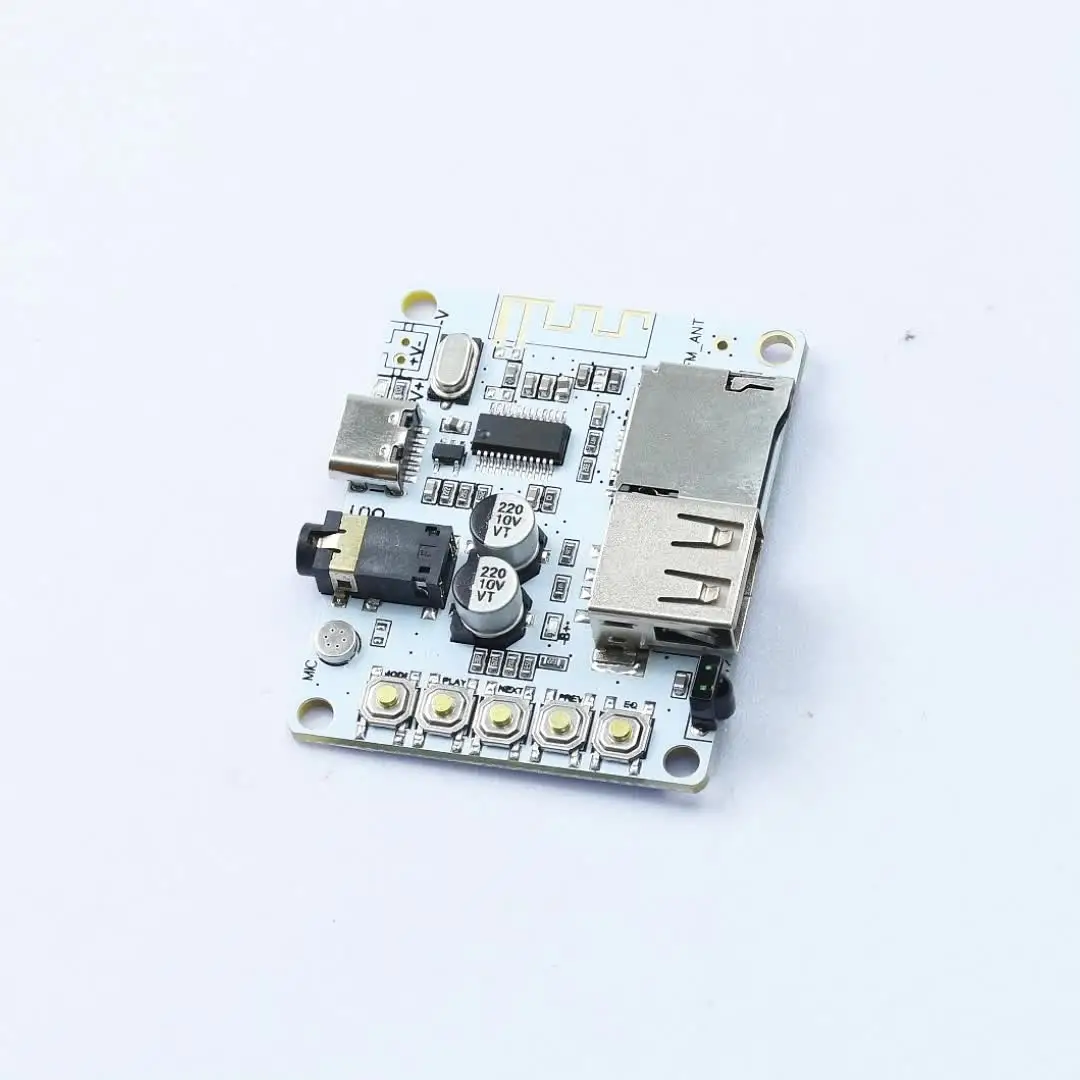
This manual provides detailed instructions for the installation, operation, and maintenance of your Bluetooth 5.4 Audio Receiver Module. This versatile module is designed to provide stable wireless audio streaming and media playback for various applications, including car and home audio systems.

Figure 1: Bluetooth 5.4 Audio Receiver Module, highlighting its stable connection capabilities.
2. Key Features
- Bluetooth 5.4 Connectivity: Equipped with a BT 5.4 chip for a more stable connection, effectively solving issues such as disconnections and stuttering.
- Lossless Audio Decoding: Supports playback of multiple audio formats including AAC, MP3, WAV, FLAC, and APE.
- USB/TF Card Playback: Direct playback from USB flash drives and TF cards with a playback memory function for convenient use.
- Multiple Power Supply Options: Flexible power input via USB Type-C, power bank (requires soldering), or a DIY battery holder interface.
- Built-in FM Radio: Features a professional antenna layout for stronger and clearer signal reception.
- Audio Output: Standard 3.5mm AUX audio interface, compatible with car AUX inputs.

Figure 2: The audio decoding module supports various lossless formats.
3. Specifications
| Parameter | Value |
|---|---|
| Product Name | BT 5.4 Audio Receiver |
| Functions | BT reception, USB/TF playback, FM radio reception |
| Decoding Formats | AAC, MP3, WAV, FLAC, APE |
| Bluetooth Name | WSn6688 |
| Bluetooth Version | 5.4 |
| Radio Frequency | 87.5MHz - 108MHz |
| Audio Output | 3.5mm AUX audio standard interface |
| USB/TF Card Support | FAT32, exFAT (NTFS not supported, can be formatted to FAT for playback) |
| Product Dimensions | 50mm * 40mm |

Figure 3: Detailed product parameters and dimensions (50mm x 40mm).
4. Package Contents
The package includes:
- 1x Bluetooth 5.4 Audio Receiver Module
5. Setup Instructions
5.1 Power Supply Methods
The module supports three methods for power supply:
- USB Type-C Power Supply: Connect a standard USB Type-C cable to the module's Type-C port.
- Power Bank Power Supply: For portable use, a power bank can be used. This method requires soldering the battery to the board.
- DIY Battery Power Supply: Utilize the dedicated battery holder interface for custom battery setups.
Note: The USB port can also power the battery while charging if a rechargeable battery is connected.

Figure 4: Illustration of the three power supply options: USB Type-C, power bank, and DIY battery.
5.2 Battery Connection (for DIY/Power Bank)
Important: Ensure correct positive (V+) and negative (V-) terminals are connected to prevent product damage!

Figure 5: Back view of the module showing the correct polarity for 3.7V/5V battery connections.
5.3 Audio Output and Media Connections
Refer to the wiring diagram below for connecting the module to various audio devices and media sources.

Figure 6: Comprehensive wiring diagram illustrating connections for activated speakers, regular headphones, amplifiers, car AUX, 5V phone charger, USB flash drive, memory card, and battery interface.
The module features a 3.5mm audio output interface (labeled "OUT") for connecting to headphones, amplifiers, or car AUX inputs. USB flash drives and TF memory cards can be inserted into their respective slots for direct media playback.

Figure 7: Labeled diagram of the module's interfaces, including USB port, TF memory card slot, antenna mounting hole, antenna interface, BT F antenna, 3.7-5V battery holder/interface, USB Type-C power supply, 3.5mm audio output, BT voice call microphone, and infrared remote control receiver.
6. Operating Modes
The module supports Bluetooth, USB/TF card playback, and FM radio modes. Buttons on the module allow for mode switching, play/pause, next/previous track, and EQ adjustments.
Video 1: Product showcase demonstrating the module's features and operation.
6.1 Bluetooth Mode (BT Mode)
- Power on the module.
- The module will automatically enter Bluetooth pairing mode (indicated by an LED, if present, or an audible prompt).
- On your device (smartphone, tablet, etc.), search for Bluetooth devices and select "WSn6688" to pair.
- Once paired, you can stream audio wirelessly to the module.
6.2 USB/TF Card Playback Mode
- Insert a USB flash drive or TF memory card (formatted to FAT32 or exFAT) into the corresponding slot.
- The module should automatically detect the media and switch to playback mode.
- Use the PLAY/PAUSE, NEXT, and PREV buttons to control playback. The module features a playback memory function.
6.3 FM Radio Mode
- Ensure an antenna is connected to the FM_ANT port for optimal reception.
- Switch to FM radio mode using the MODE button.
- Use the NEXT/PREV buttons to scan for stations or fine-tune the frequency.
7. Maintenance
- Keep the module dry and clean. Avoid exposure to moisture or extreme temperatures.
- Do not attempt to disassemble or modify the module, as this may void the warranty and cause damage.
- Clean the surface with a soft, dry cloth. Do not use harsh chemicals or solvents.
8. Troubleshooting
| Problem | Possible Cause | Solution |
|---|---|---|
| No power | Incorrect power connection, faulty power source. | Check power supply connections (Type-C, battery polarity). Ensure power source is functional. |
| Bluetooth disconnection/stuttering | Interference, device too far, low battery. | Ensure devices are within range. Reduce interference. Charge/replace battery. |
| USB/TF card not playing | Incorrect file format, unsupported card format (NTFS), corrupted media. | Ensure media is FAT32 or exFAT. Check audio file formats (AAC/MP3/WAV/FLAC/APE). Try another card/USB. |
| Poor FM radio reception | No antenna, weak signal. | Connect an external antenna to the FM_ANT port. Adjust antenna position. |
| Remote control not working | No remote included, incompatible remote. | This module does not typically include a remote control. If using a universal IR remote, ensure it is compatible with common audio player protocols. |
9. User Tips
- Intuitive Controls: While button labels might not be in English, the functions (MODE, PLAY, NEXT, PREV, EQ) are standard and can be figured out intuitively.
- File System Compatibility: Remember that USB drives and TF cards must be formatted to FAT32 or exFAT. NTFS is not supported for direct playback.
- Power Bank Connection: If using a power bank, be prepared to solder the battery connections to the board as indicated in the setup section.
- External Antenna for FM: For the best FM radio experience, always connect an external antenna to the designated FM_ANT port.
10. Warranty and Support
For any issues or technical support, please refer to the official product page or contact the seller directly. Keep your purchase records for warranty claims.
An additional user manual in PDF format may be available for download: