
1. Introduction
The DC 5V Schumann Waves Generator is an ultralow frequency pulse audio resonator designed to influence and regulate brainwave rhythms. This new generation device features an adjustable frequency range from 0.01Hz to 99999Hz, controlled via a color touchscreen. It aims to create an artificial electromagnetic field that affects biological rhythm harmonics, promoting a positive and relaxed environment, aiding sleep, reducing stress, enhancing focus, and stimulating creativity.
The device utilizes a high-power STM chip for stable output and real-time waveform measurement, making it suitable for various applications such as sleep aid, Zen meditation, and tea ceremonies.

2. Product Components and Specifications
2.1 Product Diagram

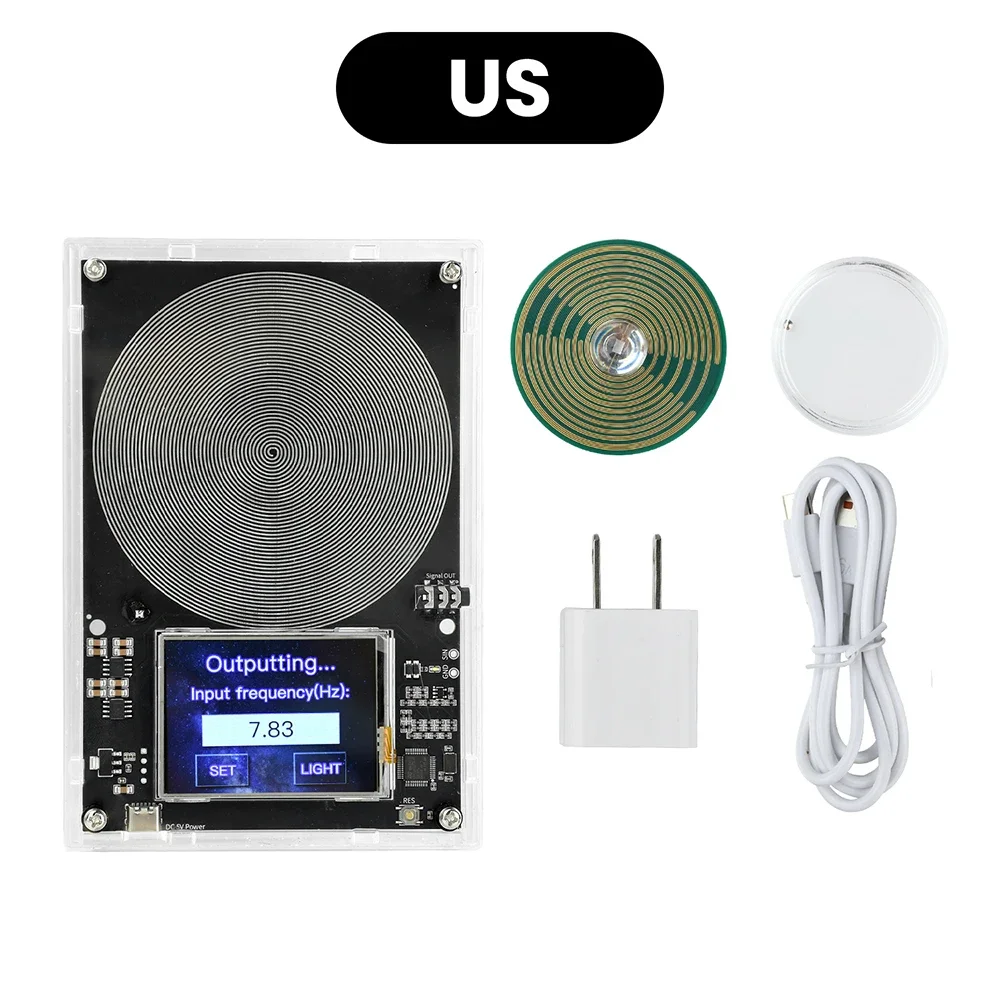
Key Components:
- High-transparency acrylic shell: Provides protection and a clear view of internal components.
- Antenna panel: The primary output for Schumann waves.
- Headphone jack (3.55mm AUX): Output interface.
- High-capacity embedded STMicroelectronics STM chip: Ensures stable and efficient operation.
- Factory reset button: (Do not touch during normal operation).
- Type-C interface: For power supply.
- Touch-adjustable color screen: For intuitive operation and frequency display.
2.2 Technical Specifications
| Attribute | Value |
|---|---|
| Product Name | Schumann Wave Generator (Adjustable Frequency) |
| Product Model | LD-BTXCMP |
| Casing Material | High Transparency Acrylic |
| Frequency Range | 0.01-99999Hz |
| Power Supply | USB Type-C 5V/1-2A |
| Output Interface | 3.55mm AUX Headphone Jack |
| Product Dimensions | 160mm * 110mm * 15mm (excluding screw height) |

3. Setup
- Power Connection: Connect the device to a USB Type-C 5V/1-2A power source using the provided power cord. The device will power on and display the current output frequency on the screen.
- Accessory Connection (Optional):
- Magnetic Bead: Place the magnetic bead directly above the antenna panel. It will vibrate at different frequencies and speeds. Note that the magnetic bead may stop vibrating at higher frequencies.
- Induction LED Bead: Place the LED bead directly above the antenna panel. It will light up in blue light, with brightness varying depending on the output frequency. This accessory must be used with the LED bead included with the device.

4. Operating Instructions
4.1 Adjusting Frequency
- Power On: Connect the device to power via the Type-C port. The screen will display "Outputting... Input frequency(Hz):" and the current frequency.
- Enter Input Mode: Tap the "SET" button on the touchscreen to enter the frequency input mode.
- Input Frequency: Use the on-screen numeric keypad to directly input your desired frequency (e.g., "888").
- Confirm Frequency: Tap the "OK" button to confirm the input. The device will then output at the newly set frequency.
- Quick Access: Press the 'e' button (if available on the keypad) to directly access a selected frequency and automatically return to the main interface.

4.2 Screen Control
Screen Off Button ("LIGHT"): Tap the "LIGHT" button to turn off the screen. To turn it back on, simply touch any area of the screen.
4.3 Visual Demonstration

Video 1: Demonstration of connecting power, setting frequency, and observing the induction LED bead and magnetic bead response.
5. Maintenance
To ensure the longevity and optimal performance of your Schumann Waves Generator, keep it clean and dry. Avoid exposing it to extreme temperatures, humidity, or direct sunlight. Do not attempt to disassemble the device, as this may void any potential warranty and cause damage.
6. Troubleshooting & FAQ
Q: Why does the device output a sine wave instead of a square wave?
A: Ordinary logic integration modules generate square wave signals, which, if directly transmitted, contain many harmonic components that can be useless. This device uses imported high-precision chips and function integration modules to produce a purer sine waveform, which is more stable and effective.
Q: How can I measure the waveforms?
A: Waveforms can be measured using an oscilloscope. For standard oscilloscopes, use probes. The probe fixture should be clamped at the first welding point of the headphone jack, and the probe can touch any antenna position to produce a waveform. For specific technical knowledge on frequency measurement, it is recommended to contact the oscilloscope manufacturer.
Q: The magnetic bead stops vibrating at higher frequencies. Is this normal?
A: Yes, this is normal behavior. The magnetic bead is designed to vibrate at different frequencies and speeds, but its vibration may cease when the output frequency is too high.
7. User Tips
- Optimal Placement: Experiment with placing the device in different areas of your home, bedroom, study, or office to find the most beneficial effect for your personal needs.
- Personal Experience: The effects of Schumann waves can vary from person to person. Adjust the frequency and observe how you feel to find what works best for you.
- Enhance Environments: This generator is suitable for enhancing sound and visual effects in audiovisual spaces, assisting with sleep, calming the mind, improving work efficiency, and fostering creativity.
- Mindfulness Practices: Integrate the device into your meditation or tea ceremony routines to deepen tranquility and focus.
8. Warranty and Support
For any technical support, questions, or concerns regarding your Schumann Waves Generator, please contact the seller or manufacturer directly. Keep your purchase records for reference.