
Introduction
This manual provides instructions for the SkyBeats Universal IR Remote Control, designed as a replacement or secondary controller for various X96 series TV Boxes. It covers setup, operation, maintenance, and troubleshooting to ensure optimal performance.

Setup
1. Battery Installation
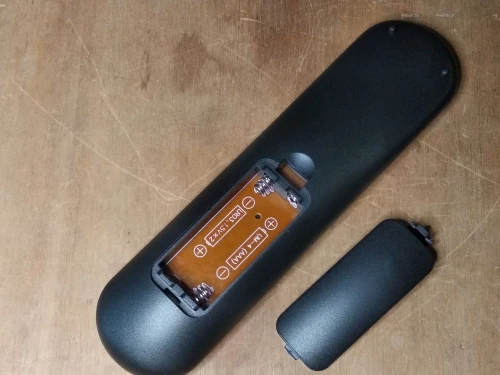
- Locate the battery compartment cover on the back of the remote control.
- Slide the cover downwards or press the latch (if present) to open the compartment.
- Insert two AAA (1.5V) batteries, ensuring the positive (+) and negative (-) terminals align correctly with the markings inside the compartment.
- Replace the battery compartment cover by sliding it back into place until it clicks securely.
2. Initial Use (IR Communication)
This remote control uses Infrared (IR) communication. For most compatible X96 series TV Boxes, it should work directly without additional pairing. Point the remote directly at your TV Box.
3. Programmable Buttons (SET Function)
Some buttons on this remote may be programmable to control other devices (e.g., your TV). The 'SET' button is typically used for this function. Refer to your TV Box or TV manual for specific programming instructions, as the process can vary. Generally, it involves:
- Pressing and holding the 'SET' button until an indicator light changes.
- Entering a code for your device or using an auto-search function.
- Testing the programmed buttons.
Operating Instructions
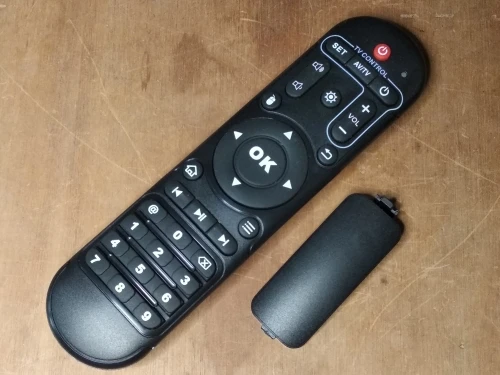
The remote control features a standard layout for navigating your TV Box. Below is a description of common buttons and their functions:
Remote Control Button Layout and Functions:
- ON/OFF (Power): Turns the device on or off.
- SET: Used for programming functions (e.g., to control a TV).
- AV/TV: Switches between AV and TV input modes.
- MUTE: Mutes or unmutes the audio.
- VOL+ / VOL-: Increases or decreases the volume.
- Directional Pad (Up, Down, Left, Right): Navigates menus and selections.
- OK: Confirms selections or enters menus.
- RETURN (Back): Returns to the previous screen or menu.
- MENU: Opens the main menu or context menu.
- HOME: Returns to the home screen.
- Play/Pause, Rewind, Fast Forward: Media playback controls.
- Number Buttons (0-9): Direct channel selection or input.
- Miracast / Airpin: Dedicated buttons for screen mirroring or casting functions (if supported by your TV Box).
- Mouse Control (Switch to mouse control): Activates or deactivates air mouse functionality (if available).
Maintenance
Battery Replacement
Replace batteries when the remote's response becomes sluggish or it stops functioning. Always replace both batteries at the same time with new AAA (1.5V) batteries. Do not mix old and new batteries, or different types of batteries.
Cleaning
Wipe the remote control with a soft, dry cloth. Do not use liquid cleaners or abrasive materials, as they may damage the remote's surface or internal components.
Storage
If the remote control will not be used for an extended period, remove the batteries to prevent leakage and potential damage.
Troubleshooting
- Remote not responding:
- Check if the batteries are inserted correctly with the correct polarity.
- Replace old batteries with new ones.
- Ensure there are no obstructions between the remote and the TV Box's IR receiver.
- Point the remote directly at the TV Box.
- Buttons not working as expected:
- If specific buttons are programmed (e.g., TV control), ensure they were programmed correctly.
- For TV Box functions, verify the remote is compatible with your specific X96 series model.
- Interference issues:
- Reorient or relocate the receiving antenna of your TV Box.
- Increase the separation between the TV Box and other electronic equipment.
- Connect the TV Box into an outlet on a circuit different from that to which other interfering devices are connected.
- Consult the dealer or an experienced radio/TV technician for further assistance.
Specifications
| Feature | Detail |
|---|---|
| Brand Name | SkyBeats |
| Model Number | Universal IR Remote for X96 Series |
| Wireless Communication | IR (Infrared) |
| Frequency | 433 MHz |
| Channel | 1 |
| Use | Universal (for X96 MAX, X96Q, X98 PLUS, X98K, X98H, X96MINI TV Boxes) |
| Support APP | No |
| High-concerned chemical | None |
| Certification | CE |
| Package Dimensions (approx.) | 17 cm (Length) x 12 cm (Width) x 2 cm (Height) |
| Weight (approx.) | 0.05 kg |
User Tips
- This remote is confirmed to work perfectly with X96 Max Plus, X96Q, and H98 set-top boxes.
- The remote is noted for its excellent quality, often being identical to original remotes for X98 TV boxes.
- While buttons are programmable, some users report the programming process can be challenging. Patience and careful adherence to programming instructions (usually found in your TV or TV Box manual) are recommended.
Frequently Asked Questions (FAQ)
- Q: Is this remote compatible with X98H Pro?
- A: Yes, this remote is compatible with X98H Pro.
- Q: Will this remote work with X96Q TV Box?
- A: Yes, it is compatible with the X96Q TV Box.
- Q: Does this control work for X96Mini Mini Plus?
- A: Yes, this remote is designed to work with X96Mini and X96Mini Plus models.
Regulatory Information (FCC Statement)
Information to User:
Note: This equipment has been tested and found to comply with the limits for a Class B digital device, pursuant to part 15 of the FCC Rules. These limits are designed to provide reasonable protection against harmful interference in a residential installation. This equipment generates, uses and can radiate radio frequency energy and, if not installed and used in accordance with the instructions, may cause harmful interference to radio communications. However, there is no guarantee that interference will not occur in a particular installation. If this equipment does cause harmful interference to radio or television reception, which can be determined by turning the equipment off and on, the user is encouraged to try to correct the interference by one or more of the following measures:
- Reorient or relocate the receiving antenna.
- Increase the separation between the equipment and receiver.
- Connect the equipment into an outlet on a circuit different from that to which the receiver is connected.
- Consult the dealer or an experienced radio/TV technician for help.
Important: Change or modifications not expressly approved by the manufacturer responsible for compliance could void the user's authority to operate the equipment.
Warranty and Support
For any issues not covered in this manual or for further assistance, please contact the retailer or manufacturer's customer support. Keep your purchase receipt for warranty claims.