
Introduction
Welcome to the user manual for your SkyBeats HB868 Portable Karaoke Machine. This guide provides essential information on setting up, operating, and maintaining your device to ensure an optimal karaoke experience. Please read this manual thoroughly before using the product.
The HB868 is a versatile karaoke system featuring a 10.1-inch HD touchscreen, dual wireless microphones, and multiple connectivity options, designed for both indoor and outdoor entertainment.
Safety Warnings
- Battery Performance: If the battery is low, you may experience noise when playing songs with strong bass. This is normal. Ensure the device has sufficient power for optimal performance.
- Hearing Protection: Prolonged use of the machine at high volume may cause hearing damage. Use at moderate volume levels.
- Charging: The HB868 has a built-in lithium battery. Do not use fast chargers exceeding 5V/3A (e.g., PD fast chargers, mobile phone fast chargers, Qualcomm fast chargers, gallium nitride fast chargers). These chargers may not be recognized or compatible with the motherboard.
- Environmental Conditions: Do not expose the device to direct sunlight, fire, or similar overheating environments.
Package Contents
Ensure all items are present in the box:
- 1 x HB868 Karaoke Machine
- 2 x Wireless Bluetooth Microphones
- 1 x TYPE-C Charging Cable
- 1 x HDMI Cable

Product Overview
The HB868 features a 10.1-inch HD touchscreen and a control panel with various buttons and knobs for comprehensive functionality.
Control Panel & Ports:
- Knobs: MIC ECHO, MIC VOL, VOL, HIGH VOL, LOW VOL (for adjusting microphone echo, microphone volume, main volume, high frequency volume, and low frequency volume).
- Buttons: APPLAUSE, LAUGHTER, RETURN, OK, ACCOMPANY, PREV, PLAY/PAUSE, NEXT (for various karaoke functions and media control).
- Rear Ports: USB, TF (TF Card slot), HD OUT (HDMI output), DC IN (Power input), OTG, ON/OFF switch.
- Side Ports: 6.5mm Mic Jack, 3.5mm Mic Jack, Type-C.
LED Indicators:
| Status | Light |
|---|---|
| Bluetooth pairing | Blue light (Blink) |
| Bluetooth connected | Blue light (On) |
| Full frequency | No light |
| Vocal | White light (On) |
| Deep bass | Green light (On) |
| Charging | Red light (On) |
| Full charge | Red light (Off) |
| TWS mode | Yellow light (Blink) |
| TWS connected | Yellow light (On) |
Setup
1. Initial Power On & Language Selection
- Locate the ON/OFF switch on the rear panel and slide it to the "ON" position.
- The device will boot up and display the main interface.
- To change the language, navigate to "Settings" > "System" > "Languages & input" > "Languages".
- Long press and drag your desired language (e.g., English) to the top of the list to set it as the primary language.
- You can delete unnecessary languages by selecting them and choosing "Remove".
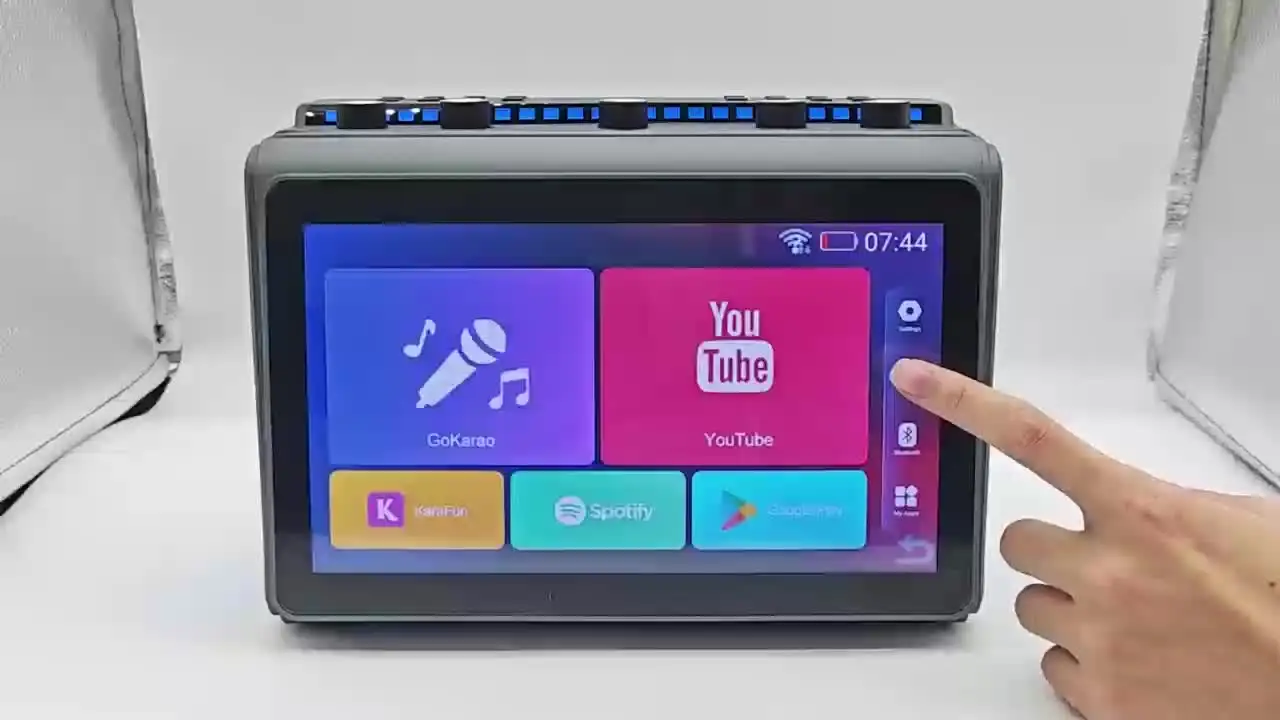
2. Wi-Fi Connection
- From the main interface, tap on the "Settings" icon.
- Go to "Network & internet" and toggle Wi-Fi to "On".
- Select your desired Wi-Fi network from the list and enter the password if prompted.
- Once connected, the Wi-Fi icon will appear in the status bar.
3. Bluetooth Microphone Pairing (TWS - True Wireless Stereo)
TWS allows two Bluetooth speakers (or microphones in this case) to be paired and play synchronously for stereo sound.
- Ensure both wireless microphones are disconnected from any other Bluetooth devices before turning them on.
- Turn on both microphones.
- On the HB868, short press the TWS button (if available, or follow on-screen prompts for microphone pairing). The yellow lights on both microphones will be solid, and the blue light on the host microphone will flash when TWS pairing is successful.
- Activate Bluetooth on your mobile device (if connecting a phone) and search for "XDOBO X8 Pro". Select and connect.
- For microphones successfully paired with TWS, they will automatically and quickly connect each time they are turned on.
- To disconnect TWS, short press the TWS button again.

4. HDMI Connection to TV
- Connect one end of the HDMI cable to the "HD OUT" port on the rear of the HB868.
- Connect the other end of the HDMI cable to an HDMI input port on your TV.
- Select the corresponding HDMI input on your TV using its remote control.
- The HB868's display will now be mirrored on your TV, allowing for a larger screen experience for lyrics and videos.

Operating Instructions
1. Basic Controls
| Key/Knob | Operation | Function |
|---|---|---|
| Power Button | Short press | Turn on audio, RGB on/off |
| Power Button | Long press 2s | Switch off audio |
| Power Button | Long press 8s | Force turn off |
| M (Mode) | Short press | Switching mode (BT/U disk/TF/AUX) |
| M (Mode) | Long press 3s | Disconnect Bluetooth |
| M (Mode) | Long press 8s | Restore factory settings |
| R (Karaoke) | Short press | Switch Karaoke mode |
| R (Karaoke) | Double-tap | Eliminate/restore original song in Karaoke mode |
| MIC ECHO +/- | Short press | Adjust microphone echo |
| MIC VOL +/- | Short press | Adjust microphone volume |
| EQ | Short press | EQ switching (full range/vocal/Deep bass) |
| EQ | Long press 8s | Turn off power saving mode |
| TWS | Short press | Entering/Disconnecting TWS |
| Play/Pause | Short press | Pause/play (BT/TF mode), Mute/play (AUX mode), Answer call (BT mode), Hang up during call |
| Play/Pause | Double-tap (BT mode) | Call back last dialled number |
| Play/Pause | Long press 2s (BT mode) | Reject call |
| Play/Pause | Long press 3s | Activate voice assistant |
| PREV / NEXT | Short press | Previous / Next song |
| VOL +/- | Short press | Adjust main volume |
2. Media Playback
- USB/TF Card: Insert a USB drive into the USB port or a TF card into the TF card slot. The device will automatically detect and play compatible audio/video files.
- Bluetooth: Connect your smartphone or tablet via Bluetooth to stream music.
- Online Streaming: Use the built-in Android system to access apps like YouTube, Spotify, or dedicated karaoke apps via Wi-Fi for a vast library of songs.

3. Power Bank Function
When the HB868 is turned on, you can connect a charging cable to its USB port to perform emergency charging for your mobile devices.
Maintenance
- Cleaning: Use a soft, dry cloth to clean the device. Do not use liquid cleaners or aerosols.
- Storage: Store the device in a cool, dry place away from direct sunlight and extreme temperatures.
- Battery Care: To prolong battery life, avoid fully discharging the battery frequently. Charge the device regularly, even if not in use.
- Microphone Care: Keep microphones dry and clean. Avoid dropping them or exposing them to moisture.
Troubleshooting
| Problem | Possible Cause | Solution |
|---|---|---|
| No power | Battery is depleted; Device is off. | Charge the device using the provided Type-C cable; Ensure the ON/OFF switch is in the "ON" position. |
| No sound | Volume too low; Mute activated; Incorrect input mode. | Increase the main volume (VOL knob); Press Play/Pause to unmute; Switch to the correct input mode using the 'M' button. |
| Microphones not working | Microphones not paired; Microphone volume too low; Microphone battery low. | Re-pair microphones via TWS; Increase MIC VOL knob; Charge microphones. |
| Noise during playback (especially with bass) | Low battery. | Charge the HB868 fully. This is a normal phenomenon at low battery levels. |
| HDMI output not working | Loose cable connection; Incorrect TV input selected. | Ensure HDMI cable is securely connected; Select the correct HDMI input on your TV. |
| Device unresponsive | System freeze. | Perform a forced shutdown by long pressing the power button for 8 seconds. |
Specifications
| Feature | Detail |
|---|---|
| Product Name | HB868 Portable Karaoke Machine |
| Brand Name | SkyBeats (also XDOBO) |
| Display | 10.1-inch Full Laminated HD Touchscreen (1080p) |
| Core Hardware | RK3326S Chip + 2GB RAM + 32GB Storage |
| Speaker System | 2 x 3-inch Woofers (4Ω, 20W) + 2 x 1.5-inch Tweeters (8Ω, 8W) |
| Audio Features | Professional Hi-Fi Sound, Echo Control, Noise Reduction, 3D Surround Sound Mode, Live Sound Mode, Extra Bass Mode |
| Connectivity | HDMI Output, USB Port, TF Card Slot, Bluetooth 5.3, Wi-Fi, OTG |
| Compatibility | USB/TF Card, Smartphones, Tablets, TV, YouTube & Karaoke Apps |
| Microphones | 2 x Wireless Bluetooth Microphones (included) |
| Battery | 6000mAh Rechargeable Lithium Battery |
| Charging | TYPE-C Charging Cable (Fast Charging not supported. Do not use while charging.) |
| Playtime | Approx. 6-8 hours (varies by volume and content) |
| Charging Time | Approx. 4-5 hours |
| Design & Build | Portable Design with Leather Wrist Strap; Plastic Housing |
| Dimensions (L*W*H) | 260*173*105 mm |
| Weight | 2769g |
| Additional Features | Lyrics Synchronization, Portable Carry Design, Dual Passive Diaphragms with Lighting Effects |
For more detailed technical information, you can refer to the official user manual PDF: View User Manual (PDF)
Warranty & Support
This product comes with a standard warranty. For specific terms and conditions, please refer to the