
1. Introduction
Thank you for purchasing the Xiviio Powerful LED Flashlight. This manual provides important information regarding the safe operation, maintenance, and troubleshooting of your device. Please read all instructions carefully before use and retain this manual for future reference.

2. Safety Warnings
WARNING
- Do not shine the light directly into eyes, which may cause eye damage.
- Keep away from children and infants to avoid injury or suffocation.
- Do not disassemble, repair, or modify the product by yourself.
- Do not use the product if it is damaged, cracked, or deformed.
- Do not immerse the product in water or expose to high temperature for a long time.
CAUTION
- Only use DC 5V charging equipment for charging.
- Do not use the flashlight while charging.
- Avoid dropping, collision, or strong impact.
- Store in a cool and dry place.
3. Package Contents
The package typically includes the following items:
- 1 x Xiviio Powerful Flashlight
- 1 x USB Charging Cable (Type-C)
- Battery (Note: Batteries are not always included and may need to be purchased separately, depending on the specific product variant.)
- 1 x Instruction Manual

4. Product Overview
The Xiviio Powerful LED Flashlight is designed for versatile use in various outdoor and indoor scenarios. It features multiple lighting modes, a telescopic zoom function, and a power bank capability.


5. Setup
5.1 Battery Installation
- Unscrew the tail cap of the flashlight.
- Insert the appropriate battery (18650 or 26650, if not included) according to the positive (+) and negative (-) marks inside the battery compartment. Ensure correct polarity.
- Screw the tail cap back on tightly.

5.2 Initial Charging
- Open the protective cover of the Type-C charging port.
- Connect the provided USB Type-C charging cable to the flashlight's port.
- Connect the other end of the USB cable to a DC 5V power source (e.g., wall adapter, power bank, computer USB port).
- The OLED display will show the charging status. Charge until the display indicates 100%.
- Once fully charged, disconnect the cable and close the protective cover to maintain water resistance.
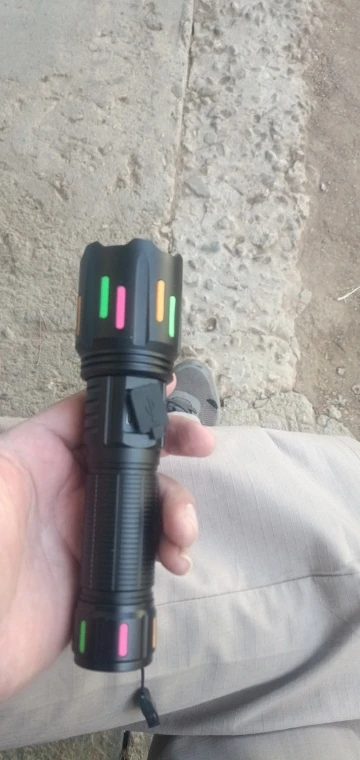
6. Operating Instructions
6.1 Power On/Off and Mode Selection
- Press the power switch button to turn the flashlight ON.
- Press the power switch button repeatedly to cycle through the lighting modes: Strong Light → Medium Light → Low Light → Fast Flash → SOS.
- Press and hold the power switch button for a few seconds to turn the flashlight OFF.
6.2 Zoom Function
The flashlight features a telescopic zoom function to adjust the beam focus:
- Zoom Out: Extend the head of the flashlight forward for a narrow, long-range beam (spotlight).
- Zoom In: Retract the head of the flashlight backward for a wide, large-area floodlight.
6.3 Power Bank Function
Your flashlight can also serve as an emergency power bank:
- Open the protective cover of the USB output port.
- Connect your mobile phone or other USB-powered device to the USB output port using an appropriate charging cable.
- The flashlight will begin charging your device (5V/1A output).
- Disconnect the device and close the protective cover when finished.
7. Maintenance & Care
7.1 Cleaning
- Clean the flashlight with a soft, dry cloth.
- Do not use corrosive or volatile liquids, as these may damage the finish or internal components.
7.2 Storage
- Store the flashlight in a dry, cool, and well-ventilated place when not in use.
- If the product will not be used for a long time, remove the battery to prevent leakage and damage.
7.3 Battery Care
- Charge the battery regularly, even if not in use, to extend its service life.
8. Troubleshooting
Common Issues and Solutions:
- No light: Check battery installation (polarity), ensure the battery is charged, and verify the power switch is functioning.
- Cannot charge: Check the cable connection, try a different USB adapter or cable. Ensure the charging port is clean and free of debris.
- Dim light: The battery is likely low. Please charge the flashlight.
- Abnormal function: If the flashlight exhibits any unusual behavior, stop using it immediately and contact customer service for assistance.
9. Specifications
| Feature | Description |
|---|---|
| Brand | Xiviio |
| Material | Aerospace Aluminum Alloy |
| LED Power | 800W |
| Lighting Distance | Up to 4500 meters |
| Zoom Mode | Telescopic Zoom (Adjustable Focal Length) |
| Lighting Modes | Strong Light, Medium Light, Low Light, Fast Flash, SOS |
| Input Voltage | DC 5V |
| Charging Method | Type-C Charging |
| Output Function | 5V/1A USB Output (Power Bank Function) |
| Battery Type | 1*18650 or 1*26650 battery (not included with all variants) |
| Waterproof Grade | IPX6 (Life waterproof, water sputtering resistant) |
| Working Temperature | -10°C ~ 40°C |
| Dimensions (Zoom In) | Approx. 17.8 cm (Length) x 5 cm (Head Diameter) x 3.5 cm (Body Diameter) |
| Dimensions (Zoom Out) | Approx. 20 cm (Length) x 5 cm (Head Diameter) x 3.5 cm (Body Diameter) |
| Lighting Time | 4 - 15 hours (depending on mode and battery capacity) |
| Charging Time | 4 - 6 hours |
| Certifications | CE, FCC, RoHS, LVD |

10. User Tips
- Charging Port Cover: Ensure the charging port cover is properly sealed after charging to maintain the IPX6 waterproof rating. Some users have noted it may not fit perfectly.
- Battery Compatibility: The flashlight is designed for 18650 or 26650 batteries. If using an 18650 battery, a spacer might be needed for a snug fit, as the compartment is also suitable for larger 26650 batteries.
- Brightness Expectations: While powerful, actual lumen output can vary. Manage expectations regarding extreme brightness claims.
- Long-Term Storage: If storing for extended periods, remove the battery and charge it regularly to preserve its lifespan.
11. Warranty & Compliance
11.1 Warranty Policy
- Warranty Period: 12 months from the date of purchase.
- The warranty covers manufacturing defects under normal use.
- The warranty is invalid due to misuse, disassembly, water damage, or collision.
11.2 Environmental Protection
This product and its battery should not be disposed of as household waste. Please recycle according to local regulations to protect the environment.
11.3 Compliance Declaration
This Xiviio product complies with EU relevant directives and standards and has passed CE, FCC, and RoHS certifications.