
Introduction
Thank you for choosing our Bladeless Neck Fan. This manual provides essential information to ensure safe and optimal use of your device. Please read it thoroughly before operation and keep it for future reference.
This portable neck fan is designed for personal cooling, featuring a bladeless design for safety and comfort, multiple speed settings, and a rechargeable battery for convenience on the go.

Figure 1: Bladeless Neck Fan (White)
Product Features
- Bladeless Design: Safe and comfortable, prevents hair from getting caught.
- Ergonomic & Soft Silicone: Designed for comfortable wear around the neck.
- 3 Speed Settings: Adjustable airflow for various cooling needs.
- Rechargeable Battery: Built-in lithium-ion battery for portable use.
- Brushless Motor: Provides strong wind force and a long service life.
- Integrated Design: Simple appearance, sturdy, and portable.
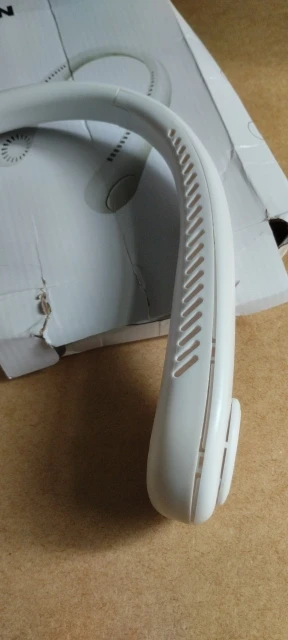
Figure 2: Soft Silicone and Ergonomic Design

Figure 3: 42-Hole Airflow for Even Cooling
Safety Precautions
Please read and follow these safety instructions carefully to prevent injury or damage to the device:
- This device uses a lithium-ion battery. Do not disassemble the battery or the device.
- Do not insert foreign objects into the fan outlets while it is operating, as this can damage the fan blades.
- Avoid placing the product in environments with temperatures above 60°C (140°F).
- Do not expose the device to direct sunlight, high humidity, or extreme temperatures.
- Keep the device away from water and other liquids.
- Children under 10 years old should only use this device under adult supervision.
- Do not use batteries with damaged outer skins; this can cause an explosion.
- If the fan will not be used for a long time, store it in a dry and cool place.
- Due to product upgrades, minor inconsistencies between this manual and the actual product may occur. Refer to the actual product.
Package Contents
- Bladeless Neck Fan
- USB Charging Cable (Micro USB)
- Instruction Manual (this document, or refer to the PDF User Manual for more details)
Setup
1. Initial Charging
- Before first use, fully charge the fan.
- Connect the provided USB charging cable to the charging port on the fan (typically located on the side/back of one of the arms).
- Connect the other end of the USB cable to a compatible USB power source (e.g., computer USB port, USB wall adapter).
- The indicator light will flash while charging. It will remain solid blue when fully charged.
- Charging typically takes 2-3 hours.

Figure 4: Charging port location (example shown on pink model)
Operating Instructions
1. Wearing the Fan
- Place the fan around your neck from the back, ensuring the air outlets are facing upwards towards your face.
- Adjust for a comfortable fit. The flexible design allows for slight adjustments.
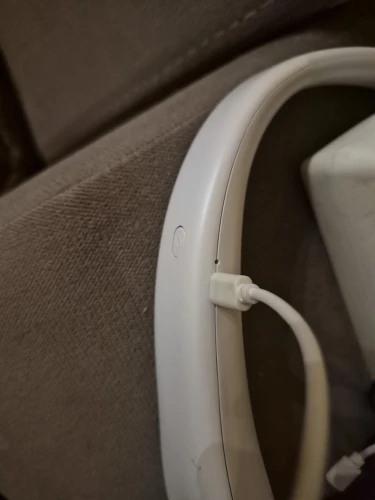
Figure 5: Proper wearing of the neck fan
2. Power On/Off and Speed Adjustment
- Power On: Press the power button once to turn on the fan at the lowest speed setting.
- Speed Adjustment: Press the power button repeatedly to cycle through the wind speeds:
- 1st press: Low speed
- 2nd press: Medium speed
- 3rd press: High speed
- Power Off: After the high-speed setting, pressing the power button again will turn off the device.
3. Battery Indicator
- During operation, the blue indicator light will remain on.
- When the battery is low, the blue indicator light will flash, indicating it's time to recharge.

Video 1: Demonstration of the neck fan in various daily activities.
Maintenance
1. Cleaning
- Ensure the fan is turned off and unplugged before cleaning.
- Wipe the exterior of the fan with a soft, dry cloth.
- Do not use abrasive cleaners, solvents, or immerse the device in water.
- Gently clean the air outlets with a soft brush if dust accumulates.
2. Storage
- If not in use for an extended period, store the fan in a dry, cool place, away from direct sunlight and extreme temperatures.
- It is recommended to charge the battery every 3 months to maintain its health if stored for long periods.
Troubleshooting
| Problem | Possible Cause | Solution |
|---|---|---|
| Fan does not turn on. | Battery is depleted. | Charge the fan fully. |
| Fan does not charge. | Charging cable or adapter is faulty; charging port is misaligned/damaged. | Try a different USB cable and power adapter. Ensure the cable is inserted correctly. If the port is physically damaged, contact support. |
| Fan is noisy or vibrates excessively. | Internal component issue; dust in fan mechanism. | Ensure no foreign objects are lodged in the air outlets. If noise persists, contact support. |
| Only one side of the fan is blowing air. | Internal motor or fan blockage on one side. | Check for any visible obstructions. If the issue continues, contact support. |
| Fan turns off by itself. | Low battery; internal fault. | Recharge the fan. If it still turns off unexpectedly after a full charge, contact support. |
Specifications
| Feature | Detail |
|---|---|
| Model | GHY07-2 |
| Power Source | Lithium Battery (18650, 3.7V) |
| Input Voltage/Current | DC 5V / 1A |
| Power (W) | 5W |
| Charging Time | 2-3 hours |
| Usage Time | 2-6 hours (varies by speed setting) |
| Wind Type | Natural Wind |
| Speed Settings | 3 (Low, Medium, High) |
| Charging Port | Micro USB |
| Dimensions (Package) | 22cm (L) x 15cm (W) x 6cm (H) |
| Weight (Package) | 0.271 kg |
Note: Specifications are subject to change without notice for product improvement.
User Tips
- The bladeless design is effective at preventing hair from getting caught, making it comfortable for users with long hair.
- Experiment with the three fan speeds to find the most comfortable airflow for different situations.
- Keep the charging cable handy, as it's essential for recharging the device.
- For optimal battery life, avoid completely draining the battery before recharging.
Frequently Asked Questions (FAQ)
Q: What is the battery duration?
A: The usage time is approximately 2-6 hours, depending on the selected fan speed. Higher speeds consume more battery.
Q: Where is the fan mode switch located?
A: The power button also functions as the mode switch. Press it once to turn on, and subsequent presses cycle through low, medium, and high speeds. Another press after high speed will turn the fan off.
Q: What type of charger connector does it use?
A: The fan uses a Micro USB connector for charging.
Warranty and Support
This product is covered by a standard manufacturer's warranty. For warranty claims, technical support, or service inquiries, please refer to your purchase documentation or contact the seller directly.
For a more detailed user guide, please refer to the official PDF User Manual.