
1. Introduction
The Gaqqee TDS/EC/TEMP Water Quality Tester is a versatile digital instrument designed for quick and accurate measurement of Total Dissolved Solids (TDS), Electrical Conductivity (EC), and temperature in various water sources. Its integrated design, high-precision sensors, and user-friendly interface make it an essential tool for monitoring water quality in domestic settings, aquariums, swimming pools, agriculture, and laboratory testing.
2. Package Contents
- Water Quality Tester × 1
- Instruction Manual × 1
3. Product Overview
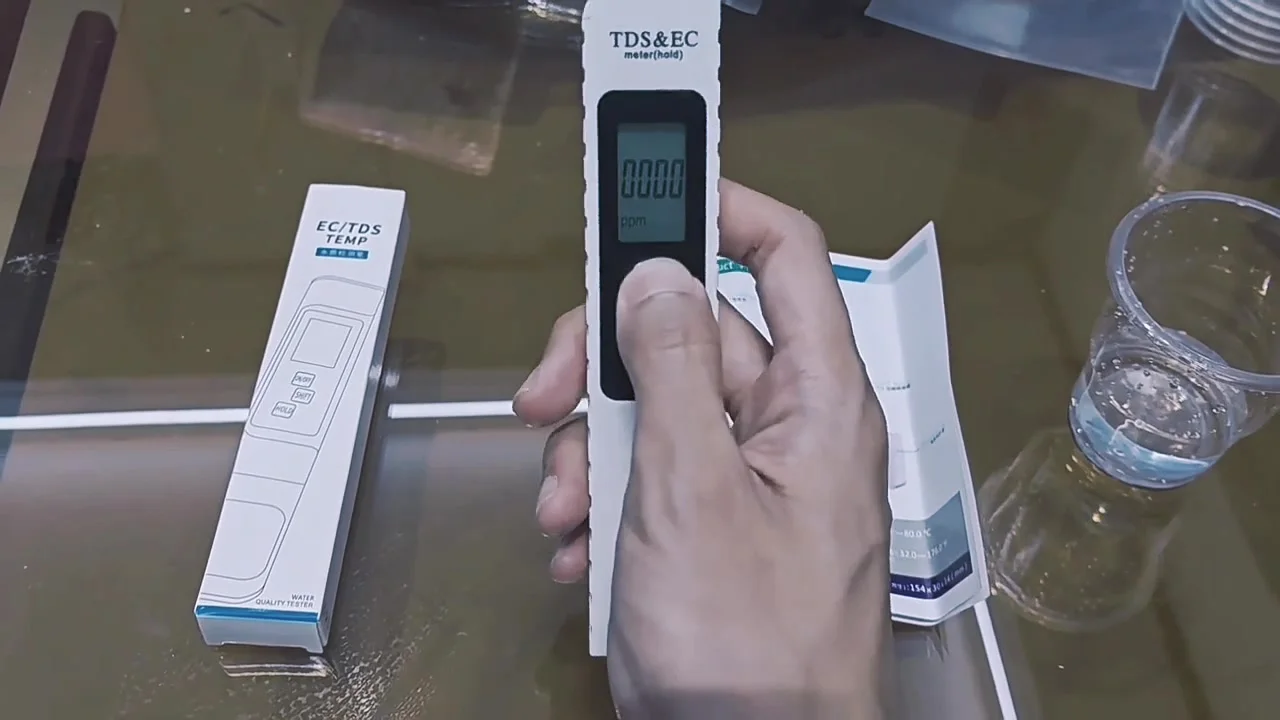
The tester features an integrated design for ease of use and portability. Key components include:
- Digital LCD: Displays TDS, EC, and temperature readings.
- ON/OFF Button: Powers the device on or off.
- SHIFT Button: Toggles between measurement modes (TDS/EC) and temperature units (°C/°F).
- HOLD Button: Locks the current reading on the display for easy viewing.
- Metal Probe: High-sensitivity alloy probe for accurate measurements.
- Probe Cover: Protects the metal probe when not in use.
- Battery Compartment: Houses the CR2032 button cell battery.

Key Features:
- Integrated Design: Simple one-touch operation for quick water quality detection.
- Highly Sensitive Alloy Probe: Built-in high-precision temperature sensor with automatic temperature compensation for various environments.
- Large-Capacity Button Battery: Uses a 3V CR2032 battery for long-lasting and stable performance, with independent replacement.
- Anti-Slip Design: Serrated, concave-convex design for a secure grip.
- Wide Range of Applications: Suitable for domestic water, bottled water, water purifiers, swimming pools, agricultural water, fish tanks, experimental testing, floriculture, and aquaculture.
4. Setup
4.1 Battery Installation
- Locate the battery compartment at the top of the tester.
- Gently slide or pull off the battery cover.
- Insert one 3V CR2032 button cell battery, ensuring the correct polarity (+/-) as indicated inside the compartment.
- Replace the battery cover securely.

4.2 Initial Power On
Press the ON/OFF button to turn on the device. The LCD screen will illuminate, indicating it's ready for use.
5. Operating Instructions
5.1 Basic Measurement
- Remove the protective probe cover from the bottom of the tester.
- Press the ON/OFF button to turn on the device.
- Immerse the metal probe into the water sample up to the immersion line. Ensure there are no air bubbles around the probe.
- Wait for the reading to stabilize (usually a few seconds). The display will show the TDS or EC value and temperature.
- To lock the reading on the display, press the HOLD button. Press it again to release.
- After measurement, press the ON/OFF button to turn off the device. Clean the probe and replace the protective cover.
5.2 Switching Measurement Modes (TDS/EC)
While the device is on, press the SHIFT button to toggle between TDS (ppm) and EC (μs/cm) readings.
5.3 Temperature Measurement and Unit Switching
The device automatically displays temperature. To switch between Celsius (°C) and Fahrenheit (°F), press the SHIFT button repeatedly until the desired unit is shown.
5.4 Understanding TDS Values
TDS (Total Dissolved Solids) is a measure of the combined content of all inorganic and organic substances contained in a liquid in molecular, ionized, or micro-granular suspended form. The following reference range can help interpret readings:

| TDS (ppm) | Water Quality | Description |
|---|---|---|
| 0-20 | High purity | Ideal drinking water for peace of mind |
| 20-50 | Average purity | Healthy drinking water to boil and use |
| 50-100 | Mineral water | Directly drinkable after professional treatment |
| 100-200 | Hard water | Needs to be softened before use |
| 200-400 | Scale formation | Barely acceptable for daily use |
| 400-500 | Poor condition | Cannot be used due to poor taste |
| 500 or more | Large contaminant levels | Affects health |
6. Maintenance
- Probe Cleaning: After each use, rinse the metal probe with distilled water and gently wipe it dry with a clean, soft cloth. Do not use abrasive materials or harsh chemicals.
- Battery Replacement: Replace the CR2032 battery when the display becomes dim or the device fails to power on. Refer to Section 4.1 for instructions.
- Storage: Store the tester in a cool, dry place, away from direct sunlight, high temperatures, and heavy objects. Always replace the protective probe cover when not in use.
- Long-Term Storage: If the device will not be used for an extended period, remove the battery to prevent leakage and potential damage to the instrument.
7. Troubleshooting
- Device Not Turning On: Check if the battery is correctly installed and has sufficient charge. Replace the battery if necessary.
- Inaccurate Readings: Ensure the probe is clean and fully immersed in the water sample. Avoid air bubbles around the probe. The test value is for reference only and can be affected by water temperature, flow rate, and pollution. It is not intended for professional measuring instruments requiring calibration.
- Liquid Over Buttons: Ensure that liquid does not spill over the buttons during testing to prevent damage.
- General Care: Do not disassemble the machine. Avoid hitting the device against hard surfaces or dropping it.
8. Specifications
| Parameter | Value |
|---|---|
| Product Name | TDS&EC-A4 |
| Measurement Range | 0-9990ppm / 0-9999μs/cm |
| Temperature Range | 0-60°C / 32-140°F |
| Tolerance | ±2% |
| Battery Type | 3V CR2032 × 1 |
| Battery Capacity | 50mAh |
| Operating Current | ≤2mA |
| Operating Temperature | 0-60°C |
| Dimensions | 154 × 30 × 14 mm (6.06 × 1.18 × 0.55 inches) |
| Net Weight | 45g |

9. User Tips
No specific user tips were available from provided reviews or Q&A. For best results, always ensure the probe is clean before and after each use, and store the device properly to maintain its accuracy and longevity.
10. Warranty and Support
For any issues, questions, or support regarding your Gaqqee TDS/EC/TEMP Water Quality Tester, please contact the seller or retailer from whom you purchased the product. Please refer to your purchase documentation for specific warranty terms and contact information.