
1. Product Overview
The QUESCAN QU33N is a multi-mode USB GNSS receiver designed for high-precision positioning across various platforms including Windows, Android, and Linux. It integrates the u-blox NEO-M8N module and features a high-performance UBX-M8030 GNSS chip, offering superior sensitivity and rapid satellite acquisition.
This receiver supports simultaneous reception from up to three GNSS constellations, including GPS, Galileo, BeiDou, and GLONASS, ensuring reliable and accurate positioning even in challenging environments like urban areas or weak signal conditions.
Key Features:
- Concurrent multi-GNSS reception: GPS, Galileo, GLONASS, BeiDou, QZSS, SBAS.
- Leading navigation sensitivity: -167 dBm.
- Ultra-low power consumption.
- Excellent positioning performance in dense urban areas.
- Built-in security & integrity protection.
- Full support for satellite augmentation systems.
- 2.0m CEP Horizontal Accuracy.
- USB 2.0 Connector with 2-meter cable.
- IP67 Waterproof level.


2. Safety Information
- ATTENTION: Not suitable for children under 3 years old.
- ATTENTION: Do not swallow small parts to prevent suffocation.
3. Setup Instructions
- Connect Power Supply: Connect the USB cable of the GNSS module to a power source (e.g., a computer USB port, USB charger, or compatible peripheral device) to ensure normal power delivery.
- Connect to Peripheral Device: Connect the USB end of the module to your peripheral device, such as a PC, Android device, or other compatible GPS receiver/controller.
- Power On and Acquire Signal: Power on your device. The module will automatically begin satellite signal acquisition and positioning. Wait for the device to establish a satellite fix.
Android Device Setup (using GPS Connector App):
For Android devices (version 4.0 or above), the module works seamlessly with the 'GPS Connector' application to enable mock location functionality, providing high-precision positioning.
- Install GPS Connector App: Download and install the 'GPS Connector' application on your Android device.
- Enable Developer Options: Go to your Android device's 'Settings' -> 'About phone' (or 'About tablet') and tap 'Build number' seven times to enable 'Developer options'.
- Enable Mock Location: In 'Developer options', find and select 'Select mock location app' (or similar wording) and choose 'GPS Connector'.
- Connect Receiver: Connect the QUESCAN GNSS Receiver to your Android device via USB.
- Launch GPS Connector: Open the GPS Connector app. It should detect the USB device.
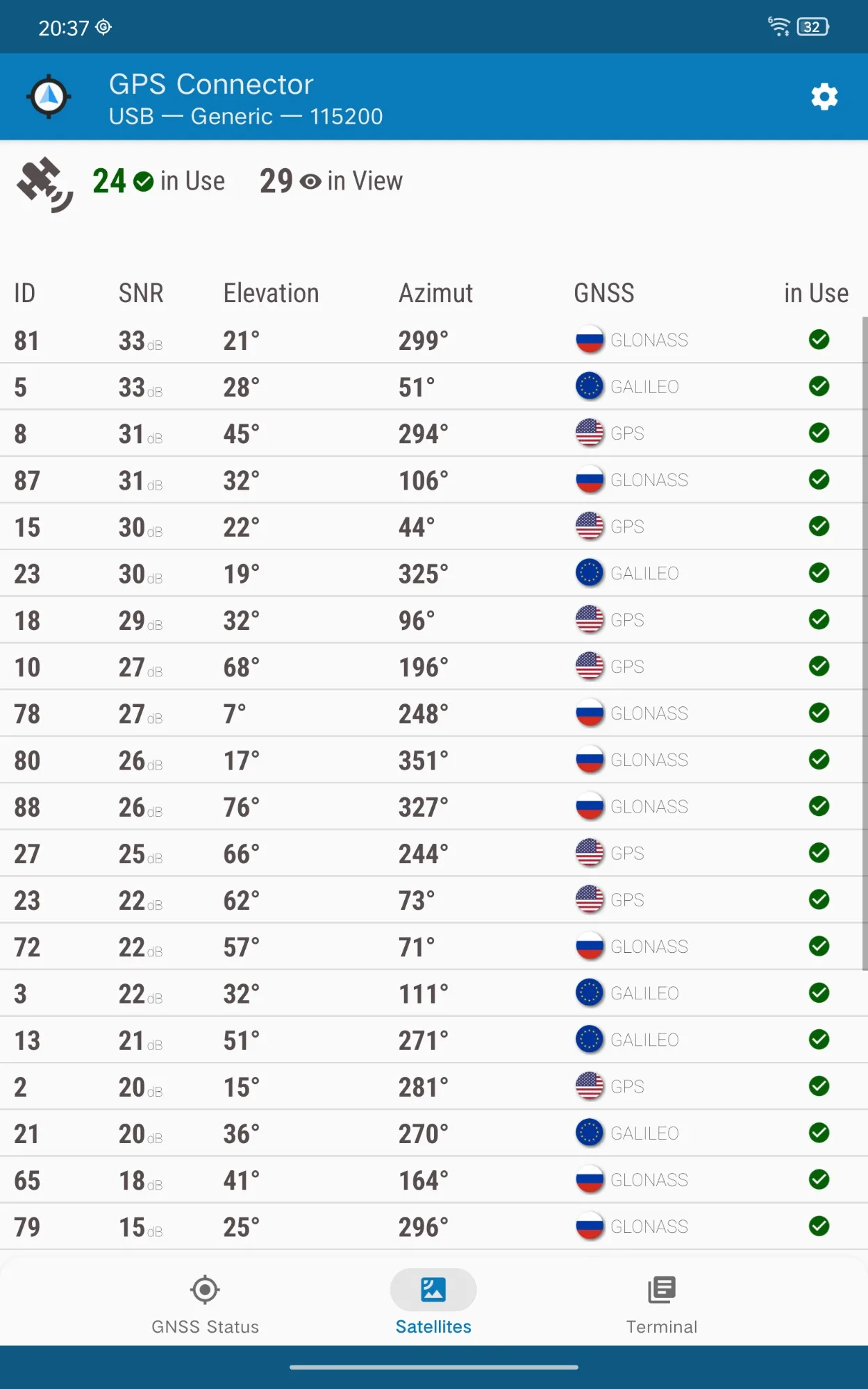
- Verify Positioning: After completing these settings, your Android device will obtain location information from the USB GPS. The app will display satellite signal values, location, ID, and other data.

PC Configuration Software (U-center):
The U-center software is designed for u-blox M8, M9, F9, and legacy GNSS products, and other compatible systems. It allows for flexible configuration and parameter saving.

4. Operating the Receiver
Once connected and configured, the QUESCAN QU33N receiver will provide continuous positioning data to your connected device. The data output adheres to standard NMEA 0183/UBX protocols.
Default Factory Settings:
- GNSS Constellations: GPS+GLONASS+Galileo+QZSS+SBAS
- Baud Rate: 115200 baud, 8 bits, no parity bit, 1 stop bit.
- Navigation Update Rate: 1Hz.
- NMEA Version: 4.10.
- Input Messages: NMEA and UBX.
- Output Messages: NMEA GGA, GLL, GSA, GSV, RMC, VTG and TXT.
NMEA Message Output:
The receiver outputs various NMEA messages, providing detailed navigation and positioning information.
| NMEA Message | Description | Enabled (Default) |
|---|---|---|
| $Talker ID+GGA | Time, position, and fix related data | Y |
| $Talker ID+GLL | Position data: position fix, time of position fix, and status | Y |
| $Talker ID+GSA | GNSS DOP and active satellites | Y |
| $Talker ID+GSV | Number of SVs in view, PRN, elevation, azimuth, and SNR | Y |
| $Talker ID+RMC | Position, Velocity, and Time | Y |
| $Talker ID+VTG | Course over ground and ground speed | Y |
| ZDA GNS DTM GBS GST GRS etc. | N |
5. Maintenance and Precautions
- Antenna Obstruction: Avoid obstructing the antenna, as this may degrade signal reception and accuracy. Ensure a clear line of sight to the sky for optimal performance.
- Electromagnetic Interference: Do not operate the module in environments with strong electromagnetic interference, as this can disrupt satellite signal reception.
- Environmental Protection: Keep the module dry, moisture-proof, and shock-resistant to ensure its longevity and proper functioning. The device has an IP67 waterproof rating, but prolonged exposure to water or extreme conditions should be avoided.

6. Troubleshooting
- Weak Signal: If you experience weak or no satellite signal, first check all antenna connections to ensure they are secure. Relocate the device to an area with a clearer view of the sky.
- Inaccurate Positioning: If positioning is inaccurate, try recalibrating the device using appropriate software (e.g., U-center) or relocate it to a better position with fewer obstructions.
- Device Not Recognized: If your computer or peripheral device does not recognize the GNSS module, verify the USB interface connection. Ensure the USB cable is properly seated and try a different USB port. Check for necessary drivers on your operating system.
7. Specifications
| Parameter | Specifications |
|---|---|
| Model | QU33N |
| Chipset | UBX-M8030-KT |
| Main module | NEO-M8N |
| Oscillator | TCXO |
| Flash | 4M Flash Memory |
| Receiver Type | 72-channel u-blox M8 engine, GPS/QZSS L1 C/A, GLONASS L1OF, BeiDou B1, Galileo E1B/C, SBAS L1 C/A: WAAS, EGNOS, MSAS, GAGAN |
| Concurrent GNSS | Up to three GNSS systems (GPS/Galileo together with either BeiDou or GLONASS) |
| Horizontal Accuracy | 2.0m CEP |
| Time Pulse Accuracy | 30 ns |
| Velocity Accuracy | 0.05 m/s |
| Dynamic Heading Accuracy | 0.3 deg |
| Tracking & Nav. Sensitivity | -167 dBm |
| Reacquisition Sensitivity | -160 dBm |
| Cold Start Sensitivity | -148 dBm |
| Hot Start Sensitivity | -157 dBm |
| Cold Start Acquisition | 26 s |
| Aided Start Acquisition | 2 s |
| Hot Start Acquisition | 1 s |
| Altitude Operational Limits | < 50000 m |
| Velocity Operational Limits | < 500 m/s |
| Dynamics Operational Limits | < 4 g |
| Data Level | USB |
| Protocol | NMEA & UBX |
| Baudrate | 4800bps-921600bps |
| Update Rate | Single GNSS up to 18 Hz, 2 Concurrent GNSS up to 10 Hz |
| Voltage | DC 3.3V-5.0V, Typical: 5.0V |
| Current | 25mA/5V |
| Dimensions | 1.49mm*W37mm*H16.5mm |
| Cable Length | 2 meters |
| Weight | 66 g |
| Connector | USB 2.0 |
| Operating Temp. | -45°C~+85°C |
| Storage Temp. | -45°C~+125°C |
| GNSS Firmware | GPS+Galileo+GLONASS+QZSS+SBAS, M8 SPG 3.01 |
| Protocol Firmware | NMEA0183 ver4.10 |
| NMEA Sentence Default | GNGGA GNGL GLGSA GxGSV GxRMC GxVTG |
| Baudrate Default | 9600bps (Automatic adaptation) |
| Update Rate Default | 1HZ |

8. User Tips
- Car Navigation: This receiver is highly compatible with various car models (e.g., Geely Okavango, Belgee X70, Hawala M6) and can significantly improve in-car navigation systems, often acquiring 12-20+ satellites.
- Configuration Flexibility: Utilize the U-center software for advanced configuration and fine-tuning of settings to optimize performance for specific applications.
- Easy Installation: The receiver is generally easy to install and set up, making it suitable for users looking for a straightforward GPS solution.
- Driver Compatibility: For older operating systems like Windows 7 (32-bit), specific driver installation might be required. Newer OS versions typically have better plug-and-play support.
9. Warranty and Support
For technical support, warranty coverage, or any other inquiries regarding your QUESCAN QU33N USB GPS GNSS Receiver, please contact customer service.
An official user manual in PDF format is available for download: View User Manual (PDF)