
1. Product Overview
The Qanba D-lite Series Arcade Button is a microswitch designed specifically for arcade game joysticks or traditional arcade switch buttons. As an integral component of the gaming controller joystick series, this product is engineered to deliver a high-quality gaming experience.
2. Specifications
| Feature | DL Series (30mm) | EL Series (24mm) |
|---|---|---|
| Model | DL-30 | EL-24 |
| Weight | 9g | 6.8g |
| Material | PC/ABS (Polycarbonate/Acrylonitrile Butadiene Styrene copolymer) | |
| Rated Load | DC5V 1mA | |
| Lifecycle | 1,000,000 operations (at rated load, acting force is 2.5±0.5N) | |
3. Setup and Installation
3.1 Compatible Devices
These buttons are suitable for use in arcade game joysticks or on traditional arcade machines.
3.2 Installation Requirements
- Mounting Aperture:
- DL Series (30mm buttons): 30.2-30.5mm
- EL Series (24mm buttons): 24-24.5mm
- Mounting Panel Thickness: 2.5-5mm
- Terminal Size: 2.8mm spade terminals
3.3 Button Dimensions
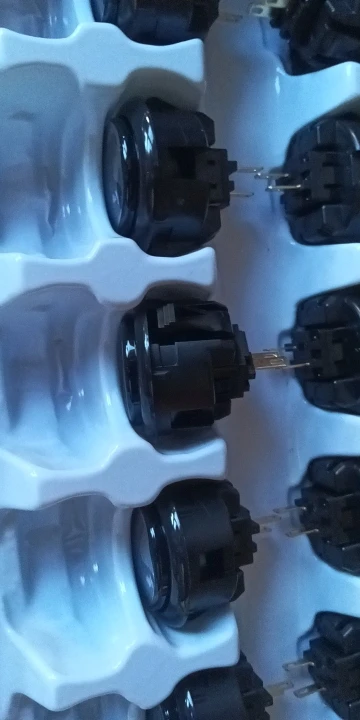
Figure 1: DL-30 (30mm) Button Dimensions
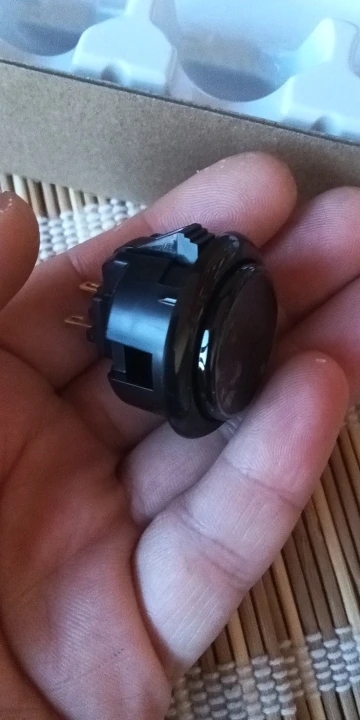
Figure 2: EL-24 (24mm) Button Dimensions
The QANBA D-lite buttons are snap-in type, designed for easy installation into compatible panels. Ensure the mounting aperture and panel thickness meet the specifications for a secure fit.

Figure 3: QANBA D-lite 30mm Buttons (DL Project)

Figure 4: QANBA D-lite 24mm Buttons (EL Project)
Figure 5: Rear view of a QANBA D-lite button showing spade terminals for wiring.
To install, simply push the button into the appropriate mounting aperture until it snaps into place. Connect the 2.8mm spade terminals to your arcade system's wiring. Ensure proper power connection, avoiding wiring errors for safe operation.
4. Operating Guidelines
4.1 Safety Precautions
- Avoid exposure to liquids or high-temperature environments to maintain optimal functionality.
- Refrain from applying excessive force to prevent damage to internal components.
4.2 Standard Operating Conditions
- Temperature: 20±15°C
- Air Humidity: 65±20%rh
Using the buttons outside these conditions may affect performance or lifespan.
5. Cleaning and Maintenance
- Regularly clean by gently wiping to maintain cleanliness.
- Avoid the use of cleaning agents containing chemical components, as these may damage the button material or internal mechanisms.
- Periodically inspect and remove any dust or debris that may affect the button's normal operation.
6. Troubleshooting
If you encounter issues with your QANBA D-lite Arcade Buttons, consider the following:
- Button Unresponsive: Check all wiring connections to ensure they are secure and correctly attached to the 2.8mm spade terminals. Incorrect wiring can prevent the button from functioning.
- Intermittent Functionality: Inspect the button for any dust, debris, or foreign objects that might be lodged around the plunger or inside the switch mechanism. Gently clean the area if necessary.
- Physical Damage: Avoid applying excessive force during installation or use, as this can damage internal components. If physical damage is suspected, contact support.
- Environmental Factors: Ensure the buttons are not exposed to liquids or extreme temperatures, which can impair functionality.
7. Warranty and Support
7.1 After-Sales Service Policy
In case of quality issues, please contact our after-sales service team for repair or replacement support. Familiarize yourself with our return policy and procedure for a smooth return process.
7.2 Contact Information
- Manufacturer: Qanba Technology Development Co., Ltd., Shenzhen, China
- After-Sales Service Email: kf@qanba.com
8. User Tips
- Quality and Feel: Users generally report excellent quality and a good feel for these buttons, making them suitable for various arcade setups, including retro machines.
- Sensitivity: The buttons are noted for being very sensitive, which can enhance the gaming experience.
- Noise Level: While some users find them quiet, others mention a slight noise. This can vary based on installation and individual perception.
- Color and Size Availability: If you require specific colors or a custom assortment of 24mm and 30mm buttons, it is advisable to check current stock and inquire with the seller about custom orders or restock schedules.
9. Frequently Asked Questions (FAQ)
- Q: When will other colors be restocked?
- A: Availability of specific colors can vary. Please check the product page regularly or contact customer support for information on restock schedules.
- Q: Can I get a custom assortment of colors (e.g., 6 blue, 6 green, 6 yellow, 6 red)?
- A: The product is typically sold in packs of 24 of a single color and size. For custom assortments, please contact the seller directly to inquire about possibilities.
- Q: Can I buy individual buttons or specific quantities (e.g., 3 blue 30mm buttons)?
- A: This product is sold as a kit of 24 buttons. For individual button purchases or specific smaller quantities, you would need to check if the seller offers separate listings for single buttons or smaller packs.