
1. Introduction
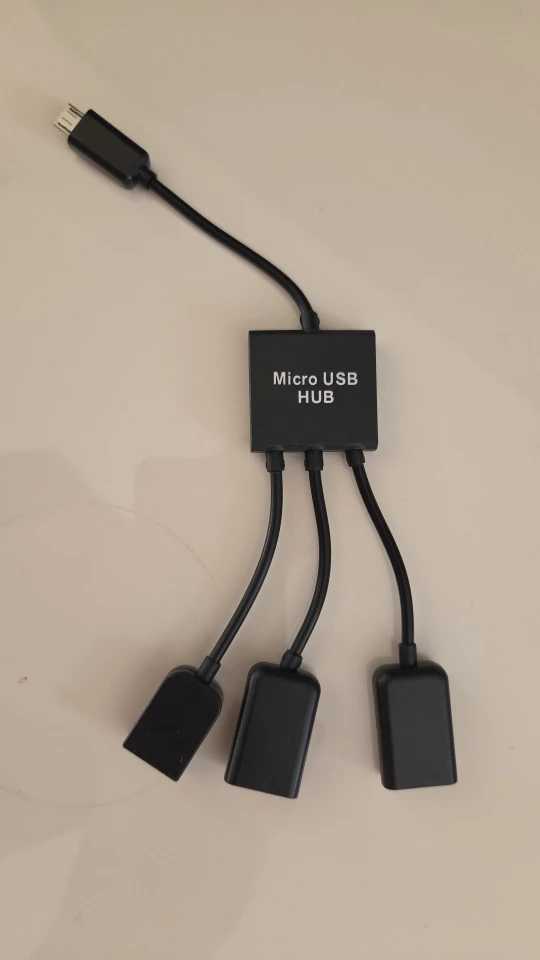
Thank you for purchasing the EDUP 3-in-1 Micro USB / Type C OTG HUB Adapter. This multi-function USB On-The-Go (OTG) host hub adapter cable allows you to connect various USB devices, such as flash drives, mice, and keyboards, to your compatible smartphone or tablet. It features two USB 2.0 host ports and a Micro USB port for supplying extra power to connected peripherals.
2. Package Contents
- 1x OTG HUB Cable
3. Setup Instructions
This adapter is designed for plug-and-play functionality, requiring no additional drivers.
- Connect to Host Device: Plug the Micro USB or Type C male connector of the adapter into the corresponding port on your smartphone, tablet, or computer.
- Connect USB Peripherals: Insert your USB devices (e.g., USB flash drive, mouse, keyboard, game console) into the USB 2.0 female ports on the adapter.
- Optional External Power: If your connected USB peripherals require more power than your host device can provide (e.g., external hard drives), connect a standard Micro USB power adapter (not included) to the Micro USB female port on the hub. This port is for supplying power to the peripherals, not for charging your host device.
4. Operating Instructions
Once connected, your host device should automatically detect the connected USB peripherals.
- Plug and Play: The adapter supports hot-plugging, allowing you to connect and disconnect devices without restarting your host device.
- Device Compatibility: This adapter supports high-speed, full-speed, and low-speed USB devices. It is suitable for devices with a Micro-B USB connector that enable USB 2.0 host or USB OTG functionality.
- Supported Peripherals: You can connect USB flash drives, USB mice, USB keyboards, game controllers, and other standard USB devices.
- Example Compatible Devices: Samsung Galaxy S2, Samsung Galaxy Note, Samsung Galaxy S3/S4, GALAXY Tab3 8.0, Sony Xperia NX-020, Sony Xperia acro HDIS12S, Toshiba REGZA Phone-T01D, and Sony S-series Tablets.
5. User Tips
- External Hard Drives: If connecting a portable hard drive, it may require external power. Use the central USB port for higher power devices and ensure you connect a power source to the hub's Micro USB port if the drive is not recognized or functions intermittently.
- Charging Functionality: This is an OTG adapter designed to connect peripherals to your host device, not to charge your host device. The Micro USB port on the hub is for supplying power to the connected USB accessories.
- Careful Handling: The cable is designed to be compact. Handle with care to ensure longevity, especially at connection points.
6. Maintenance
- Keep the adapter dry and away from moisture.
- Clean the adapter with a soft, dry cloth. Do not use liquid cleaners.
- Avoid exposing the adapter to extreme temperatures or direct sunlight.
- Store the adapter in a clean, dust-free environment when not in use.
7. Troubleshooting
- Device not recognized:
- Ensure your smartphone or tablet supports OTG functionality and that it is enabled in your device settings (if applicable).
- Check all connections to ensure they are secure.
- Try connecting the USB peripheral directly to your host device (if possible) to rule out issues with the peripheral.
- If using an external hard drive, ensure external power is supplied to the hub's Micro USB port.
- External hard drive not working:
- Many external hard drives require more power than a smartphone or tablet can supply. Connect a Micro USB power adapter to the hub's dedicated power input port.
- Try connecting the hard drive to the central USB port on the hub, as some users report better compatibility there.
- Host device is not charging:
- This adapter is designed for OTG functionality (connecting peripherals), not for charging your host device. The Micro USB port on the hub is for supplying power to the connected USB peripherals.
8. Specifications
| Product Type | 3-in-1 OTG HUB Adapter |
| Brand | EDUP |
| Connector Type (Host) | Micro USB Male / Type C Male (variant dependent) |
| Ports | 2x USB 2.0 Female (Host), 1x Micro USB Female (Power Input) |
| USB Standard | USB 2.0 (compatible with USB 1.1) |
| Length | Approx. 19 cm |
| Color | Black |
| Function | OTG Host Hub Adapter with Power Input |
9. Warranty and Support
For any warranty claims, technical support, or product inquiries, please contact the seller or retailer from whom you purchased this product. Please retain your proof of purchase for warranty purposes.
A detailed user manual in PDF format may also be available for download at: User Manual (PDF)