
1. Product Overview
The Qanba Gravity Silent Joystick is an 8-way directional arcade joystick specifically designed for arcade game joysticks and traditional arcade machines. As a key component of the game controller series joystick, it provides users with a high-quality, precise, and quiet control experience.

2. Specifications
| Feature | Description |
|---|---|
| Model Variants | JOV8S (Omron High elasticity switch), JCV8 (Cherry MX Speed Silver switch) |
| Connector | 5-pin (XH2.54mm terminal interface) |
| Ball Top Size | 35mm |
| Installation Size | 85mm x 40mm |
| Lever Dimensions (Total) | Height: 102mm (4in), Width: 95mm (3.74in), Depth: 57mm (2.24in) |
| Standard Working Environment | Temperature: 20±15°C, Air Humidity: 65±20%rh |
| Package Dimensions | 14cm (L) x 9cm (W) x 7cm (H) |
| Package Weight | 0.386 kg |
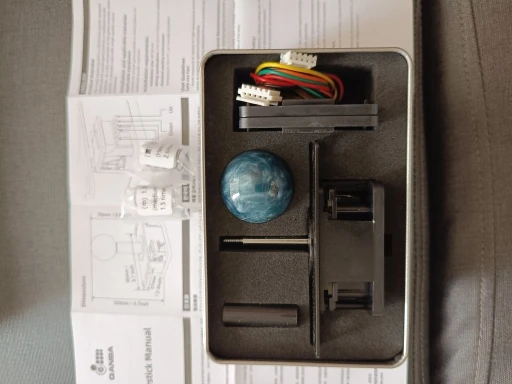
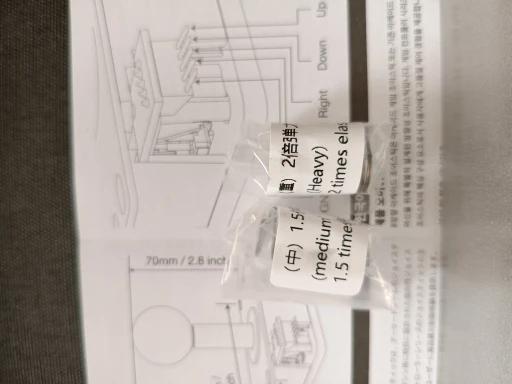
| Included Accessories | 2 Restrictor Gates (Square, Circle), 3 Springs (Soft, Medium, Strong), Dust Covers, Wiring Cable |
| Certification | CE |
| Origin | CN (Origin) |
3. Installation
The Qanba Gravity Silent Joystick is suitable for use in arcade game joysticks or control devices on traditional arcade machines. Ensure your device has an appropriate mounting area and compatible wiring.
3.1 Installation Requirements
- Mounting Space: A minimum area of 85mm x 40mm is required for installation.
- Wiring: The joystick uses an XH2.54mm 5PIN terminal interface.
3.2 Wiring Diagram
Connect the 5-pin cable from the joystick to your arcade board or control device according to the following pinout:
GND Left Right Down Up

3.3 Restrictor Gate Installation
The joystick comes with interchangeable restrictor gates (square and circle) to customize the feel and movement. To change the gate:
- Unscrew the base of the joystick to access the restrictor plate.
- Carefully remove the current restrictor gate.
- Insert the desired restrictor gate (square or circle) into position.
- Re-secure the base of the joystick.

4. Operating Instructions
4.1 Safe Use Tips
- Avoid exposure to liquids or high-temperature environments to maintain optimal functionality.
- Refrain from applying excessive force to prevent damage to internal components.
4.2 Environmental Considerations
Before using the joystick in special environments, understand the possible effects of the environment on the joystick and take appropriate protective measures.
5. Cleaning and Maintenance
- Keep the joystick clean by gently wiping it regularly with a soft, dry cloth.
- Avoid using chemical-based cleaners, as they may damage the materials.
- Regularly check and remove any dust or foreign matter that may affect the normal operation of the keys or switches.
6. Troubleshooting
If you encounter issues with your Qanba Gravity Silent Joystick, consider the following:
- No Response: Ensure the 5-pin wiring is correctly connected to the arcade board or control device. Check for loose connections.
- Incorrect Movement: Verify that the restrictor gate is properly seated and not obstructing movement.
- Stiff or Loose Lever: The joystick comes with three different tension springs. You can customize the feel by replacing the spring. Refer to Figure 4 for spring options.
- Unusual Noises (e.g., 'clunking'): Ensure all components are securely fastened. If the issue persists, check for any foreign objects or damage.
7. User Tips
- Customization: The joystick includes multiple restrictor gates (square, circle) and three springs of varying tensions (soft, medium, strong). Experiment with these to find your preferred feel and response for different games.
- Model Differences: Be aware that the JOV8S model uses Omron High elasticity switches, while the JCV8 model uses Cherry MX Speed Silver switches. These offer different tactile feedback and durability characteristics. Choose the model that best suits your play style and preferences.
- Upgrade Potential: Many users find this joystick to be a significant upgrade over stock levers, offering smoother and quieter operation.
- Quiet Operation: The 'Gravity Silent' design is highly praised for its quiet performance, making it ideal for late-night gaming sessions without disturbing others.
8. Warranty and Support
In case of quality problems, please contact our after-sales service team for repair or replacement support.
9. Contact Information
If you have any questions or need assistance, please contact:
- Manufacturer: Shenzhen Qanba Technology Development Co., Ltd.
- After-sales service email: kf@qanba.com
10. Frequently Asked Questions (FAQ)
- Q: Will this joystick fit my Qanba Drone arcade stick?
- A: The installation size for this joystick is 85mm x 40mm. Please measure the available space in your Qanba Drone to confirm compatibility. This joystick is designed as a replacement for many arcade setups.
- Q: Does it come with an octagonal restrictor?
- A: The product typically includes square and circle restrictor gates. While some packages may vary or include additional types, the standard offering provides these two options for customization. Please refer to Figure 3 for the included restrictor gates.