
1. Product Introduction
The Mixxar MIXCLL001 is a versatile 3-in-1 portable lighting solution designed for various uses, including camping, emergencies, night riding, and home lighting. It functions as a camping lamp, a powerful flashlight, and an adjustable desk lamp. Additionally, it features a built-in power bank to charge your mobile devices. Its simple structure, durable ABS material, and ease of cleaning make it suitable for daily use in various environments.

Image 1.1: Mixxar Multi-function Camping Light in a camping environment.
2. Package Contents
- Multi-function Camping Light (MIXCLL001) x 1
- USB Charging Cable x 1
- User Manual x 1
3. Setup
3.1 Initial Charging
- Locate the USB charging port on the device.
- Connect the provided USB charging cable to the device and plug the other end into a standard USB power adapter (not included) or a computer USB port.
- The charging indicator light will illuminate, indicating the device is charging.
- Charge the device fully before first use to ensure optimal battery performance.
3.2 Placement
- Place the product on a flat, stable surface when using it as a desk lamp or for general area lighting.
- Ensure the device is kept away from sharp objects, high temperatures, open flames, and humid environments.
4. Operating Instructions
4.1 Power On/Off and Lighting Modes
The device features a three-stage lighting mode. Press the power button to cycle through the modes:
- First Press: Activates the Camping Lamp mode (diffused area light).
- Second Press: Activates the Flashlight mode (focused beam).
- Third Press: Activates the Desk Lamp mode (if the arm is extended).
- Fourth Press: Turns the device off.
4.2 Using as a Flashlight
In flashlight mode, the device provides a focused beam suitable for directional lighting. Hold the handle for easy portability.

Image 4.1: The device functioning as a flashlight.
4.3 Using as a Camping Lamp
In camping lamp mode, the device emits a diffused light, ideal for illuminating tents or small areas. The integrated handle allows for hanging.
4.4 Using as a Desk Lamp
To use as a desk lamp, extend the flexible arm from the top of the device. The light head can be adjusted to various angles to direct illumination precisely where needed.

Image 4.2: The device configured as a desk lamp with an adjustable arm.
4.5 Power Bank Function
The device can be used as an emergency power bank to charge other USB-powered devices, such as smartphones. Locate the USB output port, connect your device's charging cable, and ensure the camping light has sufficient charge.

Image 4.3: The device charging a smartphone via its power bank function.
4.6 Product Demonstration Video
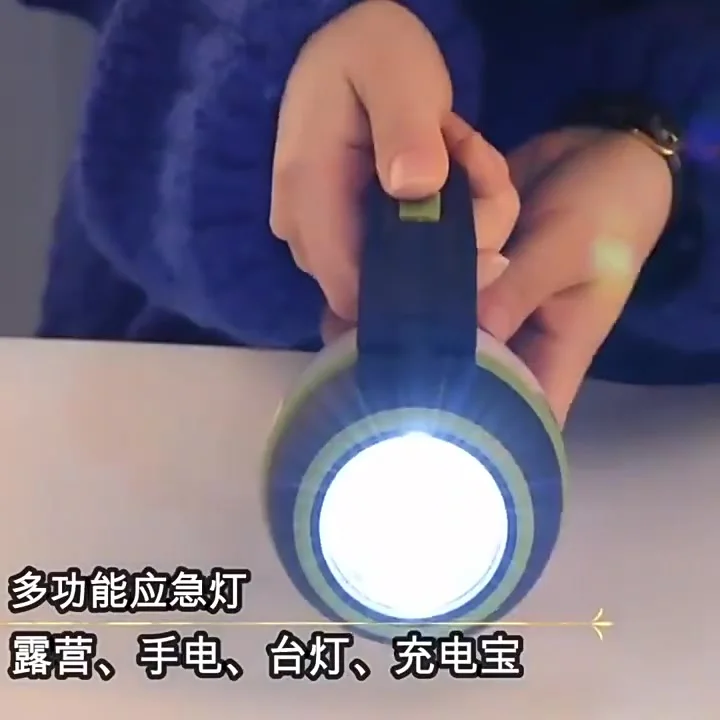
Video 4.1: A short demonstration of the Mixxar Multi-function Camping Light's various features and modes.
5. Maintenance
5.1 Cleaning
- Use a soft, dry cloth to gently wipe the surface of the device to remove dust and dirt.
- Do not use strong acid or alkaline detergents, abrasive cleaners, or solvents, as these can damage the finish.
- Ensure the device is turned off and unplugged before cleaning.
5.2 Storage
- When not in use for extended periods, store the device in a cool, dry place.
- Avoid placing heavy objects on the product to prevent deformation or damage.
- It is recommended to charge the device every 3-6 months during storage to maintain battery health.
6. Troubleshooting
- Device not turning on: Ensure the device is fully charged. Connect it to a power source and allow it to charge for at least 30 minutes before attempting to turn it on again.
- Device not charging: Check that the USB cable is securely connected to both the device and the power source. Try using a different USB cable and a different power adapter/port to rule out faulty accessories.
- Device not charging other devices (Power Bank function): Ensure the camping light itself has sufficient charge. Verify that the charging cable for the external device is functional and properly connected to the USB output port.
- Light flickering or dim: This may indicate a low battery. Recharge the device fully.
- Physical damage (cracks, deformation): If the product is cracked, broken, or deformed, discontinue use immediately to prevent potential hazards.
7. Specifications
| Attribute | Specification |
| Model Number | MIXCLL001 |
| Brand Name | mixxar |
| Material | ABS (Body Material) |
| Color | Black and Green |
| Dimensions (H x W) | 15 cm x 8.5 cm |
| Light Source | LED bulbs (Highlight Wick) |
| Power Source | Rechargeable battery |
| Battery Type | Built-in 18650 Lithium Ion |
| Battery Life | 5-8 hours (usage dependent) |
| Charging Input | USB-5V-1A (Universal USB interface) |
| Voltage | 3.7V-4.2V |
| Power | 5W |
| Lighting Period (h) | 6 hours |
| Shooting Distance | 100-200m |
| Waterproof Rating | IPX45 |
| Features | 3 in 1 (Camping Lamp, Flashlight, Desk Lamp), USB Rechargeable, Power Bank |
| Certifications | CCC, CE, FCC, ROHS |
8. User Tips
- Users frequently praise the device for its bright illumination and long-lasting battery life, making it reliable for extended use.
- The integrated power bank function is a highly valued feature, allowing users to conveniently charge their mobile phones or other small devices during emergencies or when away from power outlets.
- Ensure the flexible arm for the desk lamp mode is handled gently to maintain its adjustability and longevity.
9. Warranty and Support
9.1 Warranty
This product comes with a 2-year warranty from the date of purchase against manufacturing defects. This warranty does not cover damage caused by misuse, accidents, unauthorized modifications, or normal wear and tear.
9.2 Customer Support
For any quality problems, technical assistance, or warranty claims, please contact your seller or the manufacturer's customer service. Provide your purchase details and a clear description of the issue for prompt support.
9.3 Compliance
This product complies with relevant EU safety standards and other applicable regulations.