
1. Introduction
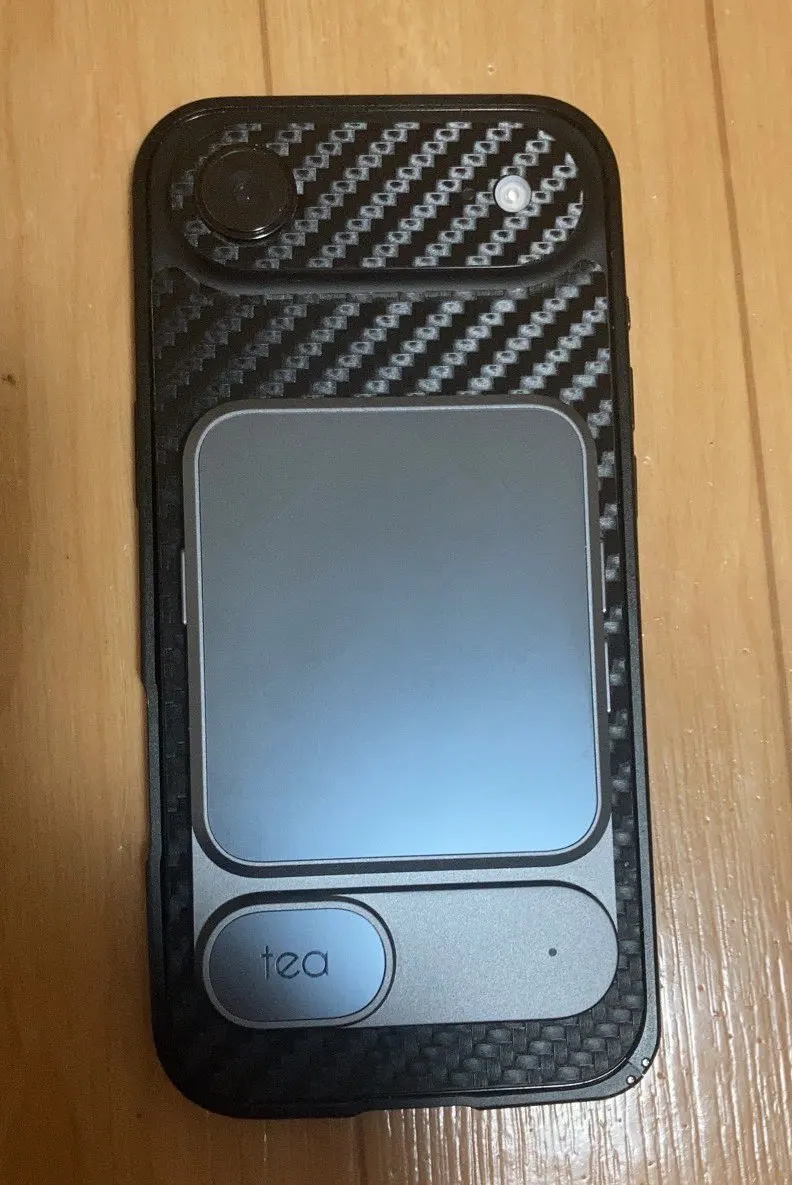
The Khadas Tea is an ultra-slim, portable headphone amplifier designed to elevate your audio experience. Featuring a high-performance DAC, Bluetooth connectivity, and a built-in battery, it offers studio-quality sound on the go. Its magnetic attachment ensures seamless integration with compatible smartphones.

Khadas Tea connected to a smartphone, showcasing its compact design and broad compatibility.

Official product video demonstrating the features and usage of the Khadas Tea amplifier.
2. Device Overview
2.1 Interface Diagram

Top view of the Khadas Tea, highlighting control buttons and indicator light.
- Power Button: On/Off, Play/Pause, Call control, Siri activation, Bluetooth reconnect.
- Volume Up (+): Increase volume, Previous track.
- Volume Down (-): Decrease volume, Next track.
- RGB LED: Status indicator for power, battery, and connection modes.
Bottom view of the Khadas Tea, showing audio and charging ports.
- Microphones: For voice calls and voice assistant commands.
- USB-C Port: For charging and USB data input.
- 3.5mm Single-Ended Jack: Headphone output.
3. Setup
3.1 Charging the Device
Before first use, fully charge your Khadas Tea. Connect the device to a power source using the provided USB-C cable. The RGB LED will show a solid red while charging and turn off when fully charged. Use a power adapter that supports 5V ≥ 1.0A.
3.2 Power On/Off
- To Power On: Long-press the Power button for 3 seconds.
- To Power Off: Long-press the Power button for 5 seconds.
3.3 Bluetooth Pairing
To pair your Khadas Tea with a new device:
- Ensure the Khadas Tea is powered off.
- Long-press the Power button for 6 seconds until the RGB LED flashes blue, indicating pairing mode.
- On your smartphone, tablet, or PC, go to Bluetooth settings and select