
1. Introduction
This manual provides essential information for the safe and efficient use of your Coswall Smart IP66 Waterproof Socket. This smart socket is designed for both indoor and outdoor use, offering robust protection against water and dust (IP66 rated), and features smart control capabilities via Wi-Fi, Tuya App, voice assistants like Alexa and Google Home, and IFTTT.

2. Safety & Warnings
Important Safety Information
Read all instructions before use. Failure to follow these instructions may result in damage to the product or personal injury.
- Warning: Keep the device and its cord out of reach of children under 3 years old.
- Keep away from children unless supervised by an adult.
- Do not use this product for purposes other than its intended use.
- Inspect the product before each use; do not use if damaged.
- Follow installation and operation guidelines to avoid injury.
- Do not expose to water or moisture beyond its IP66 rating. Ensure the cover is securely closed when not in use or during wet conditions.
3. Product Overview
The Coswall Smart Waterproof Socket is available in various configurations, including 1-socket, 2-socket, and 4-socket options, with or without Wi-Fi capabilities. The smart versions integrate seamlessly with your smart home ecosystem.
Key Features:
- IP66 Waterproof & Dustproof: Designed for outdoor and harsh environments.
- Flame-Retardant PC Shell: Withstands high temperatures for enhanced safety.
- Smart Control (Wi-Fi models): Remote control via mobile app, voice control with Alexa/Google Home, and programmable timers.
- Variety of Socket Modules: Compatible with different socket types (e.g., Brazil standard, USB charging).
- Secure Buckle Design: Ensures a strong seal for weather protection.
Components:
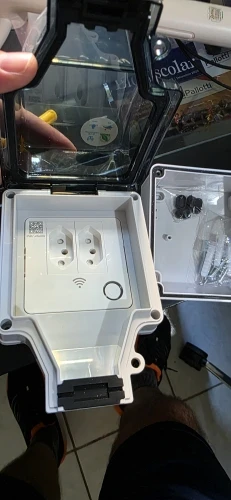
The socket unit typically includes the main housing, the socket module(s), and a transparent protective cover with a buckle mechanism.


4. Specifications
| Attribute | Value |
|---|---|
| Brand Name | Coswall |
| Model Number | CS-WP-TR-IP66-TUY-BR-11 |
| Name | IP66 Outdoor Waterproof Socket |
| Material | Plastic (Flame-retardant PC shell) |
| Socket Type | Combined (Brazil Standard shown) |
| Installation Type | Wall Mounted |
| Is Smart Device | Yes (for Wi-Fi models) |
| Features | Standing Style |
| Rated Current | 20A |
| Grounding | Standard Grounding |
| Application | Residential / General-Purpose |
| Protection Class | IP66 |
| Certification | CE, RoHS |
| Wi-Fi Protocol | IEEE 802.12 b/g/n (for Wi-Fi models) |
| Input Voltage | 100-250V 50/60HZ |
| Max. Power | <3000W/gang |
| Power Consumption | <0.6W |
| Origin | Mainland China |
Dimensions:


5. Installation
Before proceeding with installation, ensure the power supply is turned off at the main circuit breaker to prevent electrical shock. If you are unsure about electrical installations, consult a qualified electrician.
5.1 Before First Use:
Remove all protective films from the device, especially from the transparent cover and any display areas.
5.2 Mounting the Socket:
- Choose a suitable wall-mounted location, considering the dimensions of your socket variant (refer to Figures 5 and 6).
- Mark the drilling points on the wall using the backplate of the socket as a template.
- Drill holes at the marked points.
- Secure the backplate of the socket to the wall using appropriate screws and anchors.
- Connect the electrical wiring to the terminals inside the socket housing. Ensure proper grounding (Live, Neutral, Ground). Refer to Figure 7 for an example of internal wiring.
- Carefully place the socket module into the housing and secure it.
- Close the transparent protective cover and engage the buckle mechanism to ensure a strong, waterproof seal.
6. Smart Features & Operation (Wi-Fi Models Only)
For Wi-Fi enabled models, you can control your socket remotely and integrate it with smart home systems.
6.1 Initial Setup & App Pairing:
- Ensure the socket is powered on.
- Download the Tuya Smart or Smart Life app from your smartphone's app store.
- Register or log in to your account.
- In the app, tap '+' to add a new device.
- Follow the in-app instructions to put the socket into pairing mode (usually by pressing and holding the Wi-Fi button on the socket for a few seconds until the indicator light blinks rapidly).
- Connect the app to your 2.4GHz Wi-Fi network (5GHz networks are not supported).
- Once paired, you can rename the device and access its features.
6.2 App Control:
- Remote On/Off: Turn the socket on or off from anywhere using the app.
- Timer & Schedule: Set schedules for the socket to turn on/off automatically at specific times or days.
- Countdown: Set a countdown timer for the socket to turn off after a set duration.
- Energy Monitoring: Check the usage of connected appliances (if supported by your specific model).
6.3 Voice Control:
Integrate your Coswall Smart Socket with Amazon Alexa or Google Home for convenient voice control:
- In the Tuya Smart/Smart Life app, go to 'Me' > 'More Services' > 'Alexa' or 'Google Assistant' and follow the linking instructions.
- Once linked, you can use voice commands such as:
- "Alexa, turn on [Socket Name]"
- "Hey Google, turn off [Socket Name]"
7. Maintenance
- Cleaning: Wipe the exterior with a soft, damp cloth. Do not use harsh chemicals or abrasive cleaners. Ensure the cover is closed during cleaning.
- Inspection: Periodically check the socket for any signs of damage, wear, or loose connections. Ensure the waterproof seal is intact.
- Storage: If storing the device for an extended period, turn off the power, disconnect any plugs, and store it in a dry place away from direct sunlight and extreme temperatures.
- Cover Integrity: Always ensure the transparent cover is securely closed and the buckle is engaged when the socket is not in active use or when exposed to outdoor elements to maintain its IP66 rating.
8. Troubleshooting
- No Power: Check the main circuit breaker. Ensure the socket is correctly wired and all connections are secure.
- Wi-Fi Disconnection: Ensure your Wi-Fi router is working and within range. The socket only supports 2.4GHz Wi-Fi. Try restarting the socket and your router. Re-pair the device if necessary.
- App Control Not Working: Verify your phone has an internet connection. Ensure the Tuya Smart/Smart Life app is updated to the latest version.
- Voice Control Issues: Confirm that your smart assistant (Alexa/Google Home) is properly linked to the Tuya Smart/Smart Life app and that the device name is recognized.
- Water Ingress: If you suspect water has entered the socket, immediately cut power at the circuit breaker. Do not use the socket until it has been thoroughly inspected and dried by a professional. Ensure the cover is always properly closed and buckled.
9. User Tips
- For outdoor installations, consider the local weather conditions. The IP66 rating provides excellent protection against rain and dust, making it suitable for coastal areas.
- When installing a 20A socket, ensure that the internal wiring connections are robust and properly separated to handle the current safely.
- Regularly check the integrity of the waterproof cover and its buckle to maintain optimal protection against the elements.
10. Frequently Asked Questions (FAQ)
- Q: Does the socket support 110V?
- A: Yes, the socket supports a wide input voltage range of 100-250V 50/60HZ.
- Q: Are there options for more than two sockets or with Wi-Fi?
- A: Yes, Coswall offers various configurations, including 1-socket, 2-socket (with or without Wi-Fi), and 4-socket (typically without Wi-Fi) versions to suit different needs.
11. Manufacturer & Support
Manufacturer Information:
Company Name: Wenzhou Xiatian Electric Technology Co., LTD.
Full Address: 2F., South Side Building, No. 2, Xingyi Road, Puzhou Street, Longwan District, Wenzhou City, Zhejiang Province, China
Email: Coswall@126.com
Website: https://coswall.aliexpress.com/store/529450
Telephone: +86 15067883575
EU Authorized Representative:
Company Name: MJCM SARL
Full Address: Bettinastr.30, 60325 Frankfurt am Main, Germany
Email: mjcm190928@gmail.com
Website/Telephone: +33-767213611
Importer:
Name: MJCM SARL
Full Address: Bettinastr.30, 60325 Frankfurt am Main, Germany
Compliance Information:
This product complies with CE and RoHS standards.
12. Additional Resources
For a detailed user manual in PDF format, please refer to the official document available from the manufacturer. A PDF version of the user manual can be found at: User manual (PDF).