
1. Introduction
The Topvico Wireless Power Off / On Detector (Model TP-103N) is designed to provide immediate alerts during power outages or power recovery events. Featuring a loud 118dB alarm and an LED flashing indicator, it ensures you are notified even if the audible alarm is not heard. This device is ideal for monitoring critical systems and appliances such as refrigerators, freezers, medical equipment, and other areas where continuous power is essential.

Figure 1: Front view of the Topvico Power Failure Alarm with ON/OFF switch.
2. Safety & Warnings
Please read all instructions carefully before use. Failure to follow these instructions may result in damage to the product or personal injury.
- Keep the device and its cord out of reach of children under 3 years old.
- Keep away from children unless supervised by an adult.
- Do not use this product for purposes other than its intended use.
- Inspect the product before each use; do not use if damaged.
- Follow installation and operation guidelines to avoid injury.
3. Package Contents
The package should contain the following items:
- 1x Topvico Power Failure Alarm (Model TP-103N)
- 1x Power Adapter (EU/US/AU/UK plug, depending on your region)
- 1x User Manual
Note: A 9V battery is required for operation and is NOT included in the package.
4. Specifications
| Feature | Description |
|---|---|
| Brand Name | TOPVICO |
| Model Number | TP-103N |
| Function | Wireless Power Off / On Detector, Power Failure Outage Alarm |
| Alarm Output | 118dB voice + LED (Alarms when power fails, alarms again when power is restored) |
| Power Supply (Internal) | 1 unit 9V battery (not included, alkaline battery recommended) |
| Applicable Voltage | AC 100V-220V |
| Plug Type | EU / US / AU / UK (region-specific) |
| Certification | CE |
| Dimensions (L x W x H) | 112mm x 66mm x 32mm |
| Weight | 0.15 kg |
Figure 2: Dimensions of the alarm unit.
5. Setup
-
Install Battery: Open the back cover of the alarm unit and insert one 9V battery. Ensure correct polarity. Close the back cover securely.
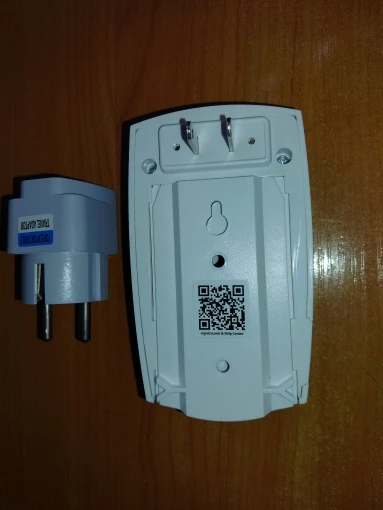
Figure 3: Battery compartment on the back of the alarm.
-
Plug into Power Outlet: Insert the alarm unit into a standard AC 100V-220V power outlet. Ensure the correct adapter for your region is used.

Figure 4: Various plug types for the alarm.
-
Activate: Pull the ON/OFF switch on the side of the alarm to the "ON" position. You will hear a tone, and the indicator light will flash, signifying that the device has entered detection status.
Video 1: Demonstration of battery installation, plugging in, and alarm activation.

6. Operating Instructions
The alarm sensor remembers the power supply status when the switch is turned ON. It will trigger an alarm when the power supply status changes (either power failure or power recovery).
- Power Failure Alarm Mode: If the power supply is normal when you turn on the alarm switch, the device enters Power Failure Alarm Mode. A sudden power failure will trigger an alarm.
- Power Recovery Alarm: If power is restored after an outage (and before the alarm switch is turned OFF), the device will automatically trigger an alarm to indicate power recovery.
You can distinguish between a Power Restored Alarm and a Power Failure Alarm by the different alarm methods described below.
Important: If you turn on the alarm switch before plugging the device into the socket, the alarm sensor will default to Power Restored Alarm Mode.

Figure 5: Visual representation of alarm states and typical applications.
7. Alarm Methods
- Initial Alarm: Upon power failure, the device will sound an alarm for 2 minutes with the LED indicator flashing.
- Loop Alarm: After the initial 2-minute alarm, there will be a 2-minute pause, followed by a 3-second alarm sound. This loop (2 minutes pause, 3 seconds alarm) will continue, with the light remaining flashing, to conserve battery power.
8. How to Stop the Alarm
To stop the alarm, simply pull the ON/OFF switch to the "OFF" position.
9. User Tips
- The alarm is very loud (118dB) and does not have a volume control. Consider its placement to avoid disturbing others.
- The device is compatible with rechargeable 9V batteries, offering a reusable power source.
- While effective, the alarm unit with its adapter might occupy significant space on a power strip or wall outlet.
- There is no visible indicator to show if the alarm is actively monitoring power, other than the initial flash upon activation.
- Some users have reported issues with the quality of the supplied power adapter, specifically thin pins causing it to fall out of sockets. If this occurs, consider using a different, more secure adapter.
10. Troubleshooting
- Alarm not working:
- Ensure a fresh 9V battery is correctly installed.
- Verify the device is securely plugged into a live AC 100V-220V power outlet.
- Check that the ON/OFF switch is in the "ON" position.
- Inspect the device for any visible damage. Do not use if damaged.
- Alarm is too loud: The device is designed for a loud 118dB alarm and does not feature volume control. Consider placing it in an area where the sound level is acceptable.
- Adapter issues: If the power adapter does not fit securely or causes the device to fall out of the socket, try using a different, compatible adapter.
- No WiFi/Smart Home Integration: This model (TP-103N) is a standalone power failure alarm and does not support WiFi or smart home platforms like Tuya.
11. Warranty & Support
For the most up-to-date online manual and FAQ, please visit topvico.com or scan the QR code provided in the physical manual.
If you encounter any problems, please contact us directly. Provide a full description of your issue, along with photos or videos if possible. If videos are too large, you may use services like www.wetransfer.com and include your order ID. We aim to respond within 24 hours.
Manufacturer: Changsha shigao electronic technology co., ltd
Address: Room 1803, building 15, Xiaoxiang aoyuan, no. 660, Yuelu west avenue, Changsha high-tech development zone, Changsha city, Hunan province, China
Email/Tel: rex@topvico.com / +8613739094160
EU Authorized Representative: AC WORKS CONSULTING Sr
Address: Via Vilfredo Pareto, 125 Cesena(FC)47521, Italy
E-mail: acworksltd@outlook.com
Tel: +39-054729444