
1. Introduction
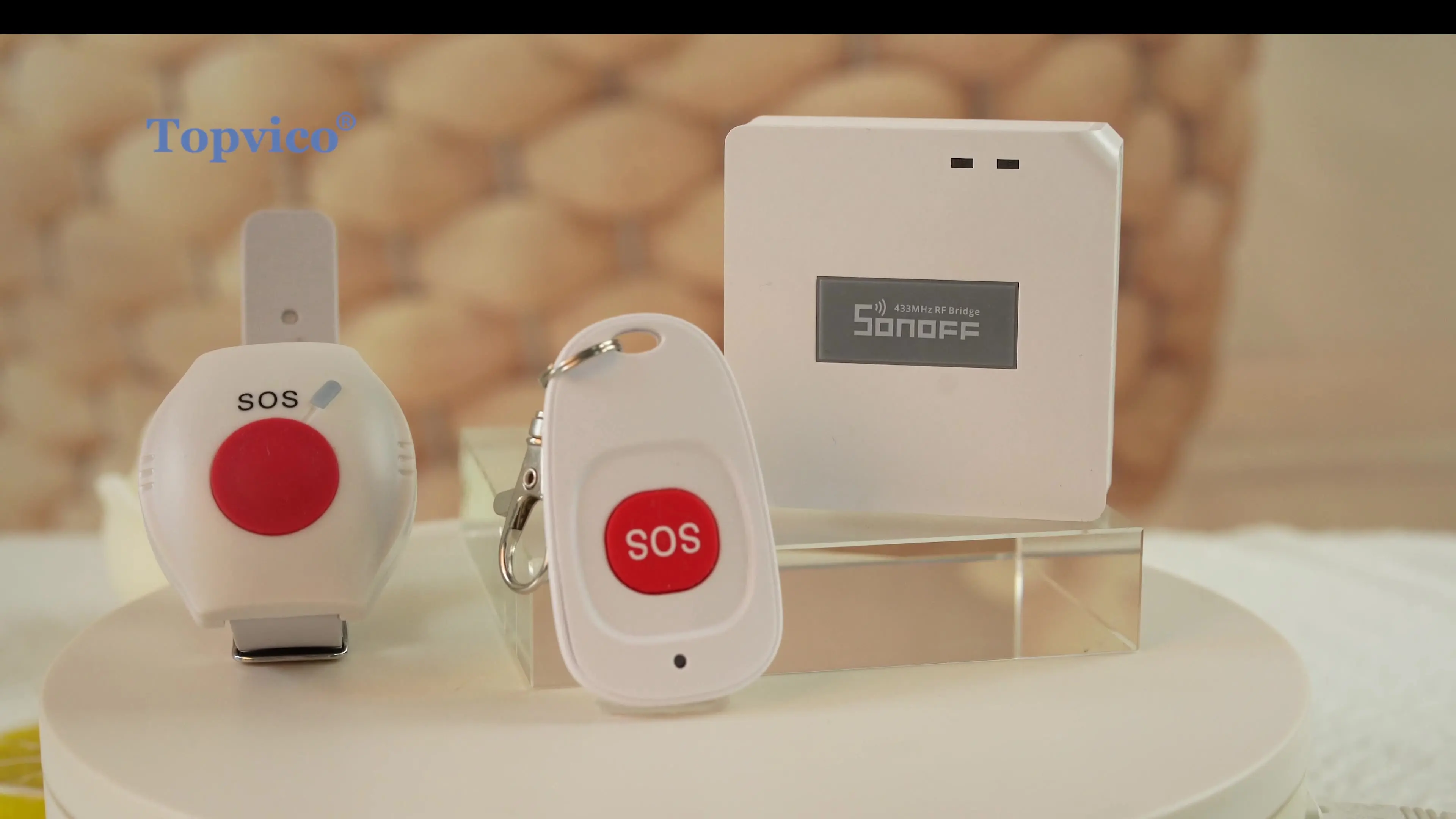
The TOPVICO WIFI SOS Button and RF Bridge system is designed to provide an emergency alert solution, particularly for the elderly, children, or individuals requiring immediate assistance. It consists of a wireless SOS device (available as a wristband or pendant) and a WIFI RF Bridge. When the SOS button is pressed, the signal is sent to the WIFI RF Bridge, which then transmits a notification to your smartphone via the eWeLink application, ensuring you receive alerts anytime, anywhere.


2. Safety & Warnings
Please read all instructions carefully before use. Failure to follow these instructions may result in damage to the product or personal injury.
- Keep the device and its cord out of reach of children under 3 years old.
- Keep away from children unless supervised by an adult.
- Do not use this product for purposes other than its intended use.
- Inspect the product before each use; do not use if damaged.
- Follow installation and operation guidelines to avoid injury.
3. Package Contents
The package typically includes:
- WIFI RF Bridge (Host)
- SOS Wristband or SOS Pendant (depending on selected variant)
- C2032 Battery (pre-installed in SOS device)
- Lanyard (for pendant variant)
- SIM ejector tool (for battery compartment access)
Note: An Android charger for the WIFI Host is NOT included and must be supplied separately.
4. Product Overview
4.1 WIFI RF Bridge (Host)
The WIFI RF Bridge acts as the central hub, receiving signals from 433MHz SOS devices and connecting to your home Wi-Fi network to send notifications to your smartphone. It features a Micro-USB interface for power and a 'Reset & Wifi Match' button for configuration.

4.2 SOS Devices (Wristband/Pendant)
The SOS devices are wireless transmitters equipped with a large red button and an LED indicator. They operate on a 433MHz frequency and are designed to be easily accessible for emergency use. The wristband is worn like a watch, while the pendant can be worn around the neck or clipped to clothing.


The SOS devices are designed to be splash-proof, making them suitable for use in environments where they might encounter water splashes, such as bathrooms or kitchens. However, they are not fully waterproof and should not be submerged.

5. Setup Instructions
5.1 Powering the WIFI RF Bridge
- Connect the WIFI RF Bridge to a power source using an Android charger (Micro-USB cable and adapter, not included).
- Ensure the device powers on and the indicator light shows activity.
5.2 APP Installation
- Download the eWeLink application from your smartphone's app store (Android or iOS).
- Register or log in to your eWeLink account.
5.3 Pairing SOS Devices with WIFI RF Bridge
The WIFI RF Bridge can learn up to 64 433MHz codes from various sensors, including the SOS devices.
- In the eWeLink app, add the WIFI RF Bridge as a new device and connect it to your home Wi-Fi network.
- Once the RF Bridge is added, navigate to its settings within the app.
- Select the option to add a new remote or sensor (e.g., "Alarm" or "1 button").
- The app will prompt you to enter a learning mode.
- Press the SOS button on your wristband or pendant. The RF Bridge will detect the signal and the app will confirm successful pairing.
- You can then name the paired SOS device (e.g., "SOS 01", "SOS 02") for easy identification in the app.

6. Operating Instructions
6.1 Triggering an SOS Alarm
In an emergency, press the large red SOS button on your wristband or pendant. The device will send a 433MHz signal to the paired WIFI RF Bridge.
6.2 Receiving Notifications
Upon receiving the SOS signal, the WIFI RF Bridge will immediately send a push notification to your smartphone via the eWeLink app. This allows you to be alerted even when you are away from home, provided your phone has an internet connection.

6.3 Family Sharing Control
The eWeLink app supports family sharing, allowing multiple users to receive notifications and manage the device. The main account holder has exclusive permissions and can grant access to other family members. If the main account is deleted, other users can re-add the device.

6.4 Expanding Your System
The WIFI RF Bridge can connect to other 433MHz sensors such as motion sensors, door sensors, water sensors, and gas detectors, allowing you to build a comprehensive home security system.

7. Maintenance
7.1 Battery Replacement (SOS Devices)
The SOS devices are powered by a C2032 battery, which typically lasts over 12 months with normal use. When the battery is low, the device's performance may be affected. To replace the battery:
- Locate the battery compartment on the SOS device.
- Use the provided SIM ejector tool or a small screwdriver to open the compartment.
- Remove the old C2032 battery.
- Insert a new C2032 battery, ensuring correct polarity.
- Close the battery compartment securely.
7.2 Cleaning
Wipe the devices with a soft, dry cloth. Do not use abrasive cleaners or immerse the devices in water.
8. Troubleshooting
- Difficulty connecting to the phone app: Ensure your WIFI RF Bridge is properly powered and within range of your Wi-Fi router. Verify that your Wi-Fi network is 2.4GHz, as the device may not support 5GHz networks. Follow the pairing steps carefully, ensuring the RF Bridge is in learning mode when pressing the SOS button.
- No notifications received: Check your smartphone's notification settings for the eWeLink app to ensure they are enabled. Verify that your phone has an active internet connection. Confirm the SOS device is successfully paired with the RF Bridge and its battery is not depleted.
- Does not work without Wi-Fi: The system relies on a Wi-Fi connection for the RF Bridge to send smartphone notifications. Without Wi-Fi, the SOS device can still send a signal to the RF Bridge, but the notification will not reach your smartphone.
- Can it alert more than one phone? Yes, through the eWeLink app's family sharing feature, multiple authorized users can receive alerts.
- Does the host make a loud sound? The WIFI RF Bridge primarily sends smartphone notifications. It does not typically emit a continuous loud audible alarm itself. The alarm sound comes from your smartphone's notification.
9. Specifications
| Feature | Specification |
|---|---|
| Model Number | TP-541RF |
| Brand Name | TOPVICO |
| Function | Wireless SOS Wristband + WIFI host with smartphone notice |
| SOS Wristband/Pendant | 433MHz, EV1527, 430K (cannot work alone) |
| WIFI Alarm Host | Connects 433MHz sensors, connects WIFI router, sends notice to smartphone |
| Work Distance (SOS to Host) | 15 to 30m indoor, 100m outdoor |
| Work Mode | SOS sends signal to WIFI host, WIFI host sends smartphone notice via APP |
| APP Name | eWeLink |
| SOS Working Voltage/Current | DC 3V/13mA |
| SOS Transmitted Power | 10mW |
| SOS Modulation Mode | ASK |
| SOS Power Supply | 1*C2032 battery (included), work time > 12 months |
| WIFI Host Power Supply | Android charger (not included) |
| Application | Old people, hospital, kids |
| Features | WIFI Panic Button for the Elderly, SOS Emergency Alarm |
| WIFI Host Dimensions | 62mm x 62mm x 20mm |
| SOS Wristband Dimensions | Length: 244mm, Device Length: 43mm, Band Width: 16mm |
| SOS Pendant Dimensions | 56.5mm x 32mm |
| Water Resistance | Splash-proof (not fully waterproof) |
| Learnable 433MHz Codes | Up to 64 |
10. User Tips
- Wi-Fi Connection: Ensure the WIFI RF Bridge is placed in an area with a strong and stable 2.4GHz Wi-Fi signal for reliable operation.
- Battery Check: Periodically check the battery status of your SOS devices through the eWeLink app, if available, or replace the battery annually to ensure continuous functionality.
- Range Awareness: Be mindful of the indoor working distance (15-30m) between the SOS device and the RF Bridge. Obstacles like walls can reduce this range.
- Notification Settings: Double-check your smartphone's notification settings for the eWeLink app to ensure alerts are not silenced or blocked, especially if relying on the system for critical emergencies.
- App Connectivity Issues: If you experience difficulty connecting the device to the app, try resetting the RF Bridge and attempting the pairing process again. Ensure your phone's Bluetooth (if applicable for initial setup) and Wi-Fi are active.
11. Compliance Information
This product is CE & RoHS Certificated.
12. Warranty & Support
For detailed warranty information and technical support, please refer to the official product documentation or contact the manufacturer directly. A user manual in PDF format is available for download: User manual (PDF).
Manufacturer Information:
- Company: Changsha shigao electronic technology co., ltd
- Address: Room 1803, building 15, Xiaoxiang aoyuan, no. 660, Yuelu west avenue, Changsha city, Hunan province, China
- Email: rex@topvico.com
- Phone: +8613739094160
EU Authorized Representative:
- Company: AC WORKS CONSULTING Sr
- Address: Via Vilfredo Pareto 125 Cesena(FC)47521, Italy
- E-mail: acworksltd@outlook.com
- Tel: +39-054729444