
Important Safety Information
WARNING: Please mind potential fire risk and strictly follow the instruction manual for charging and storage. For disposal, please check your local authority's website for more information and dispose of the lithium-ion battery safely in accordance with the applicable legal requirements.
The object of the declaration is in conformity with the relevant legislation:
- (EU) 2023/1542 Batteries and Waste Batteries
- 2014/53/EU Radio equipment
- 2011/65/EU ROHS
Package Contents
Ensure all items are present in the package:
- MINISO MS128 Wireless Headphones (2 units)
- Charging Case
- User Manual (this document)
- Charging Cable
- Replaceable Pads Set
- Carrying Bag

Product Overview
The MINISO MS128 ANC Wireless Headphones offer a premium audio experience with advanced features such as Active Noise Cancelling (ANC), a full-color touchscreen charging case, and a comfortable in-ear design. Enjoy pristine audio quality, deep bass, and minimal lag for gaming, all powered by a V6.0 chip and Bluetooth 5.3 for stable connectivity.


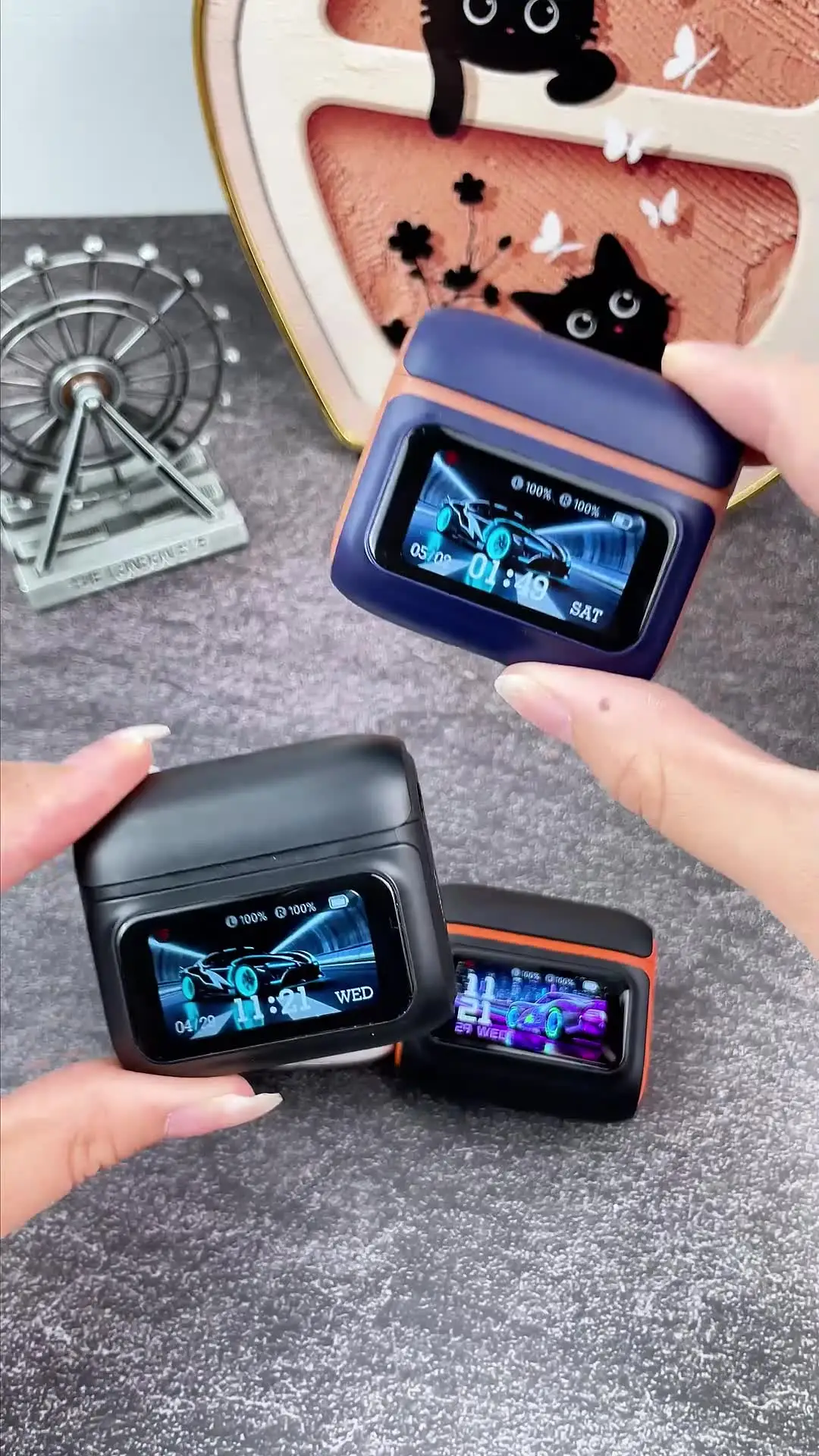
Video: Product demonstration of the MINISO MS128 Wireless Headphones, showcasing features and usage.
Setup
1. Power On and Off
Automatic Power On: Taking the earphones out of the charging case will automatically turn them on.
Manual Power On: To manually turn on each earphone, press and hold the touchpad for three seconds.
Automatic Power Off: Placing the earphones in the charging case will automatically turn them off.
Manual Power Off: To manually turn off each earphone, press and hold the touchpad for five seconds.
Note: If the earphones are not paired with a Bluetooth device within three minutes after powering on, they will automatically power off. They will also power off after three minutes if the paired Bluetooth device moves out of the effective connection range and has not reconnected.

2. Pairing
Initial Pairing: When there is no pairing record for the left and right earphones, they will automatically pair with each other after being turned on. After successful pairing, you will hear two beeps.
Reconnection: When the left and right earphones have pairing records, they will automatically connect back when they are turned on, and the prompt will sound "beep".
3. Wearing the Earphones
Insert the earbud into your ear canal and gently twist it to secure a comfortable and stable fit. The ergonomic design with soft ear caps ensures a snug fit and better sound effect.

Operating Instructions
1. Touch Controls (Earbuds)
The earbuds feature multi-function touchpads for easy control:
| Function | Action (Left Earbud) | Action (Right Earbud) |
|---|---|---|
| Power On | Press and hold touchpad for 3 seconds | |
| Power Off | Press and hold touchpad for 5 seconds | |
| Play/Pause Music | Tap 1x | |
| Volume Up | Tap 2x | Tap 2x |
| Next Track | N/A | Tap 3x |
| Previous Track | Tap 3x | N/A |
| Answer/End Call | Tap 1x | |
| Reject Call | Hold for 2 seconds | |
| Activate Voice Assistant | Hold for 2 seconds | |
2. Charging Case Touchscreen
The full-color touchscreen on the charging case allows you to view power levels and switch between various modes and functions instantly. Available functions include:
- Music Playback Controls
- Equalizer (EQ) Settings
- Stopwatch
- Game Mode
- 'Find My Earbuds' feature
- Active Noise Cancelling (ANC) / Transparency Mode Control
- General Settings


Indicator Lights
The earbuds and charging case use indicator lights to communicate their status:
- Headset Turned On: White light flashes.
- Headset Turned Off: Red light stays on for 2 seconds, then turns off.
- Pairing Status: White light flashes.
- Connection Successful: No light.
- Headphone Charging: The red light stays on for a long time. After being fully charged, the red light goes off.
- Charging Case: The charging case display screen shows the battery level. When fully charged, the screen shows 100%.
Note: After the charging status is displayed on the charging case screen, it will automatically turn off after about 30 seconds of inactivity. Sliding on the screen can reactivate the display.

Maintenance
Cleaning
Regularly clean your earbuds and charging case with a soft, dry cloth. Avoid using liquids or abrasive cleaners, as these can damage the device.
Water Resistance
The MINISO MS128 headphones are IPX5 rated, meaning they are waterproof, dustproof, and sweat-resistant. This makes them suitable for workouts and outdoor activities. However, they are not designed for submersion in water.

Troubleshooting
Earphones Not Pairing or Connecting
- If the earphones are not paired with a Bluetooth device within three minutes after powering on, they will automatically power off.
- If the paired Bluetooth device moves out of the effective connection range and has not reconnected within three minutes, the earphones will automatically power off.
Clear Bluetooth Pairing History
If both earphones cannot be paired, you may need to clear the Bluetooth pairing history:
- Ensure the earphones are powered on and not connected to any device.
- Tap both the left and right earphones 5 times simultaneously. This will clear all connected devices from their memory.
Reset Earphones
If the earphones fail to pair or reconnect to each other, you can reset them:
- Tap both earphones five times simultaneously.
- Note: Resetting the earphones will clear the Bluetooth pairing history. You will need to re-pair them with your device after a reset.
Specifications
| Feature | Specification |
|---|---|
| Model Product | MINISO-MS128 |
| Brand Name | MINISO |
| Material | Plastic |
| Communication | Wireless (Bluetooth) |
| Bluetooth Version | 5.3 (V6.0 Chip) |
| Wireless Range | <10m (Approximately 10m) |
| Active Noise-Cancellation | Yes (25-30dB Noise Reduction) |
| Sound Isolating | Yes |
| With Microphone | Yes |
| Control Button | Yes |
| Volume Control | Yes |
| Driver Diameter | 13mm (Also stated as 10mm in some materials) |
| Frequency Range | 20Hz - 20kHz |
| Impedance | 32Ω |
| Earphone Duration | Approx. 3.5 H (Earphone) |
| Battery Capacity (Charging Case) | 300 mAh |
| Total Playtime (with case) | Up to 40 hours |
| Charging Time | ≈ 1.5 hrs |
| Earphone Input | 5V ⎓ 50mA |
| Waterproof Rating | IPX5 |
| Codecs | AAC, sbc |
| Vocalism Principle | Balanced Armature |
| Connectors | Type-C |
| Certification | CE, RoHS, FCC |

User Tips
- Value for Money: Many users find the MS128 to offer performance comparable to much more expensive headphones, making it a great value.
- Gaming Performance: The minimal lag provided by the advanced chip makes these earbuds ideal for an immersive gaming experience.
- Extended Listening: With up to 40 hours of total playtime when utilizing the charging case, you can enjoy your audio for extended periods without frequent recharging.
- Noise Isolation: The soft earbud design contributes to excellent passive noise isolation, enhancing the Active Noise Cancelling feature for a more peaceful listening environment.
Warranty and Support
For any warranty claims, technical support, or further inquiries, please contact the seller or MINISO customer service directly. Keep your proof of purchase for warranty validation.
A detailed user manual in PDF format can be found here.